
The best vibe coding tools in 2026 are Lovable for a first web app with no code, Replit for building and hosting in one place, Cursor if you already read code and Claude Code for work across a whole codebase. The other six are narrower picks. You need one tool, maybe two.
On 29 October 2026, someone on r/OnlyAICoding asked which of Cursor, Lovable, Replit, Emergent, Base and Bolt would let them build something big "without struggling a lot". I'd like that too. I'd also like a pony. Those six names do three different jobs, several of the guides answering the question come from a company selling one of the ponies, and some of the prices in them stopped existing in October.
What is the best vibe coding tool? It depends on the job:
- First web app, no code: Lovable
- Build and host in one place: Replit
- Fast prototype in the browser: Bolt
- Interfaces and front ends: v0
- Small internal tool: Base44, free plan first
- You already read code: Cursor
- A whole codebase: Claude Code
- Hand off, review later: OpenAI Codex
- You live in GitHub: GitHub Copilot
- Your own model: Cline
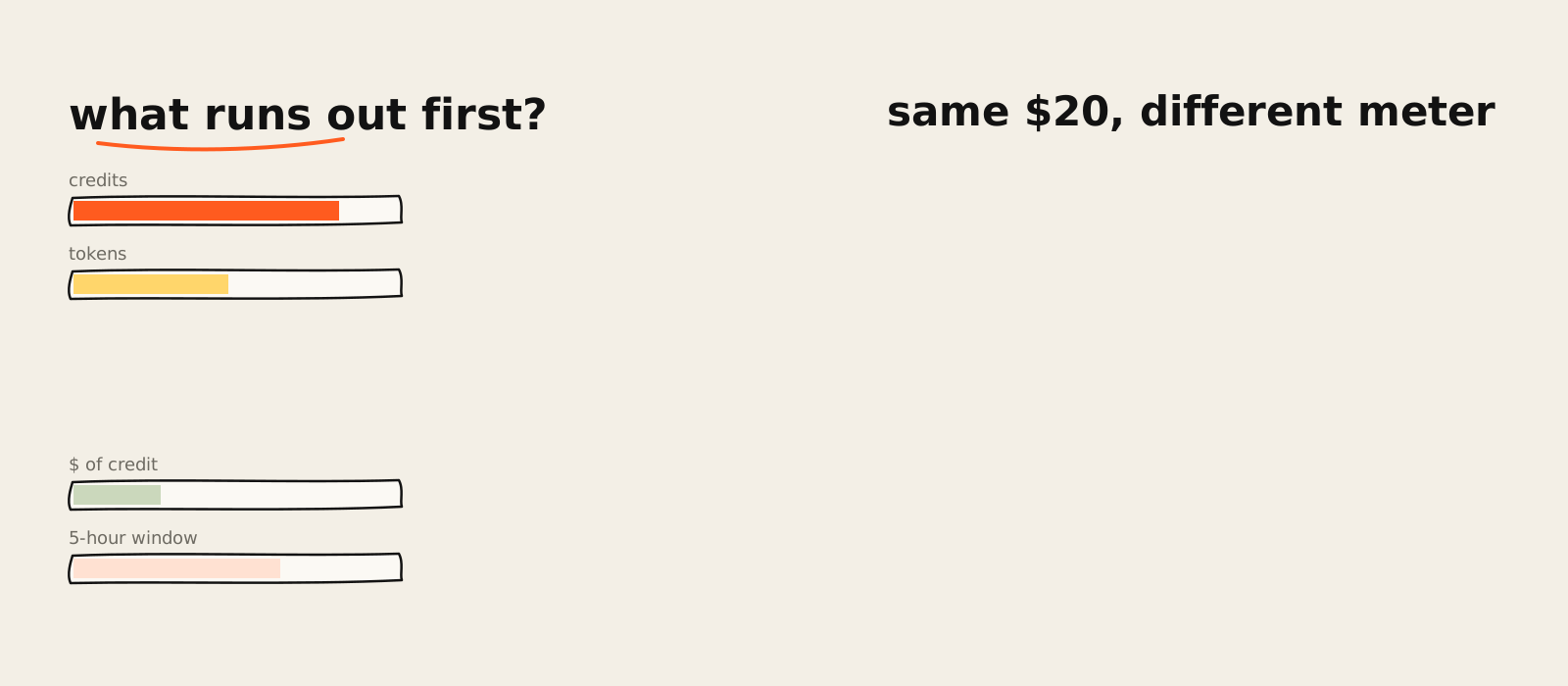
One habit before the reviews, because it saves more money than any tool choice. Ignore the price and read the meter. Every tool here sells a different unit of work, and the sticker tells you almost nothing about what you'll run out of by the 19th.
How I picked these vibe coding tools
I picked these ten vibe coding tools because the top guides keep landing on them, then ordered them by how much code you have to read: builders first, editors and agents after. Every price comes from the vendor's own page on 2 November 2026. Claude Code is the only one I use daily.
That last sentence is a conflict of interest, so it goes up front. I build this site and the free tools in AI Labs with Claude Code, it sits at number seven, and you should discount my warmth accordingly.
I sell AI automation for marketing teams, so I have a commercial reason to tell you where these things fall over. There are no affiliate links here, and every price below comes from the vendor’s own page.
Vibe coding tools at a glance
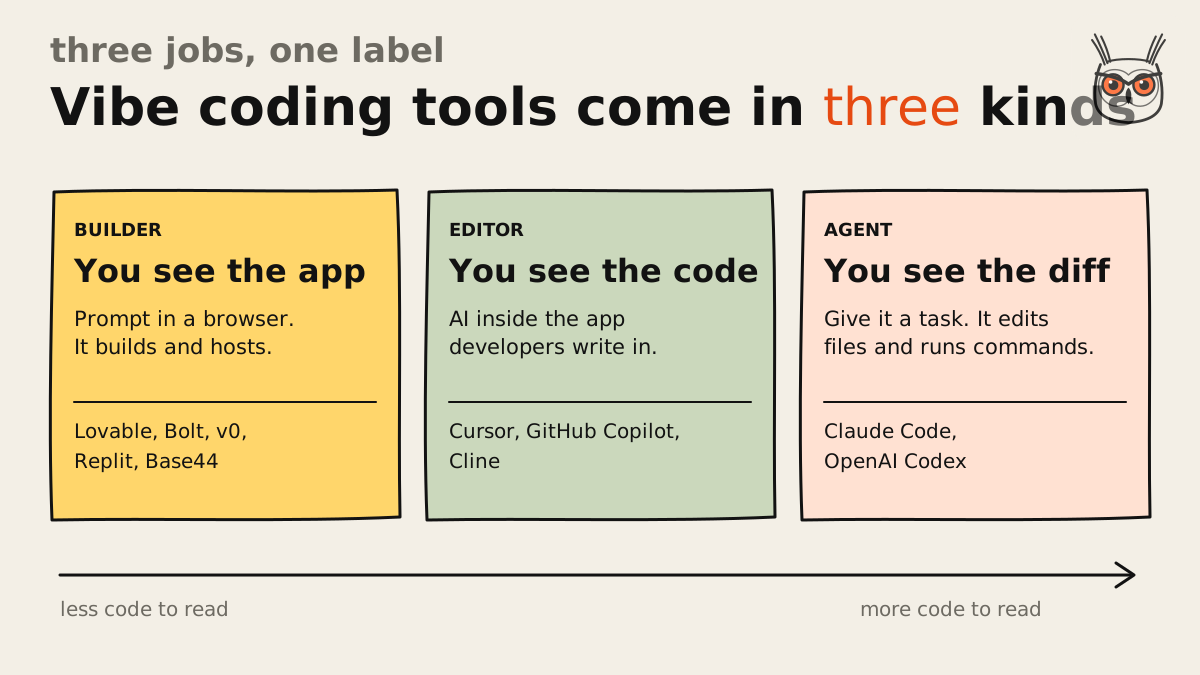
Vibe coding tools split into three jobs. Builders turn a prompt into a hosted app. Editors put AI inside the program developers already write code in. Agents take a task and change the files themselves. Most lists rank all three in one column, which is like ranking a taxi, a steering wheel and a chauffeur.
| Tool | Type | Best for | Paid from (2 Nov 2026) | Runs out first | Where it breaks |
|---|---|---|---|---|---|
| Lovable | Builder | First web app, no code | $25/mo | Credits | Fine control |
| Replit | Builder | Build and host in one place | $20/mo | Model credit | Agent says fixed when it isn't |
| Bolt | Builder | Fast browser prototypes | $25/mo | Tokens | Debug loops eat tokens |
| v0 | Builder | Interfaces and front ends | $30/user/mo | Dollars of credit | Complex app logic |
| Base44 | Builder | Small internal tools | $16/mo, billed yearly | Messages | Buggy in a 2025 test |
| Cursor | Editor | People who read code | $8/mo Grok only, $30 for others | Usage pool, then API bill | Long sessions drift |
| Claude Code | Agent | Work across a codebase | $20/mo | 5-hour and weekly limits | No visual preview |
| OpenAI Codex | Agent | Tasks you hand off | $8/mo Go, $20/mo Plus | Message allowance | Limits are hard to predict |
| GitHub Copilot | Editor | People already in GitHub | $10/mo | $15 of AI credit | No help if you can't code |
| Cline | Editor | Bringing your own model | Free, plus your model bill | Your API budget | API costs run away |
If you came looking for AI tools for vibe coding and hoped for one winner, that table is the bad news. The ranking below is the order I'd try them in, starting from no code at all.
1. Lovable: best for a first web app with no code

Lovable is the vibe coding platform I'd hand someone who has never opened a code editor and doesn't plan to. You describe the app, it sketches a plan, then you click on things to change them. For a first build it's the best vibe coding app on this list, provided you watch the credits.
- Best for: a first web app or landing page when you can't read code.
- Pricing (2 Nov 2026): Free is 5 credits a day, 30 a month at most. Pro is $25 for 100 monthly credits, with rollover and top-ups. Business is $50 for the same 100 credits. (Lovable pricing)
- Export and lock-in: two-way GitHub sync, plus a Download codebase button on paid plans only. Leaving the built-in backend means migrating data and replacing calls that run through Lovable.
- Where it breaks: fine control and credit burn. It gives you less say over the details than the editors do.
- Skip it if: you already read code, or you want a say in every file.
- What users say: it's the one people pick first for balance, and non-technical users call the usability unrivaled.
- The skeptic's take: developers are told not to look at the raw code "unless you want to cringe", and the one con everyone lists is high credit burn.
- The cost view: even Lovable's own growth lead has written that AI pricing pages are hard to read and that Lovable has the same problem selling credits for work nobody can predict. That takes some nerve, and I like it.
I went through the pricing page, and my favourite line on it is Business. The extra $25 buys SSO and a security center and not one extra credit. Fair enough for a company, and a tidy reminder that price and meter have stopped talking to each other.
My view, and it's judgement more than data: if you can't read code and want to ship something real, a builder plus a human review beats a single AI editor. The common line is that these platforms "will get you 70% there", and older guides said 80%, then a stall. Nobody measured either number, but they describe the mood of every thread I read: a glorious weekend, followed by a job.
2. Replit: best for building and hosting in one place

Replit is the pick when you want one place to build, host and keep the data. It's the most grown-up of these vibe coding platforms, with real database controls, several ways to publish and a mobile path. The price of all that is more buttons, and an agent you have to double-check.
- Best for: apps where the database matters, and mobile apps.
- Pricing (2 Nov 2026): Core is $20 a month ($18 billed yearly) with $20 towards stronger models. Pro is $100 ($90 yearly) with $100 towards the strongest models, up to 15 collaborators and 28 days of database rollback. (Replit pricing)
- Export and lock-in: Download as zip from the file tree, plus a Git tab for GitHub. The docs don't say how portable the hosted database and deployments are.
- Where it breaks: the agent's confidence. It can say a thing is done when it isn't.
- Skip it if: this is your first build and you'd rather not meet the word "schema" yet.
- What users say: the deepest database controls of the builders here, the widest choice of ways to publish, and a phone emulator right in the preview.
- The skeptic's take: more than once the agent reported everything working when it wasn't.
- The cost view: some guides still list Core at $25 ($20 yearly). Replit's page now says $20 ($18 yearly). The vendor's page wins, and three months is a long time here.
An agent reporting a fix is like a contractor telling you the plumbing's finished from the van. Click the button yourself, every time. I'd pick Replit over Lovable the moment real data or a phone app enters the plan. It also publishes a security checklist covering auth, parameterised queries and error messages, which more vendors could stand to copy.
3. Bolt: best for fast prototypes in the browser

Bolt is the builder for getting a prototype in front of someone this afternoon. It runs in the browser, shows you the files as it creates them and can start from Figma or GitHub. On small tasks it feels slightly quicker than Lovable, and a little more technical, which is a fair trade.
- Best for: demos and prototypes you need by Thursday.
- Pricing (2 Nov 2026): Free is 1M tokens a month, capped at 300K a day. Pro is $25 for 10M tokens with rollover and no daily limit. Teams is $30 per member. (Bolt pricing)
- Export and lock-in: Export, then Download gives you a ZIP you can run locally, and a GitHub integration can create a repository. Hosting and any connected database aren't in the ZIP.
- Where it breaks: a stubborn bug. With no daily limit on Pro, nothing stops you spending the month on one argument.
- Skip it if: a file tree and a terminal make you nervous.
- What users say: the Lock file control gets the most love. It stops the AI changing a file that works.
- The skeptic's take: the free cap and the paid price are quoted differently around the web, 150K a day and $20 in one place, 300K and $25 in another. Bolt's own page says 300K and $25, so I'm siding with Bolt.
- The cost view: about 25K tokens per prompt is a common estimate. Purely as an example sum, that's 40 prompts a month on Free and 400 on Pro. A bigger app will probably cost more per prompt.
That Lock file button is my favourite feature in this whole list, on paper. Anyone who has watched an AI helpfully rewrite the login page that finally worked knows why it exists. I'd use Bolt for the demo, and think again before putting users on it.
4. v0: best for interfaces and front ends
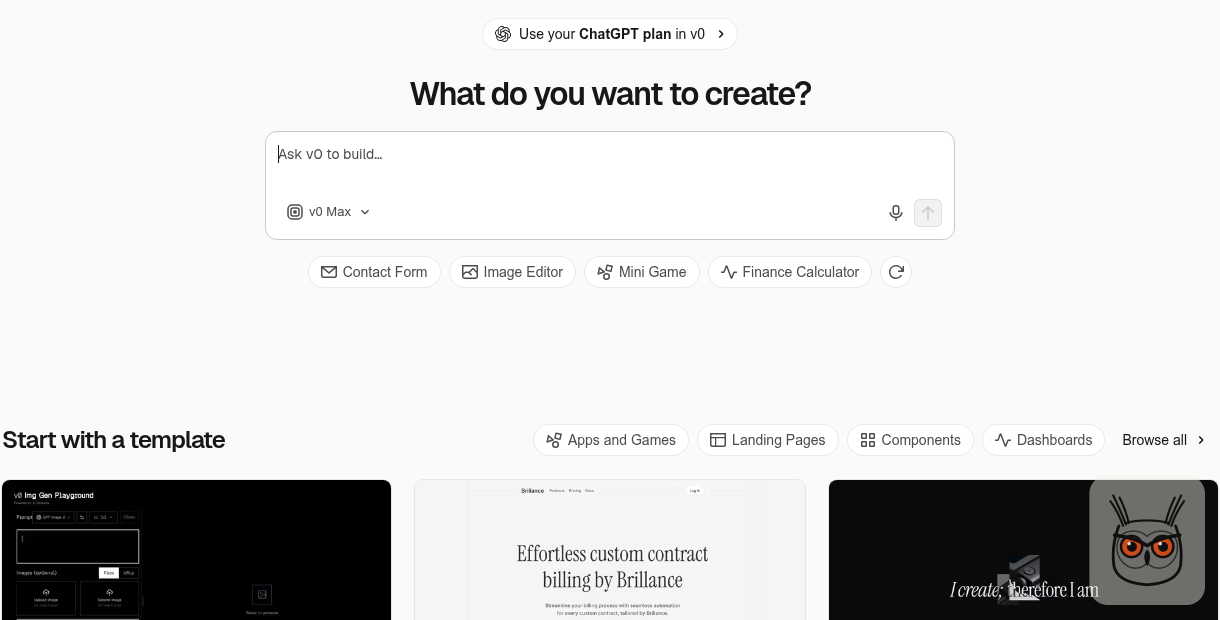
v0, from Vercel, is the pick when the interface is the point: landing pages, dashboards and front ends that look like someone cared. It suits a team with a developer nearby better than a solo founder. Think of it as a very quick front-end hire who expects you to have a Vercel account.
- Best for: marketers and designers on a team where a developer sets up the plumbing.
- Pricing (2 Nov 2026): Free is $5 of one-time credit plus 7 messages a day. Plus is $30 per user with $30 of monthly credit and $2 of free daily credit on login. Business is $100 per user. (v0 pricing)
- Export and lock-in: the FAQ, last updated 17 March 2026, says you can export the code and deploy elsewhere, and Git is optional. The full experience expects a Vercel project.
- Where it breaks: complex app logic is the usual complaint, and the newer full-stack features are still unproven.
- Skip it if: you're alone and need a real back end.
- What users say: developers set up the infrastructure while non-technical people build pages without touching anything live, with secrets kept in one place away from the public code. Teams like that split.
- The skeptic's take: customising the output takes some Tailwind CSS knowledge.
- The cost view: some guides say the free plan has $5 of monthly credit. v0's own page says one-time, for new users. I'm believing v0.
- What changed: the home page now invites you to use your ChatGPT plan in v0. How that bills is the question I'd ask first.
Plus shows $90 crossed out next to the $30, so I wouldn't read $30 as a promise. And notice what the free plan really is: a one-off $5 sample, the kind they hand you at the supermarket before you've found your trolley. Good for judging the taste. Useless for building an app.
5. Base44: best for internal tools and simple back ends

Base44 is where I'd try a small internal tool if a low entry price appeals. These vibe coding apps come with the back end attached, which is both the draw and the catch. Its quality has the weakest reputation of the ten, so start on the free plan.
- Best for: small internal tools with simple data, and not much else yet.
- Pricing (2 Nov 2026): Free is 25 message credits and up to 5 apps. Starter is $16 for 100 messages, Builder $40 for 250, Pro $80 for 500, Elite $160 for 1,200. Those prices are billed yearly, and integration credits are counted separately. (Base44 pricing)
- Export and lock-in: two-way GitHub sync needs the Builder plan or higher, there's no manual push, and the repo becomes the source of truth. Local work runs through the Base44 CLI.
- Where it breaks: quality. The output is often described as "frequently buggy".
- Skip it if: you care about leaving later and don't want to pay $40 a month for the door.
- What users say: reviews are thin and mixed. The most relatable one is a single line: "I first started with Base44 when I had a job, which was great".
- The skeptic's take: it has scored badly in testing, 35 out of 70, and has been called "the one we'd avoid" and a "total walled garden".
- The cost view: by my sums, Starter, Builder and Pro all work out at exactly 16 cents a message, and Elite at about 13. There's no volume discount until the $160 plan.
Here the sources flatly disagree. A year ago the verdict was "you can't export code (even with paid plans)". Base44's docs now describe two-way GitHub sync. The docs are newer and they win on the facts, so the walled garden has a gate now, priced at $40 a month. The bugs are harder to settle, because the testing is old and nobody has rerun it.
The $16 is a yearly commitment wearing a monthly price tag. Spend the 25 free messages first, and I'd want to see them go well before handing over a year.
6. Cursor: best for people who already read code

Cursor is the vibe coding AI editor for people who already read code: you see the agent, the files and the app side by side. It's also where the top guides are most out of date. Any Cursor price you read before October 2026 is now a historical document.
- Best for: developers, and technical founders who want to see every change.
- Pricing (2 Nov 2026): sold as The X Subscription: Free, Plus $8 (Grok models only), Premium $30, Super $100, Ultra $200. Third-party models start at Premium and are billed separately at API list price, at every tier.
- Export and lock-in: your code stays in your own folder or repo, judged from the product page, so there's nothing to export. The bill is what holds you.
- Where it breaks: long sessions. They benefit from a manual recap to avoid drift.
- Skip it if: you can't read code, or you came for Claude and want one flat number on your card.
- What users say: the strongest all-rounder, with strong repo-wide changes. It topped one scored test at 57.5 out of 70 in October 2025.
- The skeptic's take: AI editors get left off beginner lists because you see more code than you need and still have to push the app to a server yourself.
- The cost view: a worked example is $30 plus $20 of model charges, so $50 a month. Team plans start at $30 per user, down from $40.
- What changed: in October 2026 the plans moved inside xAI's X Subscription. Older guides still list Pro at $20, Pro+ at $60 and Teams at $40. Cursor's own page says otherwise, so ignore the old numbers.
I read the pricing page twice to make sure. The $8 plan lists a premium checkmark and "Less timeline ads" alongside the coding agent. So your code editor now also improves your experience of X, which I assume somebody asked for.
Under the jokes sits a real change. If your reason for buying Cursor was Claude, the subscription no longer pays for any of it. Price up Premium plus usage before you commit.
7. Claude Code: best for work across a whole codebase

Claude Code is the agent I use, and my vibe coding programming pick for work across a whole codebase. You give it a task in the terminal, and it reads the project, edits the files and runs the commands. It's also a poor first tool if the word terminal gives you a small chill.
- Best for: an existing codebase, and people comfortable reviewing a diff.
- Pricing (2 Nov 2026): every paid Claude plan includes it. Pro is $20 a month ($17 billed yearly), Max is $100, Ultra is $200. It shares limits with chat.
- Export and lock-in: it reads and edits your own files from the terminal, an IDE, the desktop app or the web, so there's nothing to take with you. The limit is the leash.
- Where it breaks: no visual preview, and you're locked to Claude models. Publishing is on you.
- Skip it if: you want to watch the app take shape as you go.
- What users say: it tied for the top of one scored table, 59.5 out of 70 in October 2025.
- The skeptic's take: it gets left off beginner lists because publishing takes extra setup and the features are aimed at a technical audience. I agree, against my own interest.
- The cost view: limits reset every 5 hours and every week. Max is 5x Pro usage at 5x the price, so on the headline numbers there's no bulk discount. If you hit a limit you can wait, upgrade or pay API rates for usage credits.
This is where you should trust me least. I use Claude Code every day, so I’m hardly a neutral party. What I value is dull: it’s very good at the scripts nobody wants to write, and those scripts sit underneath most of the marketing agents and growth work I do. The thing I watch is stale notes in CLAUDE.md, which can send a coding agent on side quests.
The catch is the shared pool. A long chat in the morning is coding budget you've already spent by lunch. If that sounds fine, and you can read what it changed, start here.
8. OpenAI Codex: best for tasks you hand off and review later

OpenAI Codex is the agent to try when you'd rather hand off a task and come back to review it. It comes bundled with ChatGPT plans, so if ChatGPT is already on your card, you've probably paid for it. That makes it the obvious experiment before you buy anything else.
- Best for: people already paying for ChatGPT, who can read the result.
- Pricing (2 Nov 2026): included in ChatGPT plans: Free, Go $8, Plus $20, Pro from $100 (tiers at $100, $200 and $500). Plus and Pro can buy extra credits.
- Export and lock-in: it works on your repositories, judged from the product page, so there's no export step. You'd be leaving a plan, and the code comes with you.
- Where it breaks: planning your month. The allowance is an estimate, and publishing still takes extra setup.
- Skip it if: you were hoping for a browser builder that hosts the app.
- What users say: one October thread opens with exactly this situation: "I already pay for ChatGPT", followed by a list of everything else they keep seeing. Thirty-three comments, and no shortage of opinions.
- The cost view: Plus is estimated at 15 to 160 local messages per five hours on GPT-6.1 Sol.
- What changed: GPT-5.5 was retired from Codex with ChatGPT sign-in on 14 October 2026, so any guide naming it needs a new paragraph.
Sit with that estimate for a second. Fifteen to 160 is more than ten to one. It's the equivalent of a restaurant saying lunch will run you somewhere between $5 and $53. OpenAI is being honest that it depends, and leaving you to find out on what.
I read the page and little else, so weigh this lightly. Try it before you pay for anything new, because the experiment costs you nothing extra.
9. GitHub Copilot: best if you already live in GitHub

GitHub Copilot is the low-risk pick if your work already lives in GitHub. It starts at $10 a month, sits close to your repositories and now includes third-party agents on its Pro plan. If you've never written code, nothing on this page will help you ship an app.
- Best for: working developers who want a cheap first step into agents.
- Pricing (2 Nov 2026): Free is 2,000 completions a month. Pro is $10 with $15 of monthly credit, Pro+ is $39 with $70, Max is $100 with $200. Completions are unlimited on Pro, and agent mode, code review and the CLI spend the credit.
- Export and lock-in: the code lives in your Git repo, going by the product page. The credits don't travel.
- Where it breaks: I couldn't find how far $15 of credit goes on agent work, and it isn't on the plans page.
- Skip it if: you don't already work in an editor.
- The cost view: every paid plan hands you more credit than it costs, $15 on $10 up to $200 on $100. I'd be curious about that before I'm grateful, because a credit is only worth what the agent burns.
- What changed: Copilot now sells dollar credits for agent work, which is where a lot of this list has landed.
Here's a detail I didn't find in the top guides I read. Pro includes access to third-party agents, and the page names Claude Code and Codex. So $10 a month looks like a way to try both from one bill, with the same unanswered question about the credit. Same meter problem, nicer font.
For a developer it's the easiest yes here. The rest of you can stop reading this section, and I won't be offended.
10. Cline: best for bringing your own model

Cline is the pick for developers who want to choose the model and pay only for what they use. It's free, open source and runs in your editor, your terminal or its own desktop app. Free describes the tool. Your model bill lives at another company, and it doesn't care.
- Best for: developers who want model choice and will watch the spend.
- Pricing (2 Nov 2026): free for individual developers. You pay for inference, at cost through Cline or with your own API keys. Enterprise is custom.
- Export and lock-in: open source, working on your local files, judged from the product page. With your own key, it has the least lock-in of the ten.
- Where it breaks: the bill and the ambition. It can rack up API costs quickly and is sometimes "guilty of over-engineering", with occasional lag on codebases over 10,000 files.
- Skip it if: you want one flat number on your card each month.
- What users say: it tied with Claude Code at 59.5 out of 70 in October 2025, and people like how it plans and asks questions before acting. That was with Claude models, so the credit is shared.
- What changed: v4.1.26 shipped on 26 October 2026 with new CLI, SDK and Desktop builds. Recent work adds cloud sessions from the CLI and a page for local models through Ollama and LM Studio.
It's the one tool here where you can see the whole cost structure on one short page, and that clarity is exactly what makes the bill your own problem. There's no plan limit to hit and no bigger plan to sell you. Some people call that freedom. Their finance teams use other words.
What are you building? Pick by use case
Match the tool to what you're shipping. A vibe coding website or landing page suits Lovable or v0, an internal tool suits Lovable or Replit, a mobile app suits Replit, and an existing codebase suits Claude Code or Cursor. Pick the job first, and the meter you'll pay comes with it.
A vibe coding website, landing page or free tool
This is the safest place to start, since a page with no user data has far less to go wrong. Choose Lovable if you're alone and v0 if a developer can set things up. Lovable handled a landing page with a rocket animating into space on scroll decently, which is a harder brief than your pricing page.
It's also where I'd aim a first project on purpose. I worked on the free tools at Synthesia and built template pages at Moosend, and one small tool that answers a question people already search for is worth more than a PDF nobody finishes. It's an SEO page too, if you pick the question well.
An internal tool
Lovable or Replit, with one warning: internal tools hold exactly the data you don't want public. Put a login on it before the link goes in Slack. (Base44's free plan is worth an afternoon, but I wouldn't start there with real data.) For scope, I like the non-developer who built a lesson tracker with Claude and Cursor over a few weekends: tutors log lessons, parents get an invoice with a pay button, "that's the whole thing". (They say a customer found it through ChatGPT, which makes a nice little story for AEO vs SEO.)
A mobile app
Replit, thanks to its emulator and publishing path. Treat it as the best documented option for mobile.
An existing codebase, or something big
Claude Code, Cursor, Copilot or Cline, and leave the builders out of it. The question I keep seeing is which tool to trust with a publishing platform, user roles and ongoing changes. My answer: a builder for the prototype and a developer after that, because no pricing page covers year two.
Three questions, one pick each
- Can you read code? If not, start with Lovable.
- Will it hold data about real people? If so, use Replit for the database controls, and pay someone to review it.
- Is there already a codebase? If so, use Claude Code, or Cursor if you'd rather stay in an editor.
Best vibe coding tool for marketing automation and AI agents
If what you want is marketing automation and not a website, the question changes. The best vibe coding tool for AI automation is the one that is comfortable writing small scripts, calling APIs and running on a schedule. That rules out most of the browser builders as the engine, though they still earn their place on top.
My pick is Claude Code, with the bias already declared. The AI agents I build for marketing teams, the ones that watch a list of competitors, draft outreach or sort leads, are mostly a few plain scripts, a schedule and a model call. That is a job for a terminal agent, not a prompt box. Cursor does the same job if you would rather stay in an editor, and Cline does it if you want to choose the model.
What those agents can safely run today, and where they still need a person, is in AI marketing agents: what they can run for you today.
If you want to build one of those agents yourself, here is how to build AI agents, from first prompt to production.
The same goes for SEO automation and AEO automation: checking which pages answer a question, spotting the ones an AI assistant skips, filling in schema. Boring, repeatable jobs, which is exactly what a coding agent is good at. Lovable and v0 belong on the other side, as the dashboard or landing page that shows the results.
- A marketing agent that runs on a schedule: Claude Code, or Cline if you want to pick the model.
- A dashboard or landing page for the results: v0 or Lovable.
- Anything with a database and a login: Replit, and have someone who reads code check the login.
If you would rather have the agent built than learn to build it, that is the work I do: AI agents and marketing automation on one side, SEO and AEO on the other. Nobody has to learn what a cron job is.
What vibe coding tools cost once the free tier ends
Entry plans for vibe coding tools ran from $8 to $30 a month on 2 November 2026, and heavier plans hit $100 to $200. The sticker tells you little, because each vendor meters something different: credits, tokens, dollars of credit, messages or usage windows. None of them converts. So read the meter.
The guides I read give you a starting price per tool and stop there. Here's the table I wanted, with prices and limits from each vendor's page. They will move.
| Tool | Cheapest paid plan | What you get | When it runs out |
|---|---|---|---|
| Lovable | $25/mo Pro | 100 credits a month | Rollover and top-ups |
| Replit | $20/mo Core ($18 yearly) | $20 towards stronger models | Credit for stronger models goes first |
| Bolt | $25/mo Pro | 10M tokens a month | Unused tokens roll over; no daily cap |
| v0 | $30/user/mo Plus | $30 of credit plus $2 a day | Buy more credit |
| Base44 | $16/mo Starter, billed yearly | 100 messages, 2,000 integration credits | Message credits go first |
| Cursor | $8/mo Plus, $30/mo Premium | Shared usage pool, refreshed weekly | Third-party models always billed on top |
| Claude Code | $20/mo Pro ($17 yearly) | Limit every 5 hours and weekly, shared with chat | Wait, upgrade or buy usage credits |
| OpenAI Codex | $8/mo Go, $20/mo Plus | Usage limits per 5 hours | Plus and Pro can buy credits |
| GitHub Copilot | $10/mo Pro | $15 of AI credit for agent features | Completions continue; agents spend credit |
| Cline | Free | Nothing metered by Cline | Your API budget |
Those are my sums from the vendors' prices. Please don't compare those three numbers with each other, which is my entire point. A credit, a message and a million tokens are different units of different work, and no vendor gives you an exchange rate.
Each page counts something else. Lovable counts credits, with the odd spectacle of two plans at two prices holding the same 100.

Bolt counts tokens, which is honest and also means nothing to anyone who has never seen one.

v0 counts dollars of credit, so a $30 plan buys $30 of usage, plus $2 a day if you remember to log in.

Cursor counts a shared pool, and then sends a second bill from a different column.

The cost view, and the part I'd call new: Cursor's change and Copilot's credits both pull the model fee apart from the tool fee. That's the same problem the builders have with credits, reached from the other side. The sticker price is now only the first line of the bill, and the second line depends on work nobody can predict, vendors included. Price up AI agents and marketing automation and you'll meet the same split: a platform fee you can read, and a model bill you can't. I keep seeing it.
A free plan won't settle any of this. One afternoon gets you 5 Lovable credits, 7 v0 messages or about 12 Bolt prompts, and Base44's 25 messages have to last the month. That's enough to judge a tool's taste. A free plan is a trial, and you can't build an app on a trial. The exception is Cline, if you already pay for model access.
People are stuck on this too. One October thread asking which $20 subscription to pick drew 163 comments, and another compares $20 plans across five tools. Call that a mood, not a finding.
Can you take the code with you? Export and lock-in
Yes, you can take the code from all five builders, by GitHub or ZIP, though Lovable's download and Base44's GitHub sync depend on your plan. The five editors and agents work on your own files, so there's nothing to export. The code is the easy part. The database and hosting are what you rebuild.
| Tool | How the code leaves | The catch |
|---|---|---|
| Lovable | Two-way GitHub sync; download button | Download is paid plans only; backend must be migrated |
| Replit | Download as zip; Git tab | Docs don't say how portable the database and hosting are |
| Bolt | Export to ZIP; GitHub repository | Hosting and connected database stay behind |
| v0 | Export and deploy elsewhere; Git optional | Full experience expects Vercel (FAQ from March 2026) |
| Base44 | Two-way GitHub sync | Builder plan or higher; local work needs its CLI |
| Cursor, Claude Code, Codex, Copilot, Cline | Already in your folder or repo | You leave a plan or a model bill, and nothing else |
On Lovable's portability the guides and the docs disagree. One says it "was a weak spot" and to budget for rework, and Lovable's docs say your apps and code are yours and portable. I think both are right, and they're describing different things. The code is yours. But the same docs say moving off means migrating the data and replacing calls that run through Lovable, and that's the rework.
The table is what the vendors say, which is also what you would be held to. The five agents and editors barely have an export story, because nobody writes an export doc for files that never left your laptop.
Where vibe coded apps break, and a check before you ship
Vibe coded apps break most visibly at the login. Security firm RedAccess reported more than 5,000 apps on Lovable, Replit, Base44 and Netlify with virtually no authentication. Before you ship, find out what a logged-out stranger can see. You can run that first check without reading a single line of code.
The scan was reported by WIRED on 7 May 2026. Around 40 percent of those apps, close to 2,000, seemed to expose private data, including what looked like a hospital's work assignments and a retailer's chatbot logs. Some had a barrier as stern as signing in with any email address. The apps were found with plain Google and Bing searches, which is a low bar for a heist.
The skeptic's take cuts both ways, so here are both sides. The platforms' line is that public doesn't mean breached, and that it's easy to fabricate apps that look like they hold real data. The data itself couldn't be confirmed as sensitive, or as real, as it appeared. And the scan came from a security company with the usual reasons to find a problem.
So I'd treat the counts as a vendor's numbers and the pattern as real. The owners contacted confirmed the exposure, and independent researchers say they come across these all the time: AI tools "do what you ask them to do", and the person who gets caught is "somebody from a marketing team", which lands a bit close to home for this site's readers. Lovable's own statement says configuration is "ultimately the creator's responsibility". That's the one point I can find that nobody disputes. It's your job.
A public app is expected behaviour. So is a stranger reading it.
Here's the check, in this order. It's my own example list, drawn from those findings and common checklists, and it isn't a standard. The first three matter most.
Open the app logged out
Use a private window. Can you see any user data at all?
Go around the screens
Can a logged-out visitor read the database or API directly, and not only through the app?
Search the public code for keys
API keys and secrets should never be in what the browser downloads.
Log in as two users
Each one should only see their own rows.
Find the undo
Is there a backup or a way to roll back the database?
Get a human to read it
Has someone who reads code looked at login and payments?
I know the reply: the platform scans for this. Partly, and it depends what you pay. Lovable lists a security center on Business and scheduled deep scans on Enterprise, and Replit has a scanner. Run them if you have them, and do the logged-out check anyway. A scanner can tell you about a setting. It can't tell you that the sheet you uploaded was the real customer list. Replit also publishes its own security checklist, which is ten minutes well spent.
Chat assistants and the tools I did not rank
ChatGPT and Gemini are fine for sketching a first page and the wrong place to keep one. In the one dated test I found, neither saved anything after a reload, and no chat gave the page a real home. Sketch in a chat, then move to a builder the moment you need saved data or a URL.
Some ranking guides now name them as the beginner pick, so it's worth knowing where they stop. ChatGPT code blocks can switch to a preview of HTML pages and React components, which is handy. In one October 2026 test ChatGPT, Claude and Gemini each built an RSVP page, and none produced one that strangers could answer and the host could read. (Gemini also started with three made-up guests, which is one way to fill a party.)
Hold that loosely: one run per chat, on free accounts, by a company that sells an app builder. It's still the only dated test I found, and it matches what you'd expect from a preview pane.
Names you'll see in threads that I didn't rank:
- Blink.new: calls itself an AI website and app builder you can build and host on.
- Emergent: keeps turning up beside Replit in comparison threads. I never got as far as its own site, so no verdict and no price.
- Devin Desktop: this is Windsurf, renamed by Cognition on 2 June 2026. If a guide still says Windsurf, check the date on it. It scored 56.5 out of 70 in an October 2025 test.
The same gap between a sketch and something that runs shows up in AI automation and agents. A demo in a chat window is easy. Keeping it running, with data and a login, is where the actual work lives.
Which one I would start with
So, back to the person on Reddit who wanted to build something big "without struggling a lot". I can't sell them the pony. Of all these vibe coding tools, I'd start them on Lovable at $25 for one month, build the smallest thing a stranger would use, and pay someone who reads code to check the login. If you read code yourself, make it Claude Code at $20, bias declared. Either way, read the meter. If you'd rather hand it over, I build growth tools with AI and agents and automations, and the rest of growthvibes.ai is the same argument with different invoices. The login still gets checked.
One last link in the chain. Building the thing is half the job. Getting found, by Google and by the AI assistants that now answer the question before anyone clicks, is the other half, and that is the SEO and AEO work I do. Same site, same invoices.
Frequently asked questions
What is the best vibe coding tool in 2026?
Lovable for a first web app with no code, Replit for building and hosting in one place, Cursor if you already read code, and Claude Code for work across a whole codebase. No single tool wins every job.
Bolt suits fast prototypes, v0 suits interfaces, Base44 suits small internal tools, Codex suits tasks you hand off, Copilot suits people already in GitHub and Cline suits anyone bringing their own model. Prices and plans in this guide were checked on 2 November 2026.
What is the best vibe coding tool for beginners?
Lovable, if you can't read code. It plans before it writes and lets you click on what you want changed. Budget for one paid month at $25, because the free plan stops at 30 credits.
You can also sketch a first page in ChatGPT or Gemini, which costs nothing. In the one test I found, neither saved data or gave the page a home, so move to a builder as soon as you need either. That test was a single run by a competitor on free accounts, so don't lean on it too hard.
What is the best free vibe coding tool?
Cline costs nothing itself, though you pay your model provider. Among the builders, every free plan is a trial: Lovable stops at 30 credits a month and v0's $5 of credit is one-time.
Bolt's free plan is 1M tokens a month, capped at 300K a day, and Base44's is 25 messages. All of these were checked on 2 November 2026.
Are vibe coding tools good enough for production?
For a prototype, yes. For production, only after a human has checked the login, the data access and the keys. These tools tend to do what you ask, and they won't always add security you didn't request.
RedAccess reported more than 5,000 vibe coded apps with virtually no authentication, though WIRED couldn't confirm all the data was real. The six-step check in this guide takes less time than explaining a leak to a customer.
What is the best AI for vibe coding?
Pick the tool first, then the model, because many tools decide for you. Claude Code runs Claude models, Cursor's $8 plan runs Grok only, and Cline runs whatever you connect.
Claude models have scored strongest for code, though the best-known test dates from October 2025. I use Claude myself, so I'm not neutral. On 2 November 2026, OpenAI's Codex pricing page listed GPT-6.1 Sol and GPT-6 Luna.
Is vibe coding the same as using an AI code editor?
No. Vibe coding means describing the software you want and letting AI write it, which you can do in a builder, an editor or an agent. An AI code editor is one place to do it, and it assumes you read code.
Builders such as Lovable show you the app, editors such as Cursor show you the code, and agents such as Claude Code show you the diff. That's why I'd never rank them as if they were the same purchase.
