
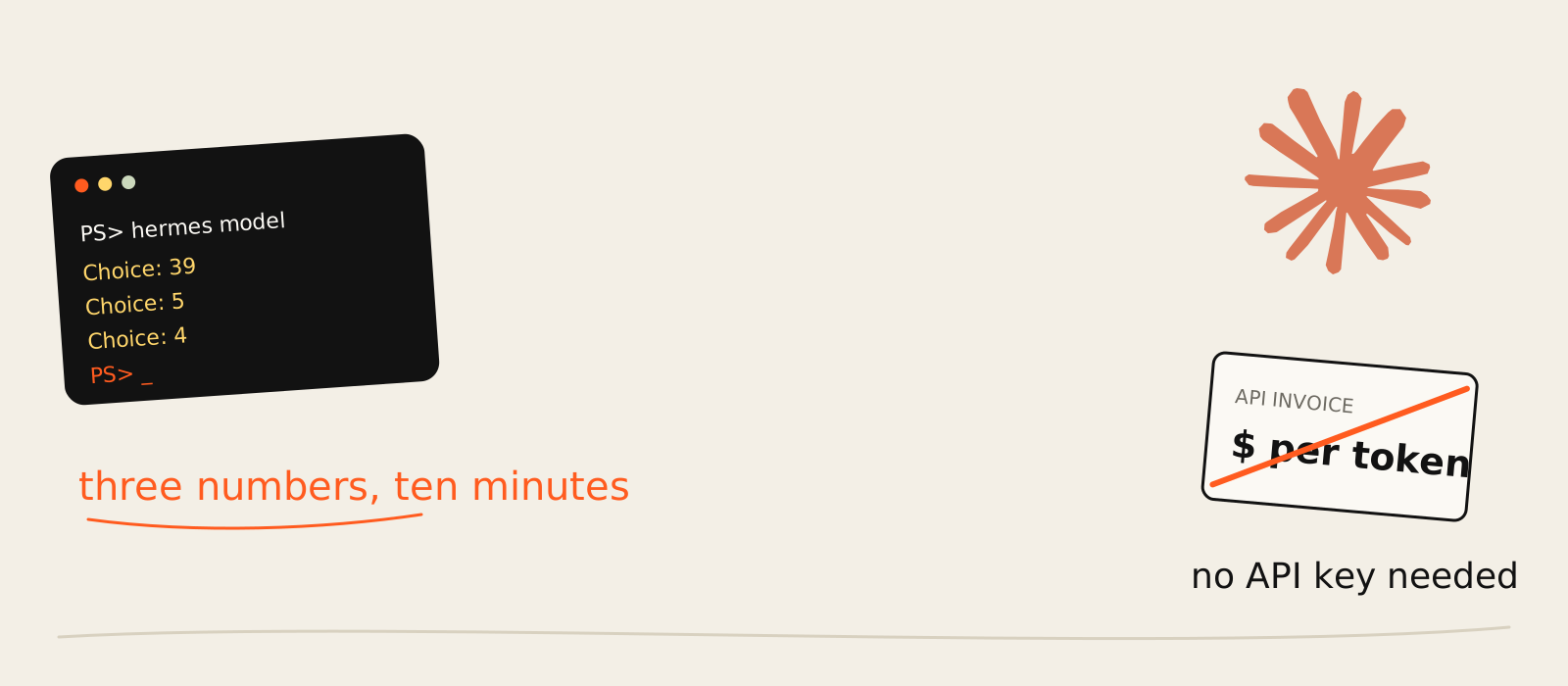
I pay for Claude Max. I also run Hermes Agent on my Windows PC. For a while those two lived separate lives: Claude on one bill, and Hermes asking for an API key that would put a second, per-token bill next to it. Paying twice for the same brain is a strange hobby.
So today, 19 November 2026, I fixed it. I installed the Claude Subscription DirectSDK plugin from Nous Research's official plugins repo, made Claude Opus 5.5 my default Hermes model, and now my Claude subscription runs Hermes Agent with no API key at all. Plain PowerShell, no IDE, about ten minutes.
Before you get excited, the honest bit up front: it isn't free. It spends your plan's allowance, and the plugin is labelled experimental by the people who built it. If you're new to the agent itself, my explainer on what Hermes Agent is covers the basics. Everything below is the exact path I typed, with my real outputs and the traps I nearly walked into.
What the plugin actually does
The plugin keeps Hermes in charge of the agent (tools, memory, skills, approvals, sessions, cron jobs) and swaps only the model underneath. Instead of calling the Anthropic API with a key, it drives the official Claude Code CLI you're already logged into, so the usage comes out of your Claude Pro or Max plan, not a token invoice.
That split matters. An agent is the loop that decides the next step, picks a tool and knows when to stop (I wrote up what makes something an AI agent if that line is fuzzy). Hermes is the loop. Claude is the brain. The plugin is the adapter between them.
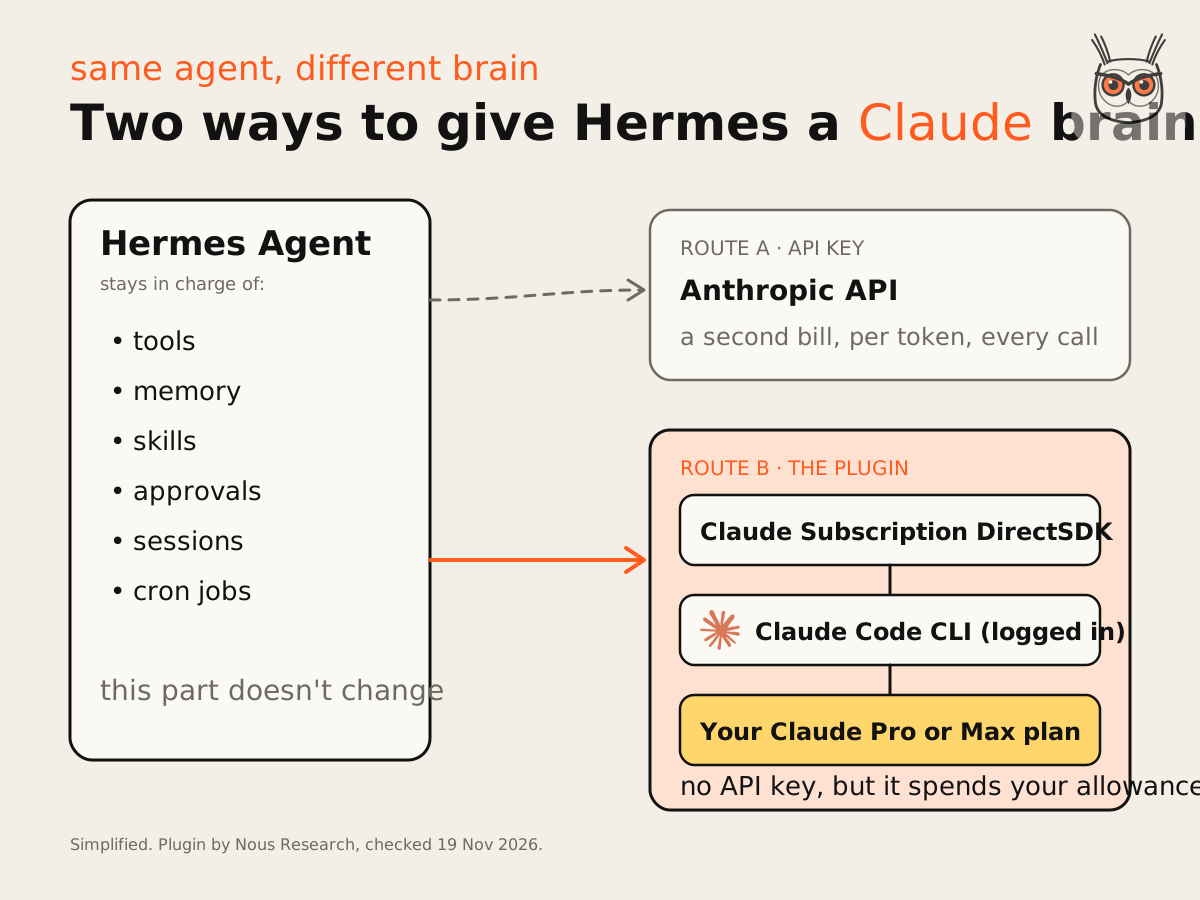
The install output says it plainly: the plugin declares no tools, no hooks, no middleware. It is a model provider and nothing else. Your agent setup doesn't change. Only who does the thinking, and who sends you the bill. Keep the loop, swap the model: it's the same separation I lean on when I set up AI automation and agents for a team, because the model is the part you'll want to change next year.
What you need before you start
You need three things: Hermes Agent 0.21.4 or newer, the Claude Code CLI installed and logged in with your Claude account, and a Claude Pro or Max subscription. On 19 November I had Hermes v0.23.1 and Claude Code 2.1.318 on a Max plan, on Windows 10.
The model you want also needs a recent enough Claude Code. The plugin README lists the minimums:
| Model | Picker id | Context | Minimum Claude Code |
|---|---|---|---|
| Opus 5.5 | claude-opus-5-5[1m] | 1M | 2.1.280 |
| Sonnet 5.5 | claude-sonnet-5-5[1m] | 1M | 2.1.284 |
| Haiku 5.5 | claude-haiku-5-5[1m] | 1M | 2.1.293 |
| Fable 5.2 | claude-fable-5-2[1m] | 1M | 2.1.321 (usage credits on Pro) |
My 2.1.318 clears Opus 5.5 easily and would fail on Fable 5.2 (more on that in Step 4). An older CLI answers with a 400 that says the model isn't supported. The fix is one command, claude update, not a forum thread.
No Claude Code yet? Install it with npm install -g @anthropic-ai/claude-code, then log in with claude auth login.
Step 0: Open PowerShell
Press the Windows key, type PowerShell, press Enter. That blue window is the "CLI" everyone keeps talking about. Every command below gets typed (or pasted) there, followed by Enter.
One thing before the screenshots: a few icons show up as empty boxes. That's PowerShell's font missing an emoji, not an error. Nothing is broken. Windows just doesn't own the right font, which is a very Windows problem to have.
Step 1: Check your versions and login
Run these three, one at a time:
hermes --version
claude --version
claude auth status | Select-String 'loggedIn|authMethod'
You want to see a Hermes version, a Claude Code version, and two lines: "loggedIn": true and "authMethod": "claude.ai". The second one is the important bit. It means Claude Code is signed in with your subscription, not with an API key.
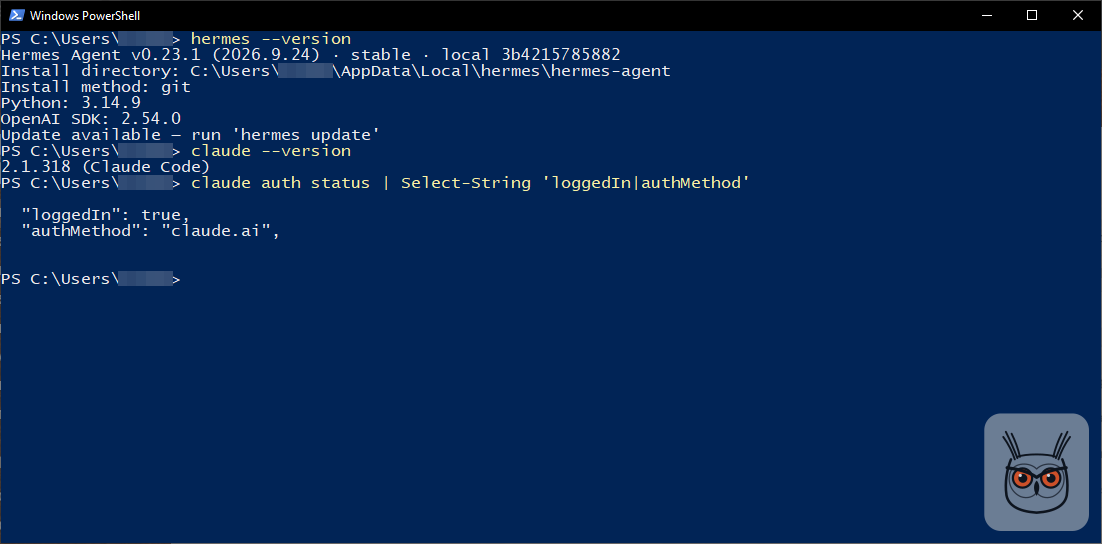
Hermes also told me an update was available. I didn't need it for this, but hermes update won't hurt.
Step 2: Install the plugin
One command installs and enables it:
hermes plugins install claude-subscription-directsdk --enableIt pulls the pinned, reviewed version from the official Nous catalog, clones it into C:\Users\<you>\AppData\Local\hermes\plugins\claude-subscription-directsdk-experimental and switches it on. No restart. The last line literally says nothing of this plugin needs a session or restart, which is the most relaxing sentence a terminal has ever said to me.
The --enable flag only skips the "enable this plugin?" question. Leave it off and answer yes when asked, same result.
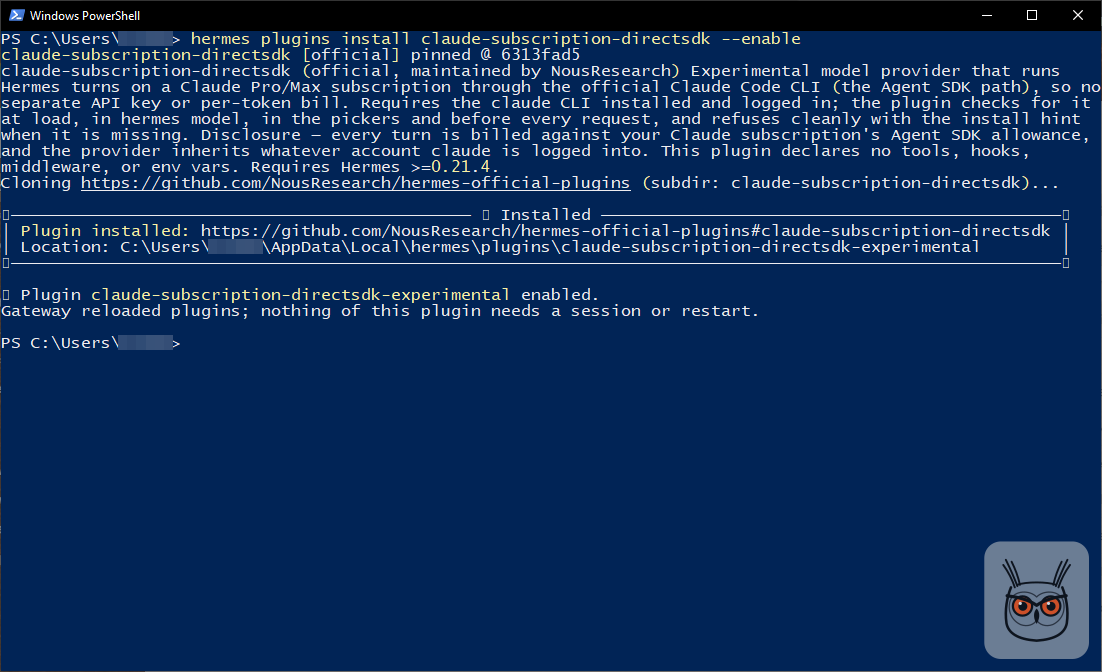
Read the disclosure it prints. Every turn is billed against your Claude subscription's Agent SDK allowance. That's the deal, in writing, before you've typed a single prompt. I like that they say it at install time instead of in a footnote.
Step 3: Check it installed (and the two names)
Run this to confirm the plugin is there and switched on:
hermes plugins show claude-subscription-directsdk-experimentalLook for Status: enabled. The catalog gave me v0.3.5 on 19 November.
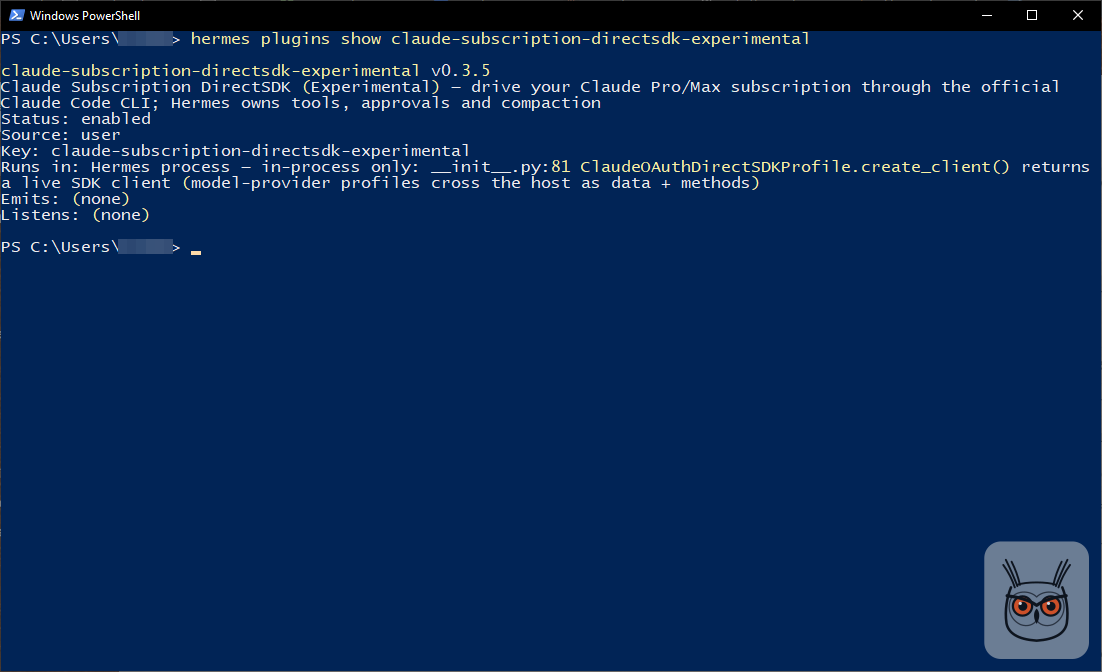
Now the bit that confused me. You install it as claude-subscription-directsdk, but once it's installed its name is claude-subscription-directsdk-experimental. Every command after the install uses the long name. Use the short one and Hermes looks at you blankly.
Two names for one plugin. Naming things remains the hardest problem in computing.
Step 4: Make Claude your default model
Run hermes model. It asks three questions in a row, and each answer is a number followed by Enter: provider 39, model 5, reasoning effort 4. Those were my numbers on Hermes v0.23.1. Yours can shift between versions, so match the labels, not the digits.
hermes model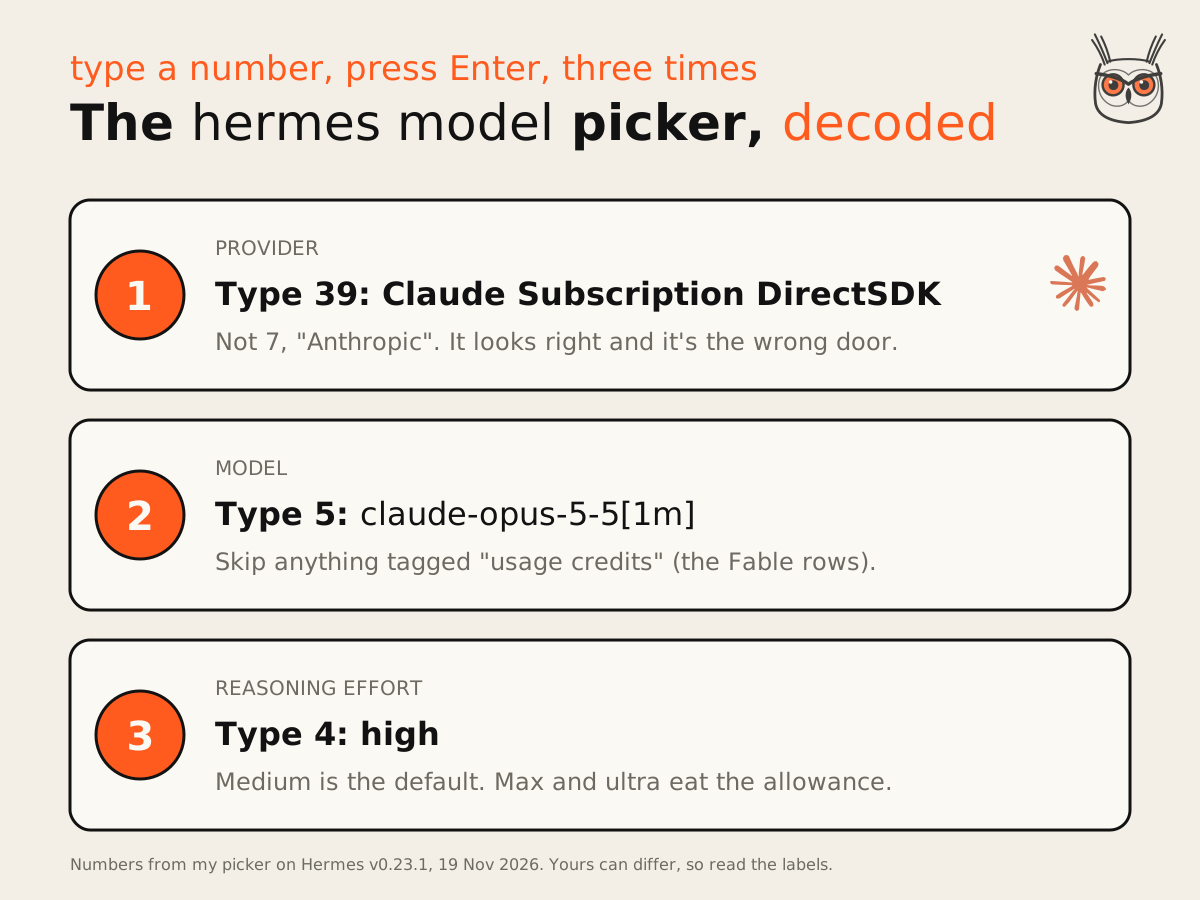
4a. Provider: 39, not 7
Scroll to Claude Subscription DirectSDK (Experimental). It was number 39 for me. Type it, Enter.
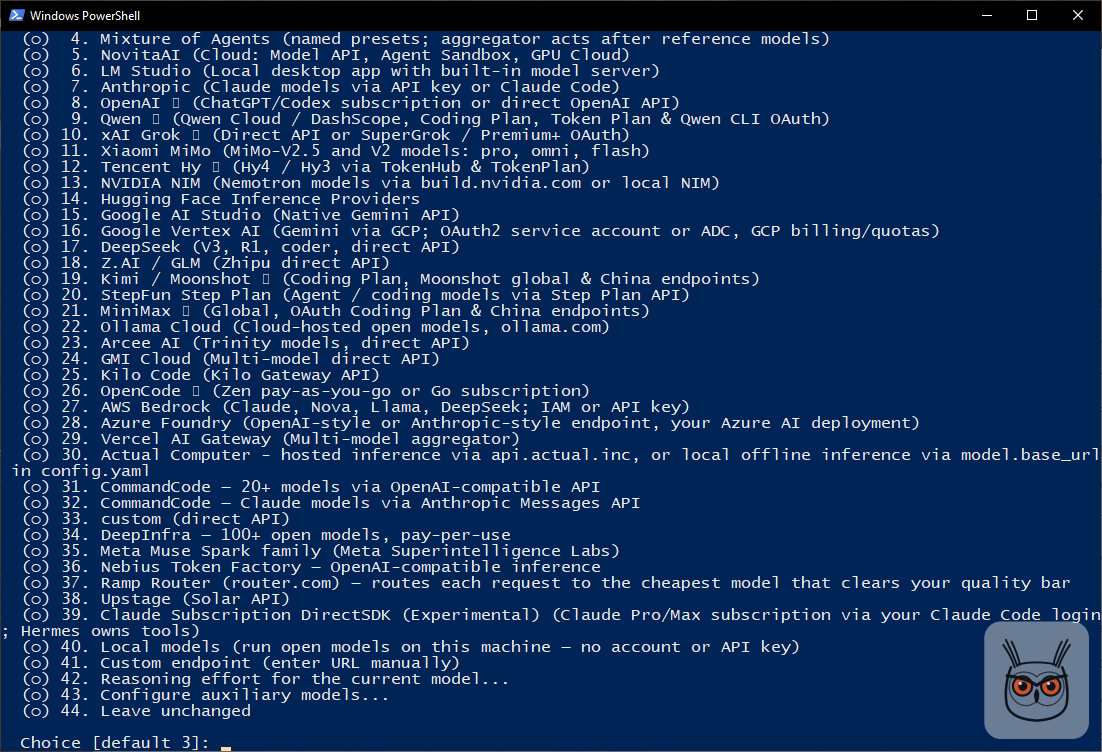
Don't pick option 7, "Anthropic". It's labelled "Claude models via API key or Claude Code", so it looks like exactly the right answer. It isn't the plugin. It's Hermes's own built-in provider, a different route, and not the one this guide sets up. A long list with the obvious-looking option being the wrong one: very on brand for a provider picker.
4b. Model: 5 for Opus 5.5
Hermes checks your Claude login first and shows credentials: (Claude Pro). Mine said Claude Pro even though I'm on Max, so don't worry if the label doesn't match your plan. Then it lists the models your plan offers. I typed 5 for claude-opus-5-5[1m], Opus 5.5 with the 1M-token context. It confirms with "Default model set to: claude-opus-5-5[1m]".
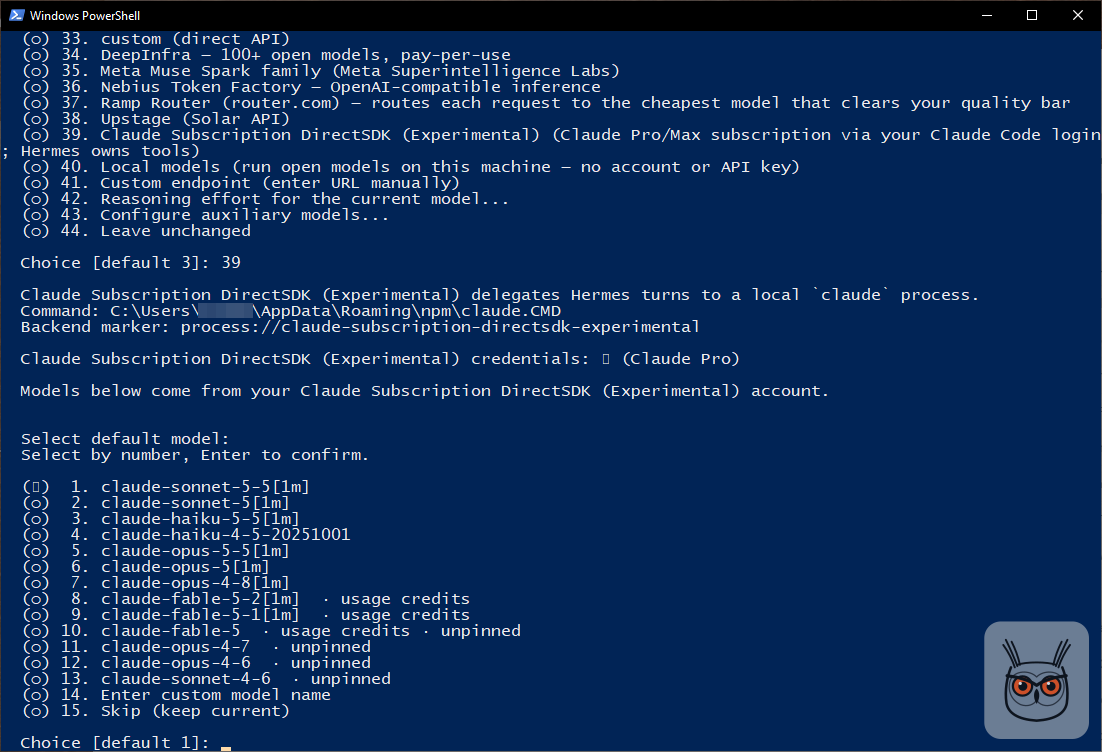
Skip every row tagged usage credits. Those were the Fable models. Anthropic's page on Fable models by plan explains the tag: on Pro, Fable 5.2, 5.1 and 5 run on pay-as-you-go usage credits from the start, not inside the plan. On Max, which is what I'm on, they count toward your limits instead, but the picker still tags them, and Opus 5.5 was the one I wanted anyway. On Pro, pick Sonnet or Opus and leave Fable alone.
4c. Reasoning effort: 4 for high
Medium was the default. I picked 4, high. Max and ultra burn through the allowance fast, so I'd keep them away from everyday use and anything on a schedule.

After the last Enter, Hermes saves and quits on its own. That's normal, not a crash. The settings land in C:\Users\<you>\AppData\Local\hermes\config.yaml.
Heads up: this changes the default for all of Hermes, including the gateway and every cron job. If you've got scheduled jobs doing real work (the kind of thing I cover in AI for business automation), they'll run on Claude from their next run. Want to try first without touching anything? Step 5 opens with a one-off test.
Step 5: Test it
Start with a one-off prompt that doesn't change your default. It's the "try before you commit" version, and I'd run it before Step 4 if you're nervous:
hermes --provider claude-subscription-directsdk-experimental -m sonnet -z "In one short sentence: which model are you?"My answer: "I'm Sonnet 5.5 (model ID claude-sonnet-5-5), running inside Hermes Agent." Drop the -z "..." part and you get a normal chat session on Claude instead of a single answer.
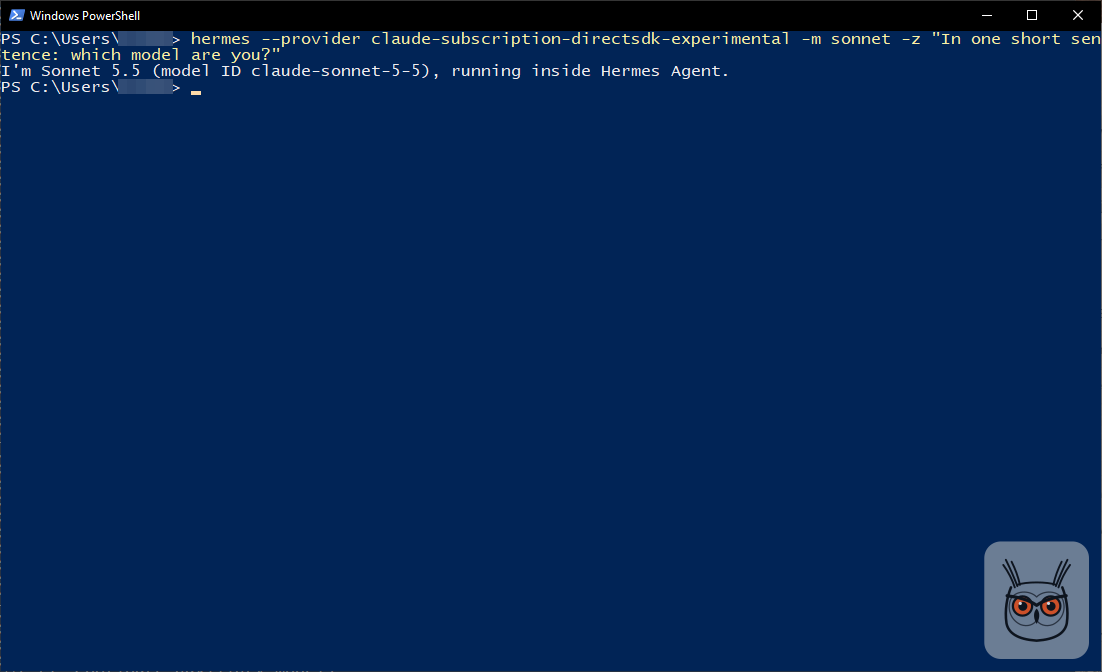
Then, after Step 4, check the new default and test with plain hermes, no flags:
hermes config get model.provider
hermes config get model.default
hermes -z "In one short sentence: which model are you?"
I got claude-subscription-directsdk-experimental, then claude-opus-5-5[1m], then: "I'm Claude Opus 5.5 (claude-opus-5-5), running as Hermes Agent." No key, no flags, Opus answering. That's the whole trick working.

Gotchas I hit or nearly hit
Most of this went smoothly. These are the bits that would have cost me an hour, or money, if I hadn't spotted them:
- Anthropic environment variables get in the way. If ANTHROPIC_BASE_URL (a custom endpoint) is set where Hermes runs, the plugin refuses the request and names the variable. That's deliberate: it never quietly falls back to billing an API account. An ANTHROPIC_API_KEY is a softer problem: the README says it gets stripped before Claude Code starts, but it can still leave the picker showing a generic model list. Clean both, and check with the command under this list. I found ANTHROPIC_BASE_URL set inside another app's terminal session; a fresh PowerShell window was clean.
- Two names. Short name to install, -experimental name for everything after. Step 3 has the details.
- Option 7 is a trap. "Anthropic" in the provider list is not the plugin.
- Usage-credits models cost extra on Pro. Skip the Fable rows.
- Changing the default changes everything. The gateway, cron jobs, anything else on Hermes. Test with the one-off command first. This is the part of setting up AI automation and agents that bites people: one config line, and every scheduled job quietly switches brains.
- Max and ultra effort drain the allowance. Fine for one hard question. Terrible for a nightly job. If you run something like a scheduled SEO and AEO check at ultra, you'll find out what your weekly limit is very quickly.
- It's experimental. Nous calls this a review build, not a production-readiness claim. Subscription rules and CLI behaviour can change under you.
Get-ChildItem env: | Where-Object Name -like 'ANTHROPIC*'Nothing comes back? Good. That's what you want.
What it actually costs (the cost view)
The cost side is where people get sloppy, so here it is straight. You don't pay per token, but you're not getting anything for free either. Every Hermes turn draws from your plan's allowance. Once you pass the plan limit, Anthropic's paid layer is called usage credits, and they're charged separately from the subscription. If you never want that, turn usage credits off in your Claude account under Settings > Usage. That's the one switch I'd flip before I'd trust any cron job with this.
How fast does it drain? Here the plugin's own README contradicts itself, a little. Older readings in it say the plugin draws at the same rate as claude -p, with interactive Claude Code stretching further. A newer measurement from 31 October 2026, on a Max plan with Opus 5.5, says the plugin now identifies itself as hermes-agent and the same work used about 1.7x less of the 5-hour window than before. I'd believe the newer number, because it's newer and it's measured. I wouldn't plan a budget around it, because the README itself says Anthropic hasn't documented the weighting, so it can change.
The plugin also documents a setting for what happens once paid overage starts, called extra_usage, with four values: allow, notify (the default), ask and stop. Note the naming: Anthropic says usage credits, the plugin still says extra usage. The README shows this command for it:
hermes config set plugins.entries.claude-subscription-directsdk-experimental.settings.extra_usage stopI haven't run that one. It also arrived with a newer build (the repo's main branch already carries a bump to 0.4.0 that adds it), and my catalog install was v0.3.5. So check your version with hermes plugins show before relying on it, and keep the account-level switch as your real safety net.
Other ways to install it
Hermes offers two other routes, and I haven't tried either: in Hermes Desktop, go to Capabilities, then Plugins, find it in the catalog and install; or ask Hermes in a chat to install the Claude Subscription DirectSDK plugin. The catalog command in Step 2 is the one I ran and the one I'd trust.
If you go the chat route, at least you get to watch an agent install its own new brain. Mildly existential, very 2026.
How to undo it
Two moves, in this order. First, run hermes model again and pick another provider, so Hermes isn't pointing at something that's about to vanish. Then remove the plugin:
hermes plugins remove claude-subscription-directsdk-experimentalNote the long name again. Undoing it takes less time than reading this section.
Is it worth it?
Yes, if you already pay for Claude Pro or Max. You get Opus 5.5 inside Hermes without a second bill, set up in about ten minutes, and the whole agent (memory, skills, approvals, cron) stays exactly as it was. That's a good trade. And if you're building your own agent and wondering which model route to plan for, my guide on how to build AI agents covers the cost caps I'd put in place either way.
The skeptic's take, which I share in part: you're building on an experimental plugin that sits on top of subscription rules you don't control. The plugin moved from its own repo into the official one, it's still shipping fixes every few days (the commit history shows changes up to 15 November), and Anthropic can change how plans meter third-party tools whenever it likes. So I wouldn't run a client's critical workflow on it without the usage-credits switch off and a fallback provider ready.
For my own Hermes, which runs my personal jobs and experiments, it's an easy yes.
What this changes for AI automation on a budget
For anyone running marketing automation or SEO automation on an agent, the model bill is the line that grows quietly. A morning report, a content check, a few AI agents tidying things on a schedule: each one is cheap, and together they're a monthly surprise. The subscription route turns that into a flat cost with a ceiling, which is exactly what you want while you're still figuring out which marketing agents earn their keep.
The ceiling is also the catch. Hit the weekly limit on a Tuesday and your automations stop until it resets (or start spending usage credits, if you left them on). So I'd put the experiments and personal AI automation on the plan, and anything a client depends on on a route with a proper budget and a fallback.
Same agent, one bill
I started with two bills for one brain. Now there's one, and Hermes answers as Opus 5.5 when I ask it what it is, which still makes me grin a bit. It cost me ten minutes, one wrong option I didn't pick, and a careful look at a billing disclosure.
If you'd rather have someone set up Hermes, the model routing and the cron jobs around it, that's the AI automation and agents work I do for marketing teams, with the spending switches flipped before anything runs.
And if you want the rest of what I write about agents, SEO and growth, it all starts on the growthvibes.ai homepage. Just don't pick option 7.
Frequently asked questions
Can I use my Claude Pro or Max plan in Hermes without an API key?
Yes. Nous Research's Claude Subscription DirectSDK plugin lets Hermes Agent use the Claude Code CLI you're logged into, so it runs on your Claude Pro or Max plan with no API key. It's labelled experimental.
Install it with hermes plugins install claude-subscription-directsdk --enable, then pick it as the provider in hermes model. The whole setup took me about ten minutes in PowerShell.
Is it free?
No. You don't pay per token, but every Hermes turn draws from your Claude plan's allowance. Once you pass the plan limit, Anthropic bills usage credits separately, so turn those off in Settings > Usage if you never want overage.
The plugin also documents an extra_usage setting (allow, notify, ask, stop) for newer builds. I haven't tested it, so I rely on the account switch.
Why does the plugin refuse to run?
Usually because ANTHROPIC_BASE_URL or a similar Anthropic override is set where Hermes runs. The plugin refuses on purpose, so it never quietly bills an API account instead of your subscription.
Check in PowerShell with Get-ChildItem env: | Where-Object Name -like 'ANTHROPIC*'. If something comes back, remove that variable from the environment that launches Hermes. An ANTHROPIC_API_KEY is stripped rather than refused, but it can leave you with a generic model list, so clear it too. An outdated Claude Code can also fail with a 400 "does not support this model"; run claude update.
Which model should I pick?
I picked Opus 5.5 (claude-opus-5-5[1m]) at high reasoning effort on a Max plan. Skip any model tagged usage credits (the Fable models), and avoid max or ultra effort for scheduled jobs.
Sonnet 5.5 is a fine, lighter choice if you want the allowance to stretch further. On Max, Fable counts toward your limits instead of usage credits.
How do I undo it?
Pick another provider in hermes model first, so Hermes isn't pointing at a missing provider. Then run hermes plugins remove claude-subscription-directsdk-experimental, using the long name. That's the whole undo.
Does it work in Hermes Desktop?
I set it up and tested it from the command line only, so I can't vouch for Hermes Desktop picking up the new default. The plugin README says the same model list feeds the desktop pickers.
Desktop also has its own install route under Capabilities, then Plugins.
