
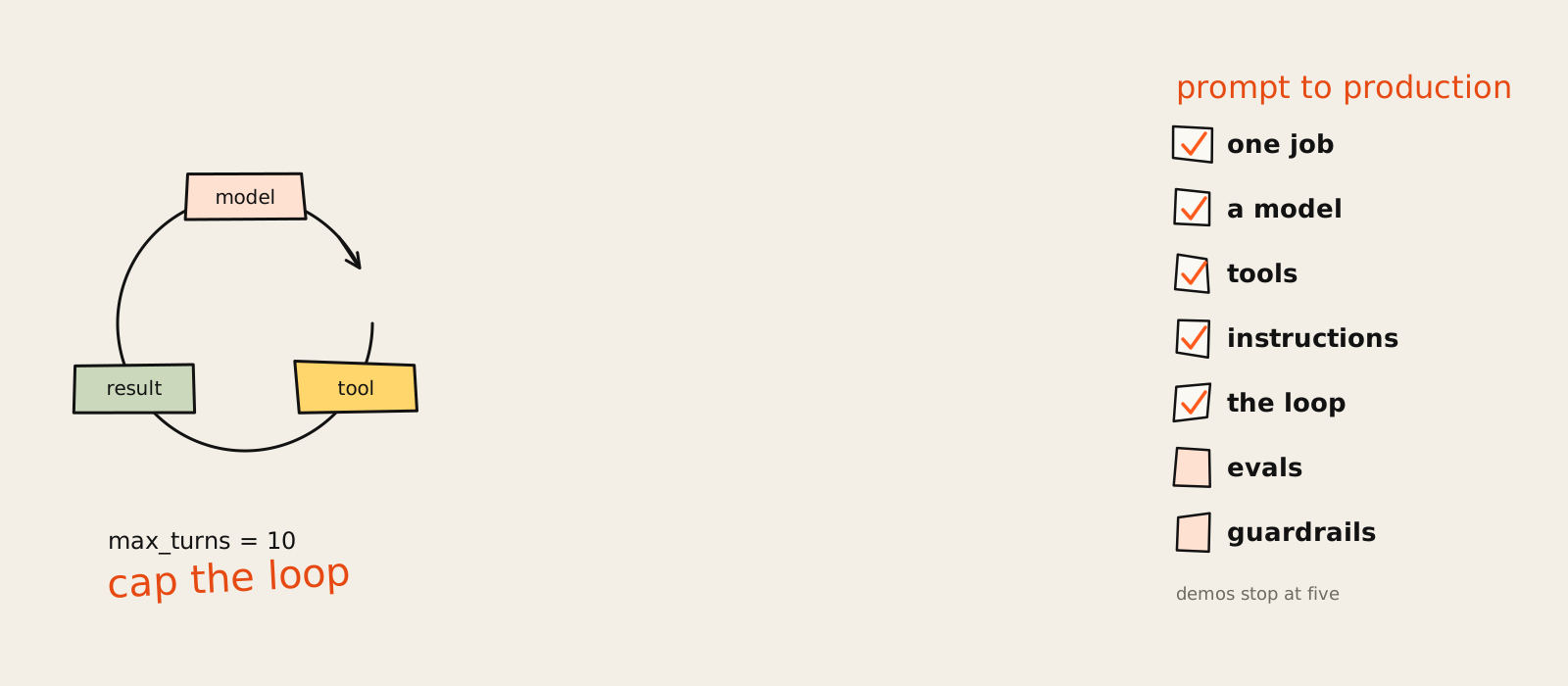
How to build AI agents, the short version: pick one job with a finish line you can check, choose a model, give it a few clearly described tools, write the instructions as numbered steps and run it in a loop with a hard stop. Then test it on real inputs before anyone trusts it. That's the whole recipe. The rest is knowing where it breaks.
Most guides stop at the moment the demo works. The agent books the fake meeting, summarises the sample PDF, everyone claps. Then it meets a real customer email, a forwarded thread with three attachments and a signature longer than the message, and it calls the same tool eleven times in a row. (Ask me how I know.)
I've built and shipped enough AI automation, for my own content work and in my AI automation and agents work for marketing teams, to have opinions about the boring half of the job: the brake, the tests and the bill. This guide goes from first prompt to production, whether you're dragging nodes around a no-code builder or writing the loop in Python. The six build steps:
- Define one job and what "done" looks like.
- Choose a model: start strong, measure, then step down.
- Give it tools with plain names and honest descriptions.
- Write the instructions as numbered actions.
- Build the loop, with a turn cap.
- Add memory and orchestration only when a real failure asks for it.
After the steps: the free route, custom agents, evals, production guardrails and the failures you'll meet in week one.
What is an AI agent (and do you need one)?
An AI agent is a model that works toward a goal by choosing its own next step: it calls tools, reads the results and repeats until it's done. A chatbot answers. A workflow follows steps you wrote. An agent decides the steps. Plenty of jobs don't need that, so the honest first question is whether yours does.
If you're still deciding which jobs are worth giving to an agent at all, I ranked them in AI agents for business: where they earn their keep.
If the definition above is still fuzzy, I wrote a plain explanation with real examples in what AI agents are.
The skeptic's take comes from an unexpected place. The two companies with the most to gain from you building agents both tell you to try not building one. Anthropic's guide to building effective agents recommends "finding the simplest solution possible, and only increasing complexity when needed", which it says might mean no agent at all. OpenAI's practical guide says a job that doesn't clearly need judgment, exceptions or messy unstructured data may be fine with a deterministic solution.
When the people selling shovels say you might not need to dig, listen.
Agent vs chatbot vs workflow
- Chatbot: one question in, one answer out. The model never decides what happens next.
- Workflow: steps you fixed in advance, maybe with a model call in the middle ("classify this email", "draft this reply"). Predictable, cheap, easy to debug.
- Agent: the model picks the next step from what it just found, calls tools and loops until it reaches the goal or hits a limit.
I worked with a SaaS client that wanted "an agent" to route inbound leads. We wrote the routing rules on a whiteboard in about forty minutes: company size, region, one question about the use case. The only fuzzy part was reading a free-text field, so that became one model call inside a plain workflow. It's still running, and nobody has had to explain to the sales team why the agent got creative.
For the buy side of lead qualification, I went through the AI sales agents worth paying for and where each one breaks.
A quick test: goal, own steps, loop
Ask three questions, in order. Can you check the result against a clear goal? If not, you're not ready to build anything. Can you write every step down in advance? If yes, build a workflow with one model call and stop there. Does it have to choose its next step from what it finds? Only then do you need an agent.
My n8n workflow that writes and publishes about 200 ads a week is that second answer in practice: six stages, one model call.
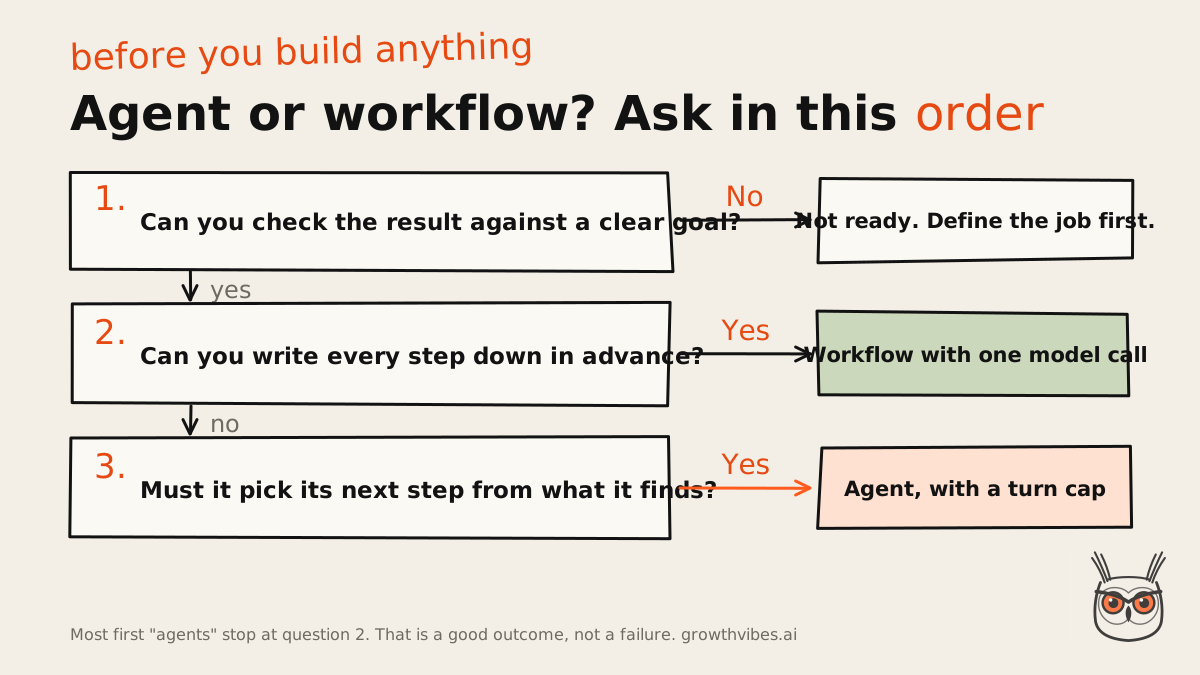
Open-ended jobs pass the test: research across sources you can't list in advance, triage where each case needs a different lookup, code changes across many files. Fixed jobs fail it, and that's a good result. Most first agents should be workflows, a position I'll defend at any dinner party that lets me, and one you'll find all over growthvibes.ai.
How to create AI agents: pick your build path
You can create AI agents three ways: a no-code builder such as n8n, a framework such as the OpenAI Agents SDK or LangGraph, or a plain loop you write against a model API. Choose by where you'll get stuck, not where you'll start. Each path is easy on day one and breaks somewhere different.
| Path | Best for | Cost (checked 4 Nov 2026) | Where it breaks | Skip it if |
|---|---|---|---|---|
| No-code builder (n8n) | A first agent; ops and marketing teams | Trial free, no card, 1,000 executions. Starter $20/mo billed annually for 2.5K executions. Plus model tokens | 5 min max run on Starter, 180 s on the trial. Prompts are harder to inspect | You need long runs or custom logic in every step |
| Framework (OpenAI Agents SDK, LangGraph) | Developers who want the loop handled | Open-source library. You pay for model tokens | Layers between you and the prompt. Versions move every few weeks | You can't say what the framework does for you |
| From scratch (model API) | Custom agents, full control | Model tokens only | You own every error, retry and timeout | You need it running by Friday |
No-code is where I'd send most marketers and founders first. n8n's homepage pitch, "Build the agent. Understand its workflow.", is a better line than most agent products manage, and as of 4 November 2026 the AI Agent node and MCP support are on every n8n plan. The catch is in the small print: Starter caps a single execution at 5 minutes and Pro at 40. An agent that researches for six minutes is a Pro customer, whether it likes it or not.
Frameworks write the loop for you, handle tool calling and give you tracing. My read: they help you start fast, then sit between you and the prompt the moment something goes wrong. What changed lately: the OpenAI Agents SDK shipped v0.24.0 on 15 October 2026, with an alpha of the next one out by 3 November. Learn the loop, not the version number.
From scratch is less scary than it sounds. The core is about 40 lines of code, and Step 5 has them. If you can't code, vibe coding tools will happily write those lines for you, which is how a lot of non-developers get past the no-code ceiling now.
My pick: no-code for your first agent, code once you hit run-time limits or need to see exactly what the model was sent. Plan the move before you need it, not during the outage.
Step 1: Define one job and what "done" looks like
Start with one job, written as a sentence a colleague could check: the input, the output and the rule that says it's right. "Handle support" is a department. "Read each new ticket, tag it with one of six categories and draft a reply for a human to send" is a job. Agents fail on vague goals first.
If you're still choosing which job to start with, I scored the options in which business processes to automate with AI first.
Agent projects rarely die because the model wasn't smart enough. Gartner expects over 40% of agent projects to be cancelled by the end of 2027 (a forecast from June 2025), and the reasons it gives are escalating costs, unclear business value and weak risk controls. Notice what's missing from that list. If nobody agreed a success metric before the build, that's your red flag.
The jobs worth an agent have at least one of three things: a judgment call with exceptions, a rulebook so tangled nobody wants to maintain it, or input that arrives as messy text, PDFs or emails. If your job has none of them, go back to the workflow.
- What you should see: one sentence for the job, a handful of real example inputs saved in a folder, and a written pass rule.
- What goes wrong: the job grows. "And it could also..." is how a two-day build turns into a quarter.
I made that mistake with a reporting agent that picked up "just one more" data source a week. By week five it was slower, pricier and wrong in new and creative ways. Cutting it back to the original job fixed all three, which was humbling and also very quick.
Step 2: Choose a model
Prototype on the most capable model you can afford, measure it on your real examples, then try smaller, cheaper models step by step and keep them only where they still pass. Picking by brand or a benchmark chart skips the one test that matters: your own inputs. Baseline first, savings second.
This is the order the vendor guides describe, and it's the right one even though they'd happily sell you the big model forever. You need a baseline before you can save money, because a cheap model that fails quietly costs more than an expensive one that works.
The cost view: in a multi-step agent, not every step needs the big brain. Send easy work to a small model and hard work to a large one (routing, in the jargon). In my own pipeline, the single heaviest step on the biggest model is most of the bill, while the steps on a mid-size model cost a dollar or three between them. The chart under "Guardrails, cost and monitoring" shows the split.
- What you should see: the strong model passing most of your example inputs, and a note of which steps a smaller model also passes.
- What goes wrong: smaller models tend to slip first on the agent part, the tool calls. If a cheaper model starts sending wrong arguments, move that step back up.
Step 3: Give it tools
Tools are the functions your agent can call: search, read a database, send an email, update the CRM. Give it as few as the job needs, each with a plain name, typed parameters and a description that says when to use it. Most agent bugs I've traced were tool problems wearing a prompt costume.
Tools come in three kinds: data tools that read (search, fetch a record), action tools that change something (send, update, create) and orchestration tools, which are other agents called as tools. With function calling, the model never runs anything itself: it asks, your code runs it, and the result goes back in. MCP, the Model Context Protocol, is a standard way to plug in ready-made tool servers, and builders like n8n support it.
One documented case worth knowing: a team building a coding agent spent more time optimising its tools than its prompt, and a single change, forcing absolute file paths, removed a whole class of mistakes. That matches what I've seen. An hour on tool descriptions beats a day on prompt poetry. It's one team and one agent, so treat it as a pattern, not a law.
The skeptics push further. Sean Goedecke argued on 17 September 2026 that tools built specially for agents mostly lose to tools that already exist, because models learned the human ones in training. Both camps are right about different things. Design the interface carefully, but wrap an API the model already knows before you invent a new one. When it's close, I side with the existing tool every time.
Overlap matters more than count. Some setups handle more than 15 distinct tools; others trip over fewer than 10 that overlap. Two tools called search_contacts and find_customer is how you get an agent that flips a coin.
- What you should see: on your example inputs, the model picks the right tool with valid arguments.
- What goes wrong: look-alike tools, descriptions that say what a tool is rather than when to use it, and errors returned as stack traces. Return errors as a sentence ("No customer with that email. Try searching by domain.") and the agent can recover.
Step 4: Write the instructions
Write the instructions (the system prompt) as numbered actions taken from a procedure that already exists: your support script, your SOP, the checklist your best person follows. Each step says what to do or produce, and edge cases get their own line. Skip the personality paragraph. "You are a world-class assistant" has never fixed a bug.
Where the instructions come from matters more than how clever they sound. A real procedure has already met real customers; a prompt you wrote at 11pm hasn't. Turn every step into an action ("look up the order", "if no order exists, ask for the number once, then hand off"), and end with the definition of done. Here's the shape I use:
Job: tag and draft replies for new support tickets.

1. Read the ticket and any earlier messages in the thread.
2. Pick exactly one tag: billing, bug, how-to, account,
   feature-request, other.
3. If the tag is billing, call get_invoices with the
   customer's email.
4. Draft a reply under 120 words that answers the question asked.
5. If you are not sure of the answer, write NEEDS HUMAN and stop.
6. Never promise refunds, dates or features.

Done = one tag and one draft, or NEEDS HUMAN.- What you should see: on your examples, the agent follows the numbered path and stops where you told it to.
- What goes wrong: missing edge cases. When it does something odd, the fix is usually a new numbered line, not a longer pep talk.
Open-ended research jobs are the exception: they need looser instructions and tighter limits.
Step 5: Build the loop
The agent loop is simple: send the messages and the tool list to the model, run any tool it asks for, add the result to the messages and go again, until the model answers without asking for a tool. The part demos skip is the brake: a turn limit and a planned message for when it's hit.
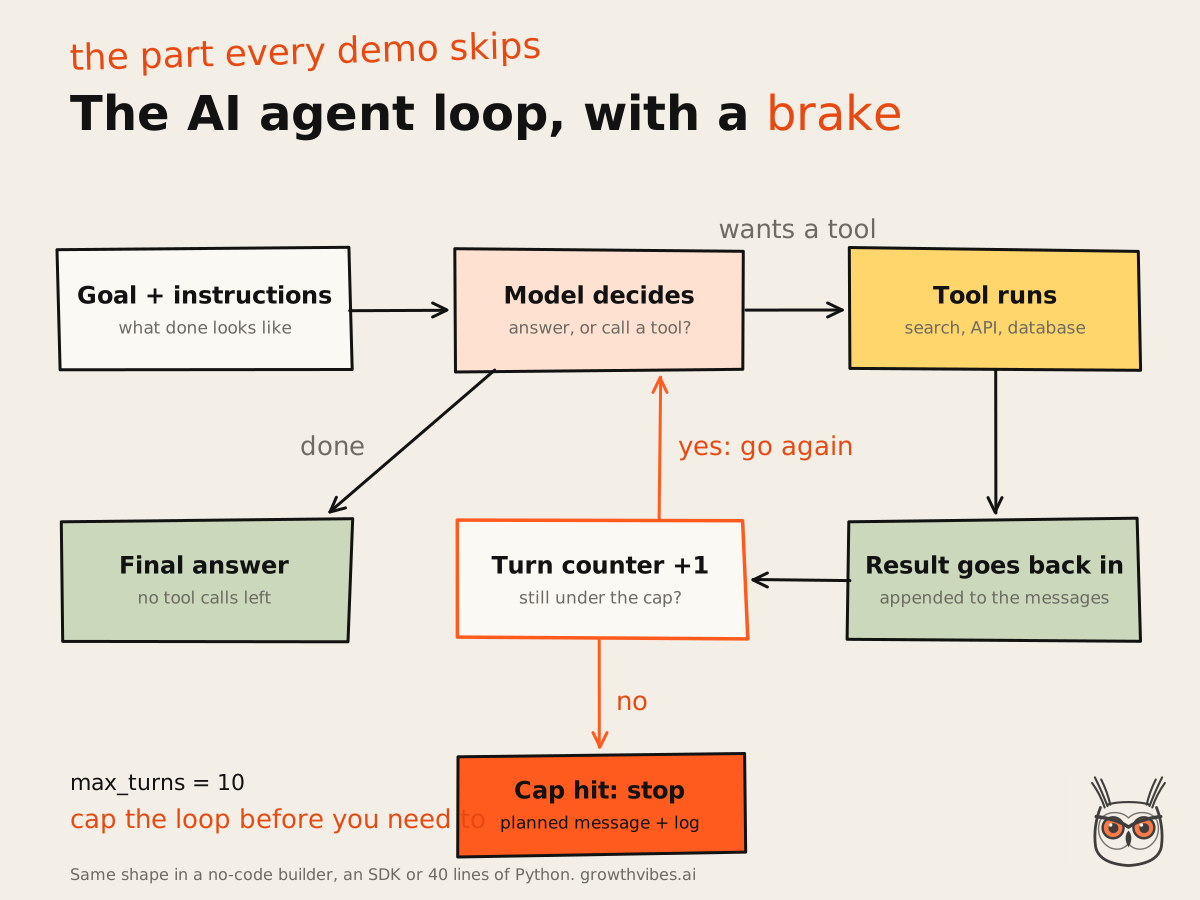
Here's how to build AI agents from scratch in about 40 lines of Python. The model call is a stub, so you can plug in whichever provider you use; real APIs have their own message format for tool calls, and this keeps the shape visible.
MAX_TURNS = 10

def run_agent(goal, tools, call_model, log):
    # call_model(messages, tools) returns either
    #   {"text": "..."}                     a final answer, or
    #   {"tool": "name", "args": {...}}     a tool request
    messages = [{"role": "user", "content": goal}]

    for turn in range(MAX_TURNS):
        reply = call_model(messages, tools)

        if "tool" not in reply:              # no tool call = done
            log(goal, turns=turn + 1, status="done")
            return reply["text"]

        name, args = reply["tool"], reply.get("args", {})
        try:
            result = tools[name](**args)
        except KeyError:
            result = f"There is no tool called {name}."
        except Exception as err:             # errors go back as text
            result = f"{name} failed: {err}"

        messages.append({"role": "assistant",
                         "content": f"Calling {name} with {args}"})
        messages.append({"role": "user",
                         "content": f"Result of {name}: {result}"})

    # The brake: out of turns, so stop politely and leave a trail.
    log(goal, turns=MAX_TURNS, status="cap_hit", messages=messages)
    return "I couldn't finish this one. A person will pick it up."
The SDKs do the same thing with more polish. In the OpenAI Agents SDK, the runner loops until the model returns final output with no tool calls, and if a run passes max_turns it raises MaxTurnsExceeded (per the docs as of 3 November 2026). You can also give it an error handler that returns a controlled final answer instead of a crash. Setting max_turns to None switches the limit off, which is the agent version of taking the batteries out of the smoke alarm because it beeps.
Cap the loop. Ten turns is a sensible start for most jobs. Some long jobs need more, so raise the cap on purpose and write down why. Don't remove it.
Step 6: Add memory and orchestration
Memory lets an agent carry context between turns or sessions. Orchestration means several agents splitting the work. Add both late. Stay on a single agent with one way of storing conversation state until a specific failure forces a split, such as picking the wrong tool even after you've fixed the descriptions.
For memory, pick one strategy per conversation and stick to it. The OpenAI SDK alone has four ways to carry state between turns, and mixing client-side history with server-side state is a tidy way to send the same context twice and pay for it twice. Long-term memory (RAG over your docs, or a notes table the agent writes to) is just another tool. The agent still has to decide to look. Whatever you store, keep it true. Stale notes steer an agent too, and Google put numbers on what that costs a coding agent.
On orchestration, the advice contradicts itself. One vendor guide tells you to split into multiple agents when logic and tools pile up, and in the same breath to max out a single agent first, while the simple-first camp wants added complexity to earn its place. My side: single agent first, and split only when you can name the failure. The test that settles it: does the agent keep choosing the wrong tool after the tool descriptions are clean? If yes, split. If you haven't checked, you're not ready to.
My own content pipeline is several agents in a row, but each one is a separate step with one contract between them: a single line of JSON that says ok or not ok. It's multi-agent in the most boring way possible. Boring is why it runs while I'm not watching, and it's the same pattern I use when I build AI automation for marketing teams.
How to build AI agents from scratch vs with a platform
Build from scratch when you need full control over prompts, tools, errors and cost, and someone can maintain the code. Use a platform when speed and a visual canvas matter more and the job fits inside its limits. The real trade-off isn't power against ease. It's who owns the debugging when it breaks at 2am.
If you're weighing the bigger vendors, I compared the enterprise AI agent platforms in a separate guide.
Platforms win the first week. You get triggers, credentials, retries and a canvas your marketing manager can read. Code wins the third month, when you need the exact prompt behind a bad answer, a cap on concurrency, or a run longer than your plan allows.
- Pick a platform if: the job is a chain of known apps, runs take minutes, not hours, and the person maintaining it doesn't write Python.
- Write it yourself if: you need custom tools, strict cost control, long runs or tests in CI.
- Do both if: you start on the platform and move the one step that hurts into code. n8n has code nodes, and a function behind a webhook works almost anywhere.
I've also seen the opposite of the usual story. A team rewrote a perfectly good n8n flow in Python because code felt more serious, then spent a month rebuilding the retry logic the platform had given them for free. Rewrite for a reason you can name, not for the vibes.
How to create AI agents for free
You can create AI agents for free while you learn: n8n's cloud trial needs no card and includes 1,000 executions, and the self-hosted Community Edition costs nothing to run on your own machine. What isn't free is the model. The platform bill and the token bill are separate, and a looping agent only inflates the second one.
If you'd rather start from an agent that already exists, Hermes Agent is a free, open-source option you run on your own machine, with the same split between software and model costs.
I also wrote down how I set up Hermes Agent on a Claude subscription so the model cost stays on one plan.
As of 4 November 2026, the n8n trial caps you at 1,000 executions, 5 concurrent executions and a 180-second timeout. That's plenty for building and testing a first agent, and nowhere near enough to run one for a team. Limits like these change, so check the page on the day you sign up.
The economist's angle: the AI Agent node costs nothing extra on any plan, but the model behind it bills by the token, and that's the meter a loop spins. A free platform with an uncapped agent is a free car with a hole in the fuel tank.
Here's what I haven't seen any of the ranking guides connect: the free route and the production route fail in the same place, the loop budget. On the trial, a runaway loop hits the 180-second timeout or eats your executions, which is at least loud. In production it eats your token budget instead, quietly. Same bug, different bill. Cap the loop on day one, whatever you're running on.
When I'm testing a new agent idea, I usually run it on a trial or a local install with a hard cap of a few turns and a dozen saved inputs. If it can't impress me in a dozen, it won't in a thousand, and I've spent nothing finding out.
How to build custom AI agents
A custom AI agent is the same loop with your own tools, your own data and your own rules: your CRM behind the tools, your docs behind the memory, your policies in the instructions. Start with direct API calls, add a framework only when you can explain what it does for you, and keep the job narrow.
Direct API calls are enough for most patterns, often in a few lines of code, and a framework that hides the prompt makes debugging harder. That advice dates from December 2024, with a note added on 9 October 2026 that much of the tooling has changed since. What changed: the tools, constantly. What didn't: the loop, tools before prompts, simple first. Teach yourself the decisions; the frameworks will keep changing names.
Custom AI agents for marketing automation and SEO
This is where it gets practical for marketing teams, and where most of my own work sits. The custom part of a marketing agent is almost never the model. It's the access: your analytics, your CRM fields, your brand rules, your list of pages. An SEO agent that knows your site and your Search Console data is useful. A generic one that writes "10 tips" posts is a liability with a login.
For a first build, I'd automate checks before drafts. In the work behind the Synthesia case study, the AI automation that earned its keep early was technical checks and alerts: the kind that tell you a key page dropped out of the index before the traffic report does. That's my opinion from doing it, not a measured comparison, but one alert that saves a page beats a hundred drafts.
The same goes for AEO automation: an agent that checks whether your pages answer the questions buyers ask AI assistants, and flags the gaps, is a better first project than one that writes new pages. It's how I approach SEO and AEO for clients: automate the checking, keep the judgment.
Test it before you trust it: evals
An eval is a fixed set of real inputs, each with a pass or fail rule you wrote down before running the agent. Run it before launch and after every change to the model, tools or instructions. Without one, "it seems better" is a feeling, and agents are very good at producing feelings.
Here's the version I use, because it's the one people actually keep running: a short list of real inputs, the ugly ones included, each with a pass rule in plain words. No scoring rubric with weights. Pass or fail.
case: billing ticket, customer has two accounts
input: tickets/0142.txt
pass if: tag = billing AND get_invoices called with the ticket's email

case: angry customer demanding a refund
input: tickets/0217.txt
pass if: draft contains no refund promise AND tag = billing

case: question the docs don't answer
input: tickets/0388.txt
pass if: output = NEEDS HUMAN
Write the rule before you look at the output, or you'll grade on a curve. Rerun the whole list after every change, because the fix for one case breaking two others is the most common thing you'll see. A model upgrade counts as a change too.
The tooling is catching up. As of 4 November 2026, n8n includes light evaluations on every plan and metric-based evaluations on one workflow on Starter. A new open-source tool, Apgar, posted to Hacker News on 29 October 2026, compares each agent release with the one before from production traces: more tool errors, retries and loops, higher cost or latency, with no LLM judge needed. It's version 0.1.3 with a handful of GitHub stars, so very early, but it's aimed at exactly the right problem.
The weakness of a short list: it misses rare failures. That's what production logs are for.
Guardrails, cost and monitoring in production
In production, an agent needs four things: a cap on turns and retries, a human check before anything it can't undo, a log of every run with its cost, and an alert when those numbers drift. Guardrails stop the expensive mistakes. Logs tell you what the agent actually costs, not what you hoped.
Guardrails by risk
Rate every tool by risk. Read-only tools are low. Tools that write are medium. Anything irreversible or touching money is high, and high-risk actions should pause for a check or a person. Set a failure threshold too: after a couple of failed attempts, the agent hands off instead of trying harder, which is more than I can say for some people I've worked with.
What drives the cost of an AI agent
I couldn't find anyone publishing a typical cost per agent run, and I'd distrust a single number anyway: it depends on tokens per turn, the number of turns and the model. Follow the money: every turn resends the conversation so far, so a loop that runs twice as long can cost more than twice as much. Caps on turns are caps on spend.
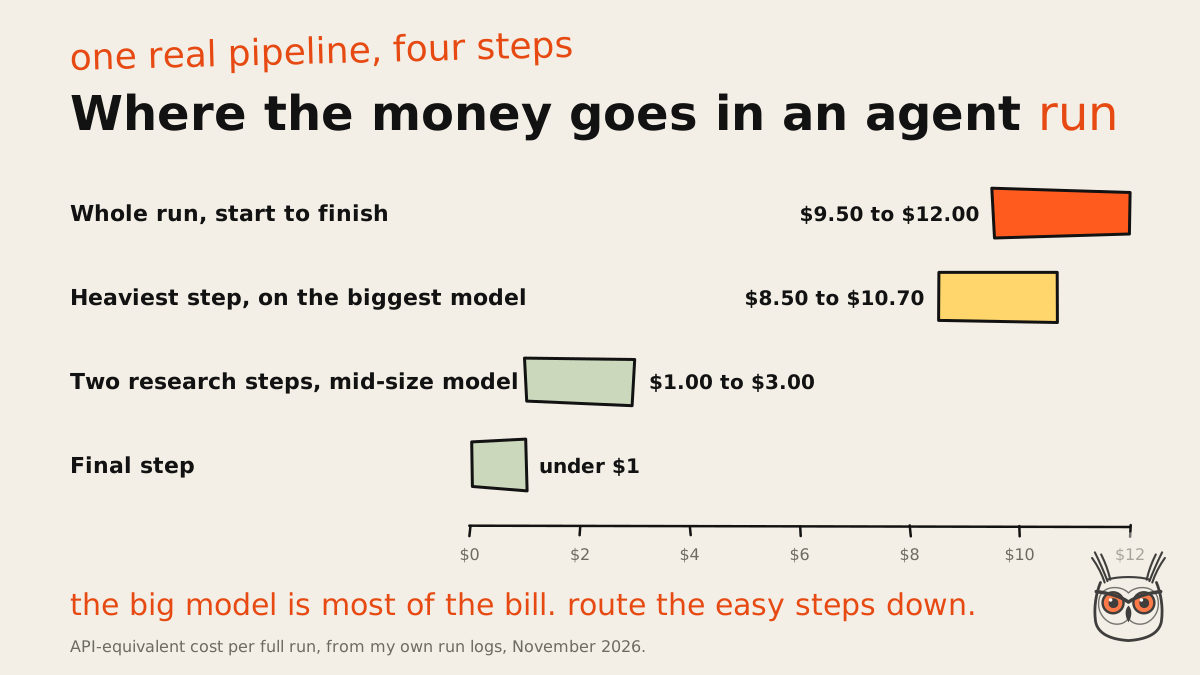
A real example: the AI agent pipeline behind my SEO content automation logs the API-equivalent cost of every step. A full run costs about $9.50 to $12, and one step on the biggest model accounts for $8.50 to $10.70 of it. The steps on a mid-size model cost one to three dollars between them. If you want to cut an agent's bill, look at the big-model step first. I only know this because I logged it from the first run.
At company scale the joke writes itself. Kevin Indig wrote about Meta's internal token leaderboard, where people left agents running on idle tasks to climb the ranks; the top user's tokens would have cost over $1.4 million at standard API rates. Companies now set budgets instead: Tesla reportedly caps AI spend at $200 a week and Uber at $1,500 per employee per tool per month. A turn cap is the same idea, one agent at a time.
The cost nobody budgets is people. In my experience, the tool bill for one agent or workflow is small next to the hours someone spends keeping it alive: a changed API, new edge cases, logs to read. That maintenance is most of what I do when I build AI agents for marketing teams. I'd hedge it for high-volume agents, whose token bills grow fast.
Before you build, it helps to know what each platform charges and what it does at its limit, which I covered in the business automation tools comparison.
Monitoring
Monitoring means traces: for every run, the inputs, each tool call, the results, the turns used and the cost. The SDKs come with tracing, and the OpenAI runner can also cap how many tools run at once. Watch the boring signals: more tool errors than last week, more retries, more cap hits, cost per run creeping up. Drift over weeks is the failure nobody has good data on yet, so you have to look.
When your agent breaks: the common failures
Most week-one agent failures are boring: a malformed tool call, a tool that errors or times out, a loop that never exits, a rate limit on a free tier. They're infrastructure problems a demo never exercises. Fix them with caps, retries, plain-text errors and logs, not with a cleverer prompt.
What people who run agents in production keep running into, with the fix for each:
- Malformed tool calls: the model sends arguments your code can't parse. The OpenAI SDK has a dedicated error for it, ModelBehaviorError. Fix: validate, return a plain error, allow one retry.
- Tool not found: it calls a tool that doesn't exist, often one it half-remembers. Fix: fewer, clearer tools.
- Timeouts: a slow API stalls the whole run. Fix: a timeout per tool and a fallback message.
- Endless loops: same tool, same arguments, again and again. Fix: the turn cap, plus a rule that two identical calls in a row ends the run.
- Rate limits: free tiers throttle you, and a throttled agent looks exactly like a hung one.
That last one got me. In the SEO content automation I built, the embeddings provider's free tier without a payment method allowed about three requests a minute, so the script had to batch and wait around 21 seconds between batches. Not dramatic. Just slow enough to look like a crash until I read the logs.
The other lessons from running it every day: a rule a model is trusted to follow gets bent sooner or later, so the important ones are checked by a script. Every step has a timeout. An empty file called PAUSE stops everything. Any failure stops the run and says which step failed, because a failure you can see is cheap. The expensive ones succeed at the wrong thing.
Add guardrails from the failures you actually see, not the ones you imagine. And early on, keep a human reading the outputs. That's how you find the cases that belong on your eval list.
Where to go next: one job, one loop, one brake
Remember the agent that called the same tool eleven times? It didn't need a better model. It needed a goal it could check, three tools with honest descriptions and a turn cap of ten. Start there: one job, a short eval list, a loop with a brake and a log you actually read. Cap the loop, then make it clever.
If you'd like a hand building AI agents and marketing automation that run without you watching, that's my AI automation and agents work.
Frequently asked questions
How do I build an AI agent from scratch?
Write a loop that sends messages and a tool list to a model, runs any tool it requests, adds the result and repeats until the model answers without a tool call. Give it a turn cap and a fallback message.
Step 5 above has the full loop in about 40 lines of Python. Start with one or two tools and a handful of saved test inputs, and add a framework later only if it saves you real work.
Can I create AI agents for free?
Yes, for learning. n8n's trial needs no card and includes 1,000 executions with a 180-second timeout (as of 4 November 2026), and the self-hosted Community Edition is free. The model's tokens are billed separately.
The free route breaks on run time and execution caps first. Plan to pay for something, the platform or the model, once a team depends on the agent.
Do I need to code to build an AI agent?
No, not for a simple one. No-code builders like n8n let you connect a model, tools and memory on a canvas. Code helps once you need long runs, custom tools or full control over prompts and errors.
A middle route is a no-code flow with one code step for the part that hurts. Vibe coding tools can also write the loop for you if you can read the result.
What's the difference between an AI agent and a chatbot?
A chatbot answers one message at a time and never decides what happens next. An AI agent works toward a goal: it chooses its own steps, calls tools, reads the results and loops until it's done or hits a limit.
A workflow sits between the two: fixed steps you wrote, maybe with a model call inside. Most jobs people call agents are workflows, and that's usually the better build.
How much does it cost to run an AI agent?
It depends on tokens per turn, turns per run and the model, so there's no honest single number. Caps on turns are caps on spend, and logging the cost of every run turns the guess into a figure.
For one real example, a full run of my own multi-step agent pipeline costs about $9.50 to $12, most of it on the step that uses the biggest model.
How long does it take to build an AI agent?
A first no-code version can take an afternoon: one beginner reported about two hours for a first n8n agent. Getting it ready for production, with tests, guardrails and logging, usually takes far longer than the first version did.
The two-hour example is a learning build. Budget most of your time for the evals and the failure handling, because that's where the real work sits.
