
Search "Hermes" right now and you get three things: a family of AI models, an AI agent and, depending on where you live, the company that lost your parcel. This article is about the second one. The other two keep turning up in the explanations anyway, which is half the problem.
So, short version. Hermes Agent is a free, open-source AI agent from Nous Research that runs on your own computer or a server, remembers what you tell it across sessions, turns tasks it finishes into reusable skills, and works on a schedule or from chat apps like Telegram. Its purpose is to take repeat work off one person's plate and get a bit better at it each time.
I run Hermes on my Windows PC and hand the coding jobs off to Claude Code, so I'm writing this as a user, not as someone selling you a server. That matters more than it should, because most of the explainers ranking for "what is Hermes Agent" come from companies that sell hosting or an agent platform. Their advice tends to end at "and here's our plan". Mine ends at whether you should bother. If you'd rather skip straight to having someone set up AI automation and agents for your team, that's what I do.
What is Hermes Agent?
Hermes Agent is an autonomous AI agent built by Nous Research, released under the MIT license. You install it on a laptop, a VPS or a cloud sandbox, connect any language model you like, and talk to it from a terminal or a messaging app. It keeps memory between sessions, creates its own skills and can run jobs on a timer.
The official line, from the Hermes Agent docs, is that it's an agent that "gets more capable the longer it runs". The README goes further and calls it the only agent with a built-in learning loop. Bold claim. I'll come back to it, because nobody has tested it independently yet and "only" is doing a lot of work in that sentence.
If you're fuzzy on what makes something an agent rather than a chatbot with a nice font, my explainer on what AI agents are covers the test I use: does the model pick the next step, the tool and when to stop? Hermes passes all three. It decides what to do, uses tools to do it (terminal, browser, files, web search) and keeps going until the job is done or it needs you.
Hermes the model family vs Hermes Agent
Hermes Agent and the Hermes models are two separate products from the same lab. The models are open-weight language models Nous Research trains. The agent is software that uses a model to get work done, and it doesn't have to be a Hermes model.
The naming is genuinely confusing (Nous Research, if you're reading: a second name wouldn't have cost much). Hermes 4, released on 27 August 2025, is a family of open-weight models in 14B, 70B and 405B sizes, built on Llama 3.1. Hermes Agent works with Nous Portal, OpenRouter, OpenAI or any endpoint you point it at, and you switch with one command, hermes model.
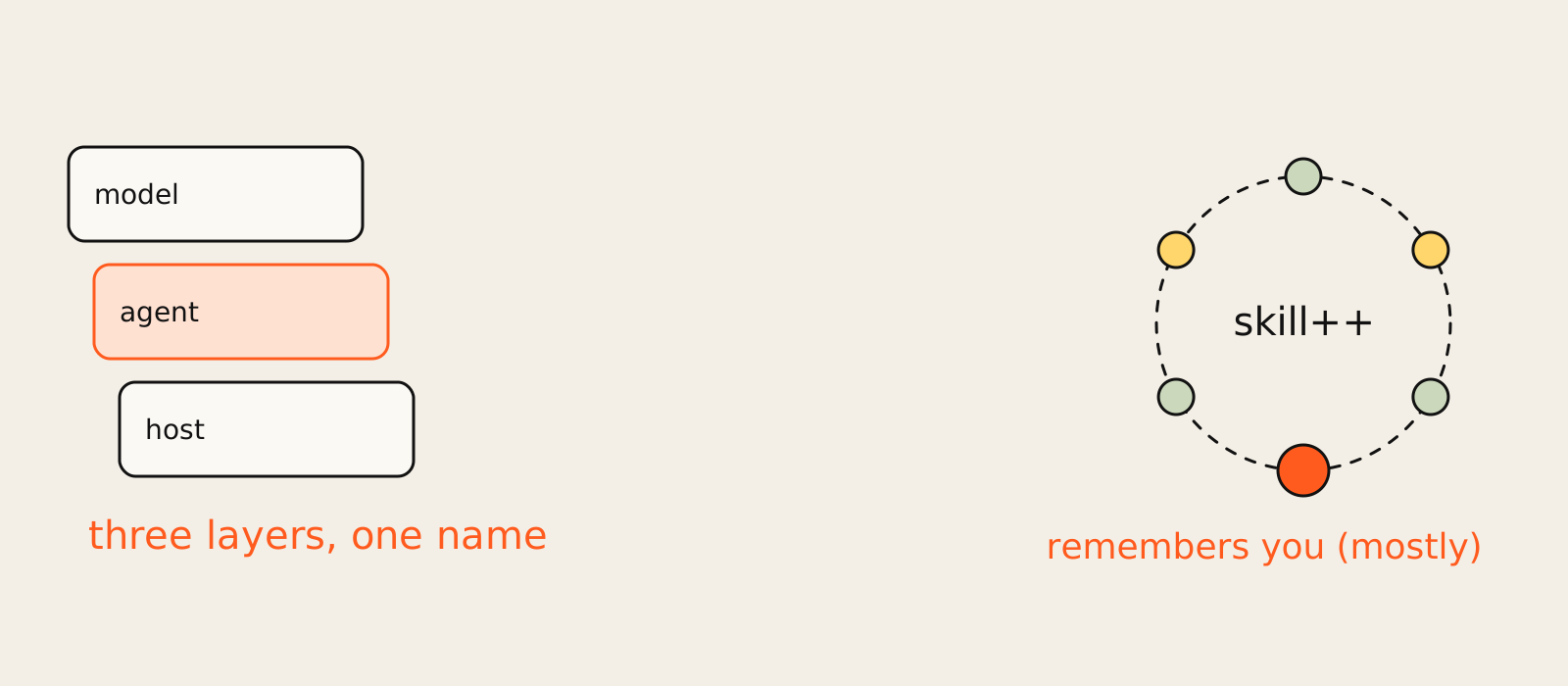
None of the top-ranking guides separate the three layers that get blurred here, so here they are:
| Layer | What it is for Hermes | What it does |
|---|---|---|
| Model | Hermes 4 (open weights) or any model you connect | The thinking |
| Agent | Hermes Agent (MIT license, free) | Memory, skills, tools, scheduling, messaging |
| Host | Your laptop, a VPS, Docker, Modal, or a Nous Portal cloud agent (paid tiers) | Where it runs |
The host layer is where the sales pitches live. Keep that in mind when a guide tells you the agent "needs" a VPS. It doesn't. It needs somewhere to run, and your laptop counts.
What is the purpose of Hermes Agent?
The purpose of Hermes Agent is to handle repeat work for one person over a long time. It remembers your preferences, saves the way it solved a task as a skill, and can run that task again on a schedule or when you message it. The payoff grows with repetition. For a one-off question, a normal chatbot is faster.
That last bit is my opinion, and it's the one I'd defend hardest. Every feature on the official list (memory, skills that improve, cross-session search, scheduled jobs) only pays off the second, fifth and twentieth time. Hermes is built for the Tuesday report, not the one-time research question.
This is the same line I draw in what AI automation actually is: automation earns its keep on work that repeats. A plain automation repeats the same steps. An AI agent like Hermes repeats the outcome and is allowed to change the steps when something breaks. That's the real difference between classic AI automation and an agent. The agent version helps when the steps wobble (a site changes its layout, a report needs a new column). It's overkill when they don't.
So what does it actually do? From the docs and the people using it, the jobs fall into a few buckets:
- Scheduled reports and checks. Daily summaries, weekly audits, nightly backups, written in plain English and delivered to Telegram, Slack or wherever you are.
- Research and writing. Browsing, summarising, drafting, with memory of what you liked last time.
- Coding and file work. Running commands, editing files, spinning up subagents for parallel jobs.
- Personal ops. Answering from your phone while it works on a machine somewhere else.
How Hermes Agent works
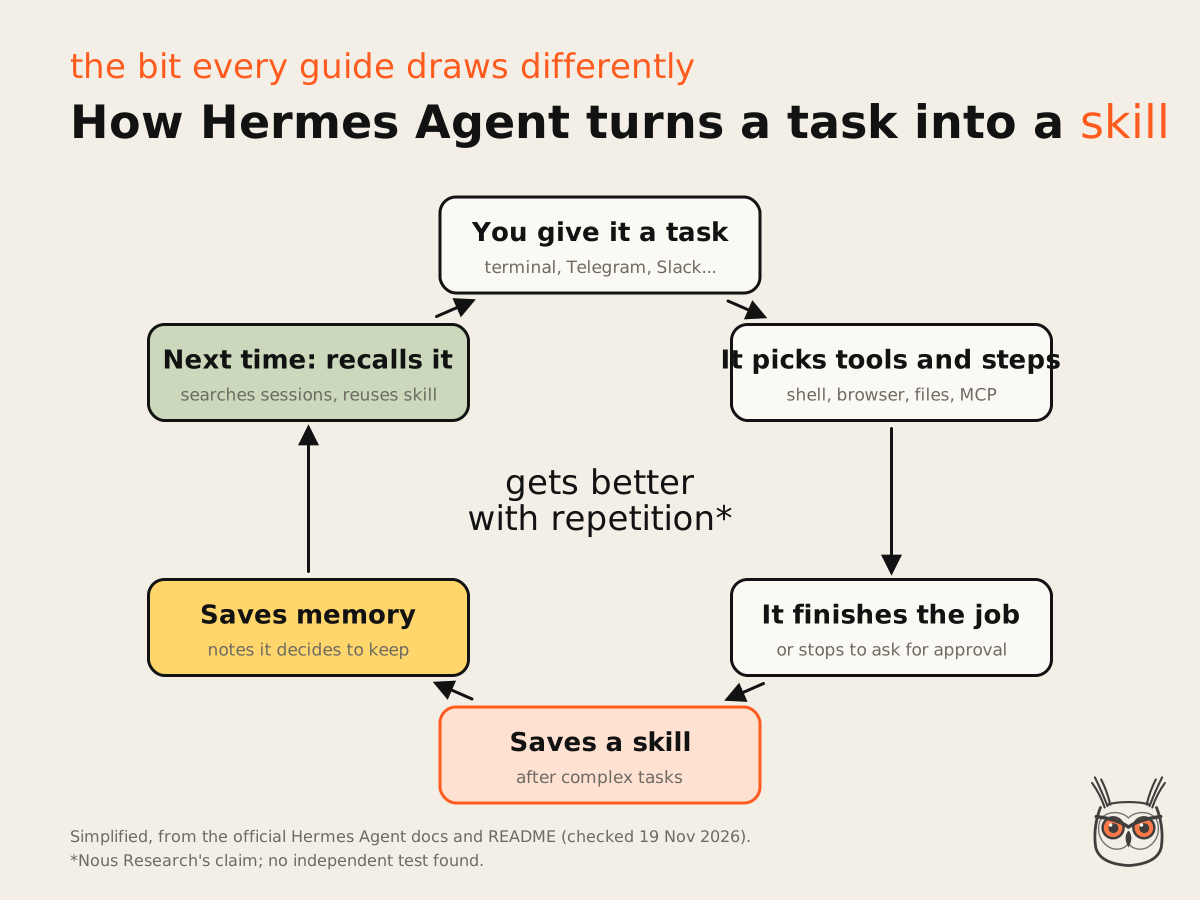
Hermes Agent runs a loop: you give it a task, it picks tools and steps, does the work, then saves what it learned as memory or as a skill. Next time a similar task comes up, it searches its past sessions and reuses the skill.
If you've read my guide on how to build AI agents, the parts will look familiar: a model, tools, memory, a loop and some guardrails. What Hermes adds is that the agent maintains its own memory and skills instead of you writing them by hand.
The learning loop and skills
A skill in Hermes is a saved set of instructions the agent writes for itself after a complex task, and then improves while using it. Skills follow the open agentskills.io standard, the same idea as Claude skills, so they aren't locked into Hermes.
Per the official feature list, the loop has five parts: agent-curated memory with periodic nudges to save things, autonomous skill creation after complex tasks, skills that self-improve during use, full-text search across past sessions with summaries, and user modelling through Honcho, an open-source library that builds a picture of who you are over time.
Here's where the guides contradict each other. One ranking explainer describes a neat multi-tier memory system with specific file names. Another describes the loop as a five-stage cycle of its own invention. The official docs use neither framing, so I'm going with the docs. If a guide gives you a tidy diagram with file names the docs don't mention, treat it as one person's reading, not the manual.
Memory across sessions
Hermes remembers across sessions in two ways: notes it decides to keep, and a searchable history of past conversations. It nudges itself to write down things worth keeping (your name, your stack, how you like reports formatted), and it can search old sessions when something sounds familiar.
People who use it daily say the first thing to do is tell it about yourself. One creator with four months of daily use suggests asking another chatbot to summarise what it knows about you, then pasting that into Hermes so it starts with context. Lazy and effective.
My favourite combination.
Where it runs
Hermes runs on Linux, macOS, Windows (natively, as of the current README) and Android via Termux, with six built-in terminal backends: local, Docker, SSH, Modal, Daytona and Vercel Sandbox. You talk to it in the terminal with hermes or through a gateway that connects Telegram, Discord, Slack, WhatsApp, Signal and email.
The Windows part is new information if you've been reading older guides. The GitHub README now says native Windows is fully supported with a PowerShell one-liner, and WSL2 still works if you prefer it. Native is how I run it. The built-in cron scheduler is what makes it feel like a colleague instead of a chat window: you say "every morning at 8, check X and message me", and it does, unattended.
What people use it for
People use Hermes Agent for scheduled reports, marketing and ad operations, research, coding help and personal assistant jobs they reach from their phone. The common thread is work that repeats and lives across several tools, where a memory of last time saves real effort.
The practitioner view is the most useful here, because it's people showing their actual setups. A media buyer built an AI media buyer on Hermes that sends a daily status update on the ad account with recommendations, connected to the Meta account, an ad generation tool and a browser via Playwright MCP. The bit they liked most wasn't the AI. It was firing off tasks from their phone while stuck in traffic. (The future of work is apparently dictating ad briefs at a red light.)
Others run it on local open-source models to keep it free and private, and build what they call a second brain around it. I keep mine simpler. Hermes handles the conversational, remember-what-I-said side, and anything that turns into real code goes to Claude Code, which is better at that job.
For a wider view of where agents pay for themselves in a company, I wrote up AI agents for business, sorted by function.
Hermes Agent for marketing, SEO and AEO automation
For marketing, Hermes fits jobs like daily ad checks, content research, monitoring rankings or AI answers, and drafting reports, as long as a human reviews anything that goes public. It's a capable base for marketing automation and SEO automation. It is not a content factory you switch on and walk away from.
There's a YouTube video titled Hermes Agent Just Automated SEO Completely, and to be fair, the creator says the quiet part out loud: Google punishes content that adds nothing, and the content has to be edited before it goes. So "completely" is doing the same heavy lifting as "only" did earlier. An agent can publish every day. It can't make what it publishes worth reading.
Where I'd use an AI agent like this for SEO and AEO work: pulling rank and AI visibility data every morning, flagging pages that dropped, drafting briefs, checking that new pages got indexed. That's SEO automation and AEO automation at the boring, useful end. The judgment calls (what to write, what to cut, what the brand should say) stay with a person. That split, agent for the legwork and human for the judgment, is the core of the SEO and AEO work I do for clients.
Hermes Agent vs OpenClaw
Hermes Agent and OpenClaw are both free, MIT-licensed, self-hosted AI agents you talk to through chat apps. The difference is emphasis: Hermes is built around a learning loop that writes and improves its own skills, while OpenClaw is known for its large community skill marketplace, ClawHub. Hermes can import OpenClaw settings, memories and skills.
That import tells you who Nous Research thinks its users are. The README has a full migration path: hermes import-agent openclaw (the older spelling, hermes claw migrate, still works), and it can also import from Claude Code, Codex and Cursor. When a product ships a migration tool for its competitor, you know which audience it's courting.
| Hermes Agent | OpenClaw | |
|---|---|---|
| License | MIT, free | MIT, free |
| Where it runs | Your machine, a VPS or six terminal backends incl. Docker and Modal | Your own machine |
| How you talk to it | Terminal, Telegram, Discord, Slack, WhatsApp, Signal, email | WhatsApp, Telegram, Discord, Slack and other chat apps |
| Big idea | Learning loop: writes and improves its own skills | Large community skill marketplace (ClawHub) |
| Skill risk on record | No reported incident found (as of 19 Nov 2026) | Unit 42 found 5 unblocked malicious skills (June 2026) |
| Switching | Imports OpenClaw settings, memories and skills | n/a |
The skeptic's take is worth hearing too. A popular Reddit thread on OpenClaw is titled "I spent a week testing OpenClaw. Cool demo, but I don't think generalist AI...", and that complaint applies to Hermes just as much. General-purpose agents demo beautifully. Whether they beat a narrow tool built for one job is a different question.
My honest answer to "Hermes Agent alternative": for most marketing teams, the alternative isn't another general agent. It's a well-built workflow in n8n, Make or Zapier with one AI step in the middle. Boring, cheap, debuggable marketing automation. I compared those in my roundup of business automation software.
Is Hermes Agent free and open source?
Yes. Hermes Agent is free and open source under the MIT license. The real cost is the language model it uses and, if you want it always on, a server. Nous Portal bundles models and tools into one subscription, from a free pay-as-you-go tier up to $200 a month, as of 19 November 2026.
The official site is refreshingly clear about this: the software is free, model providers and optional hosted services have their own pricing. The repo is very much alive, with 74,516 commits on main as of 19 November 2026, some of them minutes old when I checked.
The cost view, then. Here are the Nous Portal tiers as listed on 19 November 2026, and what they come to over a year:
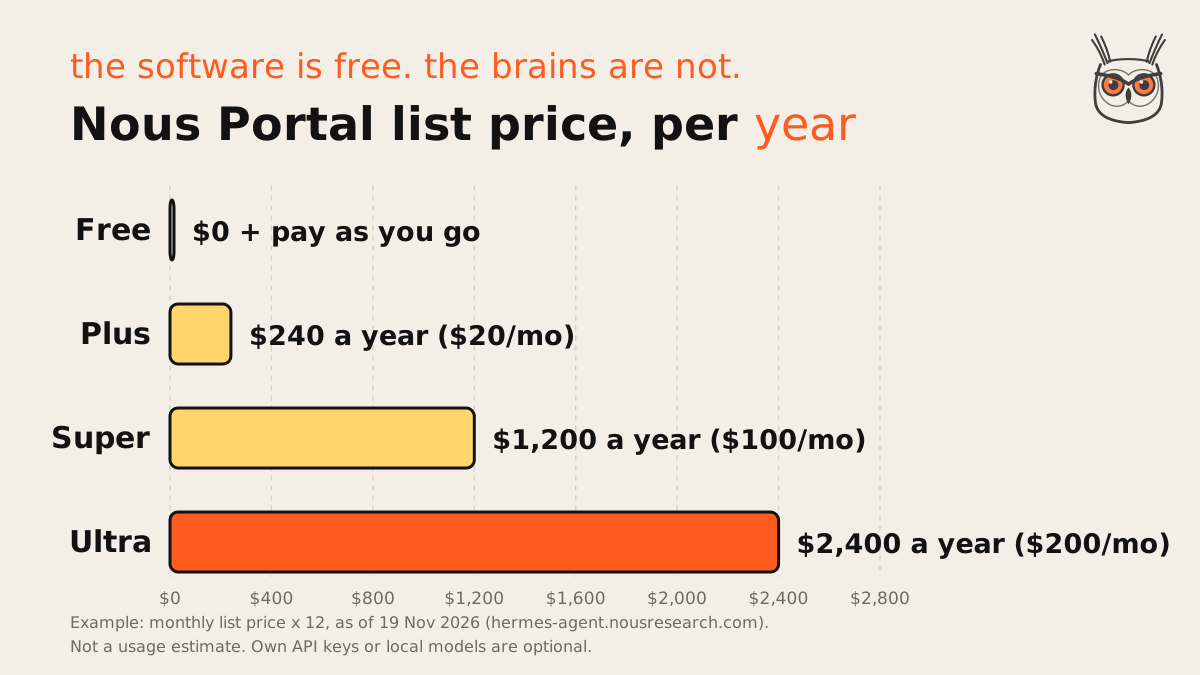
That chart is list price times twelve, an example, not a usage estimate. The paid tiers include one cloud-hosted agent (Plus gets 4 GB of RAM and 25 GB of disk). You don't need Portal at all: you can bring your own API keys, or run a local model and pay nothing but electricity.
The README's line about running Hermes on "a $5 VPS" is true and also slightly beside the point. The server is the cheap part. The model bill is the one that grows, especially if you let a frontier model run long agent loops all day. One practitioner said plainly that API keys "can get pretty expensive", which is why they run an open-source model on their own machine. The server is the rent. The model is the electricity bill, and it's the one that surprises you. Most of the agents I cover on growthvibes.ai follow the same pattern: free software, metered brains.
If you already pay for Claude Pro or Max, I wrote up how to run Hermes on your Claude subscription with no API key, step by step on Windows.
Is Hermes Agent safe?
Hermes Agent is as safe as the setup you give it. It has eight security layers and asks for approval before dangerous commands by default, but you can switch that off. Run it with manual approvals, in a Docker container, with no secrets passed in, and it's reasonably contained. Run it in YOLO mode on your main laptop and it isn't.
None of the top-ranking explainers actually read the security docs, which is odd for a tool that can run terminal commands on your machine. So I did. The Hermes security docs list eight layers: user authorization, dangerous command approval, file write safety, container isolation, MCP credential filtering, context file scanning, cross-session isolation and input sanitization.
The approval settings are the part you'll actually touch:
| Approval mode | What happens | When to use it |
|---|---|---|
| manual | You see and approve every flagged command | Safest on your own machine |
| smart | A policy decides and escalates unclear commands to you | The sample config default; read the docs before trusting it |
| off, or /yolo | No prompts at all | Throwaway containers or CI, per the docs warning |
A few defaults worth knowing. Scheduled cron jobs and single-query sessions deny dangerous commands by default, so an unattended job won't quietly rm -rf something at 3am. Approval prompts time out after 300 seconds. And inside a container backend (Docker, Modal, Daytona, Vercel Sandbox), the dangerous-command checks are skipped, because the container is meant to be the boundary.
That last one is the catch. If you mount your whole home folder into the container or forward your API keys into it, the container stops being much of a boundary. Nous Research publishes an official guide for running Hermes on a work machine, and its recommendations are sane: manual approvals, a deny list, the Docker backend and an empty list of forwarded environment variables.
Those are roughly the defaults I start from whenever I set up AI agents and automations for a team, whatever the tool. Approvals on first, autonomy earned later. Nobody has ever regretted being asked "are you sure?" before an agent deleted a folder.
The other risk is skills. A skill is instructions an agent follows, often with scripts attached, so a shared skill is code you're choosing to run. OpenClaw shows what can go wrong: Palo Alto's Unit 42 found five malicious OpenClaw skills on ClawHub that weren't blocked, including two macOS infostealers, in research published on 23 June 2026. I didn't find a reported incident for Hermes skills, but that's an absence of evidence, not a clean bill of health. Read any skill you didn't write before you install it.
Who should and should not use Hermes Agent
Hermes Agent suits one person with repeat workflows who is comfortable in a terminal and willing to review what the agent does. It's a poor fit for one-off tasks, for teams that need shared access and audit trails, and for anyone who wants to set it up once and never look at it again.
I'd use it for:
- Recurring personal jobs where memory of last time helps: daily briefs, research digests, check-ins on things you'd otherwise forget.
- A chat interface to your machine, so you can ask for things from your phone.
- Experimenting with self-improving skills before you build anything bigger for a team.
I'd skip it if:
- You need a team tool. Hermes is built around one user it learns about. Shared ownership, permissions per person and audit logs are not what it's for.
- Your process is fixed and known. If the steps never change, a plain n8n workflow is cheaper, more predictable and easier to debug. That's exactly why I built my ad-writing agent in n8n and not as a general agent.
- You won't read what it writes. A learning loop that learns the wrong lesson just gets confidently wrong faster.
To be clear about confidence: the claim that the learning loop makes Hermes measurably better over time comes from Nous Research. I haven't seen an independent test of it, and I'd love to. My read is that the payoff is real for one person and a handful of repeat jobs, and much less proven beyond that. That gap between a personal agent and a team system is where most real projects get stuck.
So, not the parcel company
Hermes Agent is a free, open agent that remembers you, writes its own skills and runs on whatever model and machine you give it. It's good at the boring repeat work, risky if you hand it the keys without approvals, and only as cheap as the model behind it.
If you've got a weekend and a few recurring jobs, install it, keep approvals on and see whether it earns a place. If you'd rather have AI agents that already fit your team's workflow, with the guardrails sorted, have a look at how I set them up. Either way, your parcel is still lost.
Frequently asked questions
What is Hermes Agent?
Hermes Agent is a free, open-source AI agent from Nous Research. It runs on your computer or a server, uses any model you connect, remembers you across sessions and writes reusable skills from the tasks it finishes.
It is separate from the Hermes 4 model family, which Nous Research also makes. See the official docs for the full feature list.
What is the purpose of Hermes Agent?
Its purpose is to handle repeat work for one person: scheduled reports, research, coding help and errands you send from your phone. It saves what it learns, so the same job should get easier each time.
For a one-off question, a normal chatbot is quicker. Hermes earns its keep on the second and twentieth run, not the first.
Is Hermes Agent free and open source?
Yes. The software is free and open source under the MIT license. You pay for the language model it uses and, if you want it always on, a server or a Nous Portal plan.
As of 19 November 2026, Nous Portal runs from a free pay-as-you-go tier to Plus at $20, Super at $100 and Ultra at $200 a month. Local models can bring the model cost to zero.
Is Hermes Agent safe?
It is as safe as your setup. With manual approvals, a Docker backend and no secrets forwarded into it, it is reasonably contained. With approvals switched off on your main machine, it is not.
The security docs describe eight layers, and cron jobs deny dangerous commands by default. Read any shared skill before you install it.
What is the difference between Hermes Agent and OpenClaw?
Both are free, MIT-licensed, self-hosted agents you talk to through chat apps. Hermes is built around a learning loop that writes its own skills. OpenClaw is known for its big community skill marketplace, ClawHub.
Hermes can import OpenClaw settings, memories and skills with hermes import-agent openclaw. For more general agents side by side, see the best AI agents by job.
Is ChatGPT an AI agent?
Mostly no. Plain ChatGPT answers what you ask. It becomes agent-like when it is allowed to pick its own steps and use tools to finish a task, like its agent mode does.
The test I use: who picks the next step, the tool and when to stop. If the model decides all three, it is an agent.
