
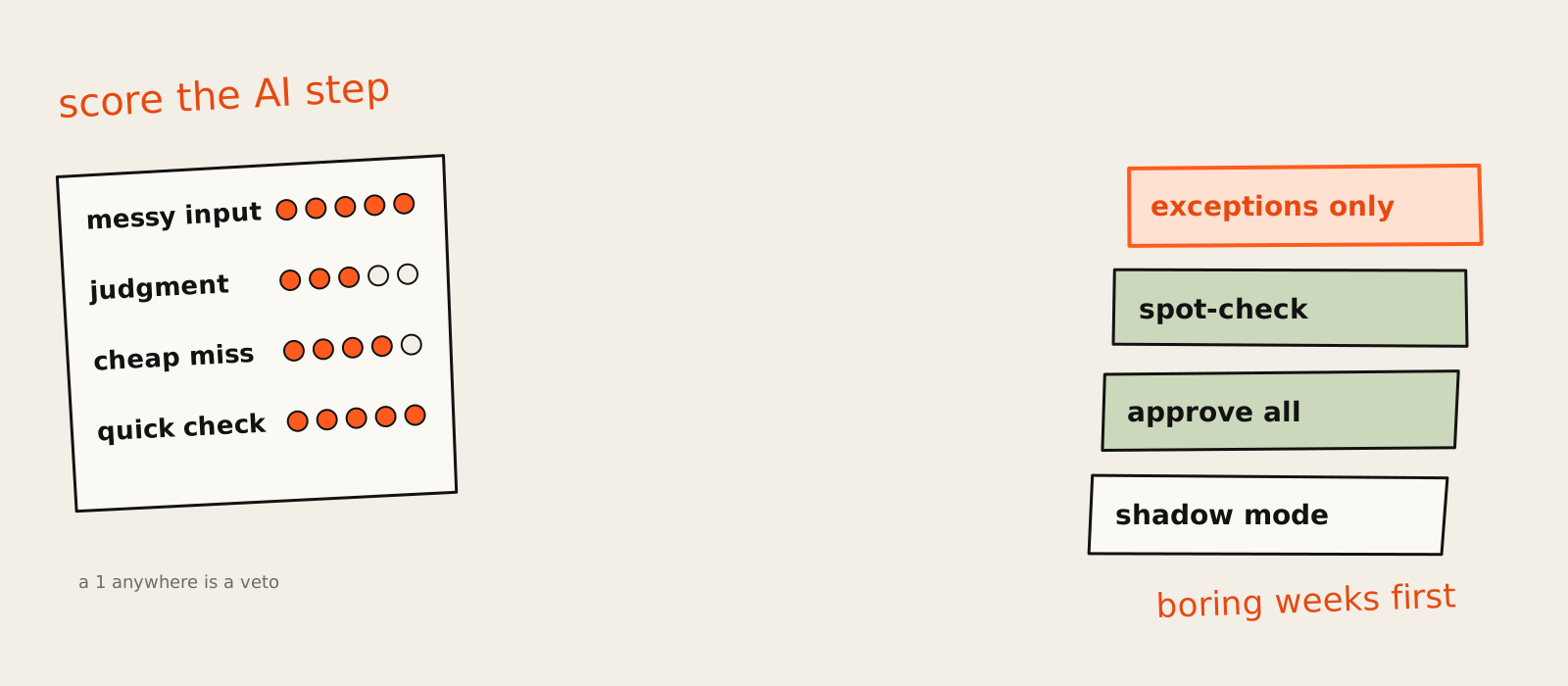
AI for business automation works best when the AI is one step inside a boring process, not the whole process. Pick work that arrives in volume, needs a bit of reading or judgment, and is cheap to get wrong. Then score the AI part on its own, pilot it with a person checking, and loosen that check only when the numbers say you can.
A founder I spoke to this year opened our call with "we want an AI SDR that runs outbound on its own". Twenty minutes in, we found the actual fire: a shared support inbox where two people spent most mornings reading, tagging and forwarding around 300 emails. Nobody had put that on the AI roadmap, because nothing about it was exciting. It was also eating something like 15 hours of their week.
This guide is about choosing well. The general question of whether a process is worth automating at all lives in my business process automation guide, so here the focus is the AI part: which processes need an AI step at all, how to score that step, what a human check looks like in practice, and what a pilot should measure. It's the same order I follow when I build AI automation and agents for marketing and growth teams.
What AI for business automation means in practice
AI for business automation means using a language model for the steps rules can't handle, like reading an email, pulling fields out of a messy PDF or judging whether a lead is real, inside a workflow where everything else is plain rules. The AI reads and decides. The workflow does the moving, the logging and the hand-offs.
The historian's version: ten years ago this was RPA, bots clicking through screens and falling over the day an invoice arrived as a phone photo. What LLMs changed is the input. Emails, documents and call notes became something software could read. The setups that hold up are hybrids, rules for the stable steps and AI for classifying the messy stuff and routing exceptions, which is now how the automation vendors themselves describe it. They sell the thing, so take the framing with salt. I still build it that way.
If you want the plain definition before the scoring, I wrote it up in what AI automation is and where it pays off.
It's also why I'd ignore the "X% of work can be automated" headlines. McKinsey alone has published up to 30% of US hours automated by 2030 (2023, an adoption scenario) and 46% technically automatable (2017, technical potential). Different measures, different years, both quoted as "the" number. Technical potential keeps climbing. Adoption trails it by a mile.
And an AI agent? An agent picks its own next step and its own tools. Most first projects don't need one, and if you want the longer version, here's what AI agents actually are.
The big-company version, with identity, permissions and audit logs around every agent, is in enterprise AI agents.
Why most teams automate the wrong process first
Most teams pick their first AI automation by how good it would sound in a board update, not by how much time it gives back. So they start with an autonomous sales agent or a content machine, when the payoff usually sits in boring back-office work with lots of volume and mistakes that cost a minute, not a customer.
The skeptic's take comes from MIT's NANDA research: more than half of generative AI budgets went to sales and marketing tools, yet the biggest returns showed up in back-office automation (Fortune's write-up). The same work gave us the line that 95% of organisations get zero return from their pilots. I'd hold that one loosely, because it's survey-based and plenty of people have argued with it. The direction matches what I see: the exciting project gets the budget, the dull one gets the results.
If a sales agent is still on your list after that, I compared nine of them in AI sales agents: the ones worth using, including when building one beats buying.
"Let's start with an agent that does the whole job."
"It only happens twice a month, but it's so annoying."
"The rules are in Dimitra's head, but the AI will figure it out."
"Customers will love talking to it." (They will not.)
"Whatever the CEO hates doing most."
I've seen every one of those on a kickoff call, usually with a straight face. The pattern underneath is the same: the team picked the process with the biggest wow, not the one with the narrowest AI step. People who teach workflow tools for a living say the same thing in their own way: you can't build a good agent until you understand how a dull, deterministic workflow behaves.
At Synthesia, the AI automations that paid back first weren't the clever ones. They were scrapers, reports and automated technical SEO checks that sent an alert when something critical broke (it's in the Synthesia case study). An alert that a key page fell out of the index is worth more than a hundred AI drafts, at least in my experience. Nobody writes a launch post about an alert.
Boring wins. It just doesn't get applause.
How to score a process before you automate it with AI
Score the AI step, not only the process. Once the process itself is worth automating, rate the part where AI would sit on four things: how messy the input is, how much judgment it needs, what a wrong answer costs and how fast a person can check one. A 1 on either of the last two is a veto.
The first filter is the four-question test in the BPA guide: how often it runs, whether you can write the rules down, volume, and what one mistake costs. If a process fails that, stop there. Everything below assumes it passed, and you're asking a narrower question: does it need AI, and is AI safe here?
The four questions for the AI step
- Messy input (1 to 5): is it free text, PDFs, call notes, screenshots? A 1 is a clean form field. A 5 is a customer email with strong feelings and no punctuation.
- Judgment needed (1 to 5): does each item need a call a rule can't write down? "Is this a refund request or a complaint?" is judgment. "Is the amount over 500?" is not.
- Cost of a wrong answer (5 means cheap): a mislabelled ticket costs a minute. A wrong refund, a wrong invoice amount or an email to the wrong 10,000 people costs rather more.
- Check speed (5 means seconds): can a person confirm one answer in under a minute? A tag, yes. A contract summary checked against the contract, no.
The first two tell you whether you need AI at all. Add them: under 5 out of 10 and plain rules will do, cheaper and with no surprises. The last two tell you whether AI is safe to try. And the bit I'd defend in any meeting is this one. A 1 on cost or check speed is a veto, not a low score. A process can total 16 and still be a terrible first pilot if one wrong answer is expensive and nobody can spot it fast.
This is the new angle. None of the scoring methods I went through treat cost of a mistake as a gate. They rate volume, rule clarity, stability and system access, sometimes cost of error, and then add everything up. Adding is the problem. The failure stories in this space (you'll meet two below) never had a low average. They had one criterion sitting on the floor while the total looked fine.
There's a real disagreement on volume, too. One camp says automate whatever runs most often. A finance-focused guide from Streams warns that a high-volume process with lots of exceptions can be a poor first pilot. I'm with the readiness side: volume multiplies whatever you built, including the mistakes. Settling it is cheap. Pull 30 recent cases and count how many followed the expected path. (Everyone believes their inbox is 90% the same three emails. It's usually more like 60%, plus a long tail of the truly strange.)
A scoring table with example processes
Here's the method run on six common candidates. The scores are an example I made up to show how it works, not a benchmark. Your invoices are not my invoices.
| Process | Messy input | Judgment | Cheap miss | Quick check | Verdict |
|---|---|---|---|---|---|
| Inbox and request triage | 5 | 3 | 4 | 5 | AI pilot, spot-checked |
| CRM updates from calls and emails | 4 | 2 | 4 | 4 | AI pilot, spot-checked |
| Invoice and document processing | 4 | 2 | 2 | 4 | AI drafts, person approves |
| Weekly reporting and summaries | 2 | 2 | 4 | 4 | plain rules |
| Lead qualification and follow-up | 4 | 4 | 3 | 3 | AI drafts, person approves |
| Refund and dispute decisions | 4 | 5 | 1 | 2 | not yet |
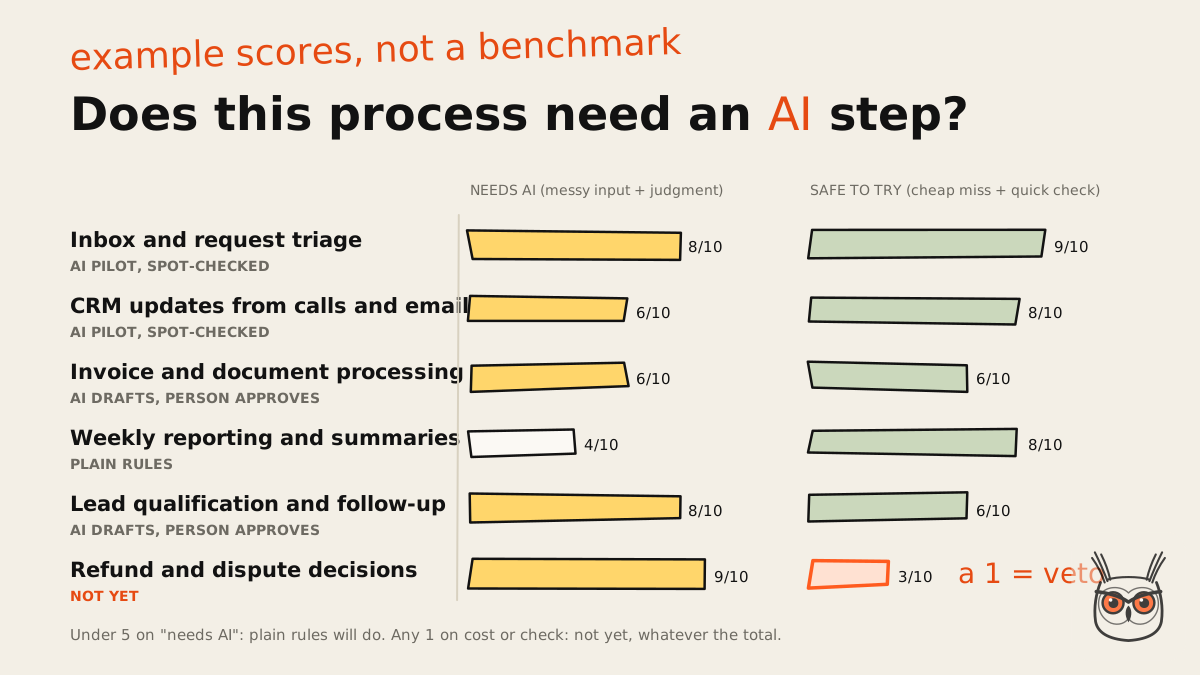
Two things jump out. Weekly reporting barely needs AI: the numbers come out of systems and a template does the job (an AI can write the two-line summary on top, if you insist). And refund decisions score highest on "needs AI" and still fail, because one wrong call costs real money and nobody can check it in ten seconds. The processes that most need AI are often the least safe to give it first.
Score with the person who does the work, not just their manager. The manager knows what the process is supposed to be. The person doing it knows what it actually is.
The first five processes worth automating with AI
The five I'd look at first are inbox and request triage, CRM updates from calls and emails, invoice and document processing, reporting and weekly summaries, and lead qualification and follow-up. Each runs often, has a narrow AI step and a natural place for a human check. Which one goes first depends on your scores, not my list.
A test I like for all five: a good AI automation is high volume plus one question you need answered about each item. Is this urgent? Which customer is it? Is this lead real? If you can't name the one question, the AI step isn't ready yet, and neither are you.
Inbox and request triage
The AI reads each incoming email or form, picks a category from a fixed list, sets an urgency and routes it. Rules do the forwarding, the auto-replies and the logging. A wrong tag is visible and costs a minute, so this lands in the spot-check zone fast. It's the job I'd hand to an AI automation build before anything with "agent" in the name, and it was the answer hiding in that founder's support inbox.
Data entry and CRM updates
After a sales call, the AI pulls next steps, budget, timeline and objections from the notes or transcript, and a rule writes them into the right CRM fields. The rep gets a one-click "looks right" message in Slack. Sales reps have been promising to update the CRM "later" since CRMs were invented, so this one tends to pay back in data quality before it pays back in hours.
Invoice and document processing
The AI extracts fields from PDFs and scans, rules match them against purchase orders and supplier records, and mismatches go to a person. This scored lower on "cheap miss" in the example because a wrong amount is real money, so it starts on AI drafts, person approves and stays there for a while. AI reads, rules match, a human pays. Clean the supplier records first, or you'll automate the mess at speed.
Reporting and weekly summaries
Mostly plain rules: pull the numbers, fill the template, post it. The AI adds a short "what changed and why it might matter" paragraph, which a person can sanity-check in a minute. It's also where I'd put checks and alerts before any clever drafting. The same logic runs through most of my SEO and AEO work: automated rank, indexing and AI visibility checks come before anyone automates a single page of content.
Lead qualification and follow-up
The AI scores inbound leads against your ideal customer profile and drafts the follow-up. Drafts, not sends, at least at first. Ask one question of any setup like this: can it send, or can it only draft? If the answer worries you, fix the access, not the prompt. There's a longer look at how this works inside a marketing team in AI marketing agents.
What not to automate with AI yet
Don't hand AI anything yet where a wrong answer is expensive and hard to undo, where most cases are exceptions, where the data isn't reachable, or where nobody can check the output quickly. Those can come later, once you have a track record. The general case for not automating is in the BPA guide; this is the AI-specific list.
- Money going out: refunds, payouts, price changes, credit notes. The AI can prepare them. A person presses the button.
- Anything that sends to customers in bulk without an approval step. More on why in a second.
- Exception-heavy work where the "normal" path is the minority. If your 30-case sample came back mostly weird, you have a human process with a few routine bits.
- Rules that live in one person's head. Write them down first. If you can't, the AI can't follow them either; it will just guess with more confidence.
- Replacing a whole team in one go. Keep the people on the exceptions, which is where they're worth most anyway.
The second point has a story attached. One builder describes an AI agent with access to an email list that read a to-do item as an instruction and sent a discount code to about 150,000 people (the talk). Nobody asked it to. It could, so it did. If an AI can reach something, assume it will use it.
The other is the one everyone quotes: Klarna leaned hard on AI in customer service, then started hiring people again after quality slipped. Klarna disputes the word "reversal" and calls it a dual-track approach (Forbes has both sides). Fine. Either way, humans came back for quality reasons, which is the part worth learning from. None of this list means never. It means not first. Drawing that line for a specific team is a big part of the AI automation work I do, and the Klarna story gets a longer look in AI agents for business.
How to roll out AI automation, step by step
Roll out AI automation in five steps: map the process as it runs today, build the rules and add one AI step with a person checking it, pilot on one team for a few weeks, measure against your baseline, then scale by loosening the check one stage at a time. Write the stop rule before day one.
Map the process as it is today
Write the steps down, measure time per item, volume and error rate, and collect 20 to 50 real cases with known-good answers.
Pick the tool and keep a human in the loop
Build the rules first, add one narrow AI step with a fixed output, and route its answers to a person.
Pilot on one team for a few weeks
One process, one team, one measure, with a written stop rule and an off switch.
Measure against the baseline
Compare error rate, time per item including review, and the size of the exception queue.
Scale and review
Loosen the check one rung at a time, and re-run your test cases whenever a prompt or model changes.
Step 1: Map the process as it is today
Write the boring version: who does what, in which tool, in what order, and what happens when something's off. Then take the baseline: time per item, items per month, and how often something gets corrected later (this SME guide puts it well: measure before the pilot starts, not after). Without a baseline, every pilot is a success, because nothing can disagree with it.
While you're there, collect 20 to 50 real cases with known-good answers. Last month's emails with the tag a person gave them. Invoices with the right fields. This is your test set, and it's the most useful hour in the whole project. It's how you'll judge the AI step's error rate before it touches anything real.
Step 2: Pick the tool and keep a human in the loop
Build the rules first and get them running without any AI. Then add one AI step with a fixed output: a category from a list, a set of named fields, a yes or no with a reason. Not an essay. A fixed output can be validated by a rule, and anything that fails validation goes to a person instead of quietly moving on.
What a human check looks like in practice: a Slack or email message with the AI's answer, the source text next to it, and two buttons. That's it. If checking one item takes longer than doing it by hand, the check is wrong, not the person. And if the AI step starts growing branches and choosing its own tools, you're building an agent now, which has its own build guide.
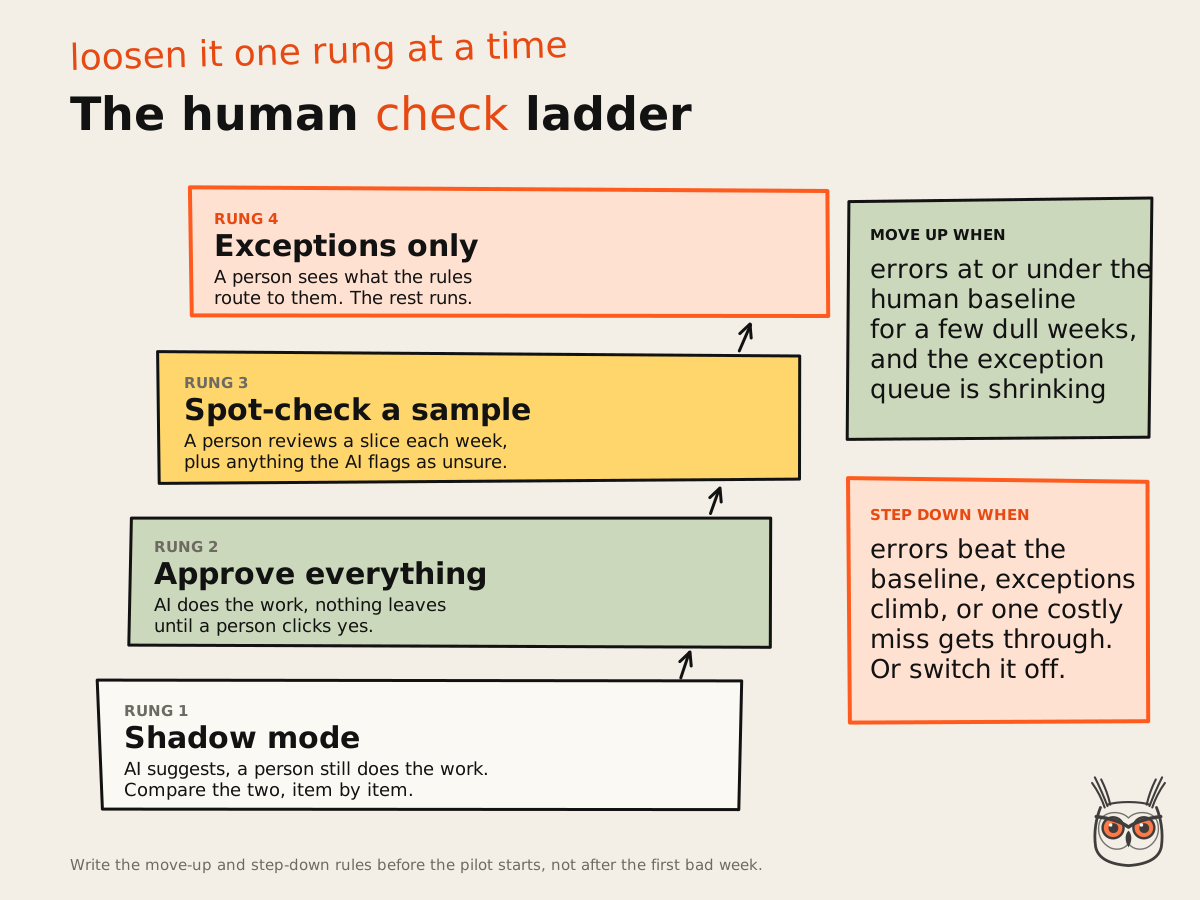
The ladder is how I'd plan the check from day one. Start low, climb one rung at a time, and step back down the moment the numbers wobble. One rule of thumb of mine, not a study: approval steps decay into rubber stamps. Every few weeks, plant a deliberate mistake in the queue and see if the approver catches it. If they don't, you don't have a check, you have a ritual.
Step 3: Pilot on one team for a few weeks
One process, one team, one measure. Run the first week in shadow mode: the AI suggests, the person still does the work, and you compare the two. Then move to approve-everything. Agree up front how long the pilot runs and what ends it early, in weeks rather than a magic number, because nobody has good independent data on how long a first automation should take.
Build the off switch before you need it. In a content system I built, the stop rule is a file called PAUSE: create it and everything stops. Any failed step pauses the run and writes down which step failed and why, so nothing half-finished goes out. Failures you can see are cheap. The expensive ones succeed at the wrong thing.
Step 4: Measure against the baseline
A pilot measures four things: the AI step's error rate against your test set and a weekly sample, time per item including review, the exception rate, and how long the exception queue gets. Count errors by what they cost, not just how many. One wrong refund outweighs fifty wrong tags. It's the first thing I set up in any project, before a single prompt gets written.
The cost view: the human check is a tax on the time you save, and you should price it honestly. Here's an example with made-up but plausible numbers. Triage of 300 emails a day at a minute each is 5 hours by hand. With the AI tagging, a person spot-checking 10% (30 items) and handling 15% as exceptions (45 items), at a minute each, that's 75 minutes. Roughly 3.75 hours a day back, with the check included. If your version of that maths comes out at ten minutes saved, that's a result too, and a cheap one to find out.
Step 5: Scale and review
Move up the ladder only when the error log is boring. In that same content system, the step that adds internal links started out saving its edits as drafts for my approval. Since 2 November it publishes them itself, because each edit is one link or one sentence, easy to spot and undo, and I'd stopped changing any of them. An approval step where nobody ever changes anything is theatre.
Then keep reviewing, because the thing you approved can change under you. A model update, a new prompt or a new rule all count as a new version. I once added a word-count floor to a writing step to stop thin output, and it made the output worse: it padded. It came out three days later. Treat every prompt or model change as a release: re-run the test set, compare the scores, then ship. Every AI automation and agents build I hand over comes with its test set for exactly this reason.
Challenges of AI business automation and how to handle them
The AI-specific problems are wrong answers that look right, outputs that drift when a prompt or model changes, data you shouldn't send to a model, and costs that grow with every step. Each has a boring fix: fixed outputs with validation, a test set you re-run, a written data rule, and a billing check before you build anything.
Those numbers come from a Nylas survey of 1,030 US professionals, published on 20 October 2026, the freshest data I'd put on this. Nylas sells agent infrastructure, so it has a horse in the race, but the shape matches what builders complain about: errors are normal, the question is whether you catch them.
- Wrong answers that look right: an LLM is confidently wrong in perfect grammar. Use fixed outputs, have the AI quote the line it based its answer on, and validate with rules. If the quote isn't in the source, it goes to a person.
- Drift: the same prompt can behave differently after a model update. Pin the model version where your tool allows it, and re-run the test set on every change, yours or the vendor's.
- Data privacy with LLMs: decide what may go to a model before you build, not after. Strip what the step doesn't need (it rarely needs a full customer record to pick a tag), check the data terms of the plan you're actually on, and keep a log of what was sent.
- Costs per step: n8n bills per workflow execution, Make per credit (mostly one per step) and Zapier per completed task, according to a Zapier comparison. A 20-step workflow with one AI call is cheap on per-execution billing and much less so on per-step.
- A nervous team: people worry about their jobs, reasonably. Put the person who does the work in charge of the test set and the check. It's hard to feel replaced by something you're grading.
Tools to start with
For a first AI automation, a workflow tool with an AI step is enough: Make if you want visual and quick, n8n if someone technical will own it, Zapier if your team already lives there. Choose by how the tool bills your kind of workflow, and by how easily a person can see what each step did.
Judged from its home page (12 November 2026), n8n pitches agents and workflows "you can follow", where you open any step and see what it did. That's the feature I'd care about most for a human check. Seeing exactly which input produced which output is half of debugging an AI step, and the other half is coffee.
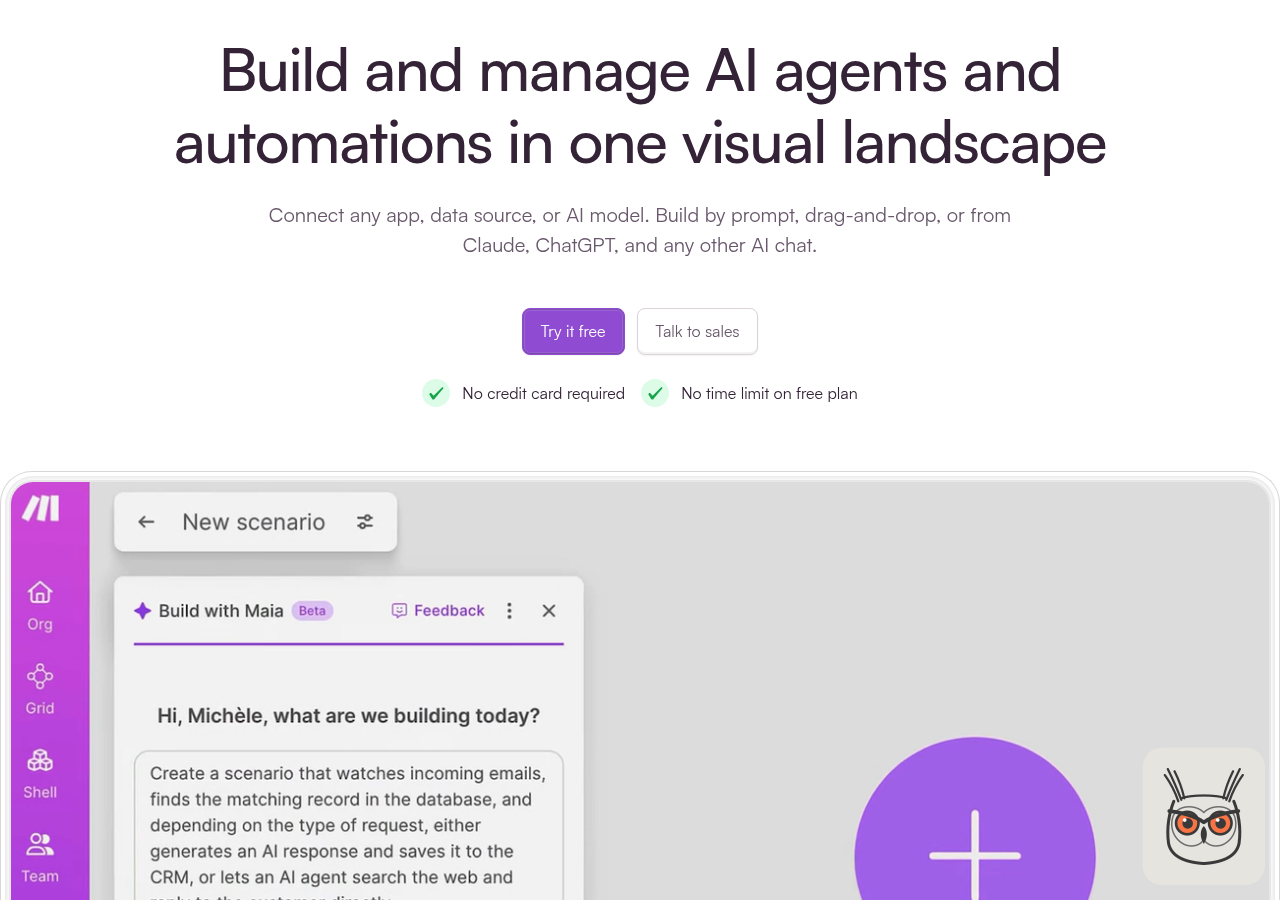
Make leads with building by prompt, by drag and drop, or straight from Claude or ChatGPT, with a free plan and no card. Building by prompt is fine for a first draft. Read every step before it touches real data, because a workflow you didn't read is a workflow you don't own.
Whichever you pick, don't buy for the feature list. Buy for the meter and the log. The fanciest AI step in the world is useless if nobody can see why it tagged an angry customer as "general enquiry".
So, about that sales agent
The founder from the start did get an AI SDR in the end. Just not first. The inbox went first: AI tags, a person spot-checks, and the weekly numbers sit next to the old mornings. Once that ran boringly for a while, the team had a baseline, a stop rule and a bit of trust, which is exactly what an outbound agent needs before it emails a single prospect.
If you'd like help picking your first one, that's most of what my AI automation consulting is about. Start boring, then build the exciting part on something that already works.
Everything else I write about it lives on growthvibes.ai.
Frequently asked questions
Which process should I automate first with AI?
Pick a process that runs often, needs AI for one narrow step like reading or tagging, is cheap to get wrong and quick for a person to check. Inbox triage and CRM updates usually win.
Score the AI step on messy input, judgment, cost of a wrong answer and check speed. Under 5 out of 10 on the first two means plain rules will do; a 1 on either of the last two means not yet, whatever the total.
What is AI business automation, simply?
It is a normal automated workflow with an AI model doing the steps rules can't, such as reading an email, pulling fields from a document or judging a lead. Rules handle everything else.
The difference from older automation is the input: AI lets software handle unstructured text and documents. For the bigger picture of automating processes, see the business process automation guide.
Can non-technical people set up AI automation?
Yes, for simple workflows. Tools like Make and Zapier let you build with drag and drop or even a prompt. It gets hard at error handling, data access and testing, which is where most projects break.
A useful rule: if you can't explain what happens when the AI step returns something unexpected, you're not done yet. That's usually the moment to bring in someone technical, for a few hours rather than a few months.
How much does AI automation for business cost?
A first automation can run on a workflow tool's free or entry plan plus model usage, so the tool bill is often small. The real cost is building it and the time people spend checking it.
Check how your tool bills: per execution, per step or per task changes the price of the same workflow a lot. Prices move often, so read the vendor's pricing page on the day you decide. I priced the same workflow on three meters in my business automation software guide.
How long does a first AI automation take to roll out?
Think weeks, not days: a short build, then a pilot of a few weeks on one team before you loosen the human check. There is no good independent data on typical timelines, so plan your own and write down the stop rule.
Most of the time goes into mapping the process and collecting test cases, not into the tool. Teams that skip that step finish the build faster and the project slower.
What is the difference between AI automation and RPA?
RPA follows fixed rules, often by copying clicks on a screen, and breaks when the screen or input changes. AI automation adds a model that can read unstructured input and make small judgment calls.
In practice the best setups mix the two: rules or RPA for the stable steps, AI for classifying documents and routing exceptions, and a person for whatever the AI isn't sure about.
