
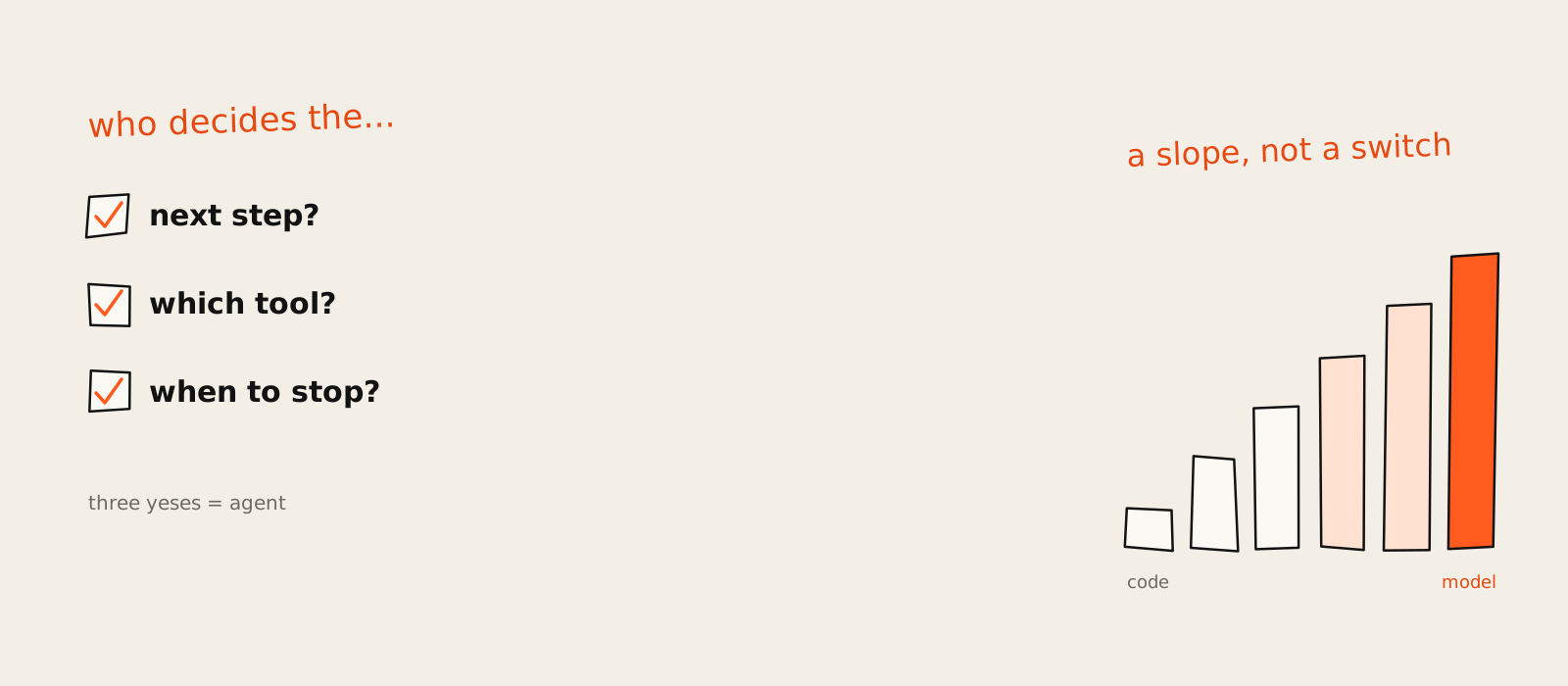
AI agents are software where a language model decides what happens next. It picks a step, uses a tool, reads what came back and goes again, round and round, until the job is done or something tells it to stop. That loop is the whole idea. The rest of the vendor slide (the persona, the "digital colleague", the little sparkle icon) is packaging.
A friend who runs marketing at a SaaS company sat through three demos in one week, all of them selling "an agent". One was a chatbot with a nicer font. One was a trigger-and-action flow with a model call in the middle. The third might have been an agent, but nobody on the call could say how you'd tell. Afterwards my friend asked me the obvious question: what actually makes something an agent?
This page is my answer, written down so I can send a link instead of a nine-minute voice note. I build AI automation and agents for marketing teams, so I spend a lot of time on the gap between the thing in the demo and the thing that runs on Monday morning. It comes down to one question: who decides the next step? Everything below is that question applied: how the loop works, how agents compare with chatbots and workflows, a three-question test you can run on any product, the types and examples you'll actually meet, and where agents break.
What are AI agents?
An AI agent is a system where a language model directs its own work. It chooses the next step, chooses which tool to use and decides when the job is finished, looping until it gets there. If your code fixes the steps in advance and the model only fills in a blank, it's a workflow, however clever the blank is.
The definitions out there disagree, but less than it looks. The people who build agents for a living draw the line at control flow. Anthropic's guide to building effective agents splits "agentic systems" in two: workflows, where models and tools run "through predefined code paths", and agents, where models "dynamically direct their own processes and tool usage". The page was re-published on 9 October 2026 with a note that the tooling has moved on since it first appeared in December 2024. The definition didn't move. LangChain's explainer (31 July 2026) is even shorter: an agent is a system that uses an LLM to decide the control flow of an application.
Google Cloud's version goes another way. It describes agents by what they have: goals, reasoning, planning, memory and some autonomy. All true. Also true of a well-built workflow, which has a goal, keeps state and runs on its own at 3am. A definition that can't tell an agent from a good workflow isn't much use when someone is trying to sell you one.
So I side with the builders, with one honest caveat: nobody has agreed a standard, and the definition still depends on who you ask (vendors stretch it over chatbots, researchers keep it for autonomous systems). My working rule is the question that settles most arguments: would it still work if you wrote the steps down in code? If yes, it was never an agent. That's the line I hold everywhere on growthvibes.ai.
What changed is worth a line too. In the old textbook sense, a thermostat is an agent: it senses the temperature and acts on it. That definition is decades old and still props up half the ranking pages, which is why you'll find robot vacuums in articles about software you're meant to pay for. The LLM version is a different animal, because the model can read a messy result and change its plan.
An agent is a model with a to-do list it writes itself. A workflow is a to-do list you wrote for the model.
How AI agents work
AI agents work as four parts and a loop. A model decides the next action, tools let it read and change things outside itself, memory carries context between turns, and a loop runs perceive, reason, act, observe and update. It keeps going until the model judges the job done or a stop rule cuts it off.
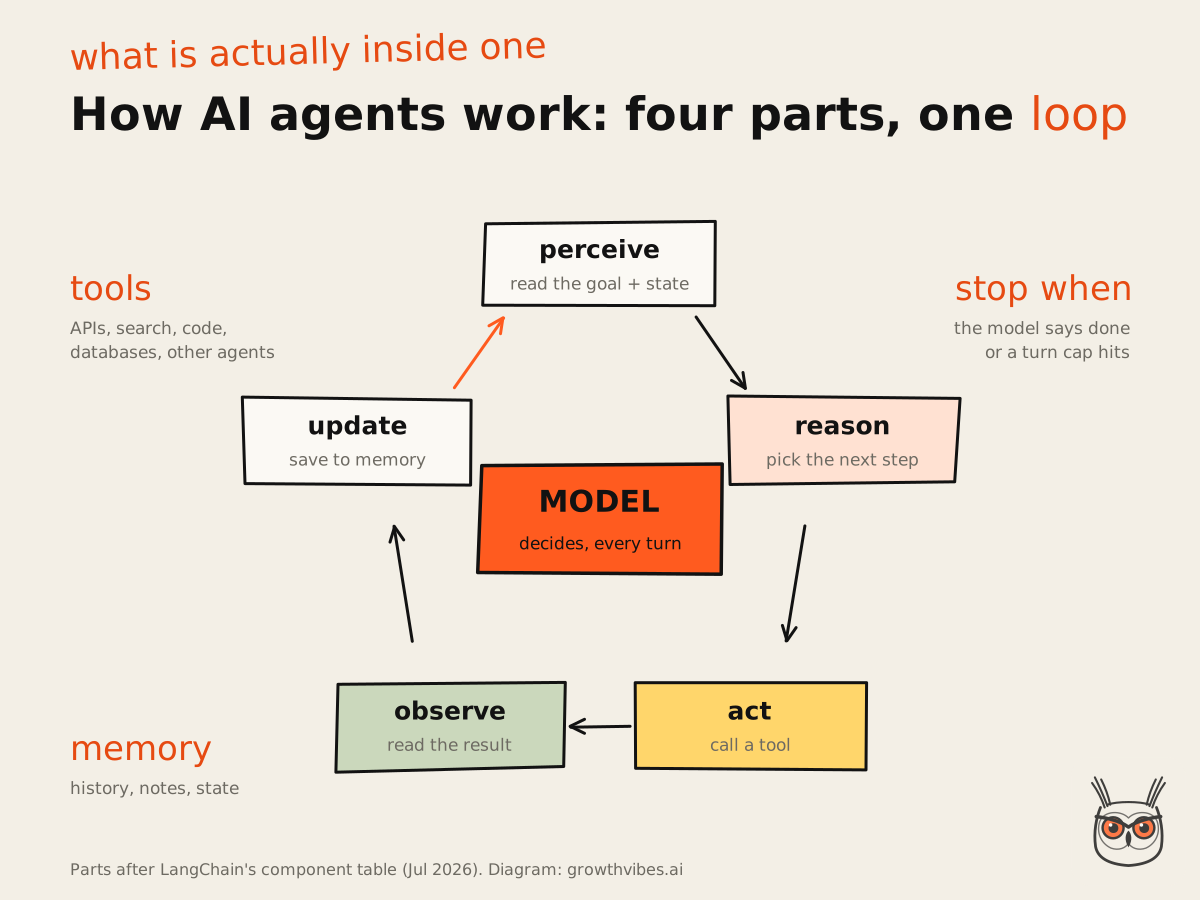
Under the hood, most agents are just a model using tools in a loop, steered by whatever the world sends back. That "just" is carrying a piano up the stairs, and it's also correct. Here's each part in plain terms.
Goal and planning
An agent gets a goal, not a script. "Pull the sign-up report, compare it with last week and email me the difference" is a script; a workflow can run it. "Find out why sign-ups dropped last week" is a goal, and the agent has to work out the steps. Planning is the model writing its own to-do list from the goal, then rewriting it when reality disagrees.
Some agents write the whole plan first and then work through it (plan-and-execute). Others decide one step at a time: think, act, look at the result, think again. That second pattern is called ReAct, short for reason and act, and it's the default shape of most agents you'll touch. Neither is smarter. Plan-first is easier to review. Step-by-step copes better with surprises.
Tools and actions
Tools turn a model that talks into a system that does things. A tool can be an API, a web search, a database query, a code runner, another agent or an MCP server. The model sees a list of tools with names and descriptions, picks one and fills in the arguments. Your code runs it and hands back the result. The model never clicks anything itself. It asks, and the plumbing obeys.
When I'm building one, the tool list is where the boring hours go, and they're the hours that pay off. A tool called "update" with a one-line description is an invitation to chaos. A tool called "update_deal_stage" that says which stages exist and when to use each one is half the prompt engineering done.
Memory and context
Short-term memory is the context window: everything the agent has seen and done in this run, appended turn after turn. That's why long runs get slow, expensive and a bit forgetful. When the window fills up, older material gets summarised or dropped, and sometimes the thing that falls out is the original goal. (You'll recognise the symptom. The agent is very busy, and it's very busy with the wrong thing.) Google measured a version of this in its own coding agents: stale notes in the files they read sent them on side quests. I wrote that up in agent distraction and how to fix it in Claude Code.
Long-term memory is anything that survives the run: a state store, a database of past results, an instruction file the agent can read and edit. In a lot of products I've looked at, "memory" turns out to be a well-organised text file. Which is fine. Text files are underrated.
Feedback and the loop
The loop is what makes it an agent. After each action the agent gets ground truth from the world: a tool result, a test that passed or failed, an error message. That feedback is the difference between an agent and a chatbot that guesses. Without it, the model is just writing confident fiction about what probably happened.
Every loop also needs a way out: the model decides the goal is met, a turn cap stops it after so many rounds, or a human checkpoint pauses it for a yes or no. Strip away the frameworks and the skeleton looks like this:
goal = "fix the failing test on the pricing page"
history = [goal]

for turn in range(20):                 # the stop rule you hope you never hit
    step = model.decide(history)       # answer now, or call a tool?
    if step.is_final:
        break
    result = run_tool(step.tool, step.args)
    history.append(result)             # ground truth goes back in
That's the shape of every agent I've seen, from a coding tool in a terminal to a no-code canvas with friendly colours. Everything else is plumbing, and opinions about plumbing.
AI agents vs chatbots vs workflows
A chatbot answers and waits for you. A workflow runs steps your code fixed in advance, even when a model writes text inside one of them. An AI agent runs a loop where the model picks the next step, the tool and the finish line. What separates them is who holds the steering wheel.
| Chatbot | Workflow | AI agent | |
|---|---|---|---|
| Who picks the next step | You, by typing again | Your code | The model |
| Who picks the tool | Usually none, or one fixed lookup | Your code, per step | The model, from a list |
| A tool returns an error | It tells you | The run stops, or retries the same step | It reads the error and tries another route |
| When it stops | After every reply | At the last box | When it judges the goal met, or a cap hits |
| Can you draw it before it runs? | One box | Yes, every box | Only afterwards, from the run log |
That table is my own synthesis of the Anthropic, LangChain and Google definitions, built on the mechanics, so treat it as a field guide and not a standard. The row I'd look at first is the error row. How software behaves when something goes wrong tells you more about what it is than anything it does on a good day.
The skeptic's take fits here. Plenty of what's sold as an agent is a chatbot or a plain automation with a new badge, a habit analysts have named agent washing. The buying side of that (can it act without a sign-off, does it give the same result twice, what does a wrong answer cost) I went through in AI agents for business. This page sticks to the mechanics.
Autonomy is a slope, not a switch
The three boxes are a simplification. LangChain maps six levels of autonomy, and for each it asks who decides three things: the output of a step, which step comes next and which steps exist at all. The answer moves from your code to the model as you go along.
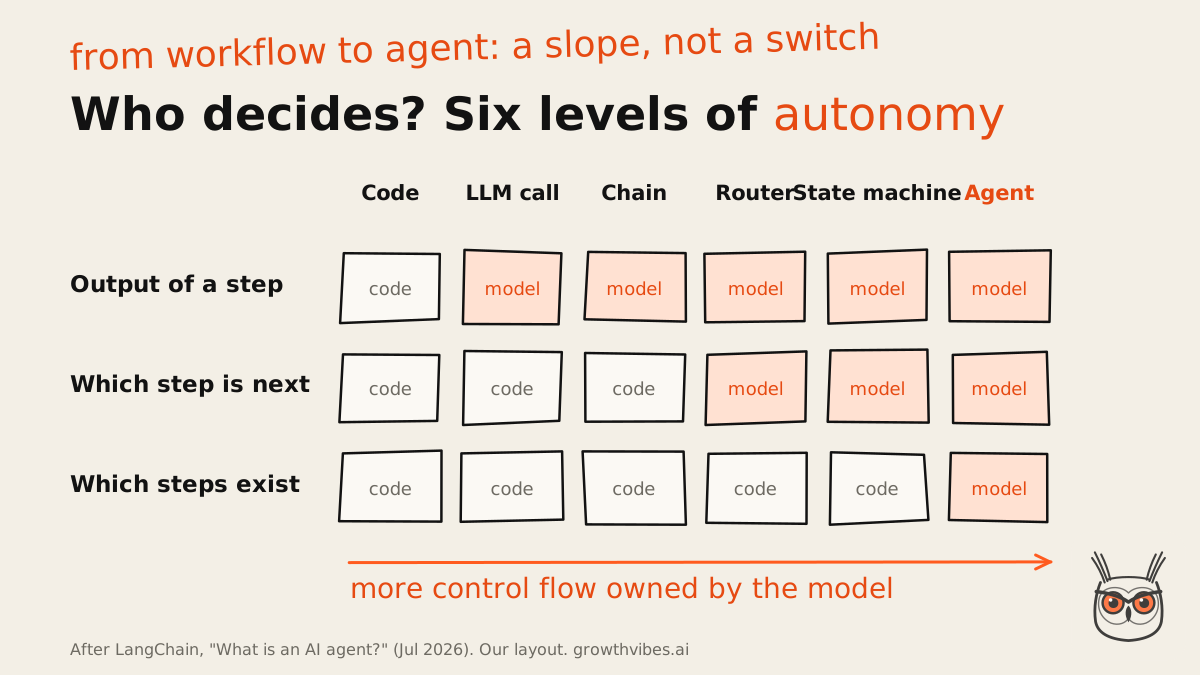
A router is the level people mistake for an agent most often: the model reads the input and picks one of several paths you built ("this email is a refund request, send it down the refund branch"). A state machine lets the model loop back and try again. Only at the last level does the model decide which steps exist, writing or choosing its own tools as it goes.
From what I've seen, most products sold as agents today sit at router or state machine, and I think that's usually the right call. The lower you sit on the slope, the cheaper each run is and the easier it is to find out why Tuesday's run did something odd. When I scope AI automation for a client, picking the level on this slope is the first conversation, and it's usually lower than they expected.
If you're deciding where an AI step belongs in a process at all, start with which processes to automate with AI first.
How to tell if something is really an agent
Ask three questions about the mechanics: does the model choose the next step, does it choose which tool to call, and does it decide when the job is done? Three yeses is an agent. One yes, usually the text in the middle, is a workflow with a smart step. Two yeses puts it somewhere on the slope.
Who picks the next step?
Ask for two run logs from different inputs. If both walk the same path in the same order, your code picked. If the path bends with what the agent found, the model picked.
Who picks the tool?
Count the tools the model can see, then check who chose the one that ran. A single hard-wired API call after the model writes some text is a workflow step wearing a lanyard.
Who decides it is done?
An agent stops when it judges the goal met, with a turn cap as a backstop. A workflow stops at the last box whether the job is finished or not.
Tiebreaker: break a tool
Make one tool return an error and watch. A workflow halts or retries the same step. An agent reads the error and tries something else, which is also how you find out if it gives up gracefully.
This test is my synthesis of LangChain's three control questions and Anthropic's point that agents suit open-ended problems where you can't predict the number of steps. It isn't an industry standard; LangChain itself says there's no agreed grading scale yet. It sorts mechanics, not usefulness.
I ran my own work through it, which was mildly humbling. The n8n ads agent I built for a retailer writes about 200 ads a week, and it scores one yes out of three. The model writes the copy. Plain code decides everything else. It's a workflow with an agent's name on the door, and I'd build it exactly the same way again.
Types of AI agents
Textbooks sort AI agents into reflex, model-based, goal-based, utility-based and learning agents, which is handy in an exam. For the tools you'll actually meet, sort them by the job they do, by whether they work with you or in the background, and by whether one agent works alone or several work together.
A quick translation for the exam crowd. A simple reflex agent reacts to what's in front of it (the thermostat again). A model-based one keeps a picture of the world. A goal-based one plans toward a target, a utility-based one weighs which outcome is best, and a learning agent improves from feedback. Today's LLM agents borrow from all five at once, which is why the labels stopped helping anyone choose software.
By the job they do
- Coding agents: read a codebase, edit files, run commands and tests. The most mature type, because a test suite tells the agent whether it worked.
- Research agents: search, read and pull findings together from sources you couldn't list in advance. Useful, and harder to check than they look.
- Browser and computer-use agents: click through websites and apps the way a person would. Improving fastest on benchmarks, and still the most fragile.
- Customer agents: answer questions, look up orders and take actions like refunds within set limits.
- Marketing agents: reports, QA, drafts built from data. What they can run today is in my guide to AI marketing agents.
You can slice it other ways too, by department for instance (customer, employee, creative, data, code, security), and you land in roughly the same place with different furniture.
Working with you, or in the background
There's also a useful line between interactive agents, the ones you talk to while they work, and background agents that start on a trigger and report back later. The interactive kind gets the demos. The background kind does more of the work, mostly unnoticed, like a good accounts team.
One agent or a team of them
Multi-agent setups, where an orchestrator hands parts of a job to specialist agents, look fantastic on a diagram. My advice is to start with one agent and well-designed tools, and only split when you hit a clear limit: the context overflows, the tool list sprawls, or different teams own different parts. Every extra agent is another place for an instruction to get lost in translation.
Marketing agents, SEO agents and AI automation
Most AI automation for marketing and SEO lives at the workflow end of the slope, and I think it should. Most of that work is find, filter, write, check, log: a job that pulls rankings every Monday, a weekly report, outreach to sites that list tools like yours. You can draw every one of those before it runs, which is exactly why they keep running.
If the vocabulary around this is new, the plain-English version of the wider idea is in what business process automation is and how to start with one process.
If you want to see what those workflow tools cost and where each one breaks, I compared them in the business automation software worth paying for.
That's the kind of SEO automation and AEO automation I'd start with in SEO and AEO work: loops you can draw on a napkin, with a model only where words need writing. AI agents earn their place in SEO when the job is open-ended, like researching what a set of ranking pages all forgot to mention, where nobody can list the steps in advance.
Real examples of AI agents
The AI agents you can try today are mostly coding agents, customer support agents, research agents and browser agents. Coding and support make the best examples because both have a finish line the agent can check: the tests pass or they don't, the ticket gets resolved or it doesn't. A finish line is what keeps an agent honest.
A newer one on the personal side is Hermes Agent, a free open-source agent that remembers you and runs jobs on a schedule. I explained what Hermes Agent is and who it suits in its own piece.
If you want to try one, here is how I run Hermes Agent on my Claude subscription without an API key.
If you're curious what big companies run, I wrote up what enterprise AI agents look like and what a SaaS team can copy from them.
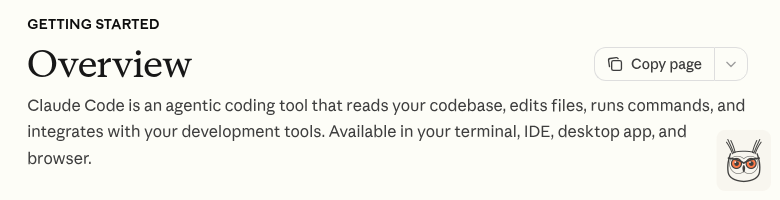
Claude Code is the one I use most days. Its own docs call it "an agentic coding tool" that reads your codebase, edits files and runs commands. Give it "the build fails on the pricing page" and it reads a few files, runs the build, reads the error, edits something, runs the build again. I never told it which file to open or when to stop. Three yeses, and a fair amount of my patience saved.
Coding agents are the poster child for a boring reason: code can be checked automatically, so the agent gets real feedback every turn instead of a vibe. Customer support agents are the other strong fit. Success is easy to measure, the actions (look up an order, issue a refund within a limit) are already programmatic, and some vendors only charge when a ticket is actually resolved. Pricing per resolution tells you how confident they are about the finish line. Voice agents are the same idea on a phone line, and I wrote up the AI voice agents worth trying separately.
Research agents are the ones built into "deep research" style modes: you ask a question, the agent runs dozens of searches, reads, searches again and writes up what it found. Genuinely useful, and the hardest of the four to check, because there's no test suite for "did it miss the best source". Browser and computer-use agents drive a real screen. They've improved faster than anything else on benchmarks (more on that below) and still trip over cookie banners like the rest of us.
My own examples are less glamorous and more instructive. For a longer build with more moving parts, I wrote up how I built an SEO content automation, step by step, including which steps got a model and which stayed plain code. Short version for the impatient: most stayed plain code.
If you'd rather see ready-made agents sorted by the job they do, I ranked the best AI agents by job to be done.
Benefits of AI agents
The main benefit of AI agents is handling jobs whose steps you can't write down in advance: a bug that could live in any of forty files, or a question that needs sources nobody has found yet. They also recover from surprises, because each result feeds the next decision.
- Open-ended jobs: the agent works out the path, so you don't have to map every branch first.
- Recovery from errors: a failed tool call becomes information instead of a dead run.
- One goal over many tools: search, a database, an API and a code runner, used in whatever order the job needs.
- Review the outcome, not every step: people check the result and the log instead of babysitting each move.
A script crashes on the unexpected. An agent reads it and adjusts.
That's a short list on purpose. The benefits are real but narrow, and they only show up on jobs that actually need a loop. The jobs I take on in AI automation and agents work mostly start by finding the one step in a process that needs judgment, and keeping the agent there.
Risks, limits and where agents break
AI agents break in predictable places: errors that compound over many steps, loops that never finish, context that fills up until the goal falls out, tools that return something odd, and costs that grow with every turn. Benchmarks show them improving fast, and still failing roughly one attempt in three.
- Compounding errors: small mistakes multiply. Say each step goes right 95% of the time (an example, not a measurement). Over 10 steps the whole run is right about 60% of the time, because 0.95 to the power of 10 is 0.599. Over 20 steps, about 36%.
- Loops: the agent retries the same failing call with growing enthusiasm. This is why turn caps exist.
- Context limits: long runs push early instructions out of view, and the agent carries on with a goal it half remembers.
- Odd tool results: an empty response or a quietly wrong one becomes a confident wrong decision two steps later.
- Cost and latency: autonomy means higher costs and more room for errors to compound. You're usually trading speed and money for a better result, and that trade should be one you made on purpose.
The academic view is the most interesting one here, because it argues with itself. The Stanford AI Index 2026 reports that agents moved from answering questions to completing tasks in 2025, with accuracy on OSWorld, a benchmark of real computer tasks, rising from about 12% to 66.3%, within six points of the human baseline. The same report says agents still fail roughly one in three attempts on structured benchmarks.
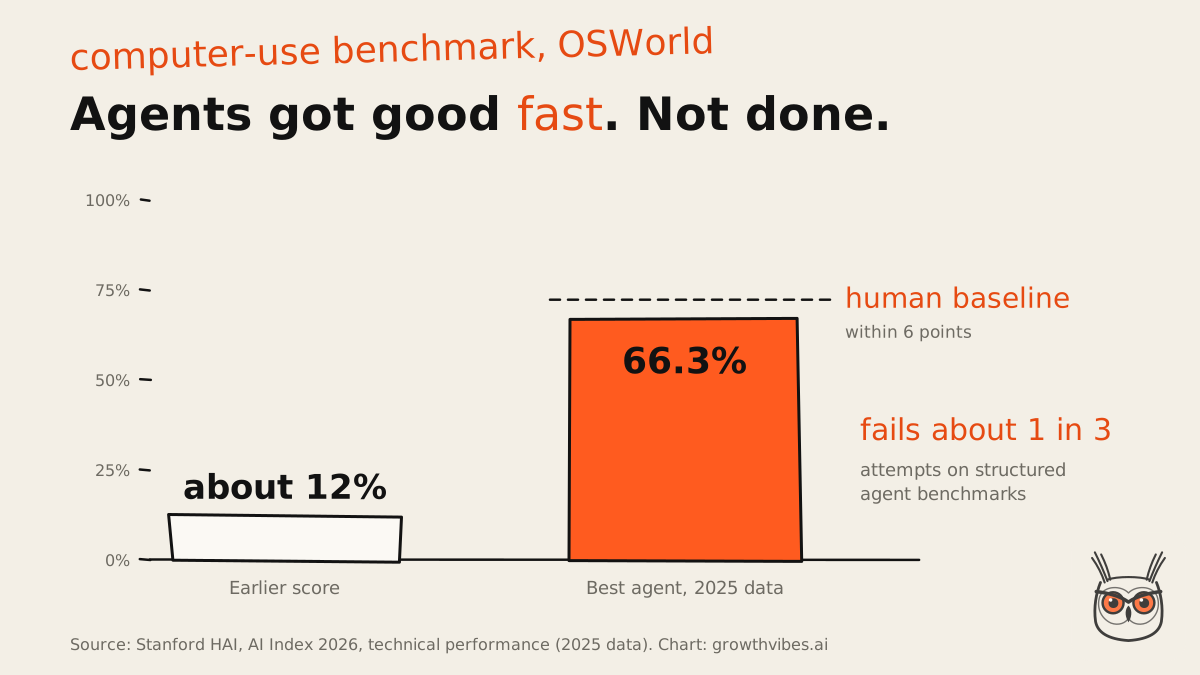
Then the twist. The report also flags that some widely used evaluations have error rates up to 42% in their questions. So which number do you believe? I read the trend as real and the absolute scores as soft. A benchmark score is a promise about the benchmark, not about your job.
Task length matters as much as model quality. In March 2025, METR found models succeeded almost every time on tasks that take a person under four minutes, and under 10% of the time on tasks over about four hours. Those were older models, so take the shape rather than the numbers. Short jobs, good odds. Long jobs, pack a lunch.
A smaller signal from the last few weeks: on Hacker News in late October 2026, two separate launches (19 and 29 October) pitched monitoring tools for agent runs. Nobody builds a smoke detector for a kitchen that never catches fire.
Should you use an AI agent?
Use an AI agent when the job is open-ended: you can't predict how many steps it takes, and the agent can check its own result. If you can write the steps down, build a workflow with one model call instead. It'll be cheaper, faster and much easier to fix at 7am on a Monday.
I hold this one firmly: most first AI agents should be a workflow with one model call. On simpler tasks, a deterministic workflow, a retrieval system or a single model call will beat an agent. Two rules I'd tattoo on a few product roadmaps: add tools before you add agents, and don't hand over judgment you can't evaluate. Even Anthropic's advice to find the simplest solution goes as far as saying this "might mean not building agentic systems at all".
before
Starting with an agent
- The path changes every run, so every bug is a new bug
- Cost per run depends on how chatty it felt that day
- You learn what it does by reading logs
- A great demo
after
Starting with a workflow
- Same path every run, so you fix each bug once
- A cost per run you can put in a spreadsheet
- You can draw it on a napkin before it runs
- Swap one step for an agent later, if it earns it
The jobs that pass the test are real, though: multi-file code changes, research across sources you can't list, triage where every case needs a different lookup. When yours is one of them, my guide on how to build AI agents goes from first prompt to production, caps and all.
Back to the three demos
So what did I tell my friend about those three demos? The chatbot was a chatbot. The flow with a model in the middle was a workflow, and probably the most useful of the three. The third might be an agent, and the way to find out is a run log and a broken tool.
AI agents are a loop where the model holds the steering wheel. Worth paying for when the road isn't mapped; a workflow gets you there cheaper when it is. If you'd like help sorting which is which in your own stack, that's most of my AI automation and agents work.
Frequently asked questions
What is an AI agent?
An AI agent is software where a language model chooses its own next step, picks which tools to use and decides when the job is done, looping until it finishes or hits a stop rule.
If code fixes the steps in advance and the model only writes text inside one of them, it's a workflow rather than an agent. Both are useful; they suit different jobs.
Is ChatGPT an AI agent?
Plain chat isn't: you ask, it answers, and you decide what happens next. When a chat assistant runs tools in a loop by itself, searching and reading before it answers, that mode behaves like an agent.
That's my reading of the control-flow test rather than an official label. Ask who picks the next step: in a chat, you do.
What is an example of an AI agent?
Coding agents are the clearest example. Claude Code reads a codebase, edits files, runs commands and checks the result, choosing each step itself. Customer support agents that look up orders and resolve tickets are another.
Research agents and browser agents are real examples too. They're just harder to check, because there's no test suite for a missed source or a misread web page.
How do AI agents differ from chatbots?
A chatbot answers one message and waits for you. An AI agent takes a goal and works on it over many steps, choosing tools and reading results, until it judges the job done. You steer a chatbot; the model steers an agent.
What is the difference between an AI agent and an AI model?
The model is one part of an agent. The model reads and writes text and makes the decisions; the agent is that model plus tools, memory and a loop that lets its decisions act on the world.
The same model can sit inside a chatbot, a workflow or an agent. What changes is how much of the control flow it's allowed to own.
How do I get started with AI agents?
Pick one job with a finish line you can check, and try a workflow with one model call first. Build a real agent only if the steps can't be known in advance.
Give it a few well-described tools, a turn cap and a spending limit, then test it on real inputs before anyone relies on it. My guide on how to build AI agents walks through each step.
