
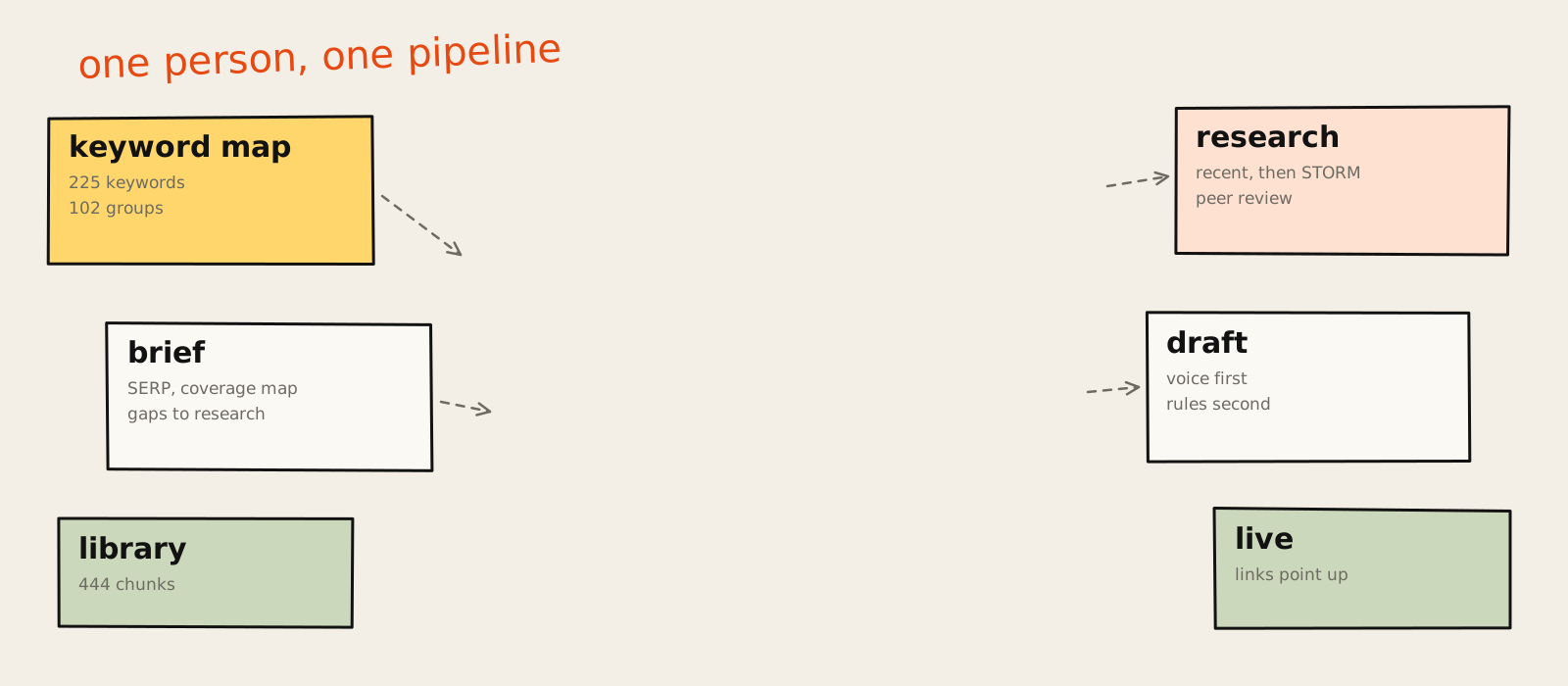
Most "SEO content automation" I see is a prompt with a scheduler attached. You paste a keyword in, a model writes 1,500 words that sound like everybody else's 1,500 words, and a plugin publishes them at 3am. Congratulations, you've automated the part nobody needed help with.
I wanted something different. I wanted a system that does what I'd do as a head of growth with a team of five: pick the right topics, read what's already out there, find what's missing, check the facts, take a position, write it in my voice, make the visuals and link it into the site properly. Then do it again tomorrow. Without me sitting there. Think of it as a small team of AI agents doing SEO automation, with me as the editor.
So I built it. This is the whole thing, step by step: the tools, the APIs, the skills, the order they run in, what each one costs, and the parts that broke. It's long. If you only want the shape of it, read the next section and look at the diagram. If you want to build your own, keep going.
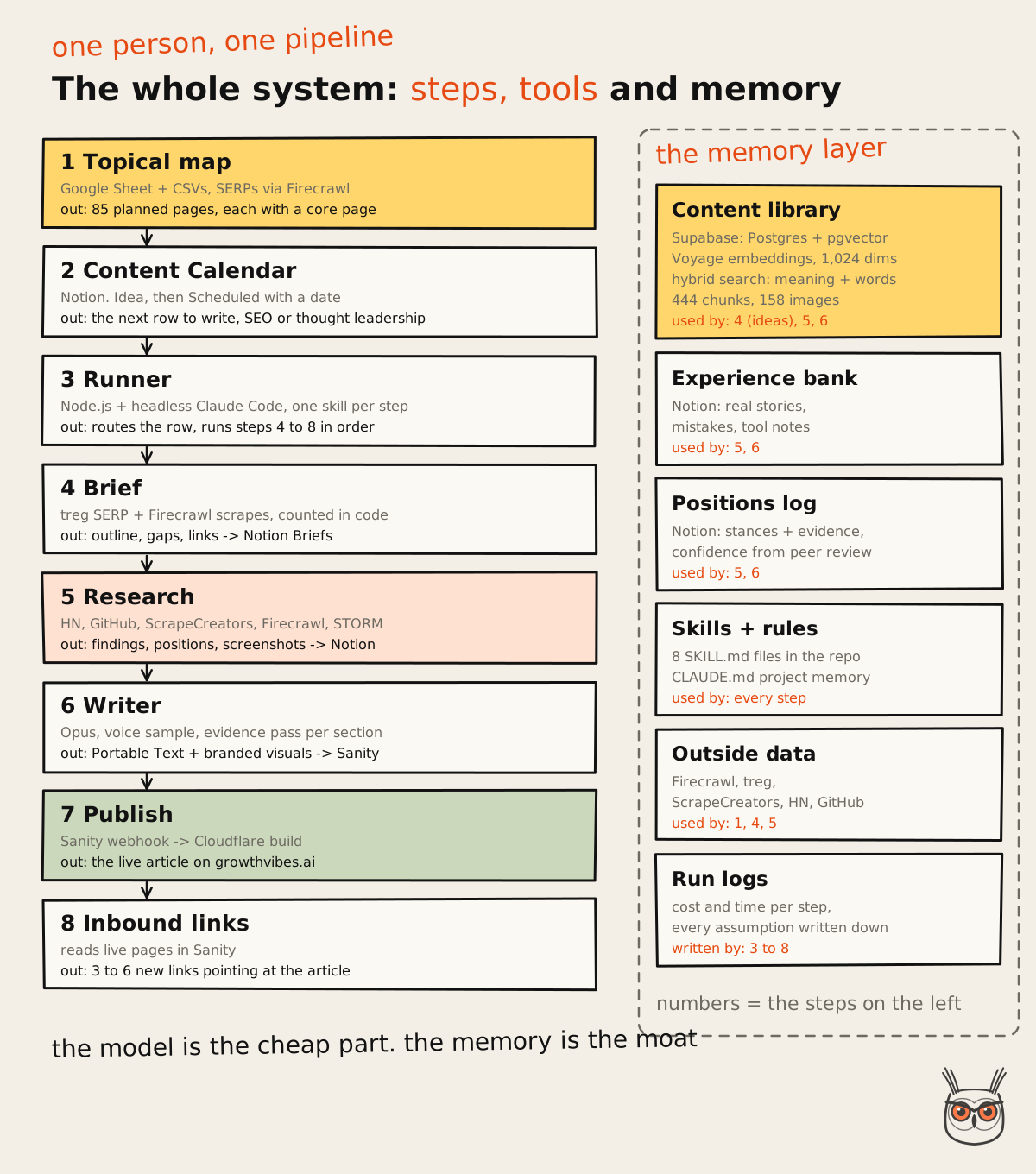
The SEO automation system on one page
My SEO content automation is a pipeline of small, boring parts that each do one job well. A topical map decides what to write. A Notion calendar decides when. A runner built on Claude Code picks the next article and sends it through four steps: brief, research, writer and inbound links. Each step is a skill, a written instruction file that turns Claude Code into a specialised AI agent, and each one reads and writes to the same places.
Here's the full picture before we go step by step.
Source: growthvibes.ai
In plain words, one article goes through this:
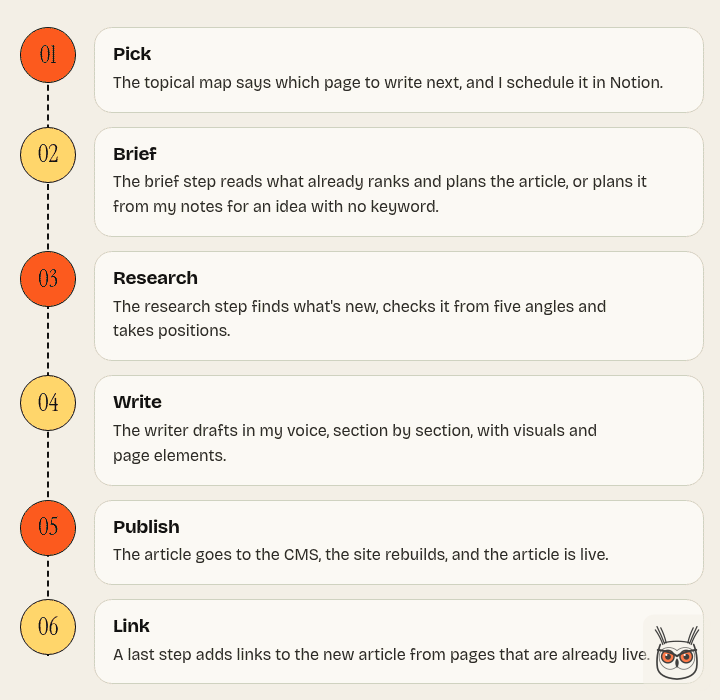
Pick
The topical map says which page to write next, and I schedule it in Notion.
Brief
The brief step reads what already ranks and plans the article, or plans it from my notes for an idea with no keyword.
Research
The research step finds what's new, checks it from five angles and takes positions.
Write
The writer drafts in my voice, section by section, with visuals and page elements.
Publish
The article goes to the CMS, the site rebuilds, and the article is live.
Link
A last step adds links to the new article from pages that are already live.
The tools behind it, and what each one is for:
| Tool | What it does in the system |
|---|---|
| Claude Code | Wrote most of the code. Runs every step headless, one skill per step |
| Google Sheets | Holds the topical map: keywords, groups, pages, priorities |
| Notion | The control room: calendar, briefs, research pages, positions, experience bank |
| Supabase + pgvector | The content library: everything I've read, searchable by meaning |
| Voyage AI | Turns text and images into embeddings for that library |
| Firecrawl | Searches Google, scrapes pages, takes screenshots |
| treg | Search data, paid per call: Google results and People Also Ask (Serper), AI Overviews, ranked keywords and volumes (DataForSEO) |
| ScrapeCreators | Recent posts and comments from Reddit, X, TikTok and YouTube |
| Hacker News + GitHub | Recent discussions and releases, free |
| Sanity | The CMS that holds the article and publishes it |
| GitHub + Cloudflare | The repo, and the build that puts the site live |
A few numbers, so you know what "a system" means here:
That last number is the one I'm proudest of, and we'll get to why.
Start with rules, not robots
Before writing a single line of code, I wrote down what the system must never do. That list shaped everything else more than any tool choice. An automation that publishes under your name is a liability with a cron job, so the rules come first.
Here's what I decided, and why each one matters.
1. I pick the topics and the dates. The machine does the rest. The runner only touches a calendar row that I've set to Scheduled with a publish date of today or earlier. Ideas sit in the calendar as ideas until I move them. Let a tool pick its own topics and you get 40 articles about "the future of X" and none about what your buyers search.
2. Facts and numbers only come from sources. Every price, statistic, date and feature in an article has to come from the research, with a link. A finding that the fact-check scores below 6 out of 10 goes on a "do not use" list, and the writer never sees it as usable.
3. The machine never decides strategy. The brief step doesn't get to swap the keyword for one it likes better. The research step doesn't get to drop a section from the outline. Each step takes its input as given and logs any disagreement under "Assumptions" for me to read.
4. Never ask questions. This sounds like the opposite of good practice, but it's the only way an unattended run finishes. Every skill is told: make the most reasonable call, write down why, keep going. A run that stops to ask at 7pm is a run that does nothing until I'm back at my desk.
5. Everything leaves a trail. Every step writes what it did to Notion or to a log: which sources, which credits, which assumptions. When something looks off in an article, I can see where it came from in about a minute.
6. One tool per job. Notion holds the state. Supabase holds the memory. Sanity holds the article. The repo holds the code and the rules. Nothing important lives only inside a model's context window, because that window forgets everything the moment the run ends.
before
A prompt with a scheduler
- Topic picked by the model
- Says what the top 10 already says
- Numbers from nowhere
- Same voice as every other site
- Nobody knows why it wrote that
after
A pipeline with rules
- Topic picked from a map
- Researches what the top 10 misses
- Every number has a source
- Written to match my own writing
- Every step leaves a trail
One more thing I decided early: the system serves the site's strategy, not the other way round. This site exists to rank two service pages, AI automation and agents and SEO and AEO, plus the homepage. Every article supports one of them. That rule ends up inside the topical map, the brief, the writer and the link step, and you'll see it come back again and again.
Step 1: Claude Code is the factory behind the AI automation
Claude Code is the tool I used to build the whole system, and it's also the engine that runs it. It wrote most of the code, under my direction, and every step of the pipeline is one headless Claude Code call that loads one skill. People expect the model to be the star. In practice it's the factory floor: the thing that turns written rules into working steps.
If you haven't used it: Claude Code is Anthropic's coding agent. It runs in your terminal or the desktop app, reads and edits files in your project, runs commands, and connects to outside tools through MCP servers. That last part matters a lot here, because it means the same agent that writes a script can also read a Notion database, query Sanity or call Firecrawl.
The repo is the brain
Everything lives in one Git repository, the same one as the website. The parts that matter for the automation:
- `.claude/skills/`: one folder per skill, each with a `SKILL.md` file. These are the instructions: what the step does, what it reads, what it writes, its rules.
- `scripts/`: small Node.js scripts the skills call for anything that has to be exact: counting words, chunking text, clustering keywords, cropping screenshots.
- `data/topical-map/`: the keyword map as CSV files.
- `docs/`: the product documents, including a long one for the topical authority and information gain work.
- `CLAUDE.md`: the project notes every session reads first. What the site is, how it deploys, the rules I've set, and a list of things that are easy to get wrong.
That last file is underrated. Every new Claude Code session starts by reading it, which means a session I open on a Tuesday knows that `main` deploys to production, that design changes need my OK, and that a certain verification file has to be served in a weird way. Project memory in a plain text file beats re-explaining your setup every morning. The catch is that a stale line in that file steers every session, which is the problem Google measured in its own coding agents.
Skills are just written instructions
A skill is a Markdown file with a short header. The header says what the skill is for, so Claude Code knows when to load it. The body is the procedure. There's no magic syntax. It reads like a very precise brief to a very fast junior who never gets tired and never remembers yesterday. In practice, each skill turns the same model into a different AI agent: an SEO agent for briefs, a research agent, a writing agent.
If you would rather start with a single agent than a whole pipeline, I wrote a practical guide to building AI agents, from first prompt to production.
And for the question before that, which business jobs an agent should take on at all, there's AI agents for business.
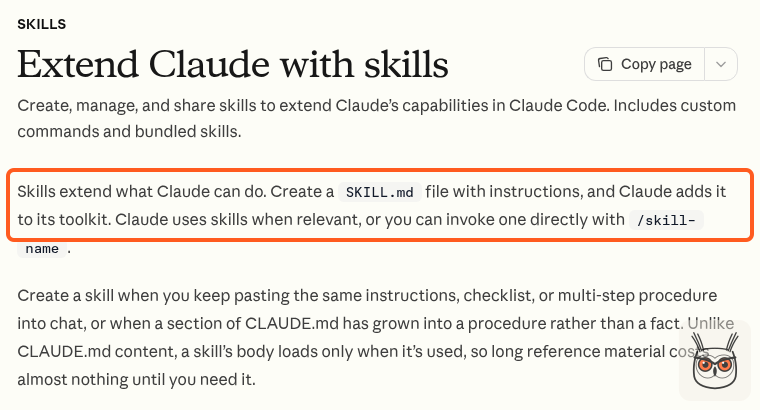
Source: Claude Code docs, 3 Nov 2026
Here's how the brief skill starts. The full skill is free to download as the SEO content brief skill, with our IDs and settings taken out:
---
name: "auto-content-brief"
description: "Non-interactive, SERP-researched content brief.
  Saved to the Notion Briefs database for the publishing pipeline."
---

# Automated content brief

This runs inside an automation. Nobody is watching, so never ask
questions. Make the most reasonable call, log it under Assumptions,
and keep going.

This skill writes briefs. It does not set strategy. Keyword choice,
clustering and internal links were decided upstream. Take the inputs
as given and never skip, reroute or second-guess them.

Goal: a brief that lets the writer build the best page in the top 10.
Cover every major heading the ranking pages cover, answer every
frequent question, and add at least one angle none of them have.
That's it. The skills for this system add up to about 27,000 words of instructions across eight files. Which sounds like a lot until you remember that a decent onboarding doc for a human content writer is about the same length, and the human gets to ask questions.
How much code, and who wrote it
The scripts come to roughly 2,500 lines of JavaScript, split by job:
| Folder | Lines | What's in it |
|---|---|---|
| scripts/topical-map | ~790 | clustering, adding keywords, validation, sheet sync |
| scripts/library | ~680 | ingest, chunking, embeddings, search, images |
| scripts/runner | ~510 | the runner, the calendar feeder, the competitor scraper |
| scripts/research | ~310 | the recent-sources step and the research checker |
| scripts/visuals | ~260 | screenshots, branded SVGs, the owl watermark |
Claude Code wrote the large majority of those lines. I wrote the rules, made the calls, read the diffs, and said "no, not like that" more times than I can count. That's the honest split, and I think it's the right one. My value here isn't typing JavaScript. It's knowing what the system has to do and noticing when it does the wrong thing confidently. It's the same split I use when I build AI automation and agents for marketing teams.
GitHub, branches and two chats that don't touch each other's files
The repo lives on GitHub. Pushes to `main` deploy the site through a Cloudflare build, so `main` is production and real work happens on branches. For the content system that rule matters less (scripts and skills don't change the site), but it's a good habit for anything an AI edits.
The bigger lesson was about chats. I ended up splitting the work into two kinds of Claude Code sessions: one owns the website code, the other owns content and skills. They don't edit each other's files. I learned that the hard way. On 30 October a batch of skill edits got pushed from the wrong document and had to be reverted the same day. Nothing broke on the live site, but it was the kind of near miss that makes you write a rule down.
Step 2: build a topical map you can defend
The topical map is the plan for every page the site should have, grouped by what Google treats as the same topic. It's the single most important part of the system, because it decides what gets written. Everything after it is execution. If the map is wrong, the automation just produces the wrong articles faster.
The method, and where it comes from
I didn't invent the approach. It's adapted from Koray Tugberk Gubur's video on topical maps, which I watched start to finish and took apart. The ideas I kept:
- A core section and an outer section. The core is where the site earns. The outer section covers nearby topics that bring traffic and send authority back to the core.
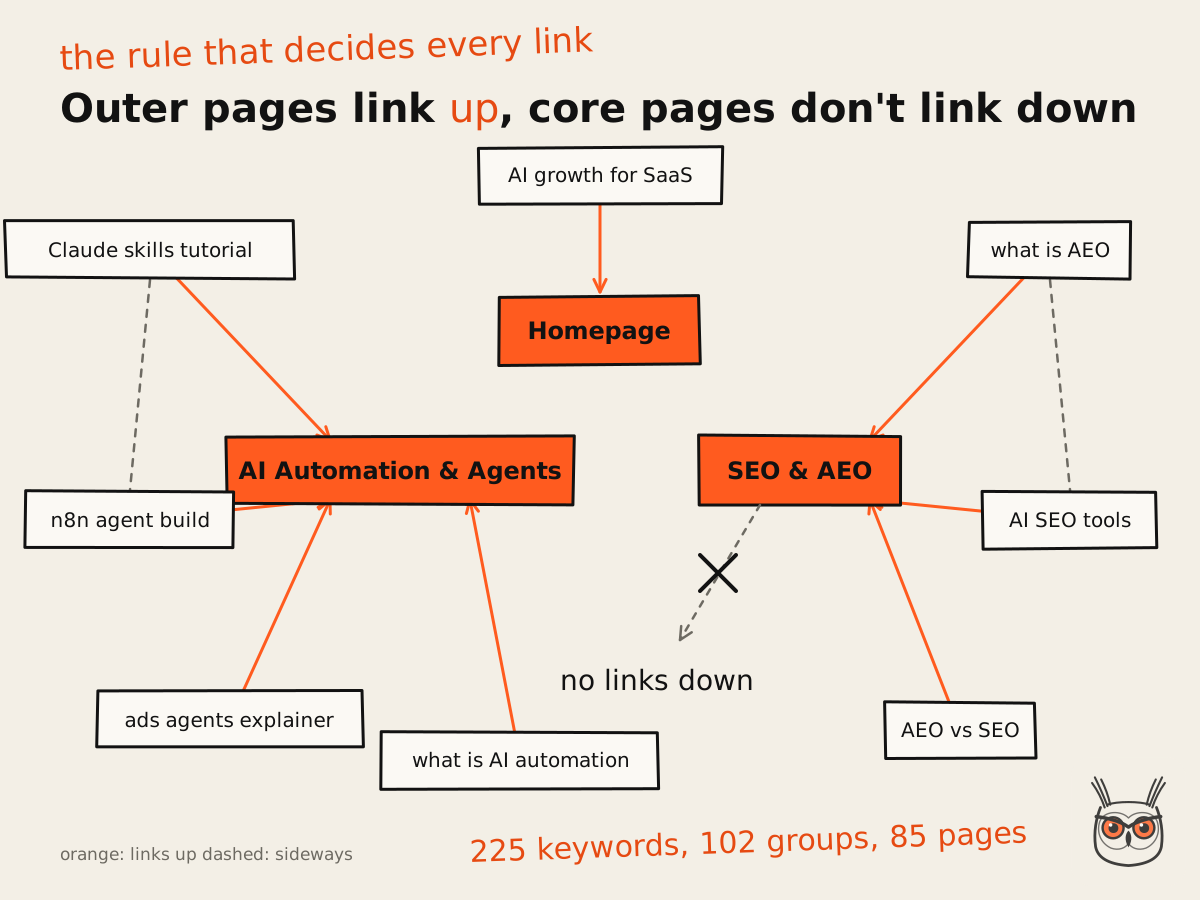
- Link direction. Outer pages link up to the core. Core pages mostly don't link down.
- Source context. Map the site to who you are and what you sell, not just to the subject. A growth consultant's site about AI automation shouldn't be mapped like a generic AI news site.
- A map is not a keyword list. Some keywords belong on one page, some need their own. You decide by how the search results behave, not by how the words look.
- One central entity, said consistently. The main phrase shows up in titles, headings, intros and image alt text, so the site reads as one source.
His other point stuck with me too: quick AI-generated maps miss the nuance, and whoever covers a topic with more care wins. That's half the reason this map is built from search results and not from a prompt.
The decision that changed the map
My first plan put "AI growth for SaaS" at the core, with SEO and AEO as an outer topic. On 2 November I changed it. The core became what I actually sell: AI automation for marketing teams, and SEO and AEO. Tutorials on building with Claude, skills, agents and automations became the authority layer around them.
That one decision moved dozens of pages. The two service pages, AI Automation & Agents and SEO & AEO, got renamed and redirected, and every article now links up to whichever of the two fits its topic. If you take one thing from this section: decide what the site sells before you decide what it writes.
225 keywords, grouped by shared search results
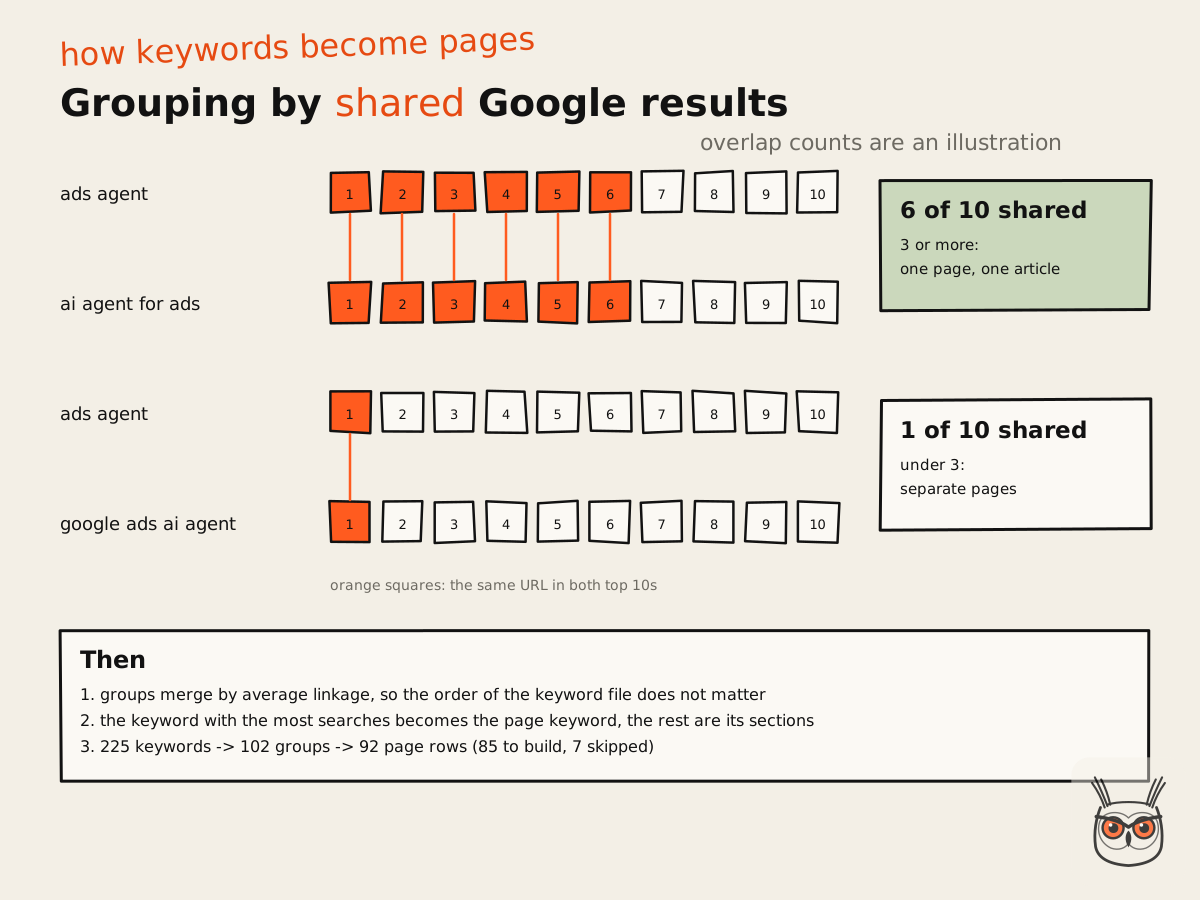
The map started with 225 keywords I collected from Ahrefs, with search volume and difficulty. Then the important part: two keywords go on the same page only if Google shows mostly the same results for both. Specifically, a keyword joins a group when it shares at least 3 of the top 10 results with the group's main keyword.
Why search results and not wording? Because wording lies. "AI agent for ads" and "ads agent" look different and share most of their results. "Meta ads agent" and "Meta ads agent for e-commerce" look almost identical and can need different articles. Google has already done the clustering. You just have to read it.
How it works in practice:
- Fetch the results. A script pulls the Google top 10 for every keyword through Firecrawl, at about 2 credits per keyword.
- Compare overlaps. For each pair of keywords, count how many of the top 10 URLs they share.
- Group. Keywords that share 3 or more results end up together. The one with the most searches becomes the page keyword.
- Plan the pages. Each group becomes one article: a category, an article type, a title, a slug and the core page it links up to.
- Validate. A checker makes sure no two pages cover the same thing and every page links up to a core page.
Source: growthvibes.ai
The clustering code went through five versions in one day, and each fix is a small lesson:
- A second pass moves a keyword to the group it overlaps with most, so the first group it touched doesn't win by default.
- Average-linkage merging, so the result doesn't depend on the order the keywords come in. Before this, shuffling the CSV changed the map. That's not a map, that's a horoscope.
- YouTube video IDs are kept when comparing URLs. Without that, two completely different videos counted as the same result because they share a domain.
- The threshold settled at 3 shared results.
- The parent is always the highest-volume keyword in its group.
The result: 225 keywords became 102 groups, which became 92 page rows: 85 pages to build and 7 skipped (job searches, wrong country, wrong industry).
Source: growthvibes.ai
What the map looks like today
| Slice | Count |
|---|---|
| Pages to build | 85 |
| In agents and automation | 60 |
| In SEO and AEO | 17 |
| Tutorials / explainers / listicles | 25 / 22 / 20 |
| Service roundups / comparisons | 11 / 7 |
| Priority 1 (write first) | 15 |
It lives in a Google Sheet, with tabs for pages and keywords and pivot tables for parent and child keywords. I edit category, priority and status there, because a sheet is where humans like to edit things. A script keeps the sheet and the repo's CSV files in sync, and it always pulls my edits from the sheet first, so the automation never overwrites a decision I made by hand.
Adding keywords later without rebuilding
Keyword research never ends, so the map can't be a one-time build. This is the bit of AI SEO I'd automate before anything else. There's a skill for adding keywords incrementally. I give it a list, a CSV or even Ahrefs screenshots, and it:
- Pulls my latest edits from the sheet.
- Places each new keyword into an existing page if it shares 3 or more results with that page's keyword.
- Promotes a new keyword to page keyword if it has more volume and fits every member of the group.
- Groups the leftovers into new pages and plans them with a stronger model, because that's the step that needs judgement.
- Runs the validator, which must end with no errors.
- Updates the sheet and writes a report.
The planning step is the only one that runs on the more expensive model. Reading screenshots and running scripts doesn't need it. Spend the expensive model on judgement, not on chores. The whole thing is shared as the topical map builder skill, scripts included.
If you want the thinking behind SEO and AEO pages specifically, I wrote about it in AEO vs SEO. The short version: a page that can't rank can't be cited, so the map comes first for both.
Step 3: Notion is the control room
Notion is where the system keeps its state and where I steer it. Every article has a row in a calendar, every brief and research pack is a Notion page, and my opinions and stories live in two Notion databases the writer reads. I picked Notion because I already live in it, and because a human needs to be able to see, at a glance, where every article is.
The databases, and what each one holds
| Database | What's in it | Who writes to it |
|---|---|---|
| Content Calendar | One row per article: title, keyword, track, status, publish date, inspiration link, live URL | Me, the feeder script, every step |
| Briefs | One page per brief, plus a "Brief data" page and a "Research" page under it | The brief and research steps |
| Positions log | The stances articles take, with evidence and a confidence level | The research and writer steps |
| Experience bank | My real stories, mistakes, results and decisions, a few lines each | Me |
| Content Library inbox | Links and pasted text I want the library to read | Me |
The calendar is the trigger
The calendar has a status column that tells the system what to do:
- Idea: something worth writing. Nothing happens.
- Scheduled, with a publish date of today or earlier: the runner will pick it up.
- Brief, Research, Writing: set by each step as the article moves.
- Published or Draft: done, with the live URL filled in.
- Paused: something failed and the runner stopped. There's a note saying why.
Ideas get into the calendar in two ways. A small script reads the topical map and adds the next pages as Idea rows, highest priority first. It never schedules anything and never edits a row that exists. And I add my own ideas, sometimes with a link to a video or article I want to build on, sometimes with a few lines of notes.
Two tracks: SEO and thought leadership
Not every article targets a keyword, and it shouldn't. A breakdown of a new model release, or a build story like this one, has no keyword with volume behind it. So the calendar has a Track column: SEO or Thought leadership.
- Rows from the topical map are SEO. They get the search-results brief.
- My own ideas get a different brief (the thought leadership brief skill), built from my notes, the inspiration link, my experience bank and the library. No scraping of the top 10, no keyword stuffed into the first 100 words.
- An empty track gets decided on the first run. The runner checks the idea against the topical map. If it's the same article as a page that's already planned, it becomes SEO with that page's context. If that page is already live, the row is paused as a duplicate. If it's a different article that only sounds similar, it's thought leadership.
That last check needed judgement, not string matching. "Meta ads agent" and "Meta ads agent for e-commerce" share every word in the shorter phrase, and they're two different articles for two different readers. So a script finds candidate pages by wording, and a short model call decides whether the intent is actually the same. When it's borderline, it goes to SEO, because a planned keyword page should never quietly turn into an opinion piece.
Why the brief lives in two pages
Each brief is a readable Notion page for me (status, the plan, why each heading exists) and a child page called Brief data that holds the same plan as JSON for the next step. The JSON is split into chunks of 2,000 characters, because that's the limit for one text block in Notion's API. A small, boring detail that will break your first run if nobody tells you.
The research step writes a Research page under the same brief: a summary for me at the top, with the bottom line and a reliability grade, and the full research JSON below for the writer.
Step 4: a content library that gives the AI agents a memory
The content library is a searchable memory of everything I think is worth reading: articles, newsletters, YouTube transcripts and my own notes, stored so the system can search it by meaning. It's the part that gives the articles something Google doesn't have, because half of what's in it isn't on page one of anything. Some of it isn't on Google at all.
As of 3 November 2026 it holds 67 documents, 444 text chunks, 53 idea cards and 158 images. Small, and growing every week.
What an embedding is, and why you should care
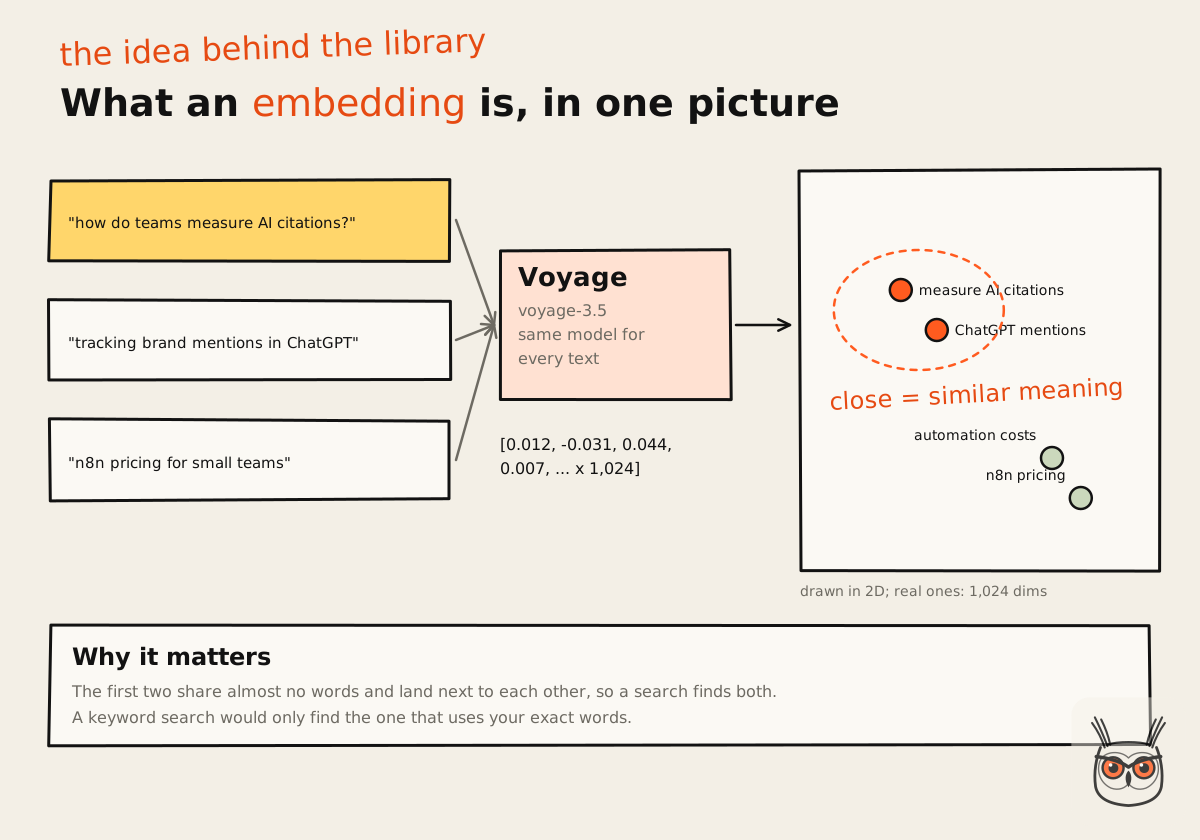
An embedding is a list of numbers that describes what a piece of text means. Texts about similar things get similar numbers, even when they use different words. "How do teams measure AI citations" and "tracking brand mentions in ChatGPT answers" share almost no words and end up close together.
Source: growthvibes.ai
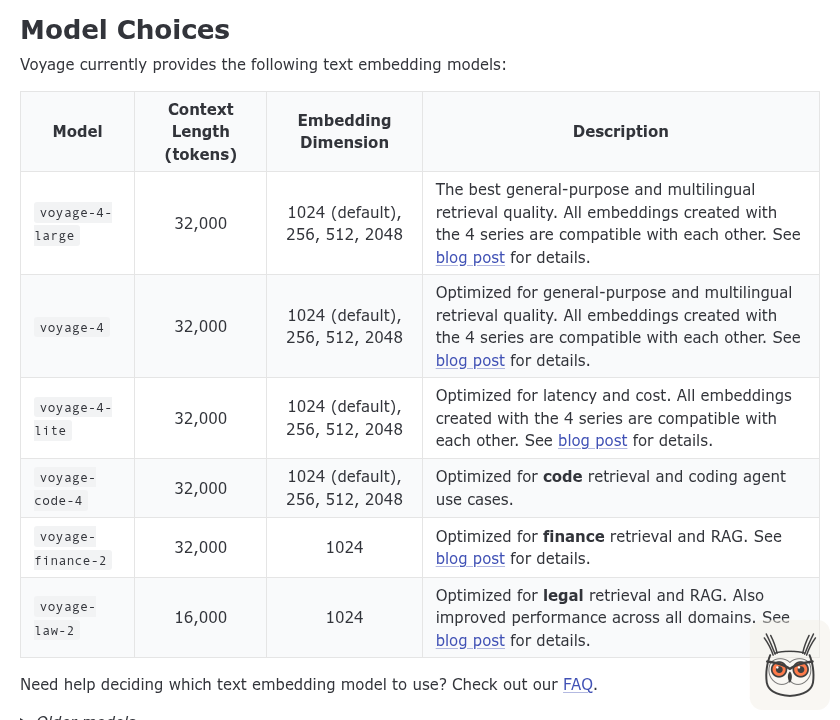
I use Voyage AI for this, the model `voyage-3.5`, which turns every chunk into 1,024 numbers. Voyage is also the embeddings provider Anthropic's own docs use in their examples. One honest note: Voyage now lists `voyage-3.5` as its previous generation. It's still good for this job, and switching would mean re-embedding everything, so it stays until there's a reason.
Source: Voyage AI docs, 3 Nov 2026
Two details that matter more than they look:
- Documents and questions are embedded differently. Voyage takes an input type, "document" when storing and "query" when searching, and using the right one improves the match.
- Images get their own model. Charts and screenshots from saved posts are embedded with Voyage's multimodal model, so the writer can search "paid search growth vs organic decline" and get the actual chart, with its credit line.
How a source gets in
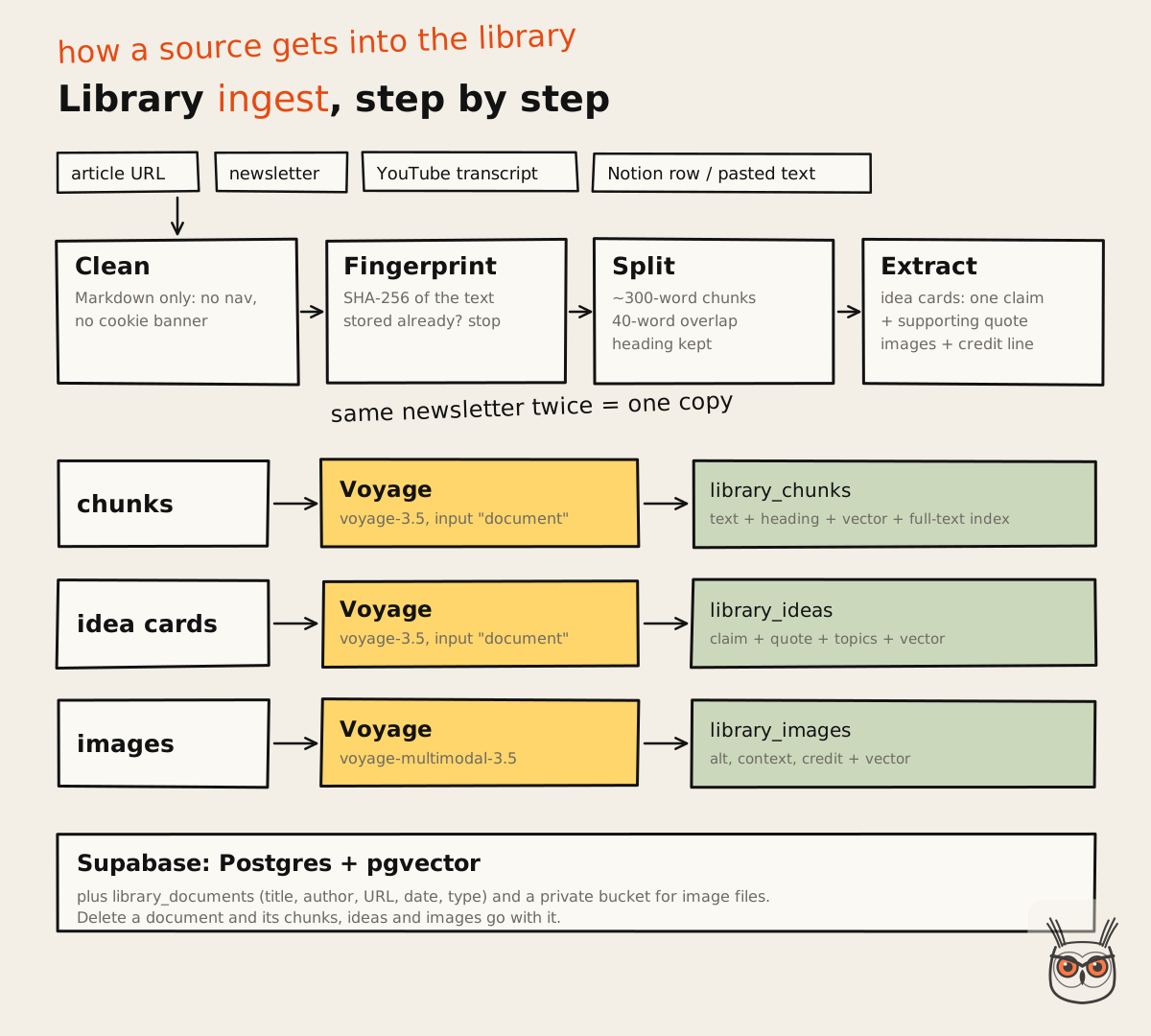
- Capture. I drop a link or paste text into the Notion inbox, or give the ingest skill a URL, file or YouTube video.
- Clean. The text becomes clean Markdown: no nav, no cookie banner, no "subscribe" box.
- Split. It's cut into chunks of about 300 words, with a 40-word overlap so no idea gets cut in half at a chunk edge.
- Extract. For articles, a model also writes short idea cards: one claim each, with the supporting quote.
- Embed and store. Chunks, idea cards and images are embedded by Voyage and stored in Supabase.
Source: growthvibes.ai
There's also a duplicate check before any of that: the cleaned text gets a fingerprint (a hash), and if the library already has it, nothing gets stored twice. Ingest the same newsletter from two links and you still have one copy.
Supabase and pgvector
The storage is Supabase, which is Postgres with a nice API on top, plus the pgvector extension that lets Postgres store embeddings and find the nearest ones. Four tables do the work: documents, chunks, idea cards and images, with the image files themselves in a private storage bucket. Delete a document and its chunks and ideas go with it.
Source: pgvector on GitHub, 3 Nov 2026
Why not a dedicated vector database? Because I didn't need one. At this size, Postgres does the job, it gives me normal SQL for everything else, and it's one less service to pay for and babysit. Pick boring infrastructure until the boring option actually breaks.
Hybrid search: meaning plus words
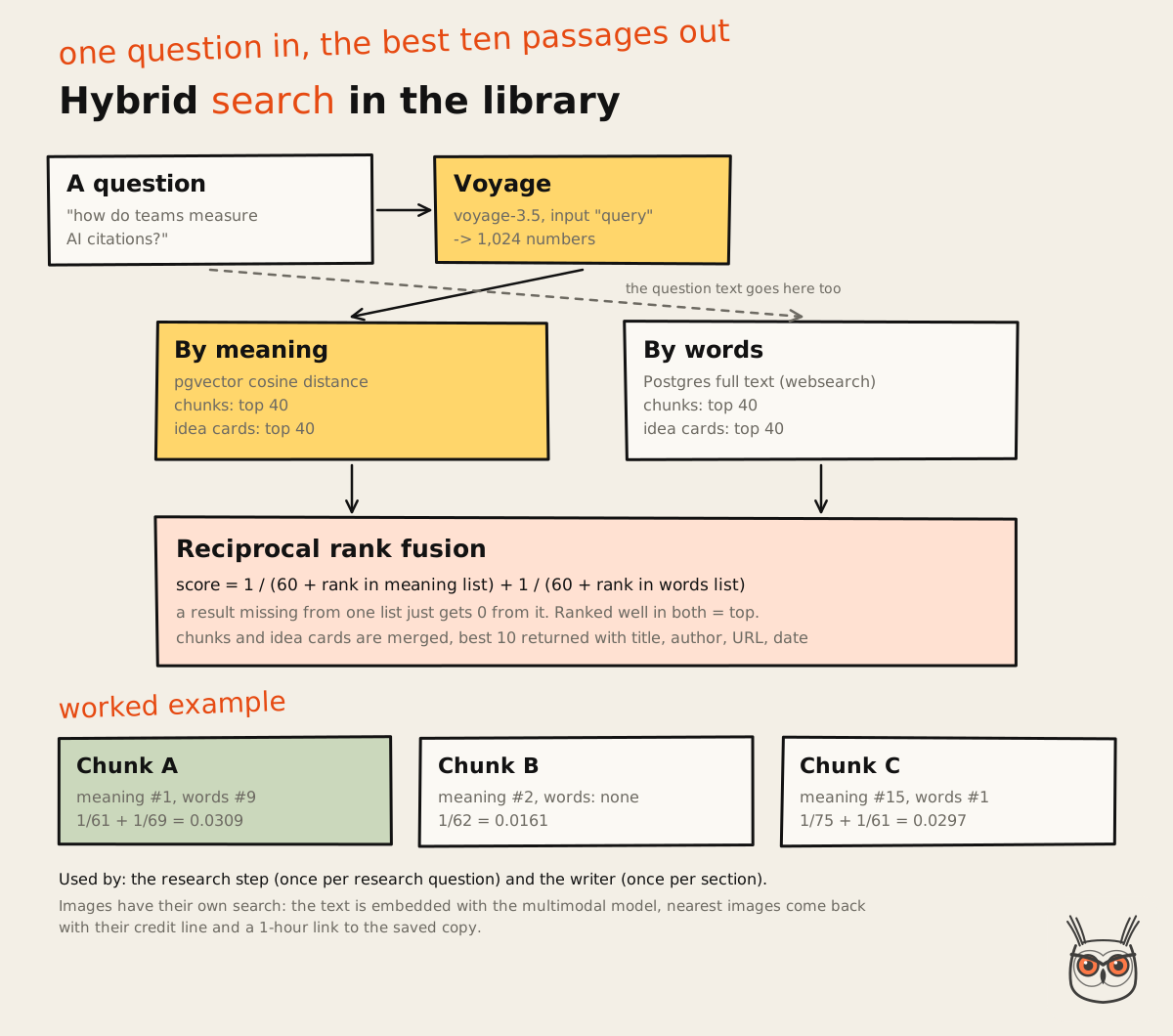
Here's the part most library setups get wrong. Searching by meaning alone misses exact terms. Searching by words alone misses everything phrased differently. So every search runs both and merges the results.
- By meaning: the question is embedded and compared with every chunk by vector distance. Top 40.
- By words: Postgres full-text search on the same chunks. Top 40.
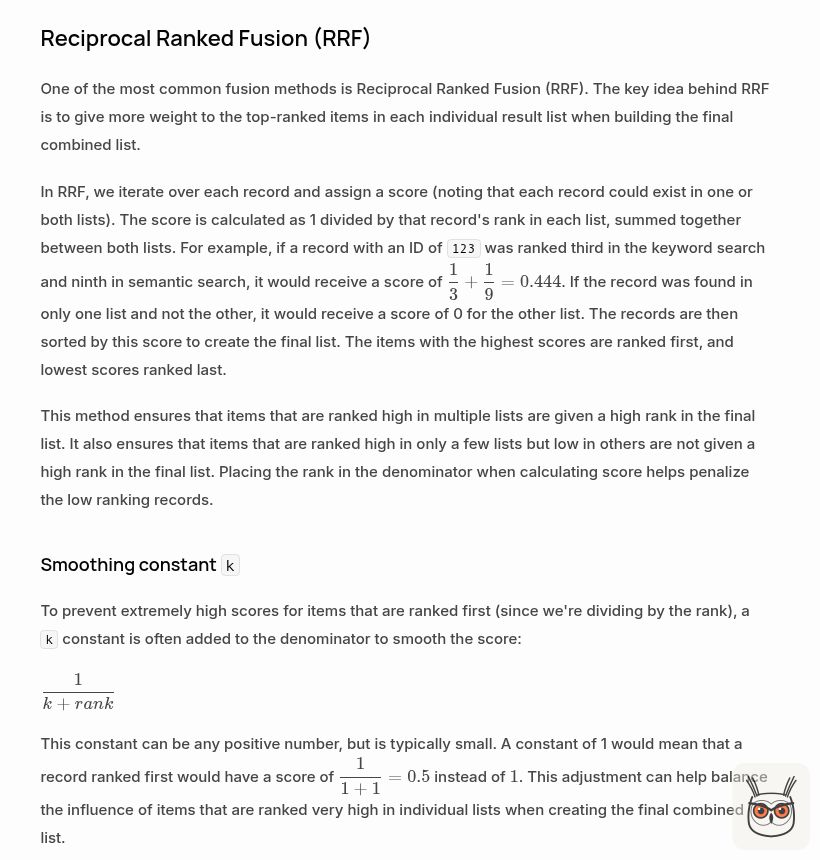
- Merge: each result gets a score of `1 / (60 + its rank)` from each list it appears in, and the scores are added. Something ranked well in both lists floats to the top.
That merge is called reciprocal rank fusion, from a 2009 paper by Cormack, Clarke and Buettcher, and it's what Supabase recommends for hybrid search too. The 60 is the constant from that paper. It keeps one list's first place from dominating everything.
Source: Supabase docs, 3 Nov 2026
Here's a simplified version of the search function, so you can see there's nothing mystical in it:
-- simplified: the real function also searches idea cards
with by_meaning as (
  select id, row_number() over (order by embedding <=> query_embedding) as r
  from library_chunks
  order by embedding <=> query_embedding
  limit match_count * 4
),
by_words as (
  select id, row_number() over (
    order by ts_rank_cd(fts, websearch_to_tsquery('english', query_text)) desc) as r
  from library_chunks
  where fts @@ websearch_to_tsquery('english', query_text)
  limit match_count * 4
)
select coalesce(m.id, w.id) as id,
       coalesce(1.0 / (60 + m.r), 0) + coalesce(1.0 / (60 + w.r), 0) as score
from by_meaning m full outer join by_words w on m.id = w.id
order by score desc
limit match_count;
The same function searches the idea cards and merges them in, so a question can come back with a passage (the chunk) and a point (the idea card) from the same source. You can set up the same library from the content library skill: it ships with the database schema, both search functions and the scripts.
Source: growthvibes.ai
Why the library matters so much
Every AI writing tool has read the same internet. If your research step only looks at Google's top 10, your article can only rearrange what's in Google's top 10. The library is the one input my competitors' tools don't have: the newsletters I pay for, the talks I've watched, the threads I saved, my own notes. It's also the piece I'd build first for any team that wants AI automation for its marketing, because every AI agent you add later gets smarter from the same memory.
The research step searches it for the topic and for every research question. The writer searches it again for every single section, because a section's own question finds different things than the article's topic does. Ideas from it can become mine in my own words. Specific data, quotes, frameworks and images always get a credit and a link.
The rate limit lesson
One practical thing. Voyage's free tier, without a payment method on the account, allows about 3 requests a minute. The ingest script is built around that: it batches up to 64 texts per request and waits about 21 seconds between batches, which works, slowly. The real fix is a payment method on the account. Batching is the workaround, a credit card is the solution. Classic.
Step 5: the SEO brief, or what the search results already say
The brief turns a keyword into a plan for the best page in the top 10: what to cover, what's missing, how long it should be, what to call it and where it links. It's the SEO agent of the system: for SEO articles it's built from the live search results. It doesn't write a word of the article. Its whole job is to make the writer's job obvious.
It runs unattended, and it's deliberately humble: the keyword, the URL, the cluster and the links were all decided upstream by the map. The brief describes how to win the results page for that keyword. Nothing more. It's the same research I'd do by hand for an SEO and AEO client, minus the third coffee.
What the brief does, in order
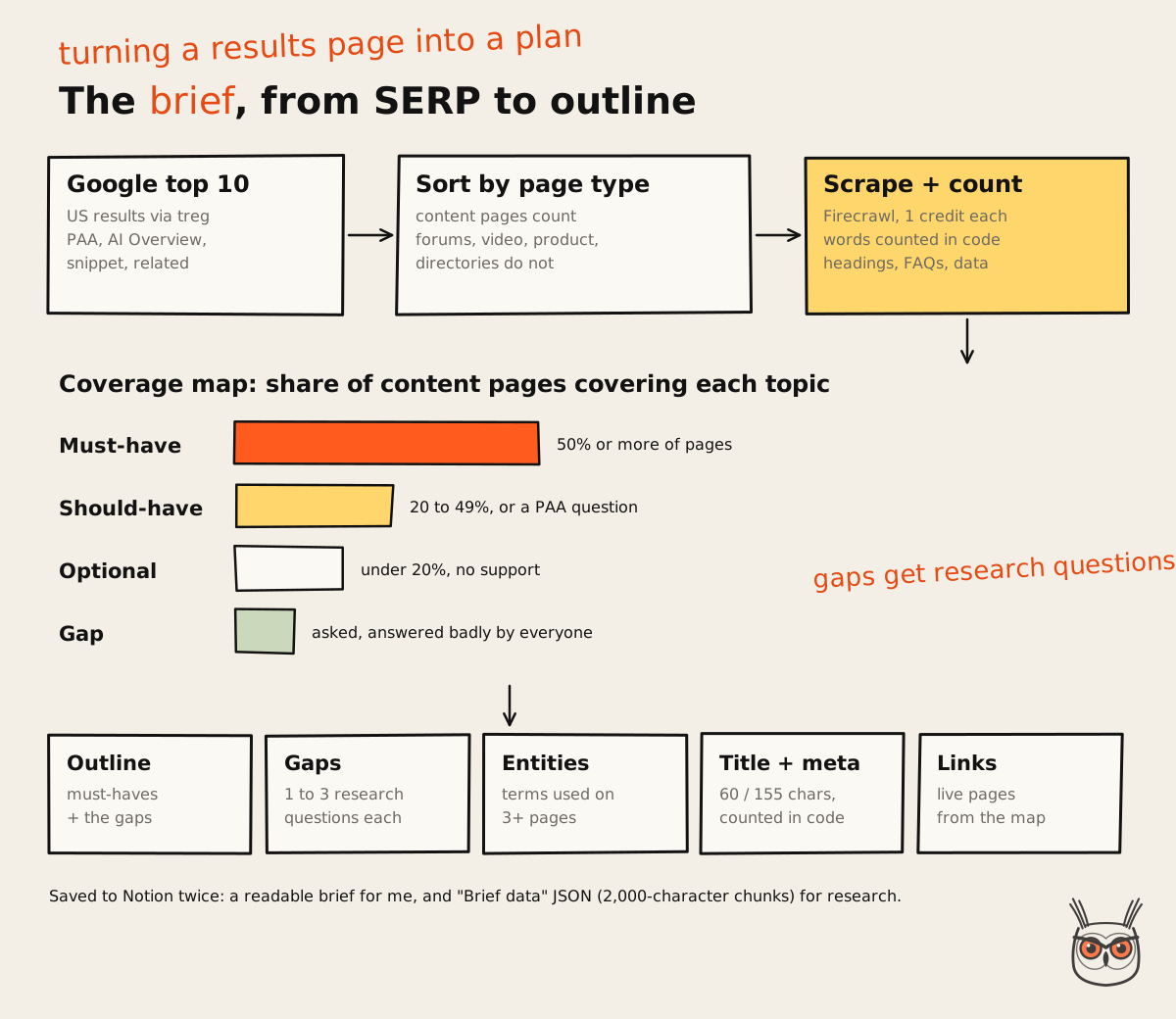
- Read the input. Keyword, child keywords and link plan from the topical map, plus whether this is a new page or a refresh.
- Collect the results. The Google top 10 for the US, with People Also Ask, related searches, the AI Overview and the featured snippet.
- Scrape the pages. Every content page in the top 10, with word counts done in code, not guessed.
- Map the coverage. Which topics most pages cover, which some cover, and which nobody covers well.
- Plan the page. Outline, gaps with research questions, entities, length, title, meta, slug and links.
- Save to Notion. A readable brief, plus the JSON for the next step.
Source: growthvibes.ai
Not every result counts
The brief sorts every result by page type before it counts anything. Articles, guides, tutorials and listicles are content pages. Forums, videos, product pages, directories, service pages and docs aren't. They still tell you about intent (a results page full of product pages is a warning), but they never count towards the word count average. Averaging a 300-word pricing page with a 4,000-word guide gives you a number that describes nothing.
Word counts, counted in code
A model asked "how long are these pages?" will give you a confident, round, wrong number. So the brief calls a script that scrapes every content page with Firecrawl, strips navigation and footers, counts the words in code and writes a short summary: word counts, the average and median, the heading tree, FAQ questions, tables and images, and sentences with data points in them. The model reads the summary, not seven full articles. Cheaper, faster and correct.
There's no minimum word count any more, by the way. There used to be a floor of 2,500 words. I removed it on 2 November. The target is the average of the real content pages, and the writer goes past it whenever the topic needs to.
The coverage map
This is the core of the brief. Every heading on every ranking page gets normalised into topics ("What is X", "X explained" and "X definition" are one topic). Then:
| Tier | Rule | What the writer does with it |
|---|---|---|
| Must-have | Covered by 50% or more of the pages | Always in the outline |
| Should-have | 20 to 49%, or matches a People Also Ask question or a secondary keyword | Usually in |
| Optional | Under 20%, no other support | Left out unless it serves the core intent |
| Gap | Asked by searchers, answered badly by everyone | At least one or two go in, each with research questions |
The gaps are the point. A brief that only reshuffles the top 10 has failed. Each gap comes with one to three specific research questions for the next step, so research isn't a vague "find more stuff".
Entities, keywords, titles and links
- Entities: terms that show up on three or more ranking pages are listed for the writer to use naturally. Plus the central phrase from the topical map, which has to appear in the H1, the intro, a heading, the closing and the alt text of key images.
- Supporting keywords: the brief looks up what the top competitor pages rank for and keeps the relevant ones. Keywords that belong to another page in the map are listed separately and left alone, so two of my articles never compete with each other.
- Title and meta: the title is 50 to 60 characters and the meta description 140 to 155, counted in code, rewritten until they fit. Models can't count characters. They'll tell you 58 when it's 71, with a straight face.
- Links: only from the map's plan, and only to pages that are live. Unfinished placeholder pages never get linked.
The brief also decides the article type: listicle, tool review, comparison, tutorial, service roundup or explainer. That choice decides the outline shape, what the research step screenshots and which writer skill runs later.
The brief skill itself is free in my AI Labs: the SEO content brief page has the full skill, the script that counts the words and what you need to run it.
Source: growthvibes.ai
Step 6: Firecrawl, the hands of the system
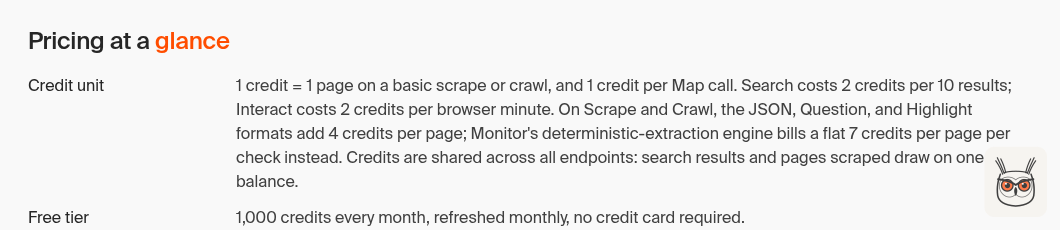
Firecrawl is how the system touches the web: it searches Google, scrapes pages into clean Markdown and takes full-page screenshots. Every step that needs a page uses it. That makes it the main variable cost, so it has a budget like everything else that costs money.
I measured the costs on 2 November:
| Action | Credits | Used for |
|---|---|---|
| Search | 2 | Finding sources, time-filtered news, fallback SERPs |
| Scrape (Markdown) | 1 | Competitor pages, docs, pricing pages, studies |
| Full-page screenshot | 1 | Every screenshot in an article |
| Scrape with a built-in "query" | 5 | Never. Read the Markdown yourself |
That last row is a lesson with a price tag. A scrape that asks Firecrawl to answer a question about the page costs five times more than a plain scrape that the model then reads itself. The research skill now says so in capital letters.
Source: Firecrawl pricing, 3 Nov 2026
Credit caps by article type
The research step gets a credit cap that depends on what kind of article it is, because a listicle of ten tools needs far more pages than an explainer:
| Article type | Cap | Screenshots |
|---|---|---|
| Explainer (default) | 30 | Up to 3, only where they prove a point |
| Tutorial | 25 + 2 per step, max 60 | One per key step, up to 10 |
| Listicle, service roundup | 20 + 5 per tool, max 80 | 2 to 3 per tool |
| Tool review | 45 | 4 to 6 |
| Comparison | 20 + 5 per tool, max 50 | Same page types for each tool |
Every call is counted. When the cap is hit, the step stops with the status "budget exhausted" and lists what it didn't get to. A budget the system can't break is the difference between an automation and an invoice surprise.
Firecrawl doesn't scrape Reddit or LinkedIn, which matters for the next step. That's where the second scraper comes in.
Step 7: information gain, or recent first and then the fact-check
The research step is where the article earns the right to exist: it finds what the top 10 misses, pulls in what changed in the last 30 days, then fact-checks all of it from five different angles before the writer sees a word. If the brief is the plan, this is the reporting, and it's the part of AI SEO that most tools skip. It's the heaviest step, the slowest, and the one I'd keep if I had to throw away everything else.
Fair warning on the term. "Information gain" gets thrown around a lot in SEO, usually with a confident claim about what Google rewards. I'm not making that claim. I use it as a working rule for us, not as Google's definition: an article should contain things that are new and things that hold up, and it should be obvious which is which.
Where the method comes from
Two sources shaped this step, and I want to credit them properly.
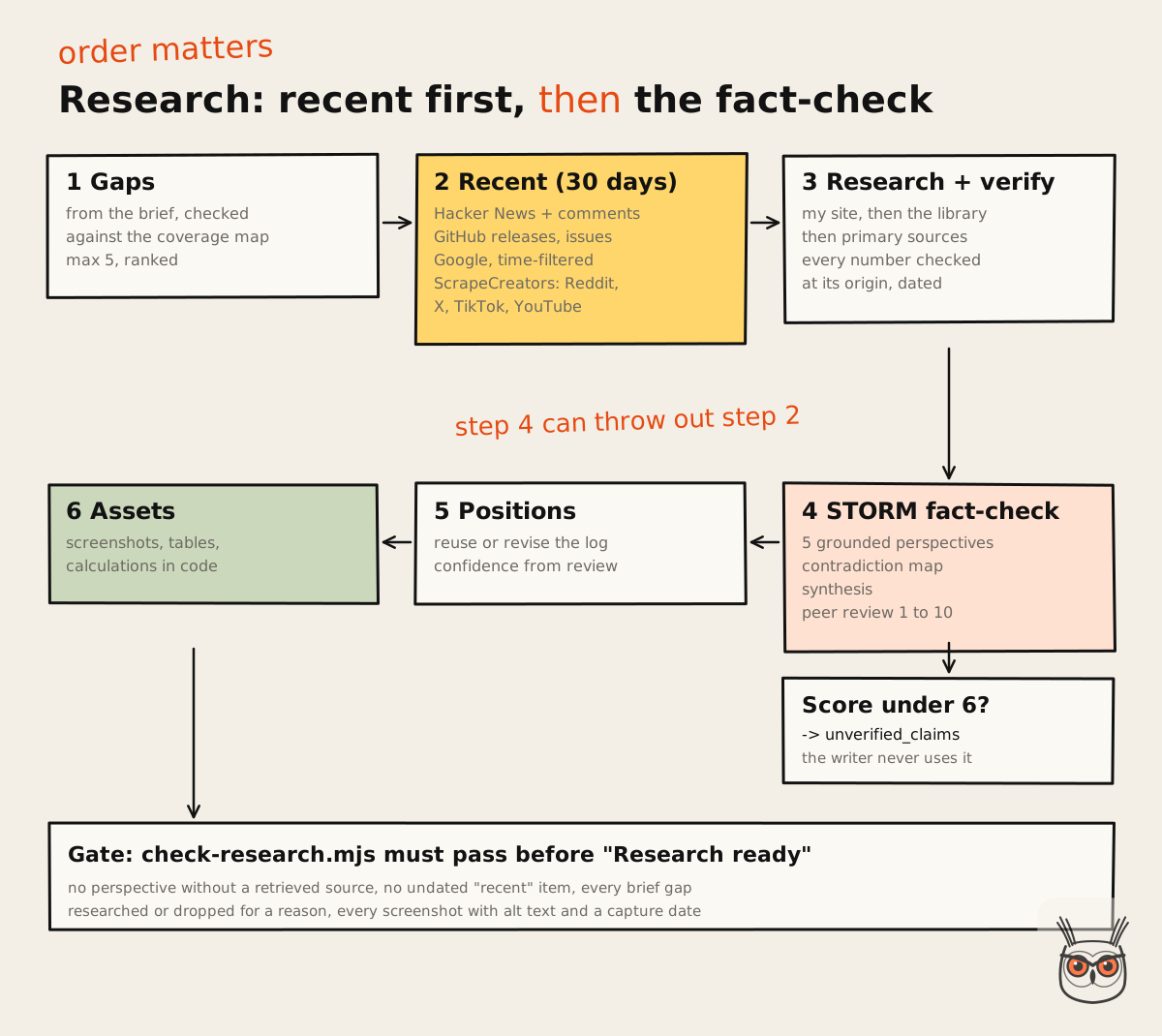
The framing came from a video by WordsAtScale on making every article pass information gain. Their simplification is two things: recent, and fact-checked from different angles. In their workflow, a recency research step runs first, a STORM-style fact-check runs on its output, and only then does the article get written. The order is the insight: the fact-check exists to check what the recency step found. (The second half of the video is a pitch for their paid community. You can skip that part.)
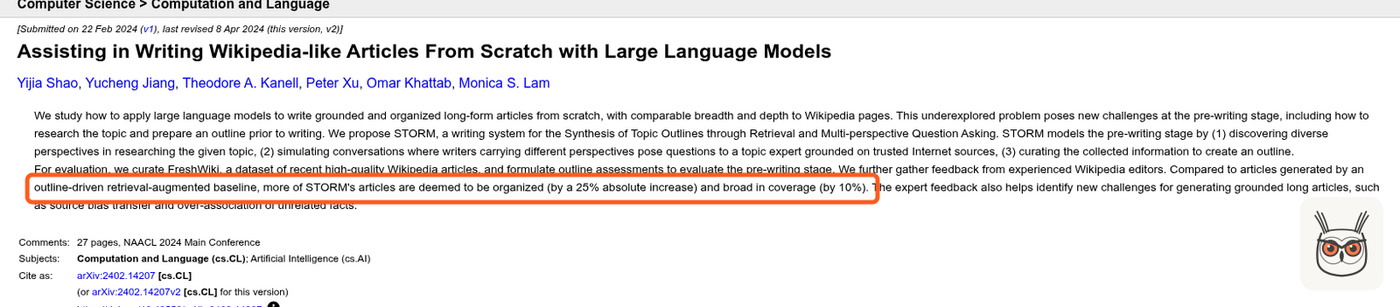
The fact-check comes from STORM, a research project from Stanford. The paper, Assisting in Writing Wikipedia-like Articles From Scratch with Large Language Models by Shao and colleagues, was published at NAACL 2024. STORM handles the pre-writing stage: it discovers different perspectives on a topic, has simulated writers with those perspectives ask questions to an expert grounded in internet sources, and builds an outline from what comes back. Compared with a simpler outline-plus-retrieval baseline, experienced Wikipedia editors rated more of STORM's articles as organized (a 25% absolute increase) and broad in coverage (10%).
Source: Shao et al., arXiv, 3 Nov 2026
The prompt version I adapted came from an article by Nav Toor that turned the method into four prompts: a multi-perspective scan, a contradiction map, a synthesis and a peer review. That's the version in my system, with one big change I'll get to.
Source: growthvibes.ai
The chain, in order
Gaps
Check the brief's gaps against what competitors actually cover, and look for more: missing, shallow, outdated, contradictory, unsourced.
Recent
Find what was said and shipped in the last 30 days, with dates.
Research and verify
Answer each gap from the best sources, and check every number at its origin.
STORM fact-check
Five perspectives, a contradiction map, a synthesis and a peer review over everything found.
Positions
Take the side the evidence supports, consistent with earlier articles.
Assets
Screenshots, tables, calculations and checklists nobody else built.
Gaps: five kinds of "missing"
The brief proposes gaps. Research confirms or drops them (a gap that two or more pages actually cover gets dropped, with the reason logged) and looks for more of these kinds:
- Missing: questions the reader would ask that no page answers.
- Shallow: topics mentioned in passing but never explained.
- Outdated: prices, features or dates that look stale. The current value gets checked at the source.
- Contradictions: two ranking pages that disagree. Research finds out which is right.
- Unbacked claims: numbers with no source, or a source that doesn't say what's claimed. (You'd be amazed how many "studies show" links point to a page that shows nothing of the sort.)
It keeps the top five, ranked by how much they'd help the reader.
Recent: what changed in the last 30 days
There's an open-source skill called last30days that researches what people said about a topic in the last 30 days across a long list of platforms, scored by engagement and freshness. I liked the idea a lot and didn't install it. I rebuilt a smaller version as one script, because the runner needs a single command with a predictable JSON output, on Windows, with no surprises.
Source: last30days-skill on GitHub, 3 Nov 2026
The script covers:
- Hacker News, free: stories with points, plus the top comments on the most discussed ones. Comments are gold, because they're real questions in real people's words, which feed headings and FAQs.
- GitHub, free: releases and the most discussed new issues for named repos. Perfect for tools like n8n or Claude Code, where the changelog is the news.
- Google, filtered to the period, through Firecrawl search, 2 credits.
- Reddit, X, TikTok and YouTube, through ScrapeCreators, when the key is set.
It doesn't cover Instagram or LinkedIn, and every Research page says so in plain words. I'd rather the article admits its blind spot than pretends it read everything.
A rule I'm strict about: an item with no date is not recent. Google's time filter is loose, and plenty of results come back without a date in the snippet. Those get flagged, and the research step either finds the date on the page (1 credit) or drops the item. "Recent" with no date is just "something I found".
ScrapeCreators: the social layer
ScrapeCreators is an API for public social media data: profiles, posts, comments, transcripts and ads across a long list of platforms, through one key. For this system it does one job: find what people on Reddit, X, TikTok and YouTube said about the topic recently, and pull the top comments for the real questions and vocabulary.
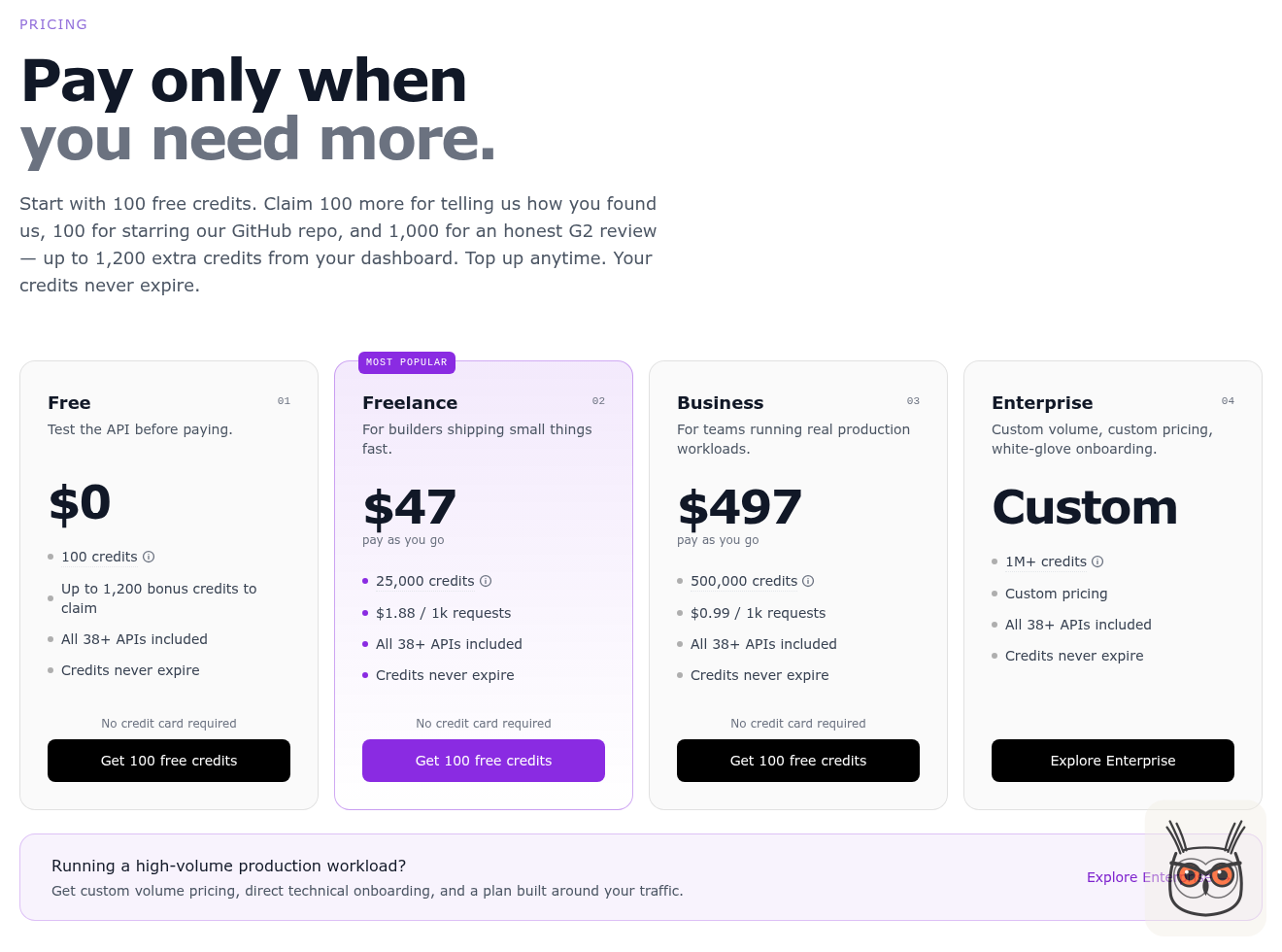
When I checked their pricing page on 3 November 2026, a new account started with 100 free credits (plus bonus credits you can claim), and most endpoints cost one credit per request. Paid credits are sold in packs, starting at $47 for 25,000, and they don't expire. The video that introduced me to the approach mentioned a bigger free allowance, so plans clearly change. Check the page before you budget.
Source: ScrapeCreators pricing, 3 Nov 2026
I give the research step about 20 ScrapeCreators credits per article. Reddit search is sorted by relevance, not recency, because "newest" on Reddit mostly means "posted four minutes ago by someone with no idea". X results come back flagged as not time-filtered, so the step treats their dates with suspicion.
Research and verify: the source ladder
For each gap, the step runs one search and scrapes two or three sources, or goes straight to the obvious one (a pricing page, a changelog, a study). Sources are used in this order:
- My own published work: live posts, case studies and service pages on the site. Unfinished placeholder pages are never used as evidence.
- The content library: the newsletters, talks and notes from Step 4. Free, and often the best stuff.
- Primary sources: official docs, pricing pages, changelogs, original studies, government data.
- Practitioner sources: GitHub issues, Hacker News, product communities.
- Adjacent articles, for angles only.
Then verification, which is tedious and non-negotiable:
- Every fact gets a source URL and a short supporting excerpt.
- Every number is checked against its source. Any calculation is done in code from sourced inputs, never in the model's head.
- A claim that cites another source is checked at the original. If the original can't be reached, the claim is marked unverified and left out.
- When sources disagree, both are kept, with which one is more current or more primary.
- Prices and anything else that changes get a date.
The STORM fact-check, grounded
Here's the change I made to the prompt version. In a single prompt, "five perspectives" means the model role-playing five people, which is creative writing, not evidence. So in my version, a perspective only exists if it's built on sources the research actually retrieved. No retrieved source, no perspective. If fewer than three perspectives can be sourced, the whole research pack is marked low confidence.
The five perspectives:
| Perspective | Who it stands for | What it looks for |
|---|---|---|
| Practitioner | People who use the thing | What works day to day, what's annoying |
| Academic | Studies and primary data | What's actually been measured |
| Skeptic | Complaints, failures, bad reviews | Where it breaks, who regrets it |
| Economist | Cost, pricing models, incentives | Who pays, who profits, what it really costs |
| Historian | What changed and why | Versions, pivots, what used to be true |
Then three more passes over everything found so far:
- Contradiction map: where perspectives or sources clash, which side has the stronger evidence, the one question that would settle the biggest clash, what everyone agrees on (safe to state) and what nobody addressed (the blind spots, which are the best candidates for a new angle).
- Synthesis: a short summary, the five findings ranked by reliability, a connection nobody else has drawn, one practical insight, one open question.
- Peer review: every finding gets a confidence score from 1 to 10 with a reason, plus the weakest link, a bias check, the missing perspective and an overall grade from A to F.
And here's the rule that makes it a fact-check and not decoration: anything scored below 6 goes on the unverified list, and the writer is told never to use it. The fact-check can overrule the recent step. A juicy recent claim that fails the check gets dropped. That's the whole point of the order.
The gate
Before the research step can mark itself ready, it saves its output as a JSON file and runs a checker script. The checker fails the run if, for example:
- a perspective has no retrieved source behind it,
- a "recent" item has no date,
- a finding scored under 6 isn't on the unverified list,
- a screenshot file is missing, over 5 MB, or has no alt text or capture date,
- a gap or FAQ question from the brief was dropped "for budget",
- in a listicle or review, a tool has no screenshots and no reason why, or only one kind of screenshot (pricing pages only is lazy).
Only a passing check allows the status "Research ready". A model can talk itself into thinking it did a thorough job. A script can't be talked into anything. The research skill and its three scripts are shared as information gain research.
A model can talk itself into thinking it did a thorough job. A script can't be talked into anything.
Step 8: positions and the experience bank
Two small Notion databases give the articles a spine: a log of the positions the site takes, and a bank of my real stories. Without them, every article would be a well-researched shrug. With them, the site says the same thing about the same topic every time, and the first-hand parts come from my actual work.
The positions log
For each gap and each important contradiction, the research step takes a position: one clear sentence, the evidence behind it, the strongest counterpoint and why the position still holds, and a confidence level taken straight from the peer review score (8 and up is High, 6 to 7 is Medium, below 6 isn't a position at all).
Before creating one, it checks the log:
- Same as an active position: reuse it and link it. No duplicates.
- Contradicts an active position: only change it if the new evidence is stronger and more current. The old one is marked Revised with a note on why, and the new one is created.
- New: add it.
This matters more than it sounds. Without it, article 12 can cheerfully contradict article 4, and a reader who reads both stops trusting either. A site with opinions needs a memory of its opinions. Medium and Low confidence positions are written with hedged wording, so the confidence carries through to the reader.
The experience bank
This one is simple: rows of my real experiences, a few lines each, tagged by topic and type (mistake, decision, experiment, lesson, result). A pricing page I rebuilt, a test that didn't work, a trade-off I had to make. The writer searches it for every section and uses a real story wherever one fits, then writes the article's URL back into the row so the same story doesn't get used in every article.
It also holds tool notes: what I actually did with a named tool, and when. Those control what the writer can claim about specific products. If there's no note and it's not a tool I use every day, the article talks about the tool the way a well-read person does: what the pricing page shows, what users and critics say. It never claims hands-on testing that didn't happen.
The bank needs feeding, and it's the one part of the system that only I can fill. I add to it as I go. Which brings up the bigger point: the more of yourself you put into the inputs, the less the output sounds like everyone else's.
Step 9: the AI writing agent puts the voice first and the rules second
The writer turns the brief and the research into a finished article in my voice and publishes it to the CMS, one section at a time. It's the step everyone assumes is the whole of AI SEO automation. It's actually the most constrained step: by the time it runs, the topic, the outline, the facts, the positions and the visuals are mostly decided. Its job is to make all of that readable, and worth reading.
It runs on the strongest model in the pipeline (Opus), because writing is where quality shows. The brief and research steps run on Sonnet.
Voice comes first, literally
The writer skill opens with a section called "the writing comes before the rules", and it means it. Before writing anything, and again before every section, it reads a voice sample: a long piece of my own writing, published elsewhere, that shows how I move through an argument. Where the jokes land, how bluntly I take a side, how I open and close a point. The skill is told to imitate how it moves and never copy its sentences.
The order of priority, when rules collide, is written down: 1. the voice, 2. the layout, 3. the information gain rules, 4. everything else. Without that order, a model will satisfy every checklist item and hand you something technically perfect and completely dead.
The voice rules are specific, because vague ones don't work:
- First person, talking to one reader. Contractions, "you", the odd rhetorical question.
- Humour in asides and deadpan arithmetic, never in forced jokes.
- Headings that are claims you could argue with, not topic labels.
- Concede, then push. Answer the objection before the reader raises it.
- Specific numbers wherever one exists. Never "significantly".
- A short line on its own after a long paragraph, for rhythm.
- Banned words, the ones I mock in real life: "unlock", "supercharge", "game-changer", "at scale" and friends. And no em dashes.
- Fresh phrasing every article. The writer reads how my last two articles open and avoids their stock phrases.
That last one came from feedback. After the first live article I noticed one experience phrase showing up far too often, so the skill now says to use it rarely and offers alternatives. The writer gets better because I read what it writes and turn my reactions into rules. That loop is the real product.
Section by section, with an evidence pass
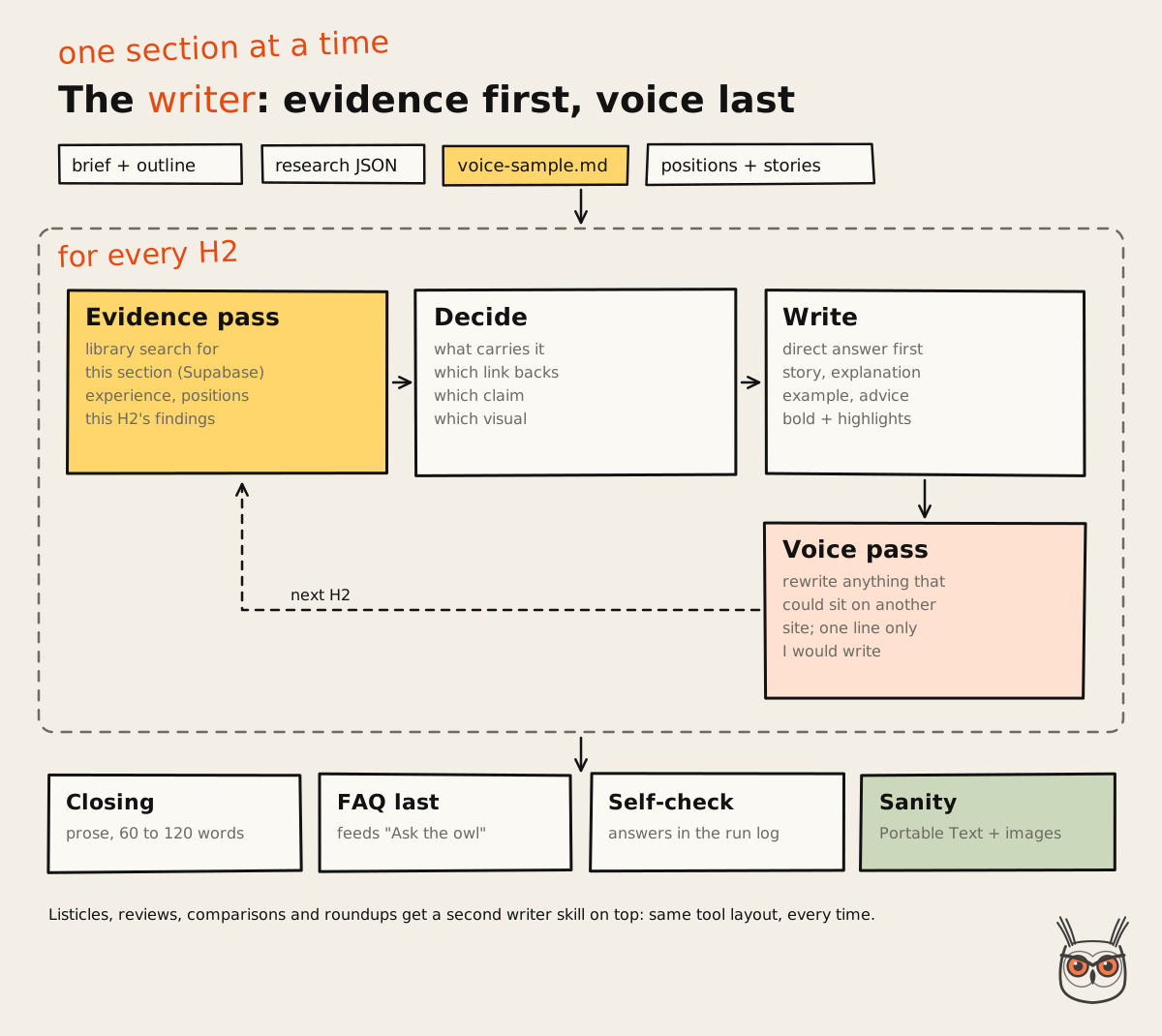
The writer never loads the whole research pack at once. For every H2, it runs an evidence pass first:
- Library. Search the content library for this section's own question, and the image index for a visual.
- Experience. Check the experience bank for a real story that fits this section.
- Positions. Check the positions log for a stance that applies.
- Research. Load only this section's findings, recent items, contradictions and screenshots.
- Decide. Pick what carries the section, which link backs which claim, and which visual proves the point.
Source: growthvibes.ai
Then it writes the section, then it does a voice pass: any sentence that could sit unchanged in somebody else's article gets rewritten. Each section needs at least one thing only I would write.
The default shape of a section is direct answer, then an observation or story, then the explanation, an example and a recommendation. Every H2 in an SEO article opens with a 40 to 60 word direct answer to the question in its heading, so an AI answer engine can lift it whole. (That habit is most of what AEO actually asks of you, which I went into in AEO vs SEO.)
The STORM material shows up on the page
The research perspectives aren't just a background check. The writer has to use them:
- At least three of the five perspectives get heard, and named in plain words: "what users say", "the skeptic's take", "the cost view".
- Every contradiction becomes a passage: who disagrees, which side the evidence supports, and the side I take.
- At least one section rests on a blind spot or a connection nobody else drew, and says so.
- Recent facts carry their date in the sentence.
- The TL;DR follows the ranked findings, most reliable first.
There's also a rule I like a lot: attribution is rare. A handful of "X says" in a whole article, at most. Ideas from the research become my points in my words, and links back up the claims. An article that reads like a summary of other people's opinions has no authority, however well sourced it is.
Two writer skills, picked by article type
Listicles, tool reviews, comparisons and service roundups have their own writer skill that sits on top of the main one. It replaces only the parts that differ: every tool gets a numbered heading like "1. Tool: best for X", a screenshot straight under the heading, a 40 to 60 word verdict with the tool's name linked to its site, a bulleted breakdown with bold labels (best for, dated pricing, where it breaks, skip it if), the named perspectives, three stat cards and a short opinion. The runner picks which writer to call from the article type in the research file. Both are shared: the SEO article writer and the review article writer.
Same tool, same layout, every time, so a reader can scan ten tools and compare them. That's the difference between a listicle and a list.
Tying every article back to the business
Every article, whatever it's about, has a passage that looks at the subject through the core topics: AI automation, marketing automation, AI agents, SEO, AEO. Not forced. For a vibe coding tools list, that's a section on which tool is the best engine for marketing automation. For an SEO tutorial, it's a section on automating that step with an AI agent. Then the closing ties the article to the work I do, in one honest line, with a link to a core service page.
That's how an article about something adjacent still tells Google, and the reader, what the site is about. It's also why this article keeps mentioning AI automation for marketing teams. Guilty.
The self-check
At the end of every draft, the writer answers a list of questions in the run log. A few of them:
- For each H2: what does it say that the top 10 doesn't? If nothing, cut it or merge it.
- Is every number dated and sourced?
- Does the article state at least one contradiction and take a side?
- Are the internal links spread out, with no paragraph carrying more than one?
- Count the "X says" attributions. More than about five is too many.
- Does every visual prove something, or is anything decoration?
The answers go in the log on the brief page, next to the angle, the word count, the links used, the visuals and their sources, and any assumptions. I read that log before I read the article.
The closing and the FAQ
Two layout rules, because they come up in every article. The article ends with a short closing in plain prose, 60 to 120 words, no bullet points and no heading like "Conclusion". It closes the loop on something from the intro and ends on a dry line or a next step. Then the FAQ block, always last.
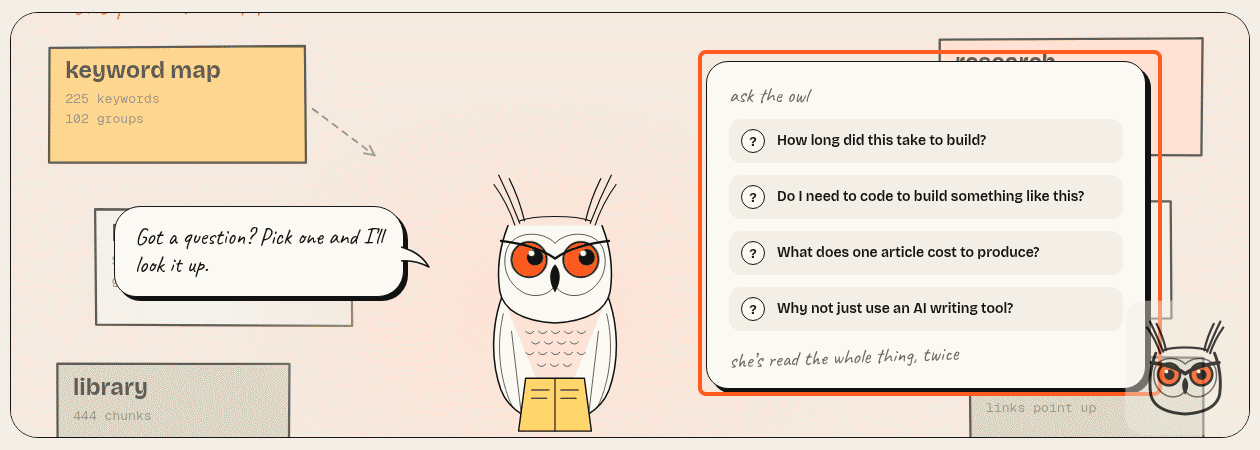
The FAQ does double duty on this site. The first four questions also appear in the article's header, in a little "Ask the owl" card: click a question and the owl answers in a speech bubble with the first paragraph of the answer. So the writer is told to put the four questions readers most want answered first, and to make each answer's first paragraph stand on its own in 20 to 45 words.
Source: growthvibes.ai
Step 10: images, screenshots and the elements on the page
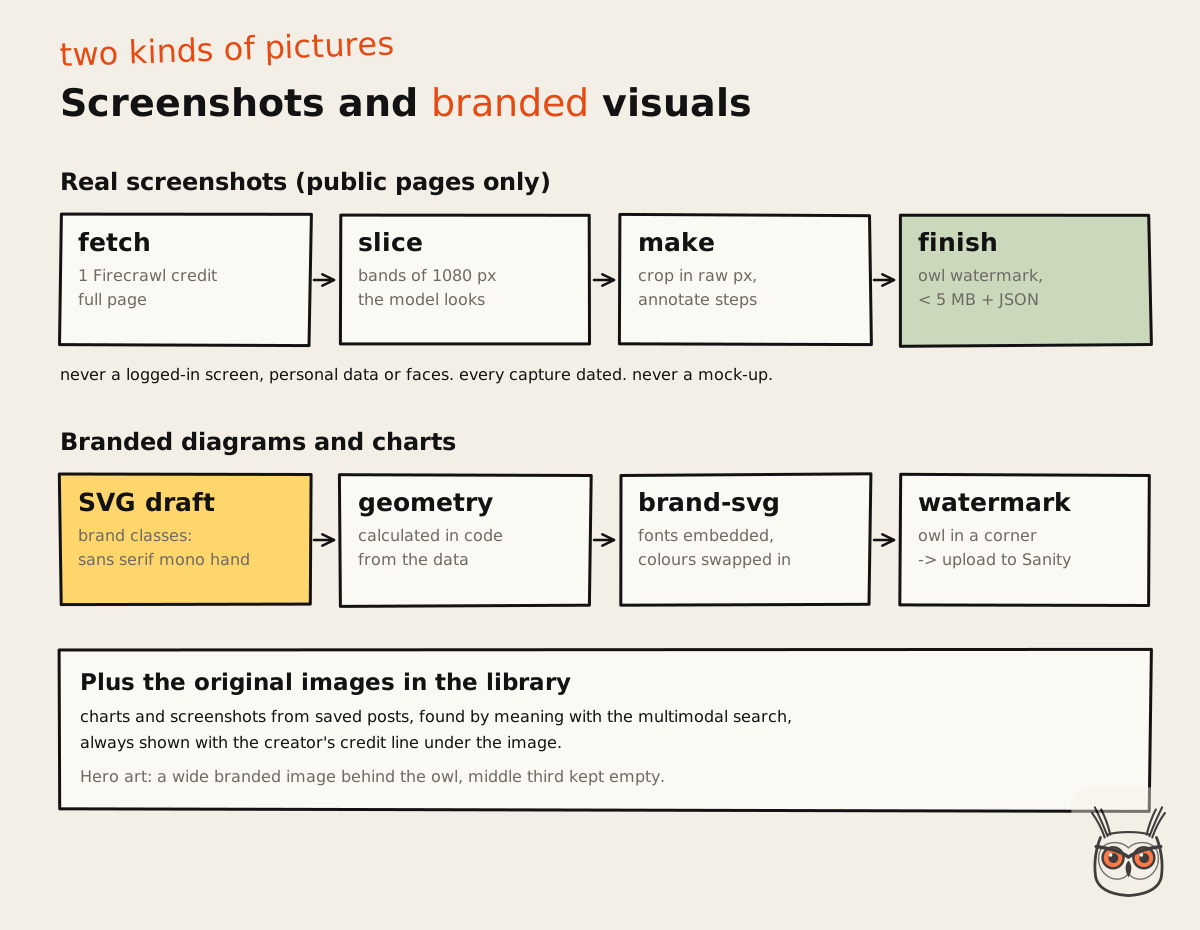
Every article gets three kinds of visuals: real screenshots captured from public pages, original images from saved sources with their credit, and branded diagrams and charts that the system builds itself. Plus a set of page elements, like the steps, stat cards and before-and-after cards you've seen in this article, which break the page up and carry structure that plain paragraphs can't.
Source: growthvibes.ai
Screenshots: one fetch, many crops
Screenshots are made by a small script in three moves:
# 1. one full-page capture of a public page (1 Firecrawl credit)
node scripts/visuals/capture.mjs fetch https://example.com/pricing work/my-article/assets pricing

# 2. look at it in bands of 1080 px, to find what's worth cropping
node scripts/visuals/capture.mjs slice work/my-article/assets/pricing.raw.png 1

# 3. crop, annotate, resize, watermark, keep it under 5 MB
node scripts/visuals/capture.mjs make work/my-article/assets/pricing.raw.png \
  work/my-article/assets/pricing-plans.png --crop 0,1200,1600,900 \
  --annotate steps.json --alt "Pricing plans, with the team plan highlighted"
The model looks at each band like a person would (it can read images), decides what's worth showing, and gives crop coordinates. There's one trap the skill spells out in bold: the coordinates have to be in the original image's pixels, not in whatever size a preview happens to show. Get that wrong and you get a beautifully framed crop of the wrong part of the page. So the script prints the real pixel range of every band, and the crops use those numbers.
For tutorials, an annotation file adds boxes, numbered circles and arrows, so the reader sees exactly where to click. Each finished image gets a small JSON file next to it with the source URL, capture date and alt text.
The rules are strict: public pages only. Never a logged-in screen, never personal data, never faces. The script refuses local and account-looking URLs. Every capture is dated, because interfaces change. And a page that blocks capture gets a note in the log and a different page, never a mock-up. A generated image is never passed off as a real screenshot.
Original images from the library
When a saved article has a chart that makes the point, that chart is often better than anything I'd make. The library stores those images, described and embedded, so the writer can search by what the image should show and get the original back with its credit line, which the site prints under the image as "Source: ...".
Branded diagrams, built in code
When an article has a process, a framework, a comparison or numbers worth showing, the writer builds its own visual. Every diagram in this article was made that way. The process:
- Write an SVG draft using brand classes instead of colours and fonts: `sans`, `serif`, `mono` and `hand` for the four brand typefaces, and fill and stroke classes for paper, ink, orange, butter and sage.
- Calculate every chart's geometry in code from the data. Bar heights, point positions, axis ticks. Never placed by eye, because a model eyeballing a bar chart will happily draw 30% taller than 40%.
- Run the brand script, which swaps the classes for real colours and embeds the fonts inside the file, so the image looks identical on the site, in the CMS and anywhere it gets shared.
- Add the owl: a second script puts a small owl watermark in a corner. Small, low contrast, and never on top of the part that matters.
Every article also gets a piece of hero art: a wide branded image behind the owl at the top of the page, with the middle third kept quiet because that's where the owl and the "Ask the owl" card sit.
The page elements
The CMS has a set of custom blocks the writer can use, and the rule is the same for all of them: use one where it helps, never to tick a box.
| Element | What it's for |
|---|---|
| Owl tip | A practical shortcut or warning. One or two per article |
| Steps | A real sequence: numbered circles joined by a dashed line |
| Stat cards | Two to four big numbers, sourced |
| Before and after | A genuine contrast, the old way crossed out |
| Sticky notes | Pains or objections a reader will recognise |
| Pull quote | One line worth pausing on |
| Table, code | Comparisons, options, prompts, commands |
| Lead form | One question that points at the matching service |
| FAQ | Always last, and it feeds "Ask the owl" |
Article bodies are stored as Portable Text, structured JSON instead of HTML, so each of those blocks is a typed object the site knows how to render. That's what lets an automation write rich layouts without ever touching the site's code. The field names are a contract: there's a document listing every block, its exact shape and when to use it, and the writer reads it.
Source: growthvibes.ai
"Can it make the article look less like a wall of text?"
"Where did that number come from?"
"Does it know which tools you actually use?"
"Will it link to pages that aren't finished yet?"
All four of those were questions I asked myself while building it. Every one of them is now a rule somewhere in a skill.
Step 11: internal links that point the right way
Internal linking is where the topical map turns into actual pages pointing at each other, and the system handles it twice: once while writing, and once after publishing. The direction comes from the map: articles link up to their core page and sideways to related live articles, and core pages don't link down.
While writing
The writer adds at least five internal links, spread through the article:
- The core service page for the article's category, about three times: once early, once in the middle, once in the closing, each with a different anchor.
- The homepage at least once.
- Related live articles, case studies or tools, only where they really help the sentence.
And a few anti-spam rules, because link stuffing is the classic automation smell: at most one internal link in a paragraph, at most two in any 400 words, no more than three in the intro and first section together, and never a paragraph written just to carry links. Only live pages, never placeholders. An unfinished page that gets linked teaches Google your site is half-built, which is a terrible lesson to teach the thing that ranks you.
After publishing
A new article starts with zero links pointing at it, which is one of the oldest problems in SEO and one of the easiest to hand to an SEO agent. So the last step of every run is a separate skill that looks at the site's live pages (articles, case studies, the relevant service page), finds the ones that should link to the new article, finds the natural spot in each, and adds the link, or one sentence carrying it when there's no natural spot.
At least three and at most six links per new article. It prefers links that flow towards the core, and doesn't add links from core pages down to articles by default. It started out saving these edits as drafts for my approval. Since 2 November it publishes them itself. The edit is one link or one sentence, which is small enough to trust and easy to spot and undo if it's wrong. An approval step where nobody ever changes anything is theatre. This one is shared too, as the inbound links skill.
Step 12: the runner that turns skills into an AI agent pipeline
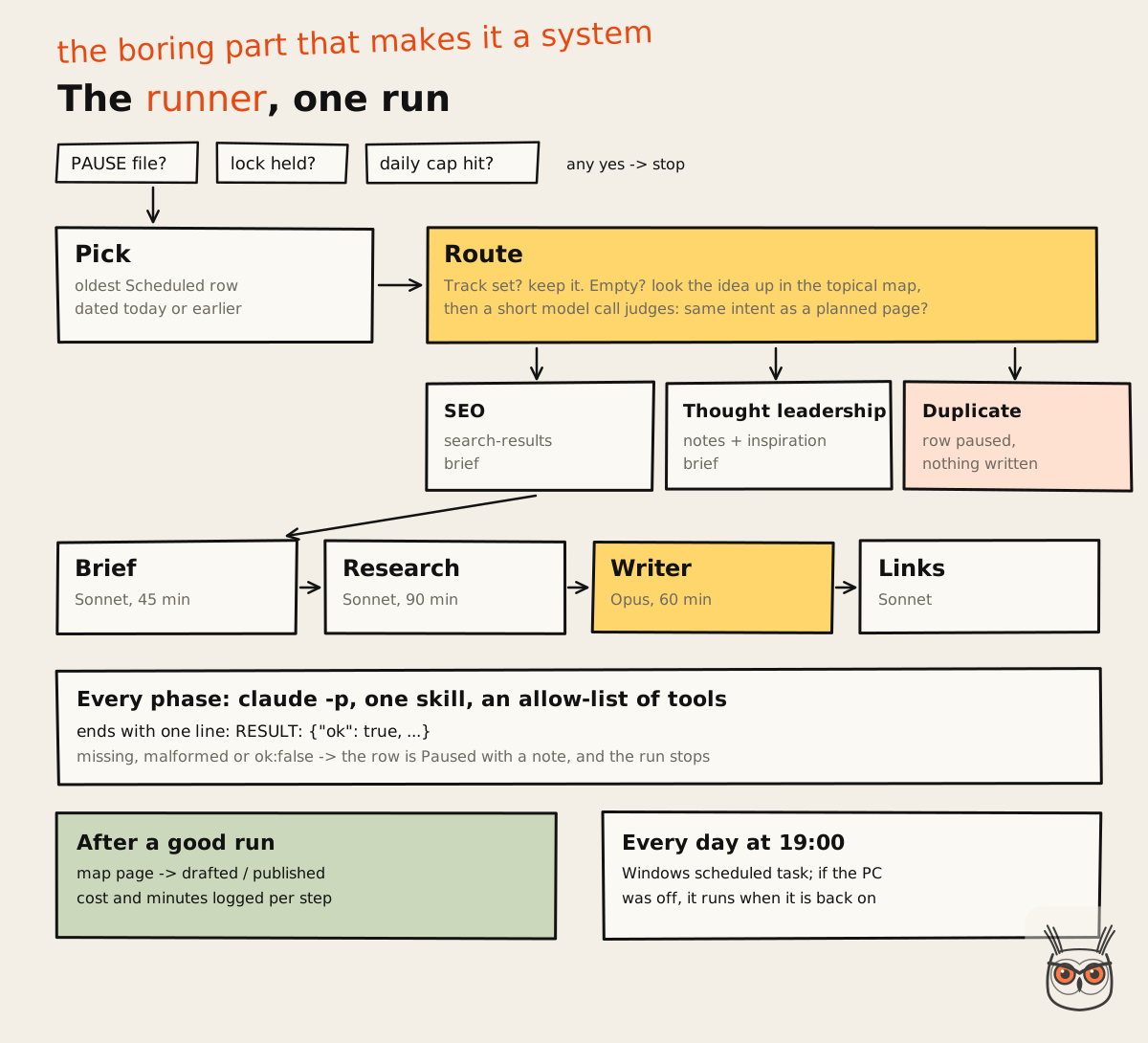
The runner is a single Node.js script that picks the next scheduled article, routes it to the right brief, runs each step as its own headless Claude Code call, and stops cleanly when anything fails. It's the least clever part of the system and the one that makes it a system. Without it, I'd have a very good set of skills and a to-do list.
How a run works
Guard
Check the stop file, the lock and the daily cap. Any of them says no, the run ends.
Pick
Find the oldest Scheduled row with a publish date of today or earlier.
Route
Decide the track: SEO from the map, or thought leadership, or a duplicate.
Run the steps
Brief, research, writer, inbound links: one headless call each, one skill each.
Close
Move the topical map forward, write the log, release the lock.
Source: growthvibes.ai
Each step is called with Claude Code's non-interactive mode, `claude -p`, with JSON output, a specific model and a timeout. Each one ends its answer with a single line the runner can parse:
RESULT: {"ok": true, "brief": "<notion url>", "summary": "Brief ready, target 3,810 words"}That one line is the whole interface between steps. If it's missing, malformed or says `ok: false`, the run fails. It's the pattern behind every AI agent workflow I'd trust unattended: small steps, one contract between them, and a hard stop when the contract breaks.
The n8n agent I built to write and publish paid ads runs on the same idea, with a check behind every rule in its prompt.
Guardrails, because it runs while I'm not looking
- A tool allow-list. Each headless call can only use the tools the runner names: files, the shell (which also runs the treg CLI for search data), and the Notion, Sanity, Supabase and Firecrawl connectors. Destructive shell commands are explicitly blocked: no deleting files, no git, no shutting anything down.
- One article per run, and a daily cap.
- A lock file so two runs can't overlap, with a three-hour timeout for stale locks.
- A stop file. Create an empty file called `PAUSE` and everything stops. The simplest kill switch I could think of.
- Fail and pause. Any failure sets the calendar row to Paused, with a note saying which step failed and why, and the run stops. Nothing half-finished gets published.
- Per-step timeouts: 45 minutes by default, 90 for research, 60 for the writer.
- Resume from any step. After a fix, I can rerun just research and the writer on an existing brief instead of paying for the brief again.
- A dry-run mode that shows what would run, and which track it would take, without calling a model or changing anything.
Scheduling
A Windows scheduled task runs the runner every day at 19:00. If the PC was off, it runs as soon as it's back on. It's not glamorous. It works, it costs nothing, and moving it to a server later is a small job.
What a run actually costs
The runner logs the API-equivalent cost of every step. The complete runs logged so far cost between about $9.50 and $12 each, and the writer accounts for most of it: roughly $8.50 to $10.70 per article, on Opus. The brief and research steps on Sonnet come in at about one to three dollars between them, and the inbound link step at well under a dollar. A full run takes about 30 to 40 minutes, mostly writing.
On top of that come the per-call costs of the outside services: Firecrawl credits inside the caps above, around 20 ScrapeCreators credits, and Voyage embeddings, which at this volume are close to free.
Two of the runs on 2 November failed, both on the same article. Both times the runner did exactly what it's built to do: it paused the row, wrote down which step failed and why, and stopped. After a fix, a later run went through end to end. Failures you can see are cheap. The expensive ones are the runs that succeed at the wrong thing.
What broke, what changed and what I'd do differently
Most of what I learned building this came from things going wrong, so here's the honest list. None of it is dramatic. That's the point: in a system like this, the failures are rarely explosions. They're quiet drifts that produce plausible, slightly wrong output, and you only catch them if you're reading.
The mistakes, in the order they happened
- Edits from the wrong place. On 30 October, skill changes got pushed from the wrong document and had to be reverted the same day. The fix wasn't technical. It was a rule: one session owns content and skills, another owns the website.
- The voice drifted towards a template. After reading the first live article, I asked for one overused experience phrase to be used rarely, for a proper prose closing before the FAQ, and for the FAQ to always come last. A closing written as a bulleted recap after the FAQ got thrown out. Those became rules the same day.
- A word count floor that made things worse. I added a 2,500-word minimum on 30 October, so articles wouldn't come out thin. On 2 November I removed it. A floor makes a model pad, and padding is the fastest way to lose a reader. Now the target comes from the real competitor pages and the topic, and the writer goes longer only when there's more to say.
- The wrong core. The first topical authority plan put "AI growth for SaaS" at the centre. It sounded right and it didn't match what I sell. Changing the core to the two services I actually offer reorganised dozens of planned pages.
- Trusting a tool's strategy. I used OpenSEO for data: search results, People Also Ask, ranked keywords. I wasn't convinced by its recommendations, so I kept it as a data source and built my own decision layer on top: the topical map. Later I swapped it for treg, which sells the same data per call, so a brief now costs about 12 cents in search data and no subscription. Data from tools, decisions from me.
- Clustering that depended on row order. Shuffle the keyword file, get a different map. Five fixes in one day, as described in Step 2.
The contradiction I had to pick a side on
The research about automated content pulls two ways, and both sides have a point. The practitioner view says AI content at volume works if it's useful, and plenty of sites show it. The skeptic's view says most of it is the same rearranged top 10, and readers and search engines both learn to ignore it.
My side: both are right about different systems. The problem was never that a model wrote it. The problem is what the model was given to write from. If the inputs are the top 10 and a keyword, you get the top 10 again. If the inputs are a real map, a private library, recent sources, a fact-check, positions and your own experience, you get something that didn't exist before. That's the whole bet of this build.
What I'd do differently
- Build the topical map first. I built the brief, research and writer before the map, then had to retrofit the map into all of them. Map first, then everything else reads from it.
- Fill the experience bank from day one. It's the one input nobody else has, and the system can't fill it. Ten minutes a week adds up.
- Write the checker scripts earlier. A rule a model is trusted to follow gets bent sooner or later. A rule a script checks doesn't.
- Measure costs from the first run. The runner logs the cost of every step, and it's the only reason I can tell you what an article costs. Do it from day one, not after the first surprise.
- Keep the human gate where it matters. I schedule every article and I read every article. I don't approve every single internal link. Put the human where judgement matters, not where clicking does.
How to build your own SEO content automation
Start with the decisions, then the data, then the automation, in that order, and build one step at a time until each step is boringly reliable. You don't need my exact tools. You need the same shape: a map, a memory, a research chain, written rules and a runner that stops when something breaks.
The order I'd build it in today
Decide the core
Write down what the site sells and which pages must rank. Everything links up to those.
Build the map
Collect keywords, group them by shared search results, plan one page per group.
Set up the control room
A calendar with statuses, a briefs database, a positions log and an experience bank.
Write one skill at a time
Brief first, then research, then the writer. Run each by hand until you trust it.
Add the gates
Checker scripts for anything that must be true: counts, dates, sources, links.
Automate last
A runner with a lock, a daily cap, a stop switch and pause-on-failure.
What to use, and what you can swap
| Job | What I use | Fine alternatives |
|---|---|---|
| Agent and runner | Claude Code, headless | Any agent you can run from a script |
| Topical map | Google Sheet + CSV files | Airtable, a database |
| Control room | Notion | Airtable, Linear, a spreadsheet |
| Library | Supabase + pgvector + Voyage | Any Postgres with pgvector, other embedding models |
| Web data | Firecrawl, treg (Serper + DataForSEO) | Other scrapers and SERP APIs |
| Social signal | ScrapeCreators, Hacker News, GitHub | Platform APIs where you have access |
| CMS | Sanity | Anything with an API and structured content |
The tools are the replaceable part. The order, the rules and the gates are what make it work.
Get the skills
Every skill in this pipeline is free in my AI Labs, with our IDs and private details removed, the scripts each one needs, and a list of the connections and keys it expects:
- Topical map builder: keywords grouped by shared Google results, one page per group
- SEO content brief and thought leadership brief: the two briefs
- Information gain research: the recent step and the STORM fact-check
- SEO article writer and review article writer: the writers
- Inbound links: links to the new article after it goes live
- Content library: the Supabase and Voyage memory, schema included
A starter writer skill
If you want to build your own, here's a stripped-down writer skill to start from. It's simplified from mine, without the settings and IDs, but it carries the parts that matter most:
---
name: "article-writer"
description: "Write an article from a ready brief and its research,
  in my voice, and save it to the CMS as a draft."
---

# Article writer

Runs unattended. Never ask questions: decide, log it, continue.

## Before writing
1. Read the brief, its outline and its research file.
2. Read voice-sample.md. Imitate how it moves. Never copy it.
3. Read the experience bank and the positions log for this topic.

## For every H2, in order
1. Evidence pass: search the library for this section's question,
   check the experience bank, the positions log and this section's
   research findings. Decide what carries the section.
2. Open with a 40 to 60 word direct answer to the heading.
3. Then: observation or story, explanation, example, recommendation.
4. Voice pass: rewrite any sentence that could sit in someone
   else's article.

## Rules
- Every number comes from the research, with its source linked.
- Never use anything in unverified_claims.
- Recent facts carry their date in the sentence.
- State each contradiction and take the side the evidence supports.
- At least 5 internal links, live pages only, one per paragraph max.
- Close with a short prose section. The FAQ comes last.

## Self-check (write the answers in the run log)
- What does each H2 say that the top 10 doesn't?
- Is every number dated and sourced?
- Did you take a side on at least one contradiction?
Start there, run it by hand on three articles, and every time you wince at something in the output, add a rule. That's honestly how mine got to be several thousand words long.
Where this connects to AI automation and SEO work
This build is the same thing I do for marketing teams, pointed at my own site. The pattern carries over almost unchanged: a source of truth that decides what to do, a memory of what the team knows, a research step that checks before it acts, written rules, and a runner with brakes. Swap articles for ad variations, outreach emails or weekly reports and the architecture barely moves. It's the same approach I used for AI automation work in-house, which you can see in the Synthesia case study.
If you are wondering which marketing jobs an agent can really run today, I went through them in AI marketing agents: what they can run for you today.
On the search side, it's also how I'd run SEO and AEO for a client today: a topical map built from real search results, pages that answer first, and a system that keeps publishing what the map says, not what a tool suggests. If you're still choosing tools for that, my take on which AI SEO tools are worth paying for is a good place to start.
A prompt with a scheduler, revisited
I started this by being rude about prompts with schedulers attached. I stand by it, but here's the fairer version: the prompt was never the problem. The problem is asking one prompt to do the work of a strategist, a researcher, a fact-checker, an editor and a designer at once. Split those jobs, give each one rules and a memory, and let a boring script run them in order, and the model turns out to be the cheapest, most replaceable part of the whole thing.
If you want something like this built for your team, wired into the tools you already use, that's what my AI automation and agents work is. And if you just want to see what it publishes next, the homepage is where it lands. Probably at 19:00.
Frequently asked questions
How long did this take to build?
The content system was built between 29 October and 3 November 2026, in 35 commits, on top of a website that was already live. The topical map and the information gain chain were mostly built in a single day.
That's with Claude Code writing most of the code. The thinking took longer than the typing: deciding the core, the rules and the order of the steps.
Do I need to code to build something like this?
Not much, but you need to read code and judge it. Claude Code writes the scripts. Your job is deciding what each step must do, checking its output, and noticing when it's confidently wrong.
If you can read a short JavaScript file and follow what it does, you can build a version of this. If you can't, start with the skills run by hand and add scripts later.
What does one article cost to produce?
The complete runs logged so far cost about $9.50 to $12 of API-equivalent usage each, mostly the writing step, plus Firecrawl and ScrapeCreators credits within fixed caps per article type.
Embeddings for the library are close to free at this volume. The bigger cost is the time to build the system and keep its rules sharp.
Why not just use an AI writing tool?
Because most of them write from the same inputs: a keyword and the current top 10. You get a tidy rewrite of what already ranks. The value here is in the inputs: a map, a private library, a fact-check and real experience.
A writing tool is one step of this pipeline. It's not the pipeline.
Will Google penalise AI-written content?
Google's guidance focuses on whether content is helpful and made for people, not on how it was produced. Thin, repetitive content made to game rankings is the problem, whoever or whatever wrote it.
Google has said as much in its guidance on AI-generated content. That's why this system spends most of its effort on research, sources and positions, and why I read what it publishes.
Can you build one of these for my team?
Yes. This is the kind of AI automation I build for marketing teams: content engines, research agents and the workflows around them, set up in the tools your team already uses, with rules and brakes built in.
Tell me what you're trying to automate on the AI automation and agents page, and I'll tell you honestly whether it's worth automating.
