
A founder showed me a whiteboard last spring with twelve jobs written on it under the heading "agents". Support, outbound, invoicing, hiring, the board deck, the lot. They wanted to know which AI agents for business to buy to cover all twelve. I asked which one job costs them the most hours a week and breaks least often when somebody gets it slightly wrong. Long pause. Then a marker came out.
That question is most of this article. AI agents for business earn their keep on boring, high-volume jobs where a wrong answer is cheap to catch, and they burn money nearly everywhere else. The demos skip that part, because "it tags your tickets" doesn't get anyone on stage.
Before I started building agents for other people's teams, I was the head of growth who had to explain the tool bills to finance, which cures you of demo optimism fast. That's the lens on growthvibes.ai generally, and here it gives you the operator's version: which jobs to hand over, what it really costs (including the review hours nobody prices in), why so many projects get shelved, how much rope to give an agent, and a 30-day plan for the first one. Prices were checked on 7 November 2026. They will be wrong by spring.
What are AI agents for business, and what are they not?
AI agents for business are software that takes a goal, picks its own next steps, uses your tools (help desk, CRM, inbox, spreadsheets) and acts, usually with a person signing off on anything that leaves the building. A chatbot answers. An automation follows steps you wrote. An agent chooses the steps.
If you want the definition from scratch first, start with what AI agents actually are, with real examples.
That's the clean definition. The market is messier. Back in June 2025 Gartner gave the relabelling a name, agent washing, and estimated that only about 130 of the thousands of vendors selling agent products were the real thing. The rest were assistants, chatbots and RPA with a new badge and, I assume, a new price.
My test is short: a tool earns the word "agent" only if it picks its own steps and can act without someone approving each move. Anything less is a perfectly good tool. Plenty of the best AI automation I've built for clients fails that test on purpose, because a workflow you can predict is a workflow you can trust. If you'd like someone to sort the real thing from the relabelled thing for your own stack, that's a big part of my AI automation and agents work.
AI agent vs chatbot vs automation
The difference that matters for a buyer is who decides what happens next, and what the software is allowed to touch.
| Chatbot | Workflow automation | AI agent | |
|---|---|---|---|
| What it does | Answers questions in a chat | Runs fixed steps when a trigger fires | Works towards a goal, picks its own steps |
| Who picks the next step | Nobody, it replies once | You, in advance | The software |
| Can it act in your tools | Rarely | Yes, the same way every time | Yes, and differently each time |
| Same result twice? | Mostly | Yes | No |
| Use it for | Simple lookups and FAQs | Routine work with clear rules | Jobs that need a judgment call |
That last row is close to the split Gartner itself recommends: agents when a decision is needed, automation for routine flows, assistants for simple retrieval. It's also why the adoption numbers you read are inflated. McKinsey's 2026 State of AI (25 August 2026) counts them separately: 47% of respondents have scaled chatbots, while only about two in ten have scaled AI agents anywhere in the organisation. When a vendor tells you "everyone is using agents", they're counting the chatbots. (Cheeky. Effective.)
Where AI agents earn their keep: use cases by business function
AI agents earn their keep on jobs that come up hundreds of times a week, follow a pattern and are cheap to get wrong: first-line support replies, lead triage, ticket tagging, weekly reports and copy produced from structured data. They lose money on rare, high-stakes calls like pricing, contracts and anything a lawyer would want to read first.
Here's the part nobody else in the search results will tell you: there is no neutral data on which jobs fail first. Surveys count incidents, not incidents per job. So instead of pretending, I rank jobs by two things you can judge yourself in five minutes: how often the job comes up, and what one wrong output costs you. Volume pays for the setup. Cheap mistakes pay for the learning curve.
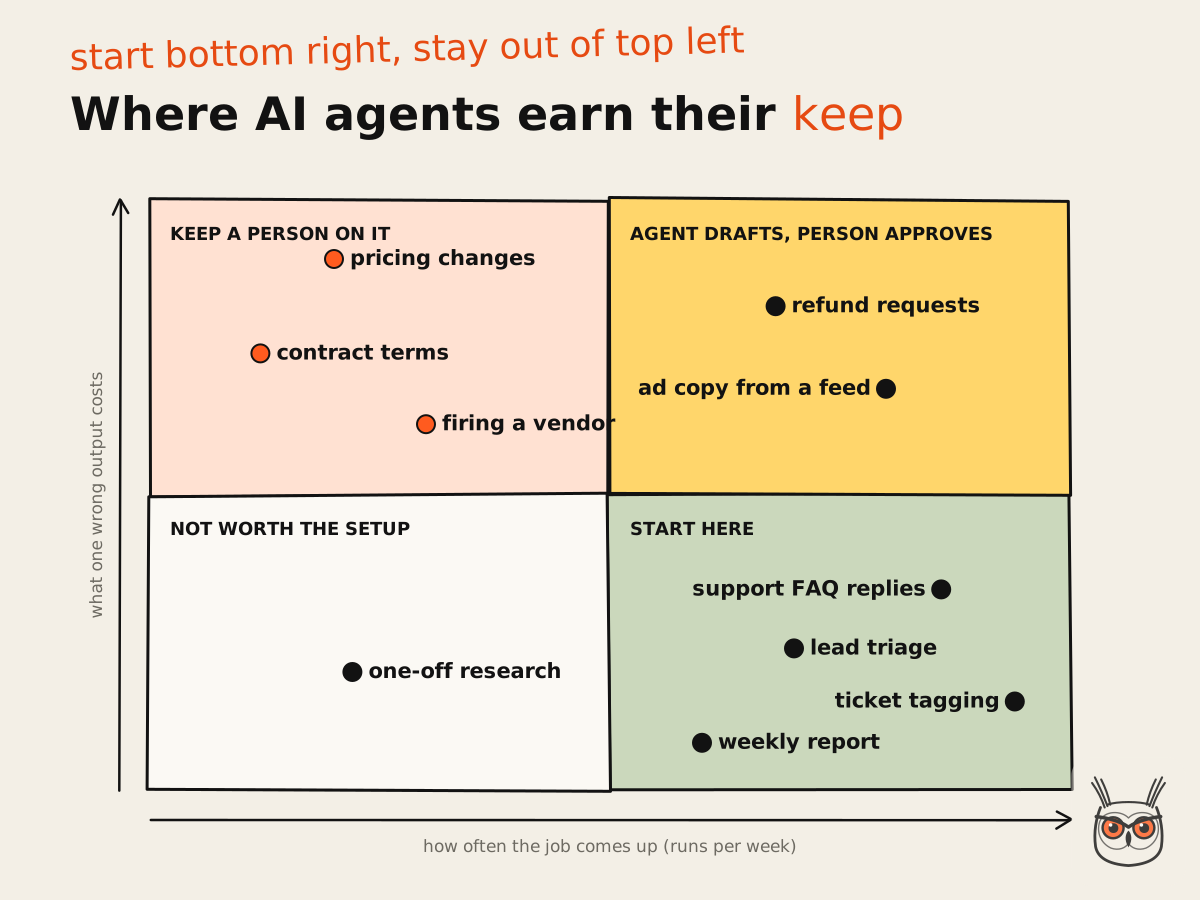
The best neutral signal on where the money shows up is McKinsey's function breakdown: respondents report cost reductions most often in supply chain, service operations and manufacturing, and revenue gains most often in marketing and sales. That fits the matrix. Service ops is volume. Marketing and sales is volume with a scoreboard. If marketing is your first candidate, I went job by job through what AI marketing agents can run today, with prices per finished task.
The sales half gets its own comparison too: nine AI sales agents ranked by the job they own, with prices as each vendor showed them.
| Job | What the agent does | What a person still does | Cost of a wrong output |
|---|---|---|---|
| Support replies | Answers repeat questions, pulls order status, hands off | Refunds, angry customers, edge cases | A bad reply, sometimes public |
| Lead triage | Scores and routes inbound, drafts the first reply | Owns the routing rules and the call | A slow follow-up |
| Marketing copy from data | Writes ads, emails or listings from a feed | Brand, promotions, approvals | A wrong price in a paid ad |
| Weekly reporting | Pulls numbers, writes the summary, flags oddities | Decides what the numbers mean | A wrong number in a doc |
| Finance ops | Matches invoices, chases missing receipts | Pays anything, approves anything | Money out the door |
Customer support
Support is the most mature use case because the job is volume, the answers repeat and the vendors have started to price per resolved conversation. Intercom's Fin charges $0.99 per outcome (checked 7 November 2026), and nothing if the customer asks for a human or the agent can't do the job. That is the vendor betting on itself, which I respect. If your support happens on the phone, I compared the platforms in my guide to AI voice agents.
The skeptic's take is Klarna. In early 2024 it said its assistant was doing the work of 700 support staff; by May 2025 its CEO was telling Bloomberg that the AI-first push had produced lower-quality support, and the company went back to hiring people. I only found that through a secondary source citing the interview, so hold it loosely. The lesson still lands: an agent that handles the easy 70% is great; an agent that handles 100% is a customer experience experiment you're running on paying customers.
Sales and lead handling
Lead handling suits an agent because it's one question asked a thousand times: is this person worth a rep's time, and what do we say first? Scoring, enrichment, routing and a first-reply draft are all fair game. Rewriting your CRM is not.
I've watched a data tool do this without any AI involved: at one SaaS company an enrichment sync overwrote job titles on a few thousand contacts with its best guess, and sales spent a week emailing accountants as "Head of Growth". Nothing errored. Give that sync a mind of its own and the guesses get more creative. In the Nylas survey from 20 October 2026 (Nylas sells agent infrastructure, so read it as a vendor survey), 25% of companies had an agent update the wrong record in the previous 90 days. Let the agent suggest; let a person own the rules.
Marketing, content, SEO and AEO
Marketing is where I've built the most, and where an agent pays back fastest when the facts come from data and the model only writes the words. The best example I can show you is my own. I built an n8n workflow that turns a retailer's weekly promotions into about 200 ads a week for a client, and it gives the team back about 8 hours a week.
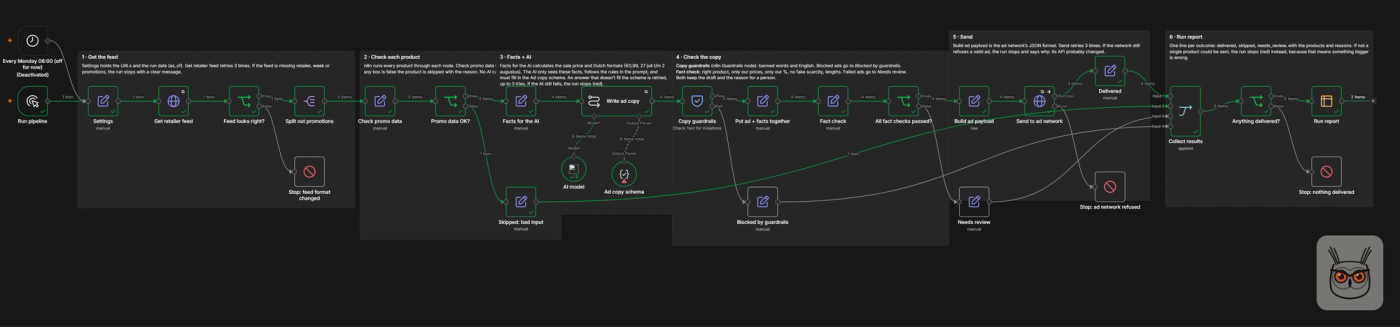
All names in that build are placeholders, by the way, so the client stays private. The interesting part isn't the AI. Only one of six stages calls a model. Everything that could cost money, every price, every discount, every "only 3 left", has a rule in code standing between the model and the ad network. That's the shape I'd copy for almost any marketing automation.
If you want the rules-first view of the same idea, start with business process automation, and treat the agent as one step inside it.
Search is the same story with a different scoreboard. A useful SEO agent doesn't write more pages; it checks more things: indexing, internal links, briefs, whether AI answers in ChatGPT or Google mention you. The mistake I'd warn you about here is letting the agent pick its own targets. At one SaaS company I worked at, an outreach workflow that hunted for "best X" listicles happily surfaced pages that were barely indexed, pages that ranked for nothing, and one list that hadn't been updated since a product it praised had shut down. Finding pages was easy. Knowing which ones an AI answer would actually quote was the whole job, and that stayed with a person. It's the same split I use in my SEO and AEO work: SEO automation and AEO automation for the legwork, judgment for which pages deserve it.
Operations, finance and reporting
Ops and reporting are the quiet winners. A weekly report agent reads your dashboards, writes the summary and flags the number that moved. The worst case is a wrong figure in a doc you were going to read anyway. Invoice matching and receipt chasing are similar: high volume, clear rules, and a person who still presses "pay".
The cycle-time gains here are real, with a caveat on who's counting. G2's 2026 AI Agents report (14 October 2026, a vendor survey of 1,019 software buyers) found 4 in 5 organisations using agents in high-volume workflows report at least 11% faster cycle times, and nearly half see 25% or more. I'd treat that as a ceiling rather than a forecast. Finance is where I'd keep the agent furthest from the money: draft, match, flag, never pay.
AI agents for small business: what to start with
A small business should start with one narrow agent for support replies or lead follow-up, priced per outcome or per run, with a person handling the exceptions. Skip the platforms that promise a digital workforce. You don't have a workforce problem; you have a Tuesday-afternoon-inbox problem, and that's a much cheaper fix.
The data says small firms haven't moved yet, which is either a warning or an opening. McKinsey's 2026 numbers: among organisations with over $1 billion in revenue, 40% now scale agents (up from 27% a year earlier), while smaller organisations stayed flat at 22%. Big companies are pulling ahead mostly because they can afford the governance work, not because the tools are better for them.
I wrote up what those larger teams deploy, and what a small team can borrow from it, in my guide to enterprise AI agents.
The good news is that small teams need less babysitting: 15% of SMBs (1 to 249 employees) say they need significantly more oversight of agents, against 27% of larger enterprises in the G2 survey. Fewer handoffs, fewer approval chains, fewer people who can say "who changed this?". A friend who runs a nine-person agency put a support agent on their help desk with exactly one rule: anything mentioning money goes to a person. The verdict on the first month: "boring, in a good way". Boring is the feature.
Entry prices are low enough that the subscription isn't the decision. As of 7 November 2026: Fin from $49 a month (50 outcomes included) on top of an existing help desk, Lindy Team from $49.99 a month for 5,000 credits, and n8n Cloud Starter at $20 a month billed annually for 2,500 workflow runs. The decision is which job, and who checks it.
How much do AI agents for business cost?
As of 7 November 2026, AI agents for business cost from about $20 to $50 a month for an entry plan, or around $0.99 per resolved support conversation, plus model usage on build-it-yourself tools. The bigger cost is the human review: for a narrow pilot, the hours spent checking the agent usually cost several times the subscription.
Vendors price agents three ways, and each one hides a different surprise:
| Pricing model | Example (checked 7 Nov 2026) | Entry price | The surprise |
|---|---|---|---|
| Per outcome | Intercom Fin (support) | $0.99 per outcome, $49/month minimum | You pay per resolution, not per attempt |
| Credits | Lindy (general agent) | $49.99/month for 5,000 credits | A "deep work" task can eat 250 to 1,000 credits |
| Per run | n8n Cloud (build it yourself) | $20/month billed annually, 2,500 runs | Model tokens are billed separately |
Small aside on Lindy: its own pricing page metadata still says "starts at $29.99" while the page itself says $49.99. Always read the page, not the search snippet. (The snippet is optimistic. Snippets usually are.)
Now the economist's view, which is the one that changes decisions. Take a narrow support agent handling 200 conversations a month. On Fin's own calculator defaults, that's 152 resolved outcomes at $0.99 plus one $19 seat for the conversations it hands off: $169.48 a month. Note the 76% resolution rate is Intercom's default assumption, not an independent figure.
Then add the person who checks the agent. In the G2 report, 31% of buyers spend six or more hours a week overseeing agents. Six hours a week is about 26 hours a month. At an assumed $30 to $50 an hour, that's $780 to $1,300 a month. The example is mine and the hourly rate is a guess; the shape is not.
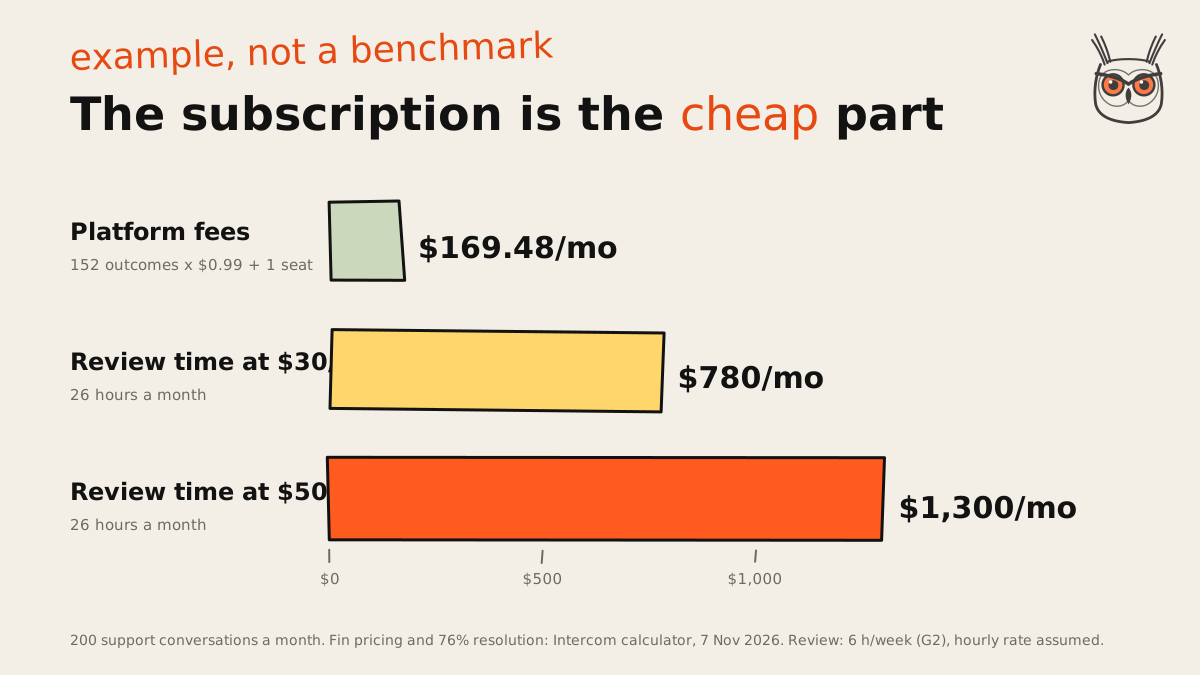
That's the hidden connection I keep coming back to. Per-outcome pricing moves the cost of a bad resolution onto the vendor, but the cost of checking stays with you. So the cheapest platform isn't the cheapest agent. The cheapest agent is the one that needs the fewest hours of babysitting. G2's buyers seem to be learning this the hard way: 46% report higher-than-expected operating costs, and 57% now prefer pay-as-you-go pricing, up from 38% in 2025. Only 9% think per-seat pricing is fair, which tells you how 2023's pricing pages aged.
Do AI agents pay back? What the ROI numbers say
AI agents pay back inside a single workflow far more often than they move company profit. Buyers of agent software report faster cycle times, but McKinsey finds the share of companies seeing any profit impact from AI flat at 37% in 2026. Measure ROI as a change in one workflow against a baseline you wrote down first.
Those two survey camps look like they disagree, and they're both right about different people. G2 surveys buyers of agent software, so 66% having agents in production is a self-selected crowd. McKinsey samples organisations in general. Use McKinsey for "how common is this" and G2 for "what happens where agents actually run". Then notice the bit that matters: 45% of G2's buyers say oversight and rework eat more than a quarter of the gains they expected. The gains are real. So is the tax.
The academic view adds the one finding I'd tape to a monitor. McKinsey's high performers, the roughly 6% who get 5% or more of EBIT from AI, are far more likely to have redesigned the workflow around it: nearly three-quarters of them, against a quarter of everyone else. Bolting an agent onto a broken process gives you a faster broken process.
And the consultancy case studies with eye-watering cost cuts? No client named, no baseline, no period. I don't quote them, and I'd gently suggest you don't put them in a board deck either.
The ROI number I trust is the boring one from my own ads workflow: about 8 hours a week back for a team, on a job with a clear before and after. No percentage, no "up to". One workflow, one baseline, one number. Boring is the feature. It's also why every AI automation project I take on starts with a written baseline before the first run.
Where AI agents fail, and why projects get cancelled
AI agent projects mostly fail on cost, unclear value and weak risk controls rather than on weak models. Gartner predicts over 40% of these projects will be cancelled by the end of 2027 for exactly those reasons. In day-to-day use, the common failures are reversed workflows, wrong records and emails nobody should have sent.
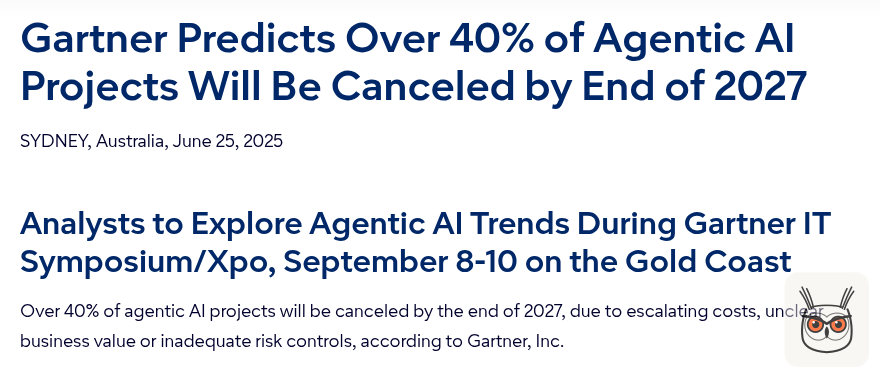
First, a correction, because this number gets passed around a lot. The "over 40% cancelled" figure is a Gartner forecast from 25 June 2025, not a measured cancellation rate. At least one of the top-ranking articles on this topic credits it to Deloitte. It isn't Deloitte's. Deloitte's own agent research (24 April 2026, 3,235 leaders in 24 countries) carries a different and arguably scarier number: only 21% of organisations have mature governance for their agents, and about 80% lack clear decision boundaries, real-time monitoring and audit trails.
What actually goes wrong, from the Nylas survey (fielded August to September 2026):
- 54% had an agent make a mistake in the previous 90 days.
- 31% had an agent trigger a workflow that had to be reversed.
- 25% had one update the wrong record.
- 18% had one send an incorrect or inappropriate email.
And it scales the wrong way: 45% of companies running one to five agents reported an incident, against 70% of those running more than 20. More agents, more surface, more 4pm phone calls.
I've hit the small version of this myself. In every single test run of my ads build, one AI answer broke the length limit: a 41-character headline against a 40-character cap. The model can't count characters reliably, so the limit lives in a schema check, and the schema caught it every time. The lesson isn't "the model is bad". It's that every rule you care about needs a check that isn't the model.
"We never agreed what success looks like, so we can't say it failed."
"The demo worked on ten examples. Production had ten thousand."
"Nobody owns it, so everybody is afraid to switch it off."
"The review step became one person clicking approve 300 times a day."
Those four are the cancellation reasons in plain clothes: unclear value, rising cost, weak controls. Some cancellations are healthy, by the way. Killing a pilot that doesn't work is the system working. Running it for 18 months because nobody wrote down a metric is the expensive kind.
How much autonomy to give an agent
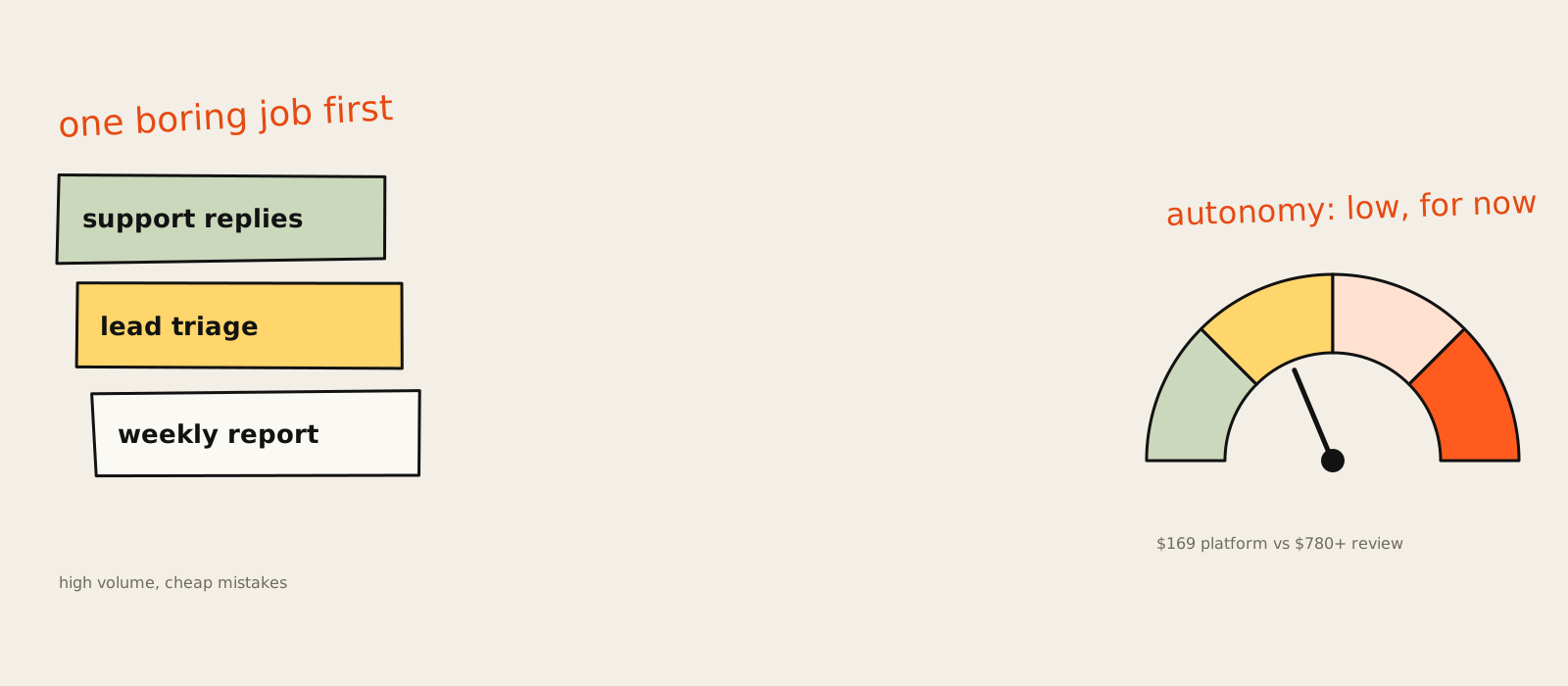
Start an agent with approval on every outside action, emails, record changes, posts and payments, and let it do read-only work freely. Loosen it only when weeks of the error log are boring. Think of autonomy as a dial you turn one notch at a time, not a switch you flip on launch day.
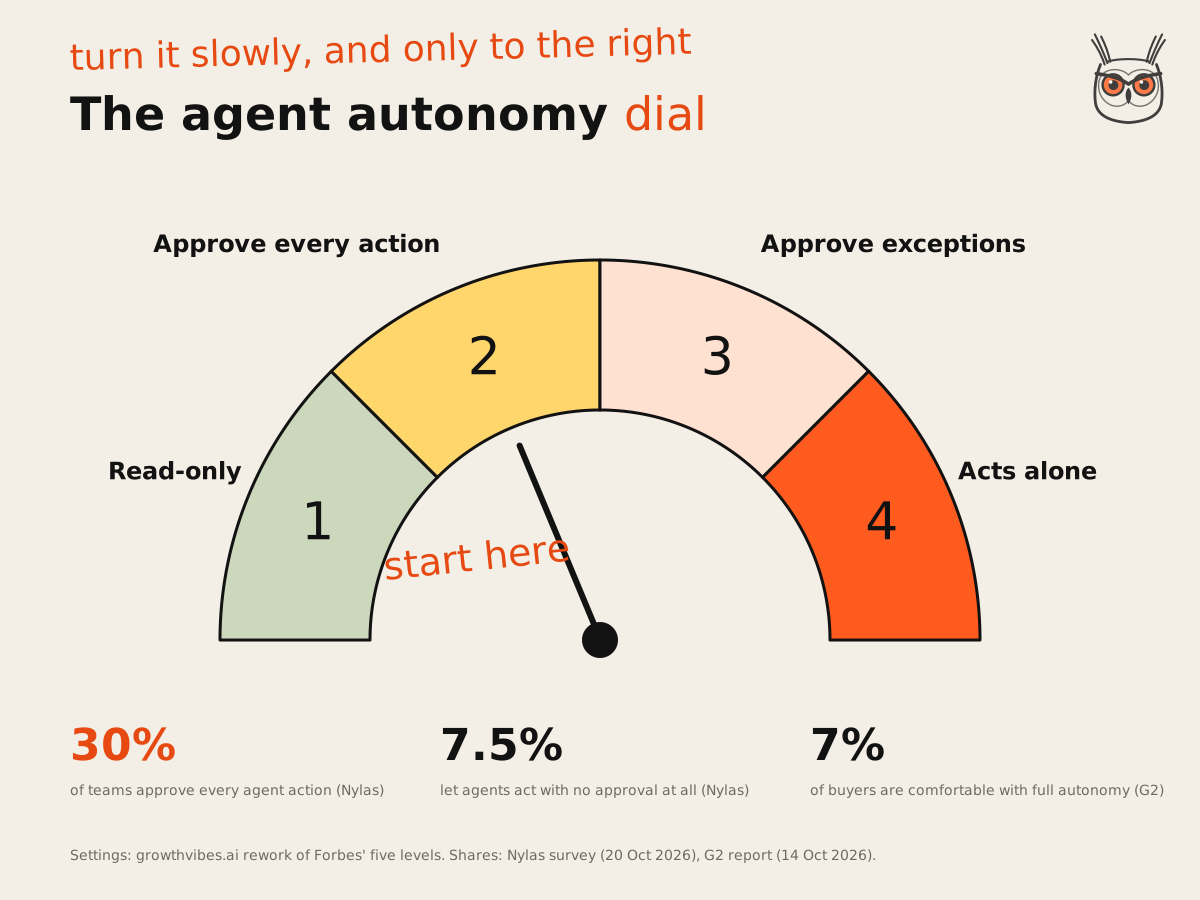
Forbes published a five-level model in March 2026, from scripted chatbot up to multi-agent systems, and suggests small businesses start at levels two and three. Fine as a map. What it doesn't tell you is what a review step looks like or how to know when to move up. So here's my rework, four settings, lowest first:
Read-only
The agent looks things up, summarises and drafts. Nothing leaves the building. Worst case: a wrong sentence in a draft.
Approve every outside action
A person signs off each email, ticket update, record change or post. Slow, and that is the point for the first weeks.
Approve by exception
Checks run on every output, and only the ones that fail (wrong price, missing field, angry customer) go to a person.
Acts alone on a narrow job
Only after the error log has been dull for weeks, with a kill switch, a spend or turn cap and a monthly re-check.
Most teams are already near setting two, and the tools ship it that way: on Lindy anything with outside impact waits for approval while read-only lookups don't, and n8n includes human approval for tool calls on every Cloud plan. Among G2's buyers, 52% require human quality review before an agent goes live and 77% re-evaluate agents at least monthly. Only 7% are comfortable with full autonomy.
The direction of travel is worth a raised eyebrow, though. Between December 2025 and autumn 2026 the share of teams letting agents act with no approval at all nearly doubled, from 4.2% to 7.5%, while the share approving every action fell eight points to 30%. Meanwhile only 53% can fully audit what their agents did last week. Loosening the dial while you can't read the log is driving faster in fog because the radio is good.
One cheap fix from the Nylas data: give each agent its own identity. Where an agent has its own account, 66% can fully audit it, against 51% when it acts through an employee's login. "Which of you sent that?" is a terrible question to answer from a shared inbox.
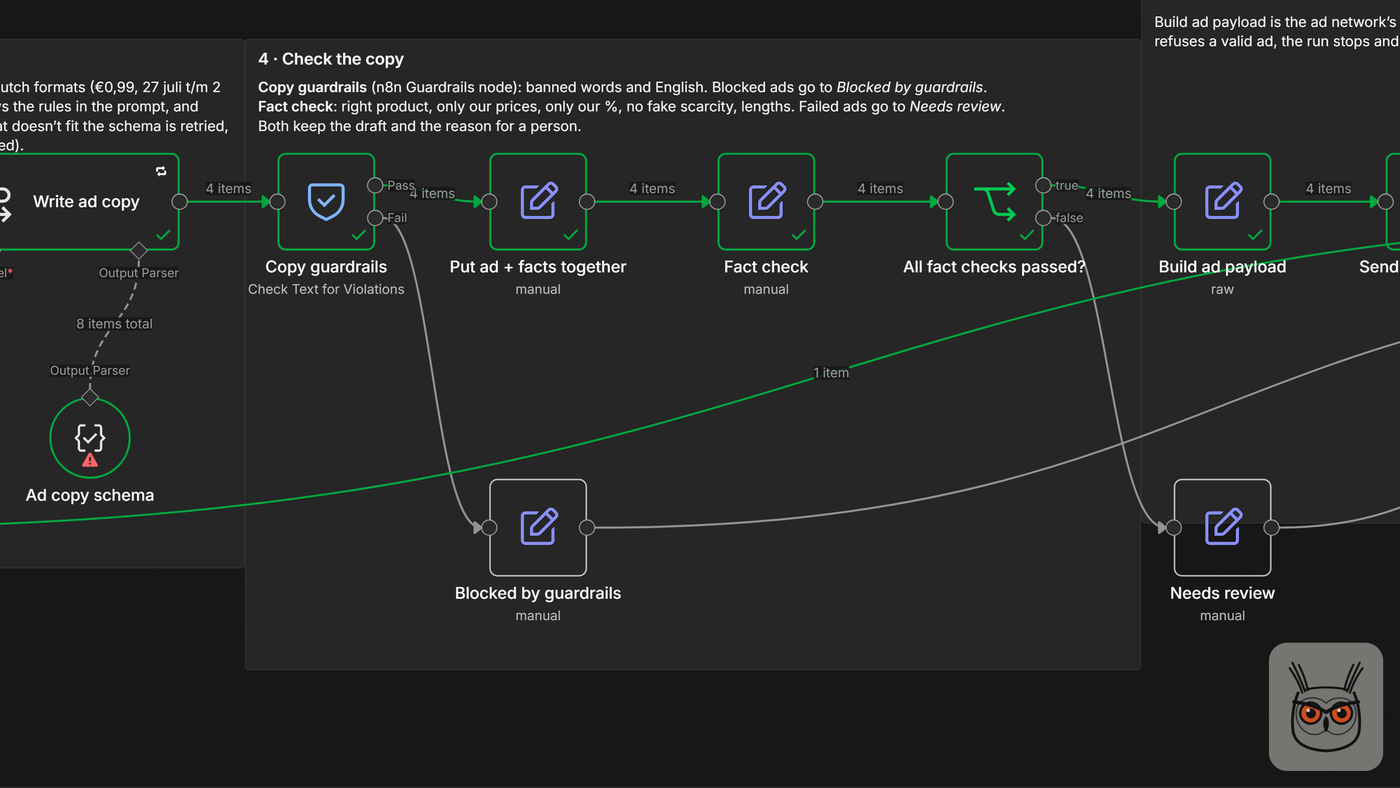
That screenshot is setting three in practice, from my ads build. Copy that fails the guardrails or the fact check goes to its own branch with the reason attached, and only the clean ads continue. The agent never gets to decide whether its own work is fine.
How to start: one job, 30 days
Start with one job, one owner, one metric and a kill switch, and give it 30 days. Pick a high-volume, low-stakes task, write down today's baseline, run the agent with approval on every outside action, then keep, widen or switch it off. Thirty days is my rule of thumb, not a law.
The companies that make agents stick do the unglamorous version. Deloitte's research describes them as starting with lower-risk use cases, building governance and scaling deliberately, and McKinsey's high performers are twice as likely to have defined how they'll measure impact before they start. Here's how that looks as a month:
Week 1: pick and baseline
Choose one job from the start-here corner. Name one owner. Write down today's number: hours a week, response time or error rate.
Week 2: run it beside the human
The agent drafts, a person approves every outside action. Log every correction and why it was needed.
Week 3: add caps and checks
Set a turn or spend cap so a stuck loop can't run up a bill, add code checks for the mistakes week two found, and test the kill switch.
Week 4: decide
Compare against the baseline. Keep, move one notch on the autonomy dial, or switch it off. All three are good outcomes.
The cap deserves its own sentence. Every agent loop needs a limit on turns or spend, and a planned message for when it hits it. The free version and the production version of an agent tend to fail in the same place: the loop that never ends. If you're building it yourself, my guide on how to build AI agents walks through caps, tools and the first prompt in detail.
If you'd rather have the month run for you, this is the shape of an engagement in my AI agents and automation service: one job, a baseline, the checks and a handover your team can run without me.
Build it, buy it or hire someone
Buy when the job is standard and priced per outcome, like support replies. Build when the logic is yours: your checks, your data, your formats. Hire someone when nobody on the team can own the review. That split is my judgment from the pricing models and surveys; there's no neutral cost comparison of the three routes for a small pilot.
If you're leaning towards buying, my ranking of the best AI agents by job to be done shows what the ready-made options cost.
| Route | Pick it when | Typical entry cost (Nov 2026) | Watch out for |
|---|---|---|---|
| Buy | The job is standard (support, scheduling) | $49/month and up, or per outcome | Lock-in, and tuning you can't see |
| Build | Your rules and data are the value | $20 to $50/month on n8n Cloud, plus model use | Someone has to maintain it |
| Hire | Nobody can own the build or the review | A project fee | A system only the builder understands |
Building is getting more popular than vendors would like. In McKinsey's survey, 32% of organisations decided against buying at least one software product because they could build it in-house with AI coding tools, and nearly half of high performers did. Nylas found 81% had already replaced at least one vendor or tool with in-house tooling. The blockers aren't engineering time, either: security approvals (42%) and integration complexity (40%) come ahead of engineering bandwidth (24%).
My own builds are mostly the "your logic" kind. The ads workflow is built in n8n because the checks were the product. The SEO content automation I built is the same idea at a bigger size: the model writes, and a lot of plain rules decide whether what it wrote is any good.
If you hire, hire someone who builds on accounts you own and plans the handover from day one. In September 2026 Gartner predicted that 70% of enterprises will abandon agent systems built by vendors' own engineers by 2028, stuck with costs they can't control and code they can't change. That's an enterprise forecast, but the trap is the same at ten people: if you can't run it without the builder, you don't own an agent, you rent a dependency. And whichever route you pick, do what half of G2's buyers do and test the vendor's claims on your own data before you sign.
Back to the whiteboard with twelve jobs on it
That founder's whiteboard ended up with one job circled: first-line support replies. The other eleven got a line through them, for now. A month later the agent was answering the repeat questions, a person handled the refunds, and nobody was waiting on the inbox at 6pm.
That's where AI agents for business earn their keep: one dull, frequent job, a person on the exceptions and a number you wrote down before you started. If you want help picking the job and building the checks, that's my AI automation and agents work. Bring the whiteboard. I'll bring a marker.
Frequently asked questions
What are AI agents for business?
AI agents for business are software that takes a goal, picks its own steps and acts in your tools, like a help desk, CRM or inbox, usually with a person approving anything that goes out. A chatbot only answers; an agent does the work.
Many products sold as agents are chatbots or automations with a new label; Gartner calls it agent washing. Judge a tool by what it is allowed to do on its own.
What's the difference between an AI agent and a chatbot?
A chatbot answers questions in a conversation. An AI agent works towards a goal, decides its own next steps and takes actions in your tools, such as updating a ticket or drafting an email for approval.
In McKinsey's 2026 survey, 47% of organisations have scaled chatbots, but only about two in ten have scaled AI agents, so the two are not the same purchase.
How much do AI agents for business cost?
As of 7 November 2026, entry plans run about $20 to $50 a month (n8n Cloud, Lindy), or $0.99 per resolved conversation for Intercom's Fin. The human time spent reviewing the agent usually costs more than the subscription.
In a worked example, 200 support conversations cost about $169 a month on Fin, while six hours a week of review costs $780 to $1,300 at $30 to $50 an hour.
Can small businesses use AI agents?
Yes. Start with one narrow job, like support replies or lead follow-up, priced per outcome or per run, with a person handling exceptions. Small teams also tend to need less oversight than large ones.
In G2's 2026 survey, 15% of small businesses needed significantly more oversight of agents, against 27% of large enterprises.
Can AI agents replace employees?
AI agents take over tasks, not whole roles. In G2's 2026 survey only 14% of buyers had reduced headcount, while 35% moved people into higher-value work. A person still owns decisions, exceptions and the final send.
McKinsey's 2026 survey also found 14% reporting an AI-related drop in headcount, less than half the share that expected one a year earlier.
Are AI agents secure enough for business use?
They can be, if each agent has narrow permissions, its own account, an audit log and a named owner. Many companies aren't there yet: only 53% can fully audit what their agents did last week.
Deloitte's 2026 research found only 21% of organisations have mature governance for agents. Start read-only and add approval steps before giving an agent write access.
How long does it take to set up an AI agent?
There is no neutral figure. Signing up takes minutes, but a narrow agent you trust in production needs a few weeks of running beside a person, which is why I plan the first one as a 30-day pilot.
Setup time depends far more on access, security approvals and integrations than on the agent itself; in the Nylas survey those were the top blockers.
Which business jobs should I automate first?
Pick a job that comes up many times a week, follows a pattern and is cheap to get wrong: support replies, lead triage, ticket tagging or a weekly report. Keep pricing, contracts and payments with a person.
