
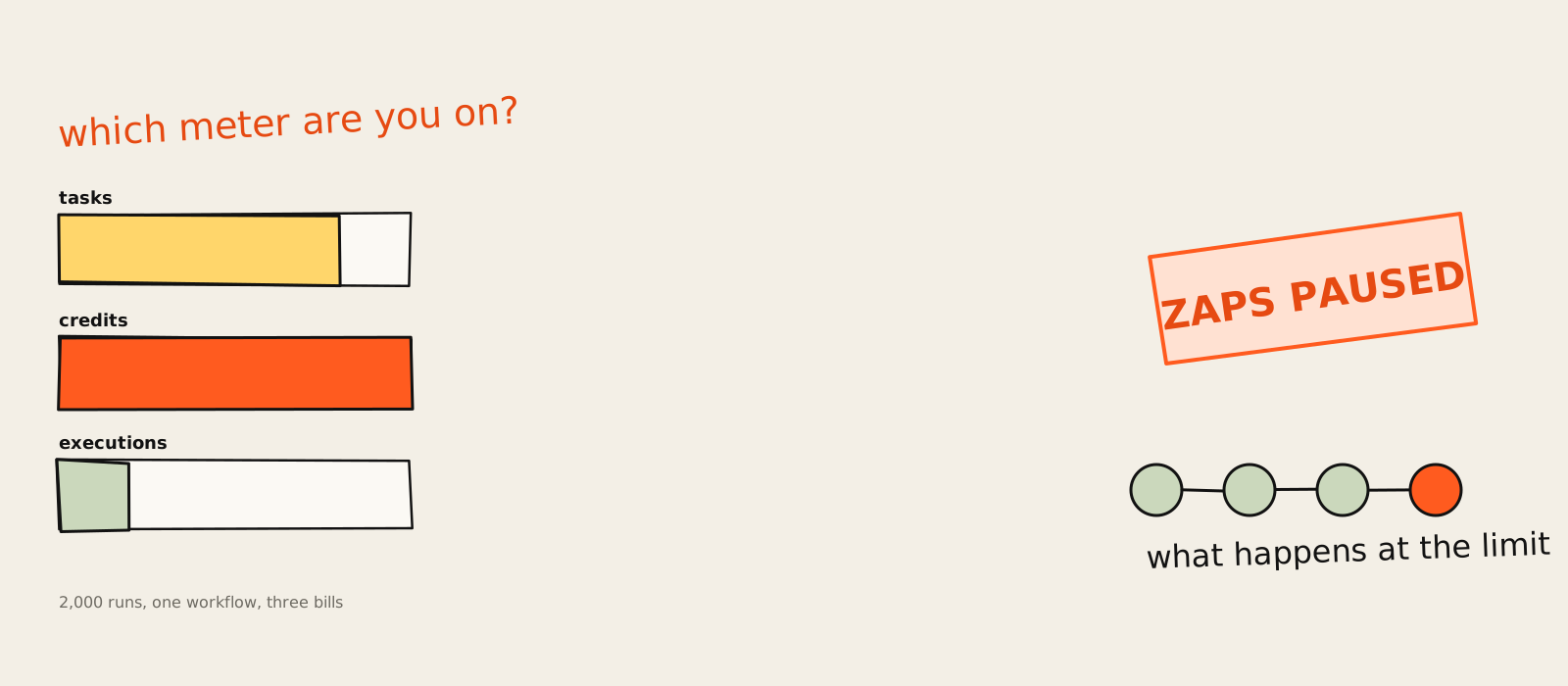
The business automation software worth paying for in 2026 is a short list. Zapier if your team wants to connect cloud apps without touching code, Make for visual multi-step flows on a small budget, n8n if someone technical will own it, and Power Automate if you already live in Microsoft 365. Add one AI agent tool, Lindy, for the work that needs judgement. The enterprise suites are for enterprises, which sounds obvious until a sales rep calls you.
The worst message I ever got from an automation tool was about four words long. At a SaaS company I worked at, our lead routing ran through a workflow tool, and on the 28th of the month it hit the plan limit and quietly paused. Demo requests kept arriving. They just stopped going anywhere. Sales noticed two days later, mostly because the calendar looked suspiciously relaxing.
Nobody had chosen a bad tool. We had chosen a tool without reading its meter. What a business automation tool does at its limit, and what it counts while you get there, matters more than its feature list. That's the lens for this ranking. I build AI automation and agents for marketing and growth teams, and most of the mess I clean up starts with a pricing page somebody skimmed.
So for each tool you get the same parts: who it's for, the price (checked on the vendor's own pricing page on 10 November 2026), where it breaks, who should skip it, and what happens to your data if you leave. Then the bit the other lists skip: the same workflow priced on three different meters, and what a small team should never buy. My motto for the whole page: read the meter, not the menu.
What business automation software is (and the four types)
Business automation software runs repetitive work for you: it moves data between apps, fills in records, sends the follow-up and routes the request, without a person clicking through each step. It comes in four types: workflow tools, RPA robots, automation built into a platform you already use, and AI agents that decide steps themselves.
The four types get lumped together in most "best business process automation software" lists, which is how a five-person startup ends up on a call about robotic process automation. They solve different problems:
- Workflow automation (also called iPaaS): connects apps through their APIs. A form is filled in, a CRM record appears, Slack pings the owner. Zapier, Make, n8n and Workato live here.
- RPA (robotic process automation): a software robot that clicks through screens the way a person would, for old systems with no API. UiPath and Power Automate's desktop flows.
- Platform automation: workflows inside the tool where your data already sits, like HubSpot for CRM and marketing or Airtable for a database with an interface on top.
- AI agents: a model picks the next step itself. Lindy is the example on this list, and Zapier and n8n both bolt agent features onto their workflow engines.
If the fourth one sounds fuzzy, that's because the word "agent" is doing a lot of unpaid overtime right now. I wrote a plain explanation of what AI agents are and how to tell one apart from a workflow. The short version: if you can draw the steps on a whiteboard before it runs, you want a workflow, not an agent. Cheaper, and it does the same thing on Tuesday as it did on Monday.
Business automation tools at a glance
Here are the nine business automation tools side by side, with each one's job, entry price and billing unit. Prices were checked on each vendor's pricing page on 10 November 2026, US prices, and they will drift. The billing unit column matters most, because it decides what your bill looks like after month three.
| Tool | Type | Best for | Entry paid price | Billed by |
|---|---|---|---|---|
| Zapier | Workflow | Connecting cloud apps, no code | $19.99/mo (Professional) | Task (successful action) |
| Make | Workflow | Visual multi-step flows | $12/mo (Core, 10,000 credits) | Credit (every module) |
| n8n | Workflow | Self-hosting, developer control | $20/mo billed annually (Starter) | Execution (whole run) |
| Power Automate | Workflow + RPA | Microsoft 365 teams | $15/user/mo (Premium, yearly) | User, bot, credits |
| Airtable | Platform | Data and interface first | $20/seat/mo (Team, annual) | Seat, runs per plan |
| HubSpot | Platform | CRM, marketing, service workflows | $800/mo (Marketing Pro, annual) + $3,000 onboarding | Seats, plan tier |
| Workato | Workflow (enterprise) | Enterprise integration | Quote only | Edition + consumption |
| UiPath | RPA | Legacy systems with no API | $25/mo (Basic, changing) | Role licences |
| Lindy | AI agent | Handing work to an agent | $49.99/mo (Team, 5,000 credits) | Credit (size of the job) |
Notice that no two of the first three count the same thing. That's not a footnote. It's the whole comparison, and it gets its own section further down.
How to choose business automation solutions
Choose business automation solutions by five things, in this order: where your data already lives, which billing unit fits your workflows, what the tool does when you hit the limit, how you get your work out if you leave, and who on your team will maintain it. Features come last, because every tool on this list can send an email.
- Where your data lives. If the work starts and ends inside HubSpot or Microsoft 365, the automation that comes with it usually wins. If it crosses five apps, you want a workflow tool in the middle.
- The billing unit. Tasks, credits, executions, seats, bots, credits-by-job-size. Short flows are cheap on tasks and credits; long flows are cheap on executions.
- What happens at the limit. Pause, stop, queue or charge you more. This is the real feature comparison, and almost nobody reads it before signing up.
- Export and lock-in. Can you take the workflows with you as a file, or do you rebuild from scratch when you move?
- Who maintains it. A tool that needs JSON and a server is free right up until the person who set it up leaves.
I've seen point five go wrong more often than the other four put together. A company inherits 40 automations, nobody remembers why half of them exist, and the safest option becomes never touching anything. Which is how you end up paying for a workflow that emails a person who left in 2023.
1. Zapier: best for connecting cloud apps without code
Zapier is the default business automation tool for non-technical teams that need cloud apps talking to each other, with 9,000+ integrations and a builder anyone can use. It's the one I'd hand to a marketing ops person on day one. It gets expensive once your flows grow long, because every successful step is a task.
- Best for: non-technical teams connecting cloud apps, with the widest app library on this list.
- Pricing (checked 10 Nov 2026): Free with 100 tasks a month and two-step Zaps; Professional from $19.99/month; Team from $69/month; Enterprise by quote. Yearly billing saves 33%. See Zapier's pricing page.
- Where it breaks: the task limit. Each successful action is a task, and past your limit Zaps either move to pay-per-task at a higher rate or pause until the next period.
- Skip it if: you run high-volume, many-step flows on a tight budget, or you need to self-host.
- Integrations: 9,000+ apps, plus webhooks and private integrations through the developer platform.
- Export and lock-in: Zaps export and import as JSON on Team and Enterprise accounts. On cheaper plans, your workflows stay put.
- Learning curve: the lowest of the group by reputation; no code needed, though the free plan stops at two-step Zaps.
- What users say: the threads asking "what are you using instead of Zapier" keep coming back, two in the same automation subreddit in two weeks (24 October and 6 November 2026), and the complaint is always the bill growing with the number of Zaps.
- The skeptic's take: Zapier's own pricing FAQ admits that the same AI prompt won't give the same answer every time. Refreshingly honest, and worth remembering before you put an AI step in front of a customer.
- The cost view: triggers, filters, formatters and paths are free, so a lean Zap is cheap. AI steps, code and the SDK now sit on the same task meter, and one Zapier MCP tool call uses two tasks.
My verdict: start here if nobody on your team wants to see a JSON file, and keep an eye on the task counter like it's your phone battery at a festival. Zapier also sells Zapier Agents (free for 400 activities a month, Pro at $33.33/month billed annually for 1,500), which is a sensible first step into AI agents for a team that already lives in Zaps. Zapier is the easiest tool to start on and the one people most often outgrow on price. Both things are true.
2. Make: best for visual multi-step workflows
Make is the pick for teams that want multi-step workflows they can see, with routers, filters and branches on a canvas, for a fraction of Zapier's price at low volume. Core starts at $12 a month for 10,000 credits. The catch is that Make counts every module, trigger included, and stops when the credits run out.
- Best for: visual, branching workflows with routers and filters; unlimited users on every plan.
- Pricing (checked 10 Nov 2026): Free with 1,000 credits a month and 2 active scenarios; Core $12/month at the 10,000-credit tier; Pro $21; Teams $38; Enterprise custom. Annual billing saves 25%. See Make's pricing page.
- Where it breaks: credits. Every module action is a credit, scenarios stop at zero, and unused credits expire at the end of the term.
- Skip it if: you need audit logs, SSO or custom roles and don't want an Enterprise contract. All three are Enterprise only.
- Integrations: 3,500+ apps, custom apps on all plans, and 300+ Make API endpoints from Core up.
- Export and lock-in: scenarios can be saved as blueprint JSON files, according to migration tool makers. Make itself stays quiet on the subject.
- Learning curve: Make publishes nothing on it. The canvas is friendlier than code and busier than Zapier, and that's about where it sits.
- The skeptic's take: when credits hit zero, scenarios stop. Incoming webhooks queue and run once you top up, which is kinder than losing them, but "kinder" is a low bar for your lead routing.
- The cost view: at $1.20 per 1,000 credits on Core, Make is the cheapest meter here for short flows. Routers and error handlers cost nothing, code runs cost 2 credits per second.
Make is the best value on this list for a team with a bit of patience, and the one I'd pick for a scrappy marketing automation setup with lots of branching. Just set a credit alert on day one. The scenario that runs every five minutes "to be safe" is where budgets go to die.
3. n8n: best for self-hosting and developer control
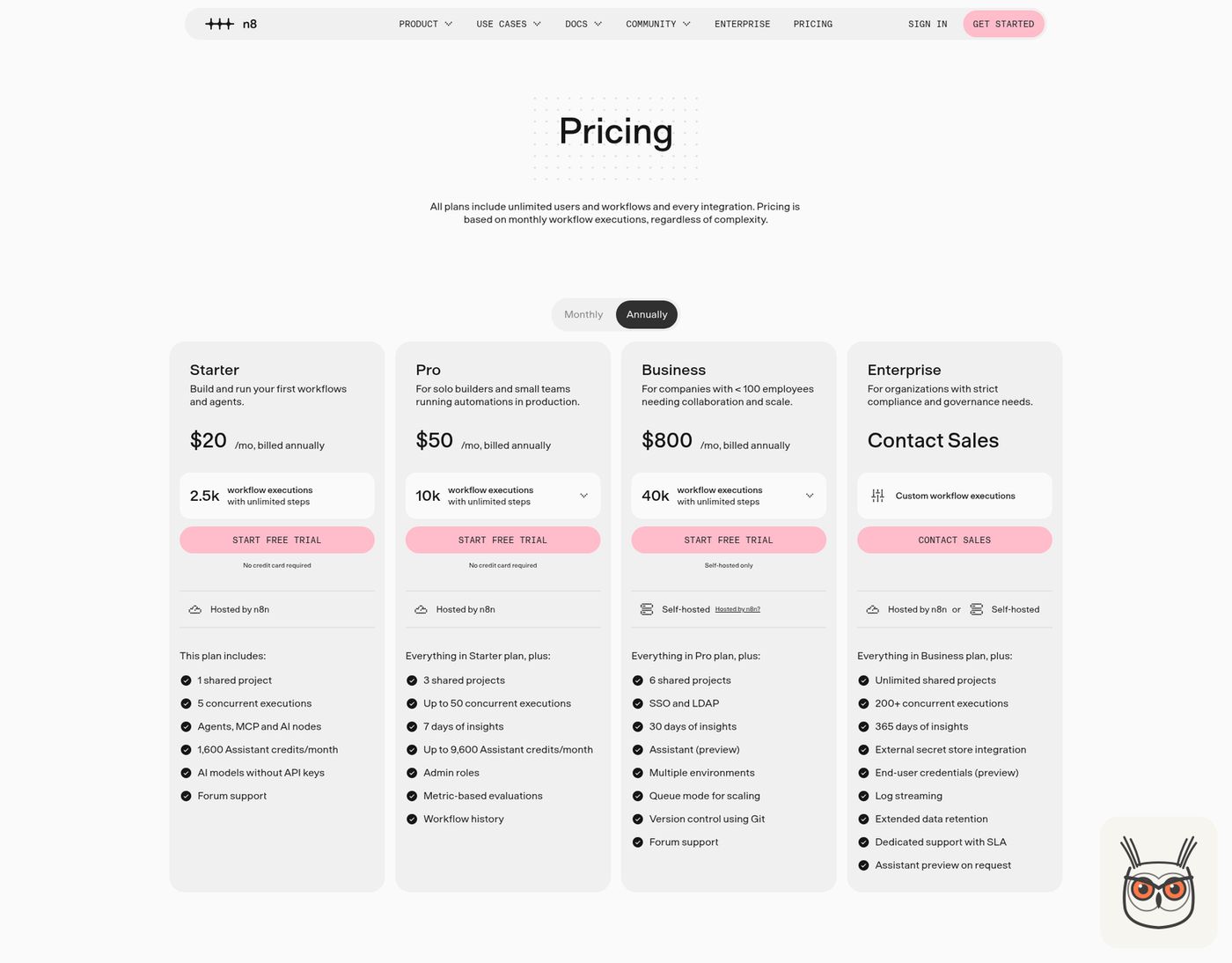
n8n is for teams with someone technical who wants control: self-hosting, code steps, AI agent nodes, and a bill that counts one execution per whole run, however many steps it has. Starter is $20 a month billed annually for 2,500 executions. Support is the weak spot unless you pay for Enterprise.
- Best for: developers and technical operators who want self-hosting, code and AI agent nodes in one place.
- Pricing (checked 10 Nov 2026): Starter $20/month (2.5K executions), Pro $50 (10K), Business $800 (40K, self-hosted only), all billed annually; Enterprise by quote. See n8n's pricing page.
- Where it breaks: support and servers. Starter, Pro and Business get forum support only; email and SLA support are Enterprise. Business only runs self-hosted, so the server is yours.
- Skip it if: nobody on the team is comfortable with servers, expressions and JSON.
- Integrations: every node on every plan, plus HTTP requests, GraphQL and cURL import. The pricing page gives no node count.
- Export and lock-in: the best of the group. The Community Edition is free on GitHub and workflows import and export as files.
- Learning curve: steeper than Zapier, though non-developers do build in it; I've seen an artist's booking manager show off their workflows in the n8n community.
- What users say: one self-hoster recently showed off 25 workflows running their business on mostly local AI. One commenter pointed out that a human still presses publish. Correct, and good.
- What changed: n8n shipped release 3.2.0 on 10 November 2026, marked as a prerelease, and has open work on self-healing workflows. It moves fast, which is great until an update moves your node.
- The cost view: a 30-step workflow costs the same execution as a 3-step one, so n8n's meter rewards long workflows and punishes nothing for being thorough.
This is the one I know best. I built an n8n agent that writes and publishes 200 ads a week for a client, and the execution meter is the reason it made sense: one run, dozens of steps, one charge. Older guides still quote a higher starting price for n8n; the pricing page says $20 a month on annual billing. My verdict: the best tool here if you have a technical owner, and a trap if you don't, because a self-hosted server is a pet, not furniture.
4. Microsoft Power Automate: best for Microsoft 365 teams

Microsoft Power Automate makes sense when your company already runs on Microsoft 365: cloud flows, desktop RPA and process mining in one product. Premium is $15 per user a month, paid yearly. The trouble is the licensing, with separate meters for users, bots and AI credits that need a spreadsheet of their own.
- Best for: Microsoft-heavy teams that want cloud flows plus desktop (RPA) flows from one vendor.
- Pricing (checked 10 Nov 2026): Premium $15/user/month; Process $150/bot/month; Hosted Process $215/bot/month; all paid yearly. Process Mining is an add-on at $5,000 per tenant a month. See Microsoft's pricing page.
- Where it breaks: licensing. Premium connectors, unattended robots and Copilot Studio agents each sit on their own meter, and agents need prepaid Copilot Credits plus an Azure subscription.
- Skip it if: your stack isn't mostly Microsoft, or you want one flat per-run bill.
- Integrations: standard, premium and custom connectors; Microsoft's pricing page doesn't give a count, and the free trial only gets the standard ones.
- Export and lock-in: nothing on the pricing page covers taking flows elsewhere. Assume they stay in Microsoft.
- Learning curve: gentle for cloud flows if you know the Microsoft apps; desktop flows are a different skill.
- The cost view: one bot runs one unattended desktop flow at a time. Want two running at once? That's two bots, at $150 each.
- The skeptic's take: Microsoft's own page says the prices shown are "for marketing purposes" and may differ at checkout. Imagine a restaurant menu with that line at the bottom.
If you already pay for Microsoft 365, try this before you buy anything else. The cloud flows will cover a lot of approvals, notifications and SharePoint chores. Just get someone to map the licences before the robots arrive, because the bot line is where the surprise lives.
5. Airtable: best when the data and the interface come first
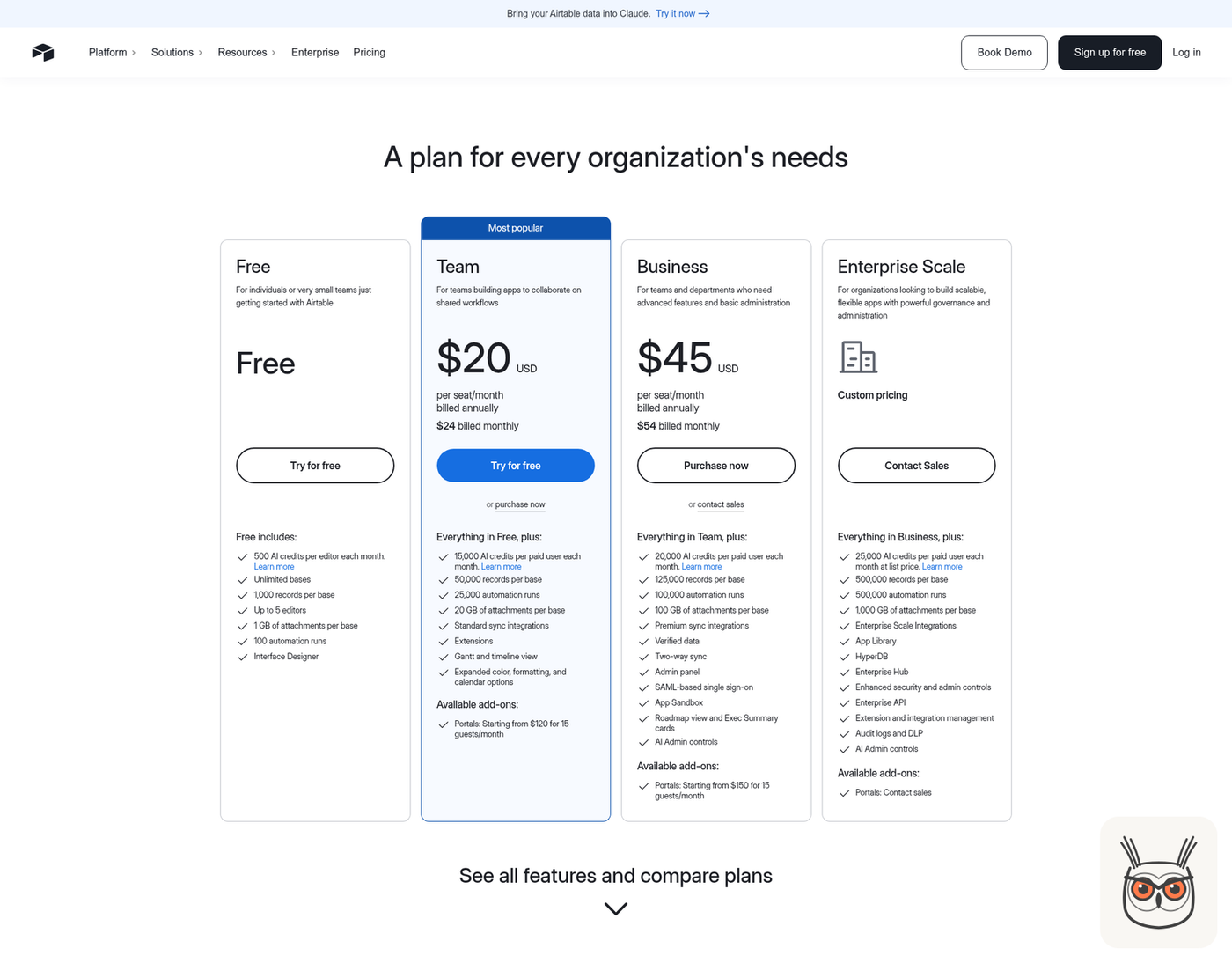
Airtable is the right call when the hard part is the data and the screen people use, and the automations just keep that data moving. Team is $20 per seat a month on annual billing with 25,000 automation runs. It's a database with automations attached, not plumbing between ten apps, and per-seat billing grows with every editor.
- Best for: teams where the records and the interface matter first, like content calendars, inventory or a lightweight ops tracker.
- Pricing (checked 10 Nov 2026): Free with 100 automation runs; Team $20/seat/month annual ($24 monthly) with 25,000 runs; Business $45 ($54 monthly) with 100,000; Enterprise Scale by quote. See Airtable's pricing page.
- Where it breaks: automations are capped per plan and per base (75, 100, 150 and 200 across the four plans), and they live inside a base, so cross-app plumbing stays thin.
- Skip it if: you mainly need to connect many apps for many editors. Every person with edit rights on one base is a paid seat.
- Integrations: sync integrations, standard on Team, premium and two-way sync on Business. No app count published.
- Export and lock-in: Airtable is silent on how automations leave a base, so plan on rebuilding them if you move.
- Learning curve: Airtable publishes nothing independent on it; spreadsheet people tend to feel at home.
- The cost view: seats are charged for everyone with edit permission on at least one base. The free plan stops at 5 editors. That's the meter to watch, not the runs.
- The skeptic's take: go over your record limit and you can't add records until you upgrade. A hard wall is better than a surprise bill, but plan for it.
Pick Airtable for the base, not for the automations. If your team needs a shared source of truth with buttons on it, it's lovely. If you need business process automation across a dozen apps, put Zapier, Make or n8n in the middle and let Airtable be one of the apps.
6. HubSpot: best for sales, marketing and service workflows
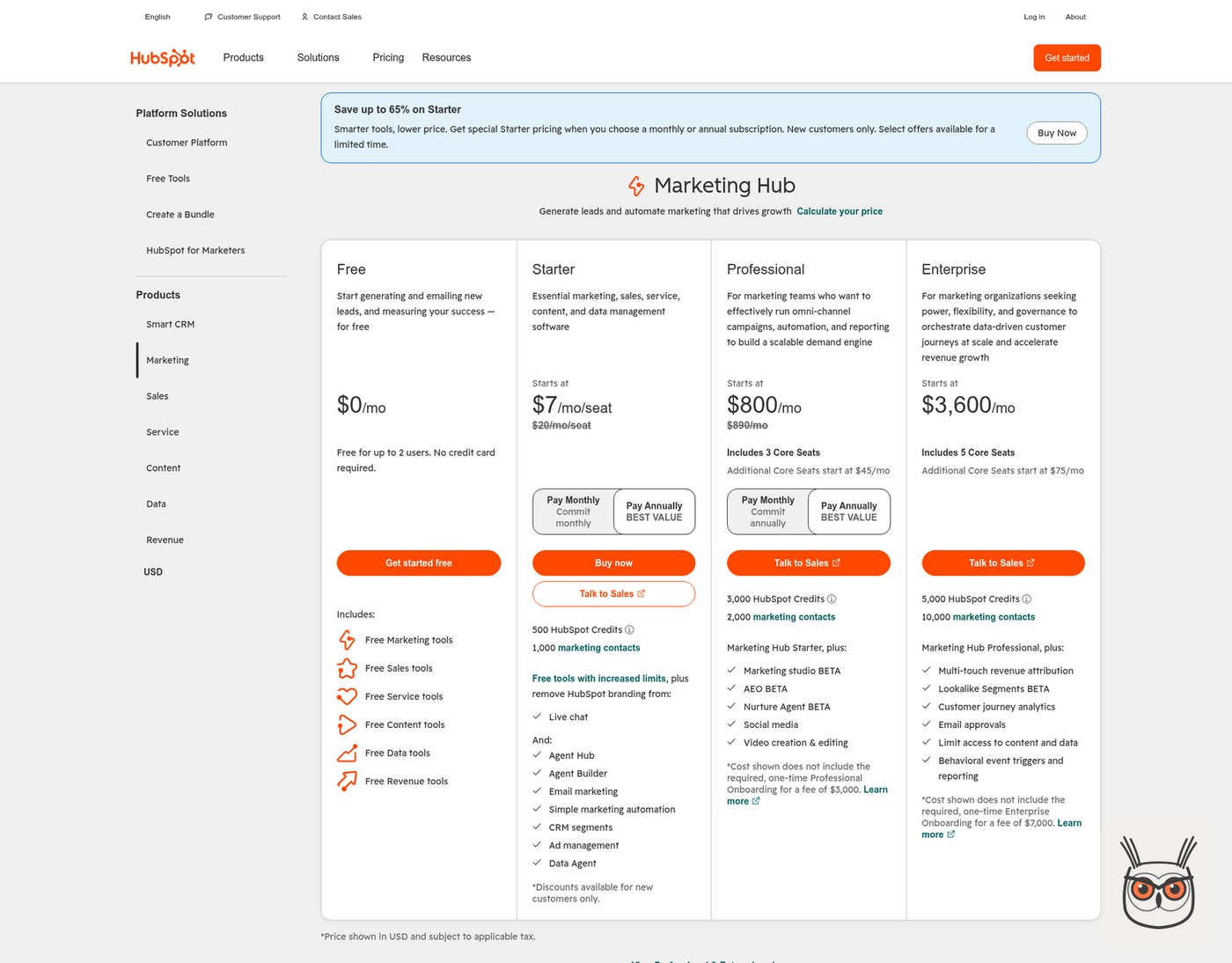
HubSpot is the pick when your sales, marketing and service already run on HubSpot and you want workflows right next to the CRM records. Real automation starts at Marketing Hub Professional, $800 a month billed annually, and there's a required $3,000 onboarding fee on top that most lists forget to mention.
- Best for: teams that already use HubSpot as their CRM and want lead scoring, nurture and routing in the same place.
- Pricing (checked 10 Nov 2026): Starter from $7/seat/month on promo (list $20); Professional from $800/month annual ($890 monthly) with 3 core seats, plus $3,000 required onboarding; Enterprise from $3,600/month plus $7,000 onboarding. See HubSpot's pricing page.
- Where it breaks: the jump in cost. Starter email automation allows up to 10 automated actions; omni-channel workflows (up to 300) start at Professional.
- Skip it if: you don't use HubSpot as your CRM and only need cross-app plumbing.
- Integrations: over 2,000 apps and services listed on the pricing page.
- Export and lock-in: HubSpot's pricing page doesn't say how workflows leave. They are built around HubSpot records, so assume they don't.
- Learning curve: HubSpot doesn't publish one, and the required onboarding tells you what it expects.
- The cost view: the guides quoting "$890 a month" are right, for monthly billing. Annual is $800. Neither number includes the onboarding, which makes year one $12,600 at the annual price before you add a seat.
- One more meter: AI agents in HubSpot run on HubSpot Credits; Professional includes 3,000. Add it to the collection.
Only if HubSpot is already your CRM. Then it's strong, because the workflow sees every contact property without a sync. If you're curious what HubSpot's agents and other AI marketing agents can actually run for you, I went through that separately. As a general business automation platform for a small team, though, it's a CRM with an expensive door.
7. Workato: best for enterprise integration
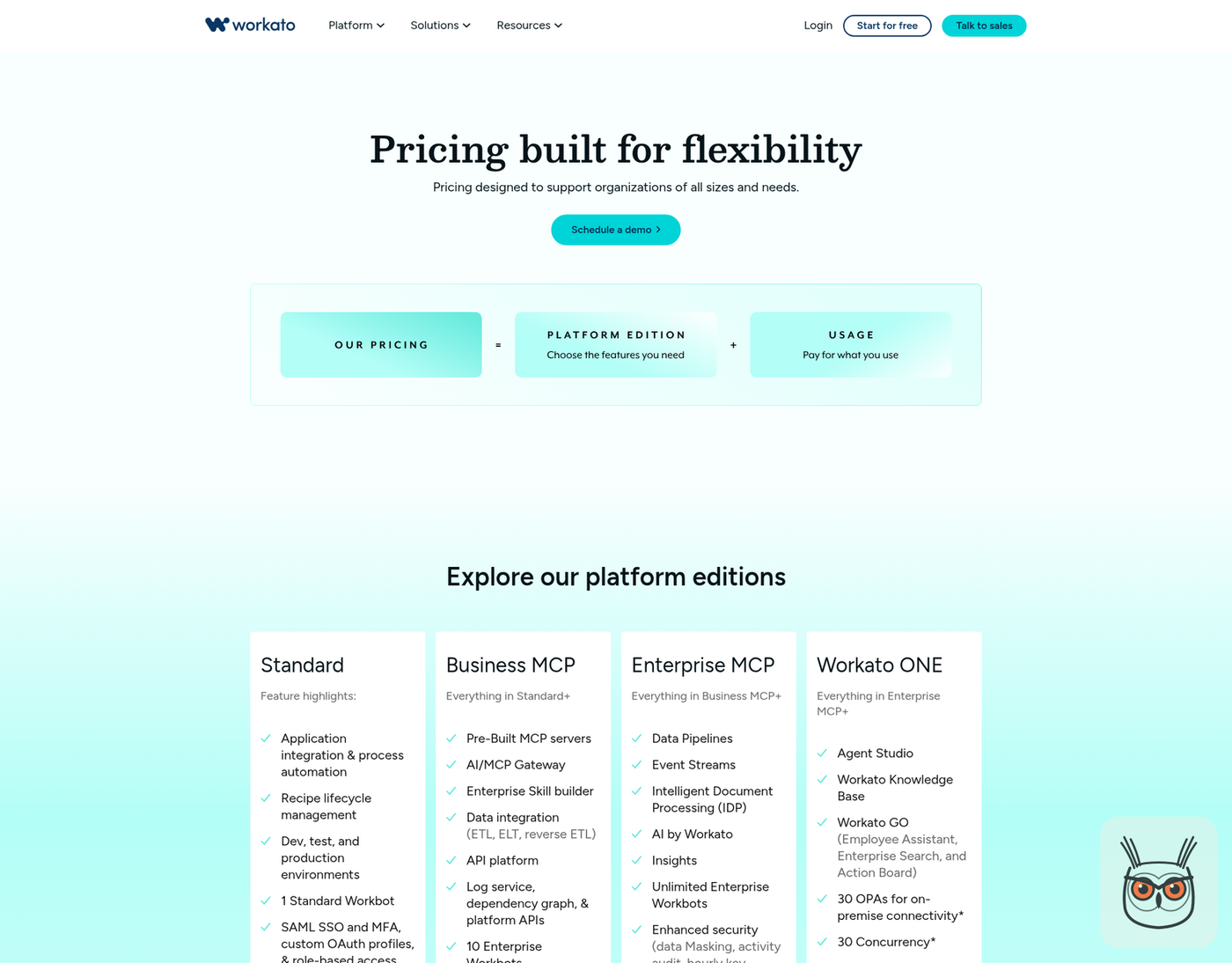
Workato is built for enterprise integration: governance, on-premise connectivity and 1,200+ pre-built connectors, sold to IT teams with procurement processes. It publishes no prices at all. Every edition is "get a quote", and the entry edition runs one job at a time, so a small team will pay for a sales cycle before a single recipe runs.
- Best for: large companies connecting ERP, HR and finance systems, including ones behind the firewall.
- Pricing (checked 10 Nov 2026): not published. Four editions (Standard, Business MCP, Enterprise MCP, Workato ONE), all by quote, with a consumption part on top. See Workato's pricing page.
- Where it breaks: concurrency. Standard includes 1 concurrent job; Enterprise MCP gets 15 and Workato ONE 30.
- Skip it if: you're a small team. No public price, a sales process and concurrency add-ons are a lot of ceremony for syncing a form to a CRM.
- Integrations: 1,200+ connectors, plus on-premise agents (3, 10 or 30 by edition).
- Export and lock-in: not a word on exporting recipes anywhere on the pricing page.
- Learning curve: Workato sells onboarding and training packages, which is a hint.
- The skeptic's take: per the small print, plan structures vary with your contract and when you joined. Two customers on "the same plan" may not be on the same plan.
- The cost view: unlimited users and workspaces sound generous until you notice the bill is shaped by editions, concurrency and consumption instead.
A serious tool for a serious IT department, and the clearest example of what a small team should not buy. If your automation needs fit on a napkin, Workato is a limousine to the corner shop.
8. UiPath: best for legacy systems with no API
UiPath is the tool for work stuck in screens with no API: old desktop software, portals, green-screen systems, where a robot has to click like a person. Community is free and Basic is $25 a month, but Basic is marked as changing, and the plans that matter for real deployments are quote only.
- Best for: automating apps and screens that have no API, with attended and unattended robots, plus document and agent features.
- Pricing (checked 10 Nov 2026): Community free; Basic $25/month, labelled "evolving" with an updated plan "coming soon"; Standard (60-day free trial) and Enterprise by quote. See UiPath's pricing page.
- Where it breaks: the jump from Basic to a quoted plan, and the screens themselves: a robot that clicks a button breaks when somebody moves the button.
- Skip it if: all your tools have APIs. A workflow tool is cheaper and simpler.
- Integrations: UiPath's pricing page gives no connector count.
- Export and lock-in: there's no public export story, so treat UiPath robots as UiPath's.
- Learning curve: licences are sold by role (Basic User, Pro User, Unattended Robot), which tells you it expects developers in the room.
- What changed: the Basic plan carries a notice that an updated plan offering is coming soon. If you're buying on that price, ask what it becomes.
- The cost view: role-based licences mean the bill follows people and robots, not runs.
UiPath is what you buy when there is no other way in. I'd always check for an API, a webhook or an export first, because every one of those is cheaper than a robot pretending to be an intern.
9. Lindy: best for handing work to an AI agent
Lindy is for handing recurring knowledge work to an AI agent: inbox triage, meeting follow-ups, research, CRM updates, working from Slack with 1,500+ integrations. Team starts at $49.99 a month for 5,000 credits per active user. It earns its place for judgement work, and it's the wrong tool for anything that must run identically a thousand times.
- Best for: recurring work that needs reading and judgement, where the steps change from case to case.
- Pricing (checked 10 Nov 2026): Free with $50 in credits that last 7 days; Team from $49.99/month for 5,000 credits per active user; top-ups $10 per 1,000 credits; Enterprise custom. See Lindy's pricing page.
- Where it breaks: credits are billed by the size of the job. Everyday asks cost 2 to 250 credits, deep work 250 to 1,000, big builds 1,000 to 2,500, so 5,000 credits can disappear in a handful of big jobs. At zero it pauses until the reset.
- Skip it if: you need the same steps to run the same way thousands of times; a workflow tool bills that more predictably.
- Integrations: 1,500+, with MCP support.
- Export and lock-in: no export path is published; an agent's setup lives in Lindy.
- Learning curve: the home page promises setup in 2 minutes. I'd believe the first two minutes.
- The skeptic's take: the page body says $49.99 for 5,000 credits, while the same page's meta description says "starts at $29.99 per user per month". The body is what you see at checkout, so go with $49.99.
- The cost view: monthly credits don't roll over, and anything with outside impact (sending an email, updating a ticket) waits for approval. That's the right default. It's also review time you should put in the budget.
My verdict: use one agent tool, for one job, with approval on. Most of the jobs people hand to an agent are better as a workflow with one model call in it, and I'm fairly firm on that. Where the number of steps genuinely can't be known in advance, Lindy is a tidy way in. I wrote about which jobs AI agents for business actually earn their keep on if you want the shortlist.
RPA vs workflow automation vs AI agents: which type do you need
Use workflow automation when your apps have APIs and the steps are known in advance, RPA when the only way in is a screen, and an AI agent when the steps depend on reading something first. Most small teams need the workflow tool, sometimes one agent, and almost never RPA. Each type breaks in its own way.
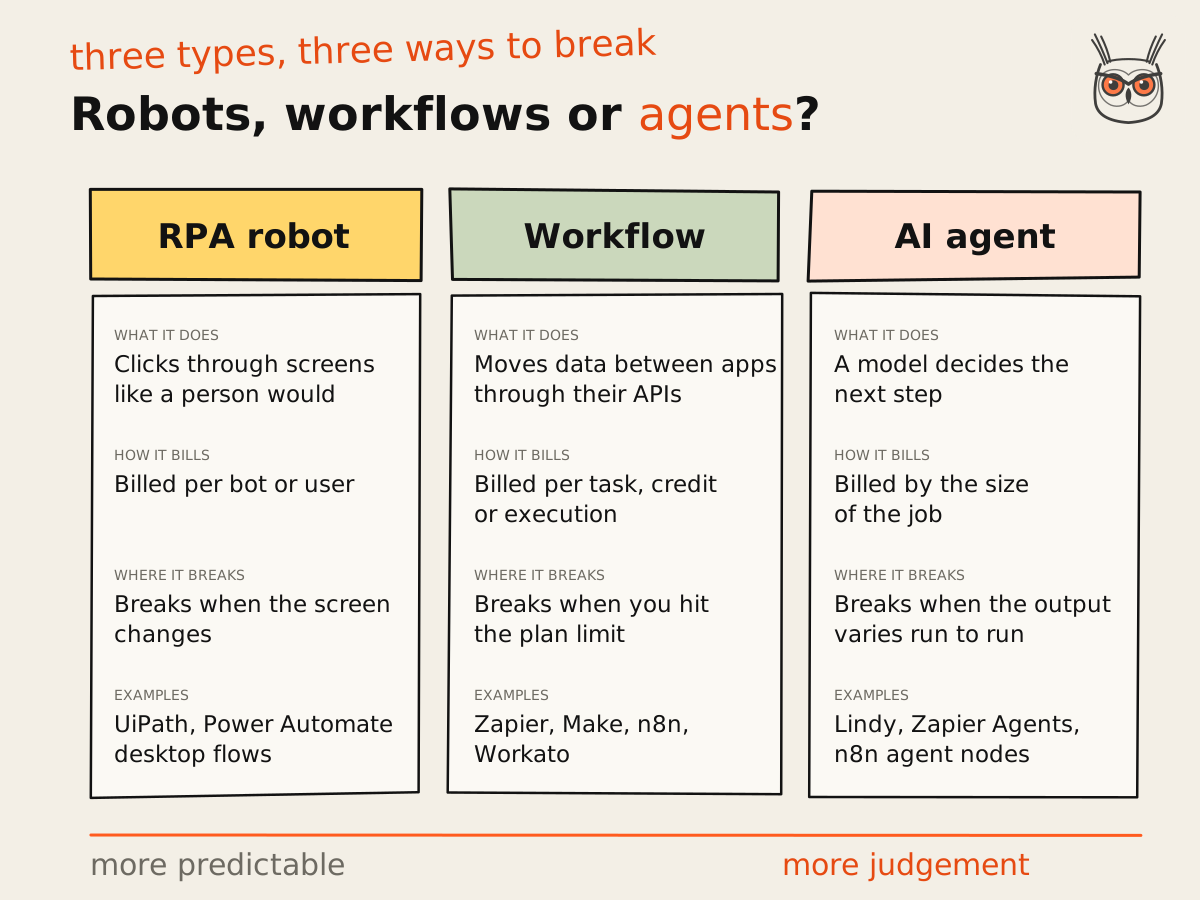
The diagram is the cheat sheet. A robot breaks when the screen changes, a workflow breaks at the plan limit, and an agent breaks when its output varies from one run to the next. Pick the failure you can live with. If you're building the agent end yourself, my practical guide to building AI agents goes step by step.
Contradiction time. The vendor lists treat agents as the upgrade from workflows, as if you'd graduate from Zapier to Lindy like moving from a bike to a car. The pricing pages tell a different story. AI output isn't deterministic (Zapier's FAQ is upfront about it), Lindy holds anything with outside impact for approval, and Zapier bills agent tool calls on the same task meter as Zaps. I side with the pricing pages. An agent is a different tool for a different job, not the next level of the same one.
There's also a question I keep seeing in practitioner threads: did anyone automate a task with AI and find doing it by hand was faster, once you count checking the output and fixing the mistakes? Nobody has good data on it. I'd still price the oversight before you call an agent a saving, because the review hours are real even when nobody measures them.
The best business automation setup for marketing automation and AI agents
For marketing automation and AI agents, the setup I'd pick for most SaaS teams is one workflow tool as the backbone (n8n with a technical owner, Make or Zapier without one) plus a single model call or one agent for the judgement steps. The CRM's own automation handles what never leaves the CRM. No enterprise suite needed.
Here's why. Marketing work is mostly plumbing with a few judgement calls in it. A lead arrives, gets enriched, scored, routed, and followed up. Four of those five steps are rules. One, writing a reply that doesn't sound like a robot, needs a model. Put the model in that one step and keep the rest deterministic, and you get an AI agent that's cheap to run and easy to debug.
- Lead routing and enrichment: Zapier or Make if the team is non-technical; n8n if someone can own it.
- Content and ad workflows: n8n, because long flows cost one execution. This is the shape of most of the AI automation I build.
- Inbox, meeting and research chores: one agent like Lindy, approval on.
- Nurture and scoring inside the CRM: HubSpot workflows, if HubSpot is already the CRM.
This is the work I do. I design and build AI automation and marketing agents for SaaS teams, usually on n8n with a model in the right spot, and hand them over running with the checks around them. The tool matters less than where you put the model.
What to automate first
Automate first the work that is frequent, rule-based and cheap to get wrong: routing form leads, syncing records between tools, weekly reports, alerts when something breaks. Leave anything that spends money or talks to customers without review until the boring automations have run quietly for a month. Boring first is how you get to clever later.
If part of that work needs a model, I scored the AI step separately in my guide to choosing which processes to automate with AI first.
List what repeats
Write down every task someone does more than weekly. Copy-paste between tools, report pulls, Slack pings. Ten minutes, one sheet.
Mark the cost of a mistake
Next to each, note what happens if it goes wrong once. A wrong internal report is cheap. A wrong email to 4,000 customers is not.
Pick one, frequent and cheap
Start with the task that runs most often and costs least when wrong. Build it, give it one owner and an alert if it fails.
Price it on the meter
Count the steps and runs, then check which billing unit it lands on before you scale it to ten more workflows.
If you work in search, this applies twice over. Automate SEO checks and reporting before you automate drafts. An alert that a key page fell out of the index is worth more than a hundred auto-written posts, and it's the kind of SEO automation and AEO automation I set up in SEO and AEO work for SaaS teams. The drafts can wait. The alert can't.
One honest caveat: the order above is my rule of thumb from doing this, not a study. Frequency times the cost of one mistake is still the fastest way I know to sort a list.
What business automation software really costs
Business automation software costs what your workflows make it cost, not what the pricing page leads with. Zapier counts tasks, Make counts credits, n8n counts executions, and the platforms count seats and bots. The same workflow can land on very different bills, so price one real workflow on each meter before choosing. Here is one worked example.
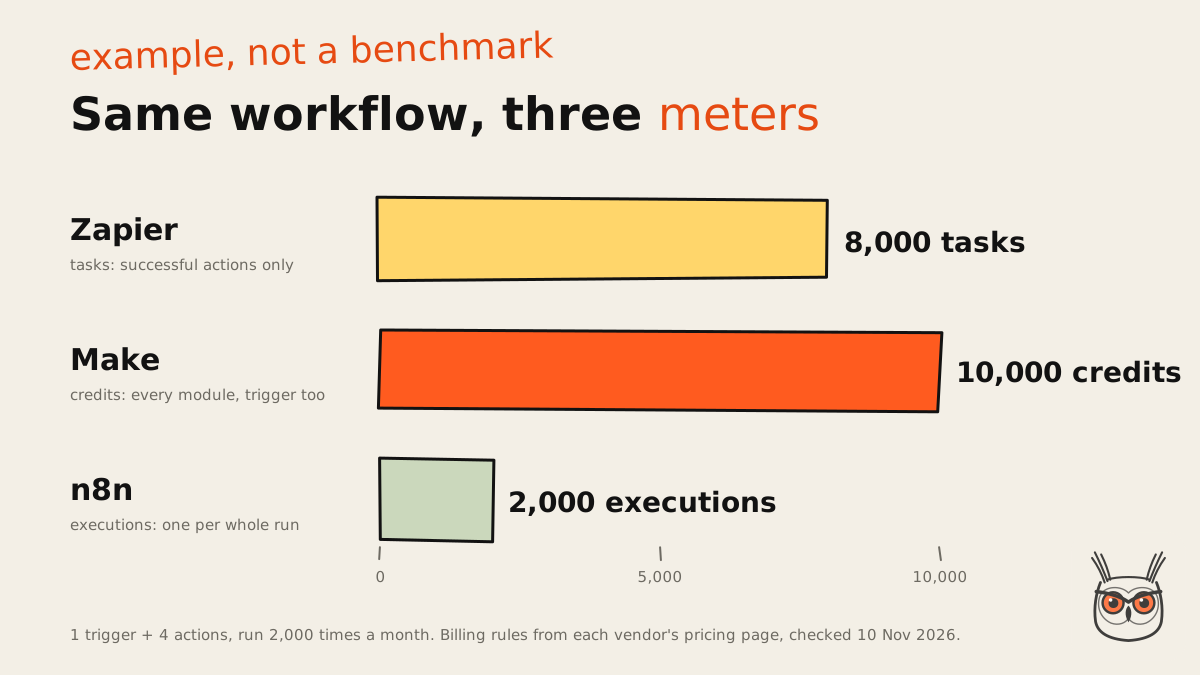
The example: a workflow with one trigger and four actions, running 2,000 times a month. On Zapier, triggers are free and each successful action is a task: 8,000 tasks. On Make, every module is a credit, trigger included: 10,000 credits, which fits Core at the 10,000-credit tier for $12. On n8n, each run is one execution: 2,000 executions, inside Starter's 2,500 at $20 a month on annual billing. Zapier's static pricing page doesn't show the price of an 8,000-task tier, so check it in the plan picker.
It's an example, not a benchmark, and it assumes every action succeeds and counts. But it shows the pattern. n8n's meter rewards long workflows; Zapier's and Make's reward short ones. Add five more steps and n8n's number doesn't move while the other two grow.
| Tool | What happens at the limit (pricing pages, 10 Nov 2026) |
|---|---|
| Zapier | Moves to pay-per-task at a higher rate, or Zaps pause until the next period |
| Make | Scenarios stop at zero credits; incoming webhooks queue until you add credits |
| n8n | Overage fees, capped on Starter and Pro |
| Airtable | Capped at the plan limit; over the record limit you cannot add records |
| Lindy | Credit-using actions pause until the reset |
| HubSpot | Not a run meter: the step up is the plan, plus $3,000 or $7,000 onboarding |
The other hidden costs are the ones in the platform column. HubSpot's required onboarding, Power Automate's per-bot licences, Workato's quote and consumption, UiPath's changing Basic plan. None of them are scandalous. They're just not on the "from $X" line in the listicles. Read the meter, not the menu.
What a small team should not buy
A small team should not buy an enterprise suite for its first automations. Workato publishes no prices and its entry edition runs one job at a time, UiPath's useful plans are quote only, and HubSpot Enterprise adds $7,000 of onboarding. A workflow tool at $12 to $20 a month plus one agent covers most small-team needs.
I'll say it more plainly. Most small teams need a workflow tool plus one agent, not a platform. The enterprise tools are good at what they do: governance, on-premise systems, hundreds of users, auditors. If you don't have those problems yet, you're paying for the meeting room and using the kettle.
The exception is real, though. If you need audit logs, SSO, data that can't leave your servers, or robots for a legacy system, the cheap tools stop being cheap fast (Make's audit logs and SSO are Enterprise only, for one). I haven't found a clean size threshold anyone agrees on. My rough line: when compliance asks about your automations, it's time to look upmarket.
When to hire a business automation system company instead
Hiring a business automation system company tends to make sense when the automation lives inside one platform, like a CRM or an enterprise suite, where the vendor already prices in onboarding, or when nobody on your team can own the review. Cross-app plumbing on Zapier, Make or n8n is usually fine to build yourself first.
The pricing pages hint at this. HubSpot makes onboarding mandatory on Professional and Enterprise. Workato sells onboarding and training packages. Make's Enterprise plan comes with a Value Engineering team, and Airtable sells professional services on Business and Enterprise. When the vendor builds a services step into the price, the product is telling you it needs help to set up.
My rule of thumb, held loosely: hire a partner certified on the platform when the work stays inside that one platform; build it yourself when it's cross-app plumbing on a workflow tool; and hire someone when nobody on your team can own the review. I've had to make this call myself, and the deciding question was never the tool. It was "who gets the alert at 9pm, and will they know what to do?"
Whoever you hire, insist the work runs on accounts you own and plan the handover from day one. An automation only the builder can run is a subscription with extra steps.
Before the next pause email lands
That paused workflow from the 28th of the month wasn't a bad tool. It was a meter nobody had read, and a limit nobody knew was there. Pick the tool whose meter matches the shape of your work, set an alert for its limit, and give every automation an owner. That's most of business automation. The rest is where you put the model, which is most of what I write about on growthvibes.ai.
If you'd rather have someone price the workflows and build the first few, that's what my AI automation and agents work is for. Either way, set the alert today.
Frequently asked questions
What is business automation software?
Business automation software runs repetitive work without a person clicking each step: moving data between apps, updating records, sending follow-ups and routing requests. It covers workflow tools, RPA robots, automation inside platforms and AI agents.
Workflow tools like Zapier, Make and n8n connect apps through APIs. RPA tools like UiPath click through screens. Platforms like HubSpot and Airtable automate inside themselves, and AI agents like Lindy decide steps on their own.
How much does business automation software cost?
Entry plans start at $12 to $20 a month for workflow tools (Make, Zapier, n8n, checked 10 November 2026), while platforms and enterprise suites run from hundreds a month to quote only.
The starting price says little about the final bill. Zapier counts tasks, Make counts credits and n8n counts executions, so one workflow with a trigger and four actions run 2,000 times a month is 8,000 tasks, 10,000 credits or 2,000 executions. HubSpot Marketing Hub Professional is $800 a month on annual billing plus a required $3,000 onboarding.
Which processes should you automate first?
Start with work that is frequent, rule-based and cheap to get wrong: lead routing, syncing records, weekly reports and failure alerts. Leave anything customer-facing or money-spending until simpler automations have run cleanly for a month.
A quick way to sort a list is frequency times the cost of one mistake. The task that runs most often and hurts least when it fails goes first.
What is the difference between BPA and RPA?
BPA (business process automation) automates a whole process, usually by connecting apps through their APIs. RPA (robotic process automation) is one technique inside it: a software robot that clicks through screens like a person.
Use RPA when a system has no API, such as old desktop software. When the apps have APIs, a workflow tool is cheaper and breaks less often, because it doesn't depend on a button staying where it was.
Is Power Automate enough if we already use Microsoft 365?
Often, yes, for cloud flows like approvals, notifications and SharePoint chores. Premium is $15 per user a month paid yearly (checked 10 November 2026). It gets complicated with premium connectors, unattended robots and AI agents.
Unattended RPA is $150 per bot a month, and one bot runs one flow at a time. Copilot Studio agents need prepaid Copilot Credits and an Azure subscription. If your stack is mostly Microsoft, try Power Automate before anything else, and map the licences before you add robots.
What are the risks of automation software?
The main risks are silent failures, surprise bills and AI steps that don't give the same answer twice. Workflows pause or stop at plan limits, and nobody notices unless someone owns the alert.
Give every automation an owner and a failure alert, check what each tool does at its limit, keep approval on for any AI step that emails customers or changes records, and prefer tools that let you export your workflows.
