
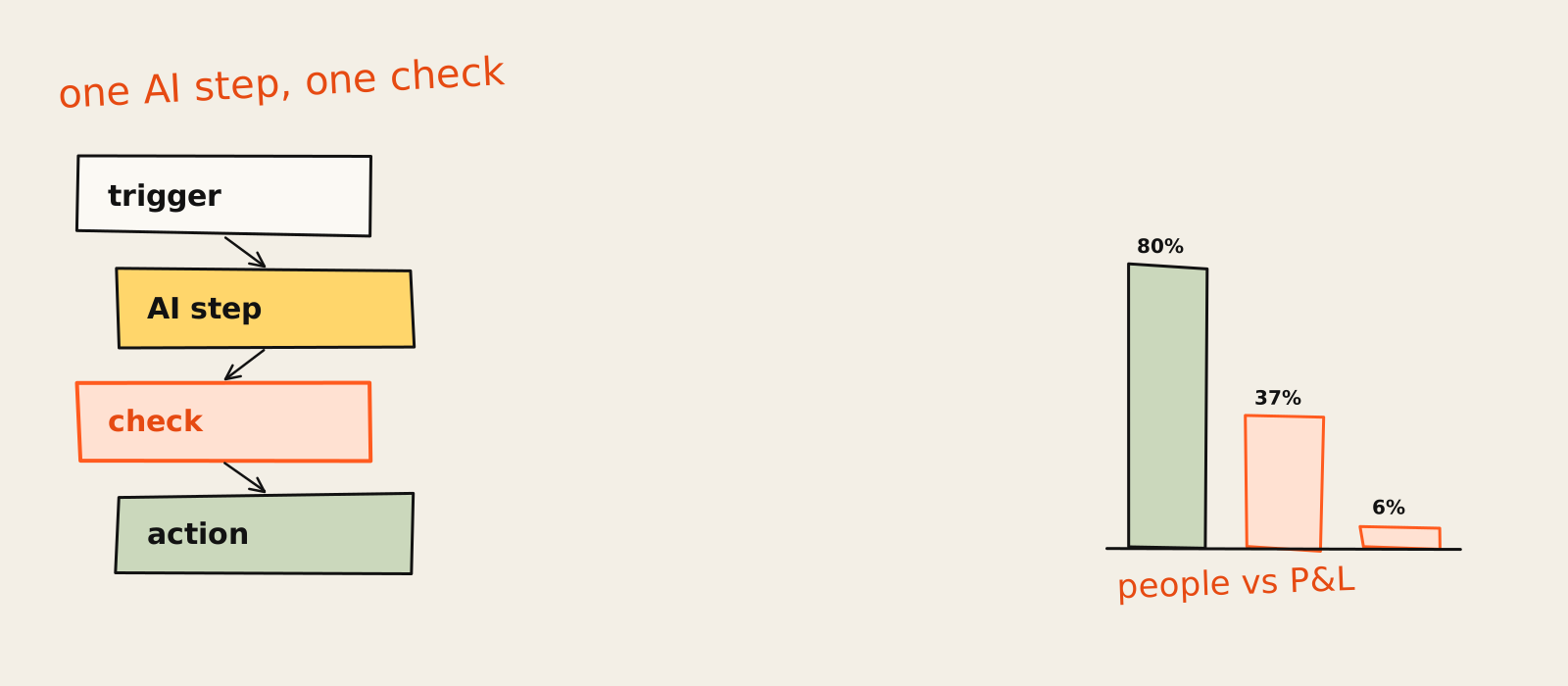
AI automation is a workflow where an AI model handles the step that fixed rules can't: reading an email, pulling numbers out of a messy PDF, sorting a request, drafting a reply. Everything around that step is ordinary automation. A trigger starts it, the model does the fuzzy bit, a check catches its mistakes, and the system acts.
Earlier this year someone proudly showed me their "fully AI-automated lead pipeline". A form fills in, a message pops up in Slack, a row lands in a spreadsheet. It worked beautifully. It also contained exactly zero AI. Not a crumb. It was a zap, and a good one, wearing a costume it had bought from a vendor's homepage.
I don't blame them. Search the term and page one is a trade show: Microsoft, Salesforce, AWS, Oracle, UiPath, Make and Zapier, each with a platform to sell you. So "AI automation" now means whatever the person selling it needs it to mean that quarter. This page is the plain version: what it is, how it differs from RPA and AI agents, how it works, where it pays off, where it quietly doesn't, and what it costs. I build AI automation and agents for SaaS marketing teams, so the opinions below come from the bit after the demo, when something has to run on a Tuesday.
The short version, which you'll hear again: most good AI automation is a boring workflow with one AI step in it. Boring is the point.
What is AI automation?
AI automation means using an AI model, usually a large language model, to do a step in a workflow that needs reading, sorting or judgment, while plain rules handle the rest. The workflow fixes the order of steps. The model fills in the one step a rule can't, like deciding what an email is about or what a document says.
The cleanest way to draw the line comes from the people who build the models. Anthropic's guide to building effective agents, re-published on 9 October 2026, splits these systems in two: workflows, where models and tools run through predefined code paths, and agents, where the model directs its own process and picks its own tools. It also tells you to use the simplest thing that works, which may be no agent at all. A model company telling you to buy less model. I'll take it.
So by that split, almost everything sold to small teams as AI automation is a workflow. That's not an insult. It's a compliment.
AI automation vs traditional automation and RPA
Traditional automation runs on rules you write in advance: if a form comes in, add a row; if the invoice total is over a limit, send it to finance. RPA (robotic process automation) is the same idea with a robot arm: software that mimics clicks and keystrokes inside apps that have no API. Neither learns anything. Zapier's own explainer puts it bluntly: RPA bots follow predefined scripts, and there's no learning involved.
That works until the input stops being tidy. A bit of history helps here. Ten years ago, an RPA bot fell over the day an invoice arrived as a phone photo, or a customer wrote "cancel pls" instead of picking "Cancel" from a dropdown. What language models changed is the input. Emails, call notes, PDFs and free-text form answers became something software can read. So AI automation isn't a replacement for the rules. It's rules plus a reader. If your process has no messy input at all, you don't need the AI part, and my guide to business process automation covers the rules-only side properly.
AI automation vs AI agents
An AI agent decides its own next step. Give it a goal and some tools, and it loops: pick an action, use a tool, read the result, go again, until it decides it's done. AI automation in the workflow sense never hands over that control. The path is fixed; the model only does its one job inside it.
The practical test I use is about permission, not branding: judge an automation by what it's allowed to do on its own, not by what the label says. Most of what gets sold as an agent today is a workflow with one model call and a human approval at the end, and honestly, that's fine. Gartner even has a name for the rebranding: "agent washing", where assistants, RPA and chatbots get relabelled as agents. In June 2025 it estimated that only about 130 of the thousands of vendors claiming agent products were the real thing. If you want the long version of where the line sits, I wrote a whole explainer on what AI agents are.
Here's how the three compare. It's my own simplification of the sources linked above, so treat the edges as blurry:
| Type | Who decides the steps | Input it handles | How it breaks |
|---|---|---|---|
| Rules-based (RPA, plain workflow) | You, in advance, as if-then rules | Structured fields | The input does not match the rule |
| AI automation (workflow with an AI step) | You fix the path; a model handles the fuzzy step | Messy text, emails, documents | The model is confidently wrong and nobody checks |
| AI agent | The model picks its own steps and tools in a loop | An open-ended goal | Errors compound over many steps, and costs climb |
How does AI automation work?
AI automation works in four parts. A trigger starts the run, like a new email or form. An AI step reads the input and classifies, extracts or drafts something. A check (a rule in code, a person, or both) catches bad output. Then an action updates a system, routes the item or sends the result.
The pieces: LLMs, machine learning, NLP, document processing and RPA
The vendor pages throw a lot of nouns at this, so here they are with the jargon taken off:
- Large language models (LLMs): the reader and writer. They classify a support ticket, summarise a call, draft a reply. This is what made AI automation suddenly useful for normal companies around 2023.
- Machine learning: the older cousin. Models trained on your historical data to predict something, like churn risk or a fraud score. Still great when you have the data. Most small teams don't.
- NLP (natural language processing): the umbrella term for software that understands text. These days it mostly means "we put an LLM on it".
- Intelligent document processing: reading invoices, contracts and forms and pulling out the fields. Mostly LLMs and OCR in a trench coat.
- RPA: the hands. Useful when the system you need to update has no API and someone has to click the buttons.
You don't need all five. Most of the AI automations I build use one LLM call and the API of whatever tool comes next. The model is usually the smallest part of the build.
Trigger, AI step, check, action
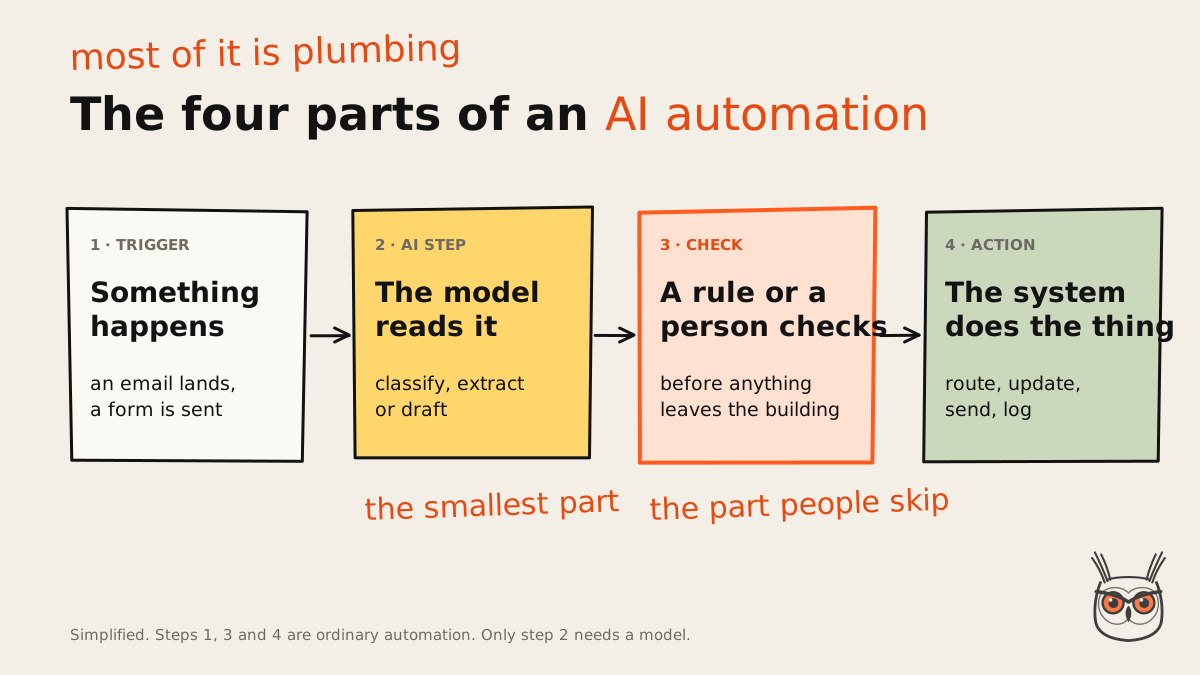
The fourth part is the one people skip, and it's the one I'd keep if you made me delete three. The practitioner's version of this is consistent across almost everyone who builds these for real. Make's own example flows draft a support reply from a knowledge base and then route it to a human review step, and its guide is clear that anything taking external action (customer replies, public posts, payments) needs a review checkpoint. Anthropic's patterns say the same thing in engineer: put programmatic checks, which it calls "gates", between steps so you know the process is still on track.
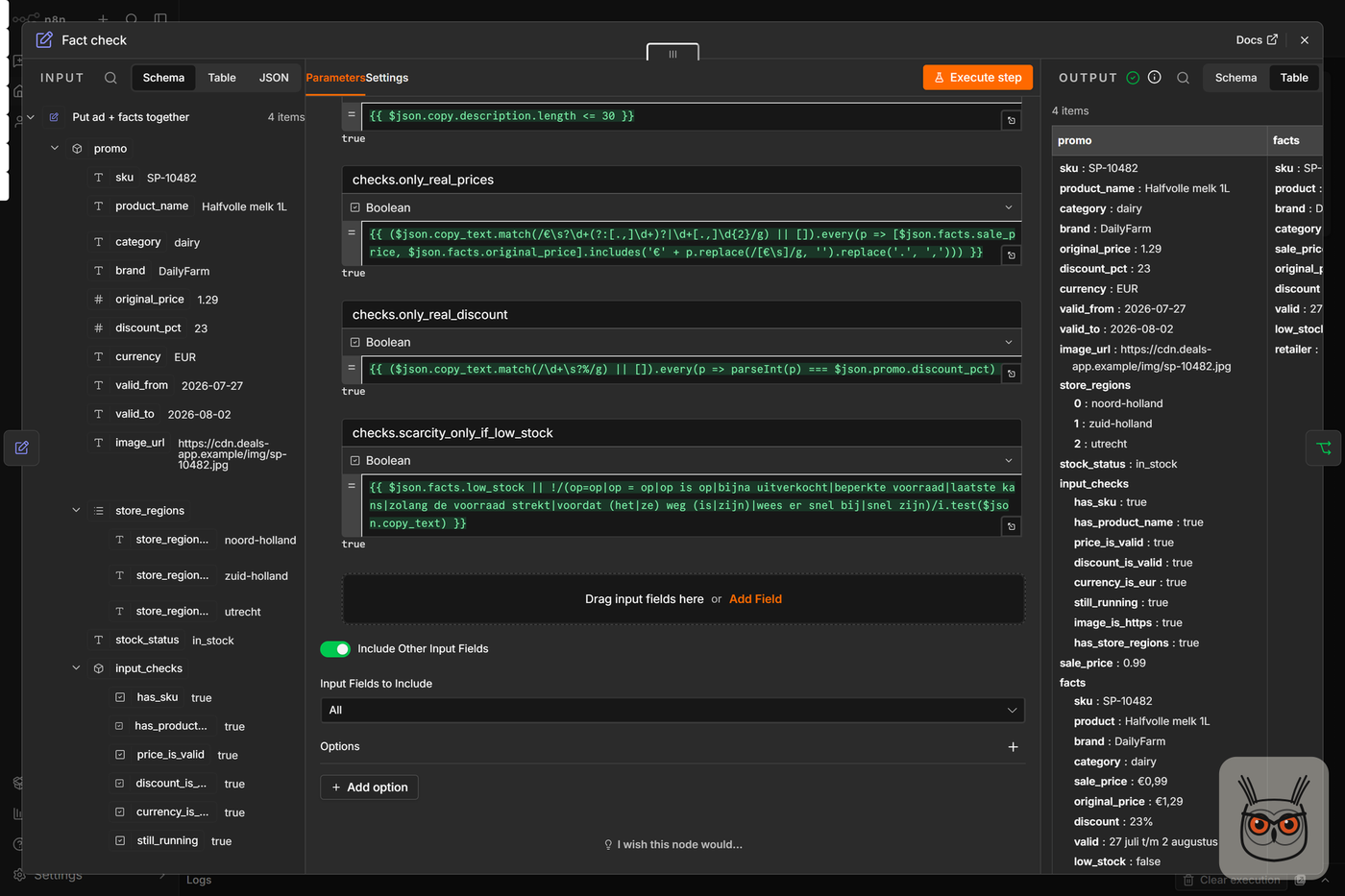
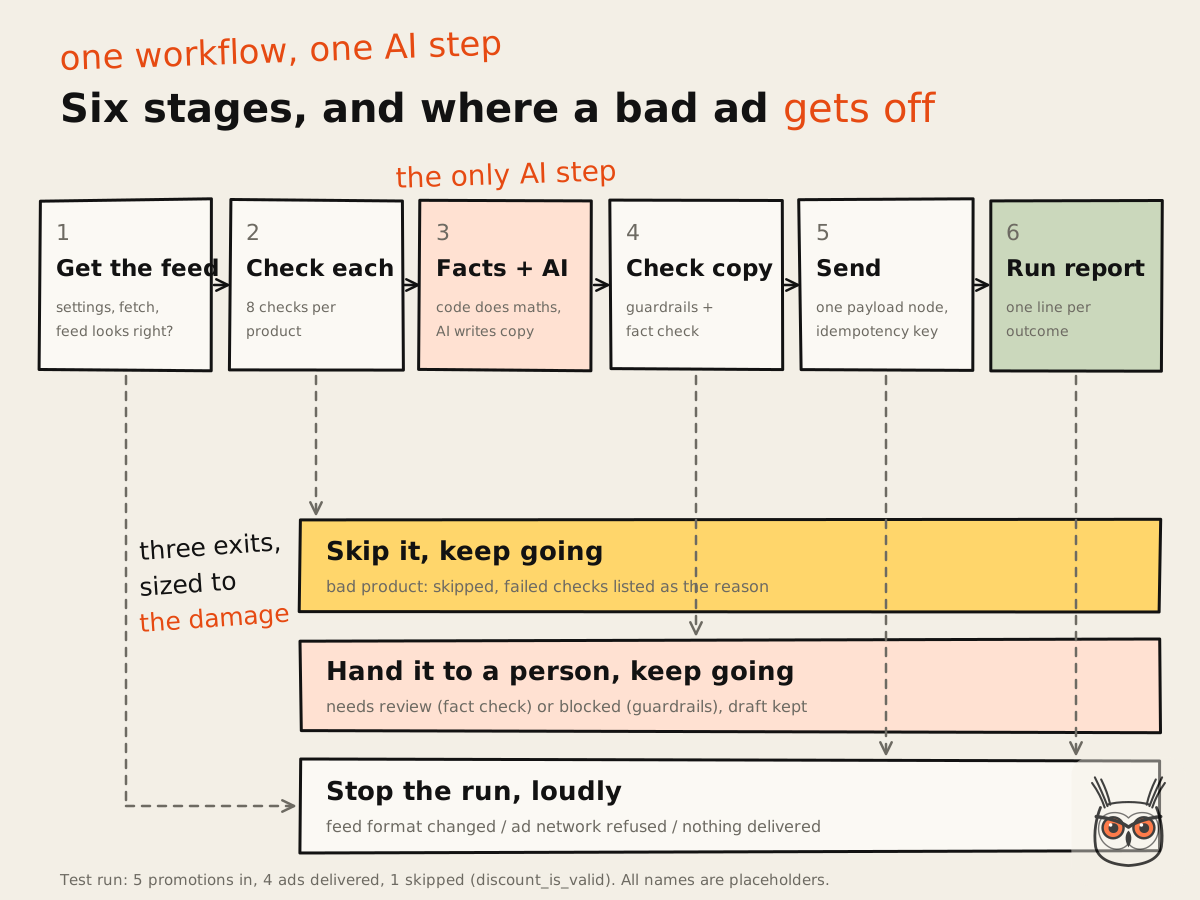
I built one of these for a retailer: an n8n workflow that turns a weekly promotions feed into about 200 paid ads a week and gives the team back roughly 8 hours a week. People call it an agent. Only one step uses AI. The model writes short ad copy from facts it's handed, and plain code checks every price, discount and duplicate before anything goes out. The full build, checks and all, is in how I built an n8n ads agent.
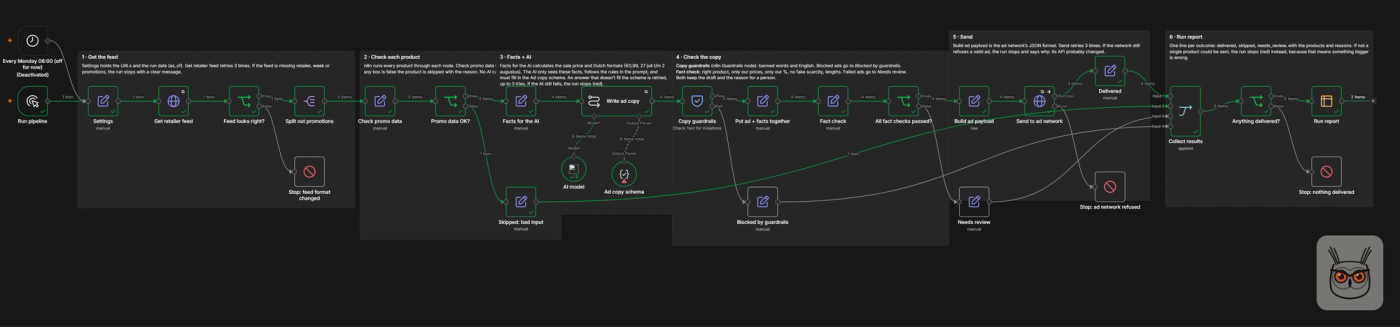
What surprised me the first few times I built these: the AI step takes an afternoon. The checks around it take the rest of the week. That ratio is normal, and anyone who quotes you a build time without the checks is quoting you the afternoon.
AI automations: examples by team
Good AI automations exist in every team, but the payoff isn't spread evenly. McKinsey's 2026 State of AI survey shows cost savings reported most often in service operations, supply chain and manufacturing, and revenue gains most often in marketing and sales. So start your shortlist there, and treat vendor case studies as vendor case studies.
That survey (McKinsey, published 25 August 2026, 1,719 respondents) is self-reported, so it tells you where people feel the money, not an audited figure. It's still more useful than a customer logo wall. It also shows companies scaling AI agents mostly in IT, knowledge management and software engineering, which is a polite way of saying the engineers got there first. Here's what AI automation looks like by team, with one AI step each.
Sales
Sales gets the flashiest demos and the most expensive mistakes. The safe AI automations are enriching new leads, summarising calls into the CRM, scoring inbound leads by fit and drafting follow-ups a rep approves. Autonomous outbound, where software writes to strangers in your name with nobody approving, is a different animal with your sending domain on the line. I compared the tools for that in my review of AI sales agents.
Support and service operations
Support is the textbook case for a reason: the volume is high, the input is messy, and a person can check a suggested answer in seconds. Typical AI automations classify tickets, pull order details, draft replies from your help docs and escalate anything angry or unusual. Keep the draft-then-approve step until you've seen a few weeks of boring results. Boring is the point.
Marketing: AI automation for SEO, AEO and content ops
Marketing is where I spend most of my time, so I'll be biased and specific. The AI automations that earn their keep here are unglamorous: tagging and routing inbound leads by what they actually wrote, turning call transcripts into briefs, drafting ad variations from a product feed, refreshing meta descriptions, and checking which of your pages AI assistants cite. That last one is where SEO automation and AEO automation meet: a workflow pulls the data, a model reads the answers, a person decides what to fix. If you'd rather someone set that up for your site, that's what my SEO and AEO work is.
The rule I hold to: a model can draft anything, but nothing customer-facing ships without a person or a hard check in between.
Operations and finance
The back office is where AI automation looks least exciting on a slide and pays most quietly. Invoice and receipt extraction, matching purchase orders, flagging odd expenses, reconciling two spreadsheets that should agree and never do. The AI step reads the document; rules do the matching; a person handles the exceptions. Finance people tend to like this because the output is checkable against a number.
Product and onboarding
At Synthesia we sent new users down different onboarding paths based on what they typed into the prompt box. People making social videos went one way; people making presentations or avatar videos went another. That's the routing pattern in its simplest form: read what someone wrote, decide which bucket it belongs in, act on it.
It also helped our SEO a lot, which I didn't see coming. The wider story is in the Synthesia case study.
Benefits of AI automation
The main benefit of AI automation is that people get faster at the reading, sorting and drafting parts of their job, right away. The company-level payoff is a different story: it shows up mostly for teams that redesign the whole workflow around the AI step, not for teams that bolt a model onto the old process.
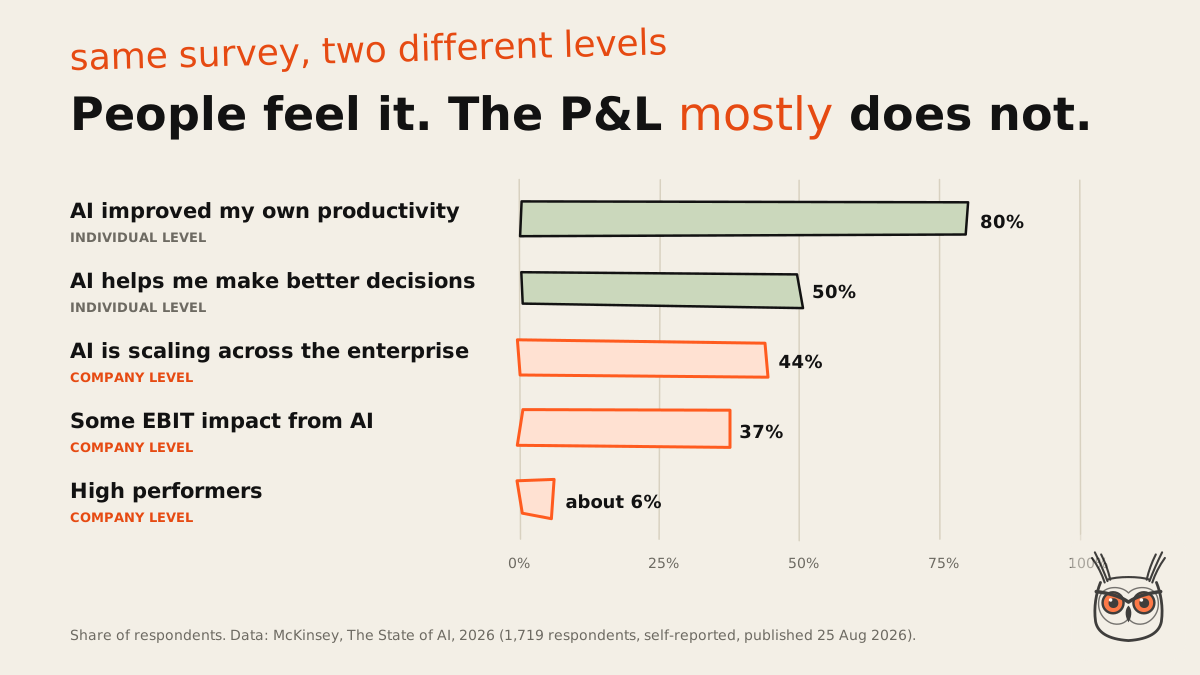
Here's the contradiction nobody on page one mentions. In the same 2026 survey, 80% of respondents say AI improved their own productivity and 50% say it helps them make better decisions. But only 37% attribute any EBIT impact to AI, about the same as a year earlier, and the "high performers" are still about 6%. Individuals feel it. The P&L mostly doesn't.
Both numbers are true; they measure different levels. And I think that's the hidden story behind the whole "does AI automation work?" argument. The people quoting a failure statistic and the people quoting a productivity gain are usually measuring different things and shouting past each other. A person saving 40 minutes a day is real. Whether those 40 minutes turn into profit depends on what the company does with them, and the honest answer is often "more meetings".
So the benefits list I'd sign up to is short:
- Time back on repetitive reading and sorting. The most reliable gain, and the one people notice in week one.
- Consistency. The same email gets tagged the same way at 9am and 6pm, which can't be said for most of us.
- Speed to first response. Work starts the moment it arrives instead of when someone opens the inbox.
- A record of what happened. Every run logs its input, its output and who approved it, which beats "I think Sam handled that".
Notice what's not on the list: "replaces a team". More on that in the FAQ.
Where AI automation pays off first
AI automation pays off first on work that comes in volume, has a clear input you can describe in a sentence, and produces an output a person can check in under a minute. Ticket triage, lead routing and invoice extraction pass that test. "Run our marketing" does not. The cheaper a mistake is to catch, the sooner it pays.
None of the ranking pages give you a filter, so here's mine. It's my own synthesis of three sources pointing the same way, not a published framework, and the longer version with a scoring sheet is my guide to which processes to automate first:
- Is there a lot of it? Volume is what turns a few saved minutes into hours. Twenty items a month won't repay the build.
- Can you describe the input in one sentence? "Support emails about billing" passes. "Anything that comes up" doesn't.
- Can a person check the output in under a minute? If checking takes as long as doing, you've built a very elaborate way to do the work twice.
The academic view adds a twist I think most teams miss. MIT Sloan's research on chaining tasks (April 2026) argues the value sits in the chain, not the single task: one step that's really hard for AI can undermine the whole operation, and every handoff between AI and a person carries review cost. So a tool that's brilliant at nine steps and bad at the tenth can be worth less than a modest tool across a clean chain. The authors also note that adoption costs dominate the gains until you pass a capability threshold, which explains a lot of disappointing first pilots.
It also explains McKinsey's high performers. Nearly three-quarters of them report fundamentally redesigning workflows because of AI, against about a quarter of everyone else. I used to think the order was "automate a task, then improve the process". I don't anymore. Look at the whole chain first, then decide where the AI step goes.
This is the bit I usually do with teams in the first week of an AI automation project: find the boring, checkable work hiding behind the exciting request.
Where it does not pay off: risks and limits
AI automation doesn't pay off where a wrong output is expensive and hard to spot: anything that spends money, changes customer records or speaks to customers without a check. It also fails when the input is chaos, nobody owns the workflow, or the whole thing is a pilot built to impress rather than to run.
The skeptic's take deserves a fair hearing, because it's partly right. Here's the most recent data on what actually goes wrong, from a Nylas survey of 1,030 US professionals published on 20 October 2026. Nylas sells software to this market and the sample leans towards engineers at software companies, so treat it as a strong hint, not a census:
Look at the kind of mistakes. Reversed workflows, wrong records, an incorrect or inappropriate email (18%). Every one is a wrong output that cost something because it reached a system or a person unchecked. And incidents rose with sprawl: 45% of teams running one to five agents reported one, against 70% of those running more than twenty.
So my ranking of jobs is by what a wrong output costs: read-only reports first, drafts a person approves second, anything customer-facing or money-spending last, and always with a sign-off. It's my own ladder, built on survey data that skews technical, so hold it loosely. I haven't seen a better one, and I apply it job by job to marketing agents in my guide to AI marketing agents.
I've seen the quieter failure play out more than once, too. A client's AI step was supposed to tag inbound emails by intent. For weeks it tagged every furious complaint as "product feedback", which, technically, it was. Nobody checked the tags because the dashboard looked healthy. The lesson I took: a check nobody reads is not a check.
Then there's the headline number. You'll see "95% of AI pilots fail" quoted everywhere. It comes from MIT's NANDA research (2025), and it measures something narrower than it sounds: pilots with no measurable P&L impact six months on, based largely on interviews, with figures the authors call directional (Fortune's write-up has the detail). Set it next to McKinsey's 37% reporting some EBIT impact and you get the same level problem as before. I'd use McKinsey for the broad picture and treat 95% as a pattern, not a fact. The pattern is real enough: most pilots are built to be shown, not to be run.
Gartner forecasts that over 40% of agent projects will be cancelled by the end of 2027, citing escalating costs, unclear business value and weak risk controls. It's a forecast from June 2025, not a measurement. But notice that none of those three reasons is "the model wasn't clever enough".
How to get started with AI automation
To get started with AI automation, pick one high-volume process with a clear input, measure how long it takes today, build the smallest workflow with a single AI step and a human check, and run it alongside the old way for a few weeks. Loosen the check only when the error rate earns it.
Pick one process
Use the three questions above: volume, a clear input, a quick check. One process, not a programme.
Measure it before you touch it
Time per item, error rate, items per week. Without a baseline, every result will look like a win.
Build the smallest version
A trigger, one AI step, one check, one action. Use a no-code tool unless you already write code.
Keep a person in the loop
Approve everything at first. Move to spot checks when a few dull weeks of results say you can.
Measure again, then decide
Time saved per item, mistakes caught, mistakes missed. Expand, fix or switch it off.
On tools: for most small teams, a no-code platform like Make, Zapier or n8n plus one model API is plenty. I compared the options, with prices and where each breaks, in my roundup of business automation software. If the team is small and the job is marketing, marketing automation for small business covers the tools and the first five workflows.
If the job genuinely needs the model to choose its own steps, that's an agent, and the build gets heavier: more moving parts, more ways to fail, and a bigger bill when it loops. Don't start there.
When I start one of these, I usually build the check before the AI step. It sounds backwards. It means that on day one I already know what "wrong" looks like, which makes the first week of results something I can actually judge instead of something I squint at.
What AI automation costs
AI automation costs come from four places: the automation platform, the model usage (billed per token), the time to build and maintain the workflow, and the person who checks the output. The first two are usually small. The last two are where budgets go wrong, because nobody puts "checking" in the spreadsheet.
The cost view, briefly. Platforms and models are usually two separate meters: Make, for example, bills its own credits and has you pay the AI provider directly through your own API key. Run costs are no longer a rounding error either. About one in five McKinsey respondents say operating costs, tokens included, are already limiting how much they use AI, and 28% spend more than a tenth of their IT budget on it.
I'm not giving you a price list, because it would be out of date before you finish reading. Here's an example of the maths instead, with made-up numbers to show the shape:
| Example (illustrative) | Before | After |
|---|---|---|
| Items per week | 300 support emails | 300 support emails |
| Person time per item | 3 minutes to read, tag, route | 30 seconds to check the AI tag |
| Person time per week | 15 hours | 2.5 hours |
| New costs | none | platform + model usage + upkeep |
Twelve and a half hours back is the saving. The economist's catch is that removing a human check saves time but moves the risk, so the cheapest sensible design checks the riskiest step only, not every step and not none. And by the MIT Sloan logic above, if the hard step in your chain stays manual, your 12.5 hours might shrink to 4. Run your own numbers before you believe anyone's, including mine.
Where AI automation is going
AI automation is heading towards more agents inside the software you already use, while custom agent projects get pruned. Large companies are scaling agents fast; smaller ones haven't moved. For a small team, a workflow with one AI step is still the sensible default (more on that in AI agents for business).
The two forecasts that get quoted most come from the same firm and pull in opposite directions. In August 2025 Gartner forecast that 40% of enterprise apps would include task-specific AI agents by the end of 2026, up from under 5%. In June 2025 it forecast that over 40% of agent projects would be cancelled by 2027. Both can be true: agents baked into the CRM or help desk you already pay for spread, while bespoke agent builds with no clear owner get cut. Treat forecasts as direction, not dates.
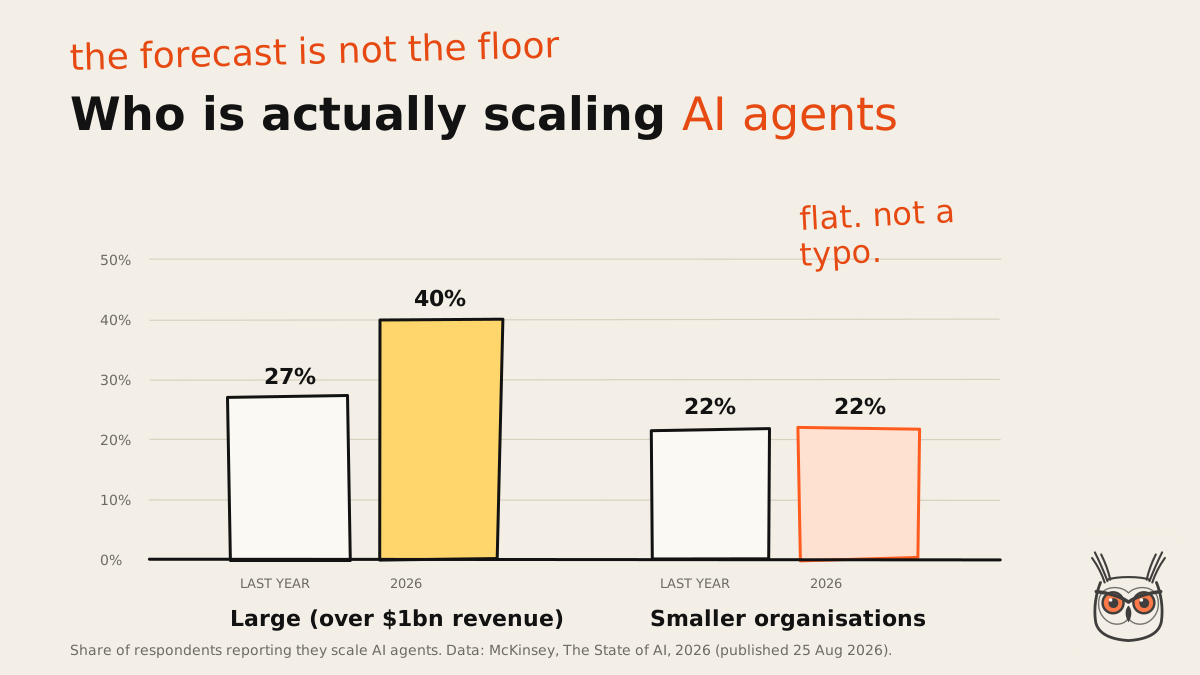
The measured picture is less dramatic. In McKinsey's 2026 survey, 40% of respondents at large organisations (over $1 billion revenue) say they're scaling AI agents, up from 27% a year earlier. At smaller organisations it stayed flat at 22%. One flat year isn't a trend, and the data is thin on small companies. My read is that small teams aren't missing the boat. They're waiting for the boat to stop leaking.
What I'd expect next, as opinion: the useful bits of "agents" turn up as features in tools you already use, the word "agent" gets stretched until it means "has a model in it", and the teams that win are the ones who got good at the boring parts (clean inputs, checks, logs) while everyone else was arguing about autonomy.
On jobs, the expectations are running ahead of what happened. 39% of McKinsey's respondents expect AI-related headcount cuts next year, but only 14% report an actual decline over the past year, against 32% who expected one in the previous survey. Tasks move first. Jobs move slower than the press releases.
So, was the form zap AI automation?
No. And it didn't need to be. That form-to-Slack zap was good automation doing a rules job. It becomes AI automation the day it gets one step that reads what the lead actually wrote, decides where it should go, and a check before anything acts on it. Still boring. Boring is the point.
If you take one thing from this page: pick the dull, high-volume, easy-to-check job, and make the check real. That's most of what my AI automation and agents work comes down to.
Start with one. You can be ambitious in month three, and I'll keep writing up the boring bits on growthvibes.ai in the meantime.
Frequently asked questions
Is AI automation the same as RPA?
No. RPA follows a fixed script, copying clicks and keystrokes, and never learns. AI automation adds a model that can read messy input like emails and documents. Many setups use both: RPA for the clicking, AI for the reading.
Be careful with labels, though. Some vendors now sell plain RPA as "AI" or even as agents. Check what the product actually decides on its own. The comparison table in "What is AI automation?" above lays out the differences.
How is AI automation different from AI agents?
AI automation runs a fixed path with an AI model handling one step. An AI agent chooses its own steps and tools in a loop until it decides the goal is met. Most business uses today are the first kind.
Agents fit open-ended jobs where you can't know the steps in advance. For everything else a workflow is cheaper, faster and easier to check. If you do need one, here's how to build AI agents step by step.
Do you need coding skills for AI automation?
Not for common cases. No-code platforms like Make, Zapier and n8n let you connect a trigger, a model step and an action without writing code. You'll need code, or someone who writes it, for custom logic or unusual APIs.
The harder skill isn't coding. It's describing the job precisely enough that you could check the output, and designing what happens when the model gets it wrong.
What is an example of AI automation?
A support inbox: a new email triggers the workflow, a model reads it and tags the topic and urgency, a rule or a person checks the tag, and the ticket is routed to the right team with a draft reply attached.
A marketing example: a weekly product feed goes in, a model writes ad copy from the facts, code checks prices and discounts, and the approved ads are published. That's the shape of my n8n ads build.
Does AI automation replace human workers?
Mostly it replaces tasks, not jobs. In McKinsey's 2026 survey two-thirds of respondents report little or no AI-related change in total headcount over the past year, and 14% report a decline.
Expectations run hotter than reality: 39% expect cuts next year. What changes first is the shape of the work, with less reading and sorting and more checking and deciding.
Is AI automation safe with business data?
It can be, if you control what it can touch. The bigger risk is usually ungoverned access to apps and data, not the model itself. Give each automation only the permissions it needs, and log what it does.
In the Nylas survey, teams that gave agents their own identity reported full audit capability 66% of the time, against 51% where agents acted through an employee's login. Check your model provider's data terms before sending customer data.
