
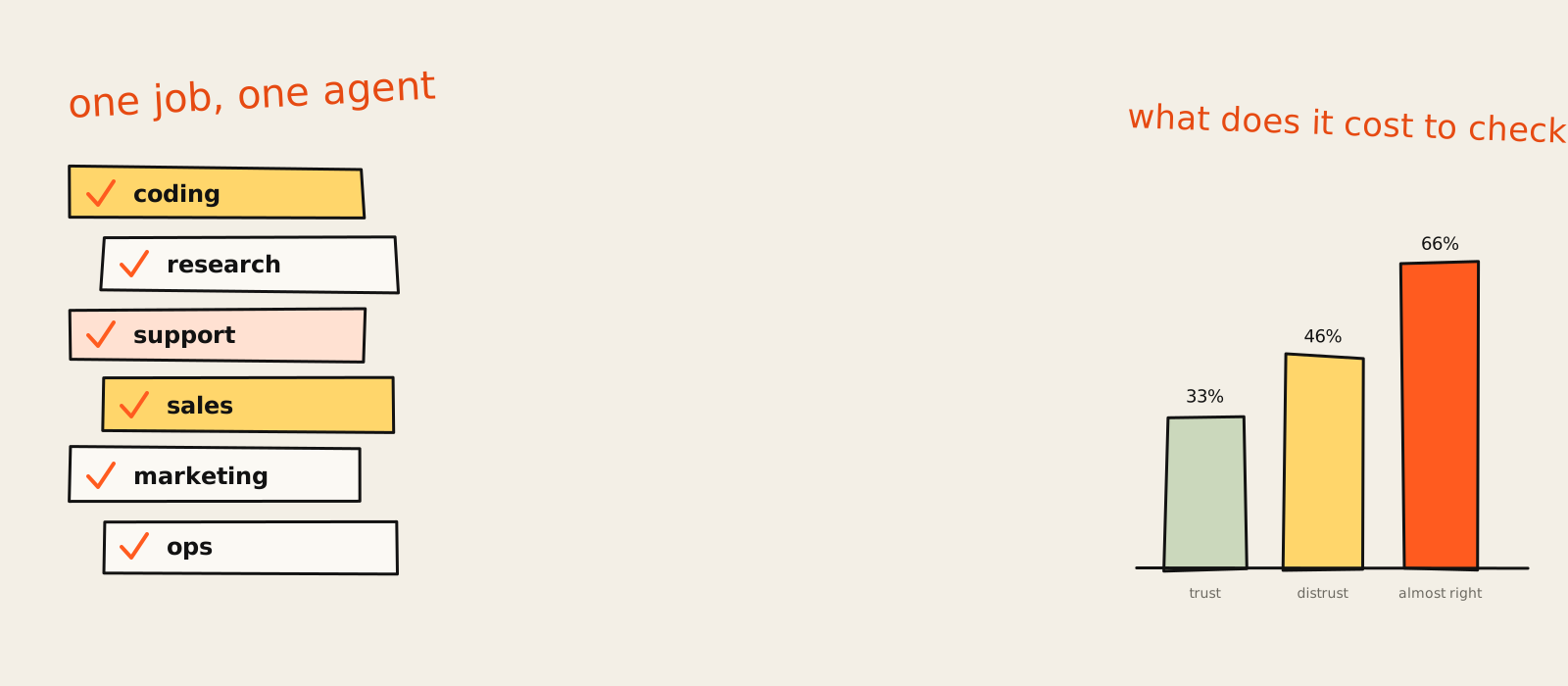
A founder I used to work with messaged me last week with one line: "what are the best AI agents right now?" I answered with two words. For what? He thought I was being difficult. I was being cheap with his time, which is a different thing.
There is no single best AI agent in 2026. There is a best one per job: Claude Code for coding, ChatGPT agent for research and errands, Intercom Fin for support, Agentforce if you already live in Salesforce, Jasper for marketing content, Moveworks for internal IT and HR, and n8n when you want to own the workflow. Pick the job first, then the agent.
The lists that rank today are mostly written by vendors that put themselves at number one (bold strategy, I respect it). So this one is organised by job, with a dated price, the plan where the agent actually unlocks, where it breaks and who should skip it. I build AI automation and agents for marketing teams, but nobody on this list pays me, so you get the unflattering bits too.
Quick answer: the best AI agents at a glance
The best AI agents in November 2026, by job: Claude Code or Cursor for coding, OpenHands if it has to be free, ChatGPT agent for research, Fin for support, Agentforce for Salesforce teams, Jasper for marketing, Moveworks for IT and HR, and n8n or Zapier Agents for workflow automation. Prices dated 17 November 2026 unless a row says otherwise.
| Agent | Job | Entry price (USD, dated) | Best for |
|---|---|---|---|
| Claude Code | Coding | $20/mo on Claude Pro (17 Nov 2026) | Real work in a real codebase |
| Cursor | Coding | $8/mo Plus (17 Nov 2026) | Coding inside an editor |
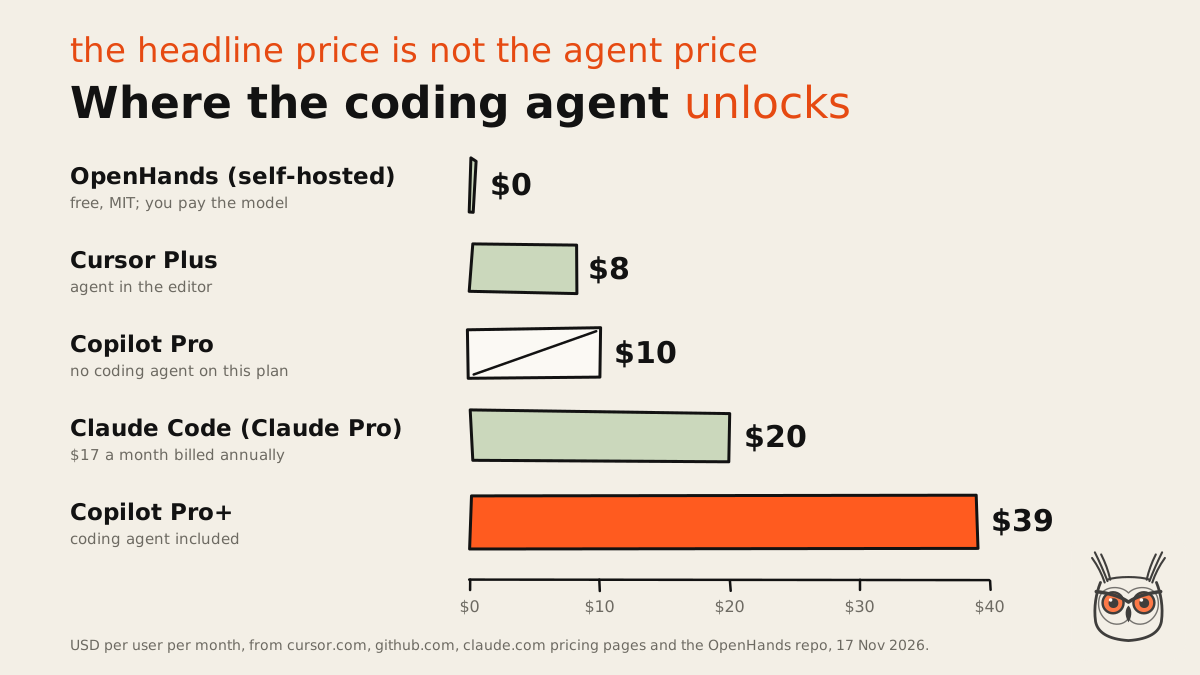
| GitHub Copilot | Coding | $39/mo Pro+ for the coding agent (17 Nov 2026) | Teams already on GitHub |
| OpenHands | Coding | Free, MIT, self-hosted | Open-source, bring your own model |
| ChatGPT agent | Research, errands | $20/mo Plus, 40 agent messages (17 Nov 2026) | Everyday multi-step tasks |
| Intercom Fin | Support | $0.99 per outcome (17 Nov 2026) | Resolving support chats |
| Agentforce | Sales, service | $2 per conversation (19 Oct 2026) | Salesforce shops |
| Jasper | Marketing | $59/seat/mo, annual (17 Nov 2026) | On-brand content teams |
| Moveworks | IT, HR, ops | Custom quote | Large internal help desks |
| n8n | Automation | $20/mo Starter, or free self-hosted | Workflows you own and can read |
| Zapier Agents | Automation | Free, 400 activities a month | No-code agents across apps |
If you only read one row: the "best" agent is the one whose output you can check fastest. More on that in the section on where agents fail, which is, conveniently, the section every vendor list forgets to write.
What counts as an AI agent (and what does not)
An AI agent is software that takes a goal, decides its own next steps, uses tools (a codebase, a browser, a CRM, an API) and loops until the job is done or it gives up. A chatbot answers. An agent does the thing, then reports back. Plenty of products wearing the label are assistants with a nicer hat.
My quick test has three questions. Does it take a goal rather than a single prompt? Does it pick its own steps? Does it act in another system, not just in the chat window? Three yeses and it is an agent. Two, and it is an assistant with ambitions. I go through the longer version, with examples, in what AI agents are.
One more line I draw on this page: ready-made agents versus builders. Fin and Claude Code are agents you switch on. n8n and Zapier are where you build your own. Both are here because, in practice, "the best AI agent platform" is often the right answer to "the best AI agent", but I keep them labelled so you don't buy a toolbox when you wanted a hammer.
How I picked these agents
I picked one or two agents per job using four filters: it has to do the job end to end, it needs a public price I could date, it needs a known way it breaks, and its output has to be cheap to check. Vendor star ratings counted not at all, since the vendor usually wrote the list.
That last filter carries the most weight. An agent that produces something a human must re-read line by line saves you less than the demo suggests, because you have swapped doing the work for reviewing the work. The cheaper the check, the better the agent. A passing test suite is a cheap check. "The tone feels on-brand" is an expensive one.
Leaderboards help less than you would think. The Agent Arena leaderboard that shows up in Google's AI answer scores models, things like task completion and tool hallucination across more than 1.5 million sessions (updated 13 November 2026). Useful if you are choosing a model for a coding agent. Useless for choosing between Fin and Agentforce, which is a bit like ranking cars by their engines and ignoring that one of them is a forklift. If you are new here, the growthvibes.ai homepage explains what I usually write about.
1. Claude Code: best AI agent for coding

Claude Code is the best AI agent for coding when the work happens in a real codebase: bug fixes, tests, migrations that run for days. You set its permissions, it reads the repo, runs commands and proposes the change. Verdict: the one I would start with, and the one I use daily.
- Best for: developers and technical marketers who want an agent working in the terminal, IDE or desktop app, on files that already exist.
- Pricing (17 Nov 2026): included from Claude Pro at $20 a month, or $17 a month billed annually; Max is $100 and Ultra $200. See Claude pricing.
- Where it breaks: long sessions without a clear stopping rule. Give it a vague goal and it will cheerfully keep going.
- Skip it if: nobody on the team can read the diff it produces. Then the review becomes the bottleneck.
- The skeptic's take: coding agents as a group have a trust problem. In the Stack Overflow 2025 survey, 66% of developers named "almost right, but not quite" as their top AI frustration.
- The cost view: the $20 plan is the cheapest way into a serious coding agent on this list, and heavier days push you to Max.
This is the one tool on the list I can talk about from the inside, because it is open on my machine most days. What I like is the permission model: it asks before it runs things, and you can widen that as trust builds. What I've learned the hard way is that the quality of the brief decides the quality of the work. "Fix the checkout" gets you a guess. "The checkout fires two POST requests on a double click, find out why and add a test" gets you a fix.
It is also the engine I would pick for marketing automation jobs that touch code, like a script that pulls search data or a small internal tool. More on that in the core topics section further down.
2. Cursor: best for coding inside an editor

Cursor is the best AI coding agent if you want the agent inside a code editor, next to the file you are looking at, rather than in a terminal. It plans, edits across files and runs tasks in the background. Verdict: the cheapest good entry point on the list, with a plan ladder worth reading twice.
- Best for: developers who live in an editor and want suggestions, chat and agent runs in one window.
- Pricing (17 Nov 2026): Free, Plus $8, Premium $30, Super $100 and Ultra $200 a month; Teams from $30 per user. See Cursor pricing.
- Where it breaks: the Plus plan runs on a shared AI usage pool, so a heavy week can hit the ceiling before the month ends.
- Skip it if: your team already pays for Copilot and is happy. Two coding agents is one too many invoices.
- The cost view: five individual tiers between free and $200 tell you usage is the real product. Pick the plan for your busiest week, not your average one.
I went through the pricing page and the thing that stood out is how many rungs the ladder has. $8, $30, $100, $200. That is not a pricing page, that is a staircase, and the stairs only go up. My read: start on Plus, watch the usage meter for two weeks, then decide.
For non-developers building small apps and prototypes, Cursor also sits in my list of the best vibe coding tools, where it competes with tools that hide the code entirely. If you want to see the code, Cursor. If you never want to see it, look elsewhere.
3. GitHub Copilot: best for teams that already live on GitHub

GitHub Copilot is the best AI coding agent for teams whose issues, pull requests and reviews already sit on GitHub. The agent can take an issue, work on it and open a pull request. Verdict: the right pick for GitHub-heavy teams, as long as you buy the plan that actually includes the agent.
- Best for: engineering teams that want the agent to pick up issues and hand back pull requests inside the workflow they already have.
- Pricing (17 Nov 2026): Free, Pro $10, Pro+ $39 and Max $100 per user a month. The coding agent is not included in Free or Pro. See Copilot plans.
- Where it breaks: the plan names. Plenty of teams think they bought "Copilot" and find the agent sits one tier up.
- Skip it if: your code lives on GitLab or Bitbucket. The whole point here is the GitHub plumbing.
- The cost view: the honest entry price for the agent is $39, not $10. Name the plan where the agent unlocks, not the headline price.
This is my favourite small trap of the year. The $10 plan is called Pro, and the agent is not in it. Nothing dishonest, it is all on the plans page, but most lists quote $10 next to "AI coding agent" and move on. Budget $39 a seat if the agent is the reason you are buying.
Here is how the coding agents line up once you price the plan where the agent actually works:
4. OpenHands: best free, open-source coding agent

OpenHands is the best free AI coding agent if you are happy to host it yourself and bring your own model. It is open source under the MIT license and very actively maintained. Verdict: the pick for teams that want control and no seat fees, and accept that the model bill still arrives.
- Best for: developers and teams who want an open-source coding agent they can run, inspect and change.
- Pricing (17 Nov 2026): free to use under the MIT license; you pay for the model you connect and the machine it runs on. See the OpenHands repository.
- Where it breaks: setup and upkeep are yours. Nobody answers a support ticket at 2am.
- Skip it if: you want something that works ten minutes after you pay for it.
- What changed: older lists quote "73K+ GitHub stars". On 17 November 2026 the repo shows 93.6k, with release v1.41.0 out on 16 November.
Free is a slightly misleading word for any agent. The software is free; the thinking is not. Every run calls a model, and the model bills by usage. My read is that OpenHands is excellent value for a team with someone who enjoys infrastructure, and a weekend hobby for a team without one.
5. ChatGPT agent: best for research and everyday work

ChatGPT agent is the best general AI agent for research and everyday errands: it browses, fills in forms, pulls sources together and hands you a result. It is the one most people already pay for. Verdict: great for occasional multi-step tasks, and the monthly message cap decides how far it goes.
- Best for: founders, marketers and analysts who want research, comparisons and small web tasks done without opening twenty tabs.
- Pricing (17 Nov 2026): Free, Go $8, Plus $20 and Pro from $100 a month. Deep research is included on Plus and limited on Free and Go. See ChatGPT pricing.
- Where it breaks: the cap. OpenAI's help center lists agent mode at 40 messages a month on Plus and 400 on Pro, per the ChatGPT agent help page.
- Skip it if: the task repeats every day. A repeated task belongs in a workflow, not a chat.
- What changed: OpenAI's help center says that starting in December, the usage allowance on Plus, Pro and Business is shared across ChatGPT and Codex.
- The cost view: 40 agent messages on a $20 plan is roughly two errands a working day. Plan for that, not for unlimited.
Is ChatGPT the best AI agent? For variety, probably yes. Nothing else on this list will book a table, compare three CRMs and summarise a report in the same afternoon. For any single job above, a specialist does it better, which is the whole argument of this page.
The word on the street is that agent mode feels magical on the first errand and slow on the fifth. Use it for the weird one-off task; build a workflow for the task you do every Monday.
6. Intercom Fin: best AI agent for customer support

Intercom Fin is the best AI agent for customer support if you want chats resolved, not just deflected. It answers from your help content, takes actions and hands over to a person when it should. Verdict: the cleanest pricing model on the list, because you pay when it actually solves something.
- Best for: SaaS and ecommerce teams with steady chat volume and a help center worth reading.
- Pricing (17 Nov 2026): $0.99 per outcome; a minimum applies if you run it on another helpdesk. Seat prices for Intercom itself are separate. See Intercom pricing.
- Where it breaks: bad help content. Fin is only as good as the articles it reads, and most help centers were last edited by someone who has since left.
- Skip it if: your support volume is a handful of tickets a week. A per-outcome model needs outcomes.
- The cost view: as an example, 500 resolved chats a month comes to $495, before any helpdesk seats.
- What changed: on 17 November 2026 the site banner announces Fin 4.
I like per-outcome pricing because it lines the vendor's incentive up with yours. No resolution, no charge. The catch is that "outcome" is the vendor's definition, so read what counts before you sign.
If support is the first process you want to hand to AI, I wrote about which ones go first in AI for business automation. Support usually makes the shortlist because it is high volume and the result is easy to check: the customer either got the answer or they didn't.
7. Salesforce Agentforce: best for sales and service teams on Salesforce

Salesforce Agentforce is the best AI agent for sales and service teams whose data and habits already live in Salesforce. It works inside the CRM, updates records and handles conversations across channels. Verdict: sensible if you are a Salesforce shop, and an expensive way to start if you are not.
- Best for: companies with Salesforce as the system of record and an admin who can wire the agent into it.
- Pricing (19 Oct 2026): $2 per conversation, or Flex Credits at $500 per 100,000 ($0.10 per standard action, $0.15 per voice action). An org can't mix both. See Agentforce pricing.
- Where it breaks: messy CRM data. An agent acting on duplicate accounts makes duplicate mistakes, faster.
- Skip it if: you are not on Salesforce. Moving CRMs to get an agent is the tail wagging a very large dog.
- The cost view: two meters, per conversation or per action, and you must pick one. Model your volume both ways before the first call with sales.
Judged from the page, Agentforce is selling a promise that "humans do what they do best", which is a nice line until you notice humans are also the ones cleaning the CRM. The agent is only as good as the records it touches.
For sales specifically I compared nine options, Agentforce SDR included, in AI sales agents, with cost per qualified lead worked out for each.
8. Jasper: best for marketing and content teams

Jasper is the best AI agent for marketing teams that care most about staying on brand across a lot of content. It ships agents for core marketing workflows plus Canvas, a workspace for on-brand content. Verdict: worth it for content-heavy teams with a brand to protect, overkill for a solo marketer.
- Best for: marketing teams producing campaigns, landing pages and social copy at volume, with brand rules to follow.
- Pricing (17 Nov 2026): Pro $69 per seat a month, or $59 billed annually, with a 7-day free trial; Business is custom. See Jasper pricing.
- Where it breaks: "on brand" is not the same as "true". The copy can sound like you and still state the wrong price.
- Skip it if: you write one blog post a month. A general assistant does that for less.
- The cost view: the agents for GEO, translation and deep research, and the no-code builder for custom agents, sit on the custom-priced Business plan, not on Pro.
The home page now says "Applied AI for Enterprise Marketing", which tells you where Jasper is heading: bigger teams, bigger contracts. That is fine, just know the interesting agents are on the plan with no price on it.
My rule for any marketing agent is to keep a human on anything that goes out under your name. I go through which marketing jobs are safe to hand over in AI marketing agents.
9. Moveworks: best for IT, HR and internal ops

Moveworks is the best AI agent for internal IT, HR and ops requests at large companies: software access, equipment, policy questions, password resets. Employees ask in chat and it acts across business applications. Verdict: a strong fit for big internal help desks, and not built for a 20-person startup.
- Best for: companies with hundreds or thousands of employees and an IT or HR queue full of the same requests.
- Pricing (17 Nov 2026): not public; the page asks you to request a custom quote after an ROI assessment. See Moveworks pricing.
- Where it breaks: requests that need a judgement call, or a system it isn't connected to.
- Skip it if: your internal help desk is one person and a Slack channel.
A pricing page whose main feature is a form usually means the price depends on how big you are. That is normal for enterprise software and a polite way of saying "if you have to ask, book a call". The logo now reads "from ServiceNow", so expect it to fit best where ServiceNow already runs.
If you are a smaller team looking at internal ops, the bigger win is usually mapping the process before buying anything; business process automation covers how.
Large teams can see what their peers actually deploy, and what they skip, in enterprise AI agents.
10. n8n: best for workflow automation you own

n8n is the best AI agent platform for workflow automation when you want to see and own every step. You build agents and workflows on a canvas, mix AI steps with plain logic, and can self-host it. Verdict: my pick for AI automation that has to run every week without surprises.
- Best for: marketers, ops people and developers who want agents with clear steps, checks and logs.
- Pricing (17 Nov 2026): Starter $20 a month billed annually (2.5K executions), Pro $50 (10K), Business 667 EUR (40K); the Community Edition is free to self-host. See n8n pricing.
- Where it breaks: loops without a brake. An agent step can call the same tool again and again unless you cap it.
- Skip it if: you want a ready-made agent and have no interest in building one.
- The cost view: n8n bills per execution, not per step, so a long workflow costs the same as a short one.
This is the other tool I can speak about first-hand. I built an ads agent in n8n where the AI only writes the short copy and plain code checks the prices, discounts and duplicates before anything goes out. It writes and publishes about 200 ads a week and saves about 8 hours of work weekly. The full build is in how I built an n8n ads agent.
The lesson that stuck: let the AI do the part only AI can do, and let boring code check everything else. That split is most of what AI automation is about once it is running for real.
11. Zapier Agents: best for no-code automation across apps

Zapier Agents is the best AI agent for no-code automation across the apps a small team already uses. You describe a job, connect apps, and the agent runs on a schedule or a trigger. Verdict: the easiest start on the list, with a free tier generous enough to find out if it fits.
- Best for: small teams and non-technical operators who want an agent working across Slack, email, calendars and a CRM.
- Pricing (17 Nov 2026): Agents Free with 400 activities a month; Agents Pro $400 billed annually ($33.33 a month) for 1,500 activities. Regular Zapier plans start free with 100 tasks. See Zapier pricing.
- Where it breaks: anything that needs exact, auditable steps. Describing a job in plain words is quick; debugging a plain-words job is not.
- Skip it if: the workflow is long, branchy and business-critical. That is n8n's job.
- The cost view: activities and tasks are two different meters on two different plans, so read both before you assume one subscription covers the agent.
I'd pick Zapier Agents for the first agent in a company with no developer, and n8n for the fifth. Zapier wins on time to first result; n8n wins on knowing why it did what it did. Both are on my list of business automation software worth paying for.
Best free and open-source AI agents
The best free AI agents in November 2026 are OpenHands for coding and n8n's Community Edition for workflows, both open source and self-hosted. For no setup at all, the free tiers of Zapier Agents (400 activities a month), Cursor, Copilot and ChatGPT let you try an agent before paying. Free tiers are trials with better branding.
| Agent | What is free (17 Nov 2026) | The catch |
|---|---|---|
| OpenHands | Everything, MIT license | You host it and pay the model |
| n8n Community Edition | Self-hosted workflows and agents | You run the server and updates |
| Zapier Agents Free | 400 activities a month | Runs out fast on busy triggers |
| Cursor Free | A free plan exists | Usage limits, upgrade path starts at $8 |
| GitHub Copilot Free | Free plan exists | No coding agent on Free |
| ChatGPT Free | Limited deep research | Agent work is a paid-plan thing in practice |
The honest version: open source is free like a puppy is free. The licence costs nothing, the walks cost an evening a week. If nobody on the team wants the walks, a paid tier is cheaper than it looks.
Hermes Agent is another free one in that mold. If you're curious about the self-hosted, run-it-yourself kind, here's what Hermes Agent is and what the model bill looks like.
If you pay for Claude already, you can run Hermes Agent on your Claude subscription instead of adding a second per-token bill.
Agent or builder: when to build your own
Buy a ready-made agent when the job is standard and priced per outcome, like support chats on Fin. Build your own on n8n, Zapier or Claude Code when the logic is yours: your pricing rules, your data, your approval steps. My confidence here is moderate, and it moves with the price of the vendor's meter.
The numbers make the trade visible. As an example, 500 resolved chats a month on Fin cost $495 at $0.99 each, with no build time. The same volume on n8n Starter fits inside 2.5K executions for $20 a month billed annually, plus the model bill, plus the hours to build and look after it. You are not choosing a price. You are choosing who maintains the thing.
If you decide to build, my practical guide on how to build AI agents goes from the first prompt to production. One story from that guide: an agent once called the same tool eleven times in a row on a real input, because nothing told it to stop. The fix was a loop with a hard limit. Boring, effective, and now in every agent I build.
And if you would rather not build or babysit it yourself, that is exactly the work I do: I set up AI agents and automations for marketing teams, starting with one job, one loop and one brake.
Best AI agents for marketing automation, SEO and AEO
For marketing automation and SEO and AEO work, the best setup is not one agent but two: n8n to run the repeatable workflow (reports, briefs, ads, publishing) and Claude Code to build and fix the scripts behind it. Jasper fits content teams with strict brand rules. Ready-made "SEO agents" mostly repackage the same pieces.
My reasoning is the cheap-check rule again. A marketing agent that pulls keyword data, drafts a brief and checks every number against the source is easy to review. One that "optimises your content" in one opaque step is not. Split the job so each step can be checked, and AI agents become useful for SEO instead of risky.
AEO adds a new reason to automate: the answer engines change what they cite every week, and tracking that by hand is nobody's idea of a good Tuesday. That tracking-and-reporting loop is a natural first agent. It is also the overlap between my two services, SEO and AEO and AI automation, which is why I keep ending up building the same kind of marketing agent for different teams.
Where AI agents still fail
AI agents still fail in three predictable ways: output that is almost right, loops that don't stop, and access that is too broad. The best data on the first one comes from developers: 66% call "almost right, but not quite" their top frustration. None of the top-ranking lists put numbers on failure, so here they are.
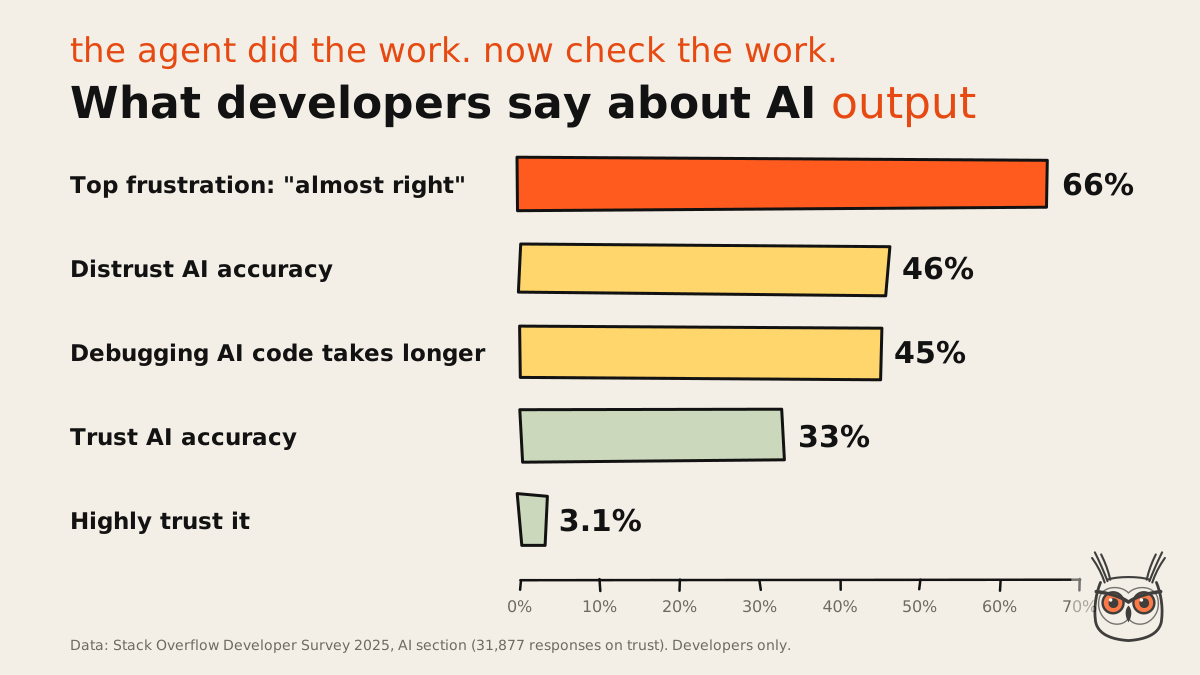
The Stack Overflow 2025 survey adds two more numbers worth a pause. 46% of developers distrust the accuracy of AI tools against 33% who trust it, and only 3.1% trust it highly. And agents are not mainstream yet: 14.1% use them daily, 9% weekly, and 37.9% have no plans to. The survey covers developers only, so sales and support agents may look different, but I'd bet on the same shape.
It was 90% right, and the 10% was the price.
It called the same tool eleven times and then apologised.
It had access to send, and it sent.
Nobody owned the review, so nobody did it.
Each failure has a boring fix. Almost right: make the output checkable, ideally by code. Loops: a hard limit on steps. Access: ask whether it can send or only draft, and if the answer makes you nervous, fix the access rather than the prompt. Judge an agent by how cheaply you can check it, not by its label or a leaderboard.
How to choose: a five-question checklist
To choose an AI agent, answer five questions in order: what data it needs, what it is allowed to do, what it costs at your real volume, how long setup takes, and how it hands over to a human. If you can't answer one of them, you are not ready to buy, whatever the demo looked like.
Data access
List the systems it must read. If the data is messy, fix that first; the agent will not.
Permissions
Decide what it may do alone, what needs approval, and what it can only draft.
Cost at real volume
Price your busiest month on the plan where the agent unlocks, not the headline plan.
Setup time
Ready-made agents take days, builders take weeks. Budget the person, not just the tool.
Human hand-off
Define when it stops and passes the job to a person, with the context attached.
For a business-wide view of where agents earn their keep first, I wrote AI agents for business, with the jobs I would and would not hand over.
So, for what?
That founder got his answer in the end. He needed support chats handled, so it was Fin, and a second look at his help center before switching it on. Two words saved him a month of demos.
Whatever your job is, the order is the same: name the job, price the plan where the agent unlocks, and make sure someone can check the output in minutes. If that someone should be me, I set up AI automation and agents for marketing teams. Otherwise, open the one that matches your job and start with last month's inputs. For what, remember.
Frequently asked questions
What is the best AI agent right now?
There is no single best AI agent. In November 2026 the best per job are Claude Code for coding, ChatGPT agent for research, Intercom Fin for support, Agentforce for Salesforce teams and n8n for workflow automation.
Pick the job first, then compare price and how easy the output is to check. The table at the top of this page has every pick with a dated price.
What are the best free AI agents?
The best free AI agents are OpenHands for coding and n8n's self-hosted Community Edition for workflows, both open source. Zapier Agents' free tier gives 400 activities a month without any setup.
Free software still runs on paid models, so expect a usage bill once the agent does real work.
Is ChatGPT the best AI right now?
ChatGPT is the strongest generalist, and its agent mode handles research and errands well. For a specific job like coding, support or workflow automation, a specialist agent usually does better.
On Plus ($20 a month, checked 17 November 2026) agent mode is capped at 40 messages a month, per OpenAI's help center.
Which AI agent is best for small business?
For a small business, start with Zapier Agents for no-code automation across your apps, or Intercom Fin if support chats eat your day. Both let you start small and pay as usage grows.
Avoid enterprise tools with custom-quote pricing until the volume justifies them.
What is the difference between an AI agent and a chatbot?
A chatbot answers questions in a conversation. An AI agent takes a goal, decides its own steps, uses tools in other systems and loops until the job is done, then reports back.
If it can only reply in the chat window, it is a chatbot or an assistant, whatever the marketing says.
Which platform has the best AI agents?
It depends on the job. GitHub and Cursor lead for coding, Intercom for support, Salesforce for CRM-based sales and service, and n8n or Zapier for building your own agents across apps.
Choose the platform where your data already lives; moving data to get an agent rarely pays off.
