
Business process automation (BPA) means handing a repeatable piece of work to software: the trigger, the steps, the hand-offs and the record of what happened, with a person stepping in only where judgment is needed. That's the whole idea. The industry then wrapped it in RPA, BPM, IPA and hyperautomation, mostly so there would be more things to put on a slide.
The best candidates are usually small and slightly embarrassing. A sales ops lead I know spent forty minutes every Monday copying new trial sign-ups from a form export into the CRM, tagging them by plan and posting a summary in Slack. Nobody ever decided this was a job. It just became one, the way a chair in the corner becomes the place where coats live.
Below is the plain version: what BPA is, how it differs from RPA and BPM, the types, examples, a four-question test for picking your first process, and what AI changes. Then the part vendors tend to skip, which is when not to automate at all. The AI angle gets the most room, because that's where my days go: building AI automation and agents for marketing and growth teams, and now and then talking someone out of one.
What is business process automation?
Business process automation is the use of technology to run a business process with little or no manual work. Software handles the trigger, the steps, the data moving between systems and the record of what happened. People handle the exceptions. I think of BPA as the goal; workflow tools, RPA robots and AI models are ways to get there.
The encyclopedia version is even shorter. Wikipedia's entry, leaning on Gartner's glossary, calls it "the technology-enabled automation of business processes". Accurate, and about as helpful as defining a sandwich as bread-enabled lunch. The word doing the work is process: a chain of steps with a start, an end and somebody who cares how it turns out.
That difference matters more than it sounds. Automating one task (sending a welcome email) is nice. Automating the process (sign-up, enrichment, routing to the right rep, the welcome email, the nudge if nobody replies, the note in the CRM) is where the hours come back. Most "we automated it" stories are one task wearing the process's coat.
What counts as a business process
A business process is any repeatable sequence of steps that turns an input into an outcome the business cares about. A refund request becomes a refund. A signed contract becomes an onboarded customer. A new hire becomes someone with a laptop, an email address and access to at least one Slack channel they shouldn't be in.
The test I use is simple: could you write the steps on one page, and would two people follow them the same way? If yes, it's a process and software can probably run it. If the honest answer is "it depends who's in that day", what you have is a habit with a job title.
BPA vs RPA vs BPM (and workflow automation)
BPA is the broad aim of running processes with software. RPA (robotic process automation) is one method: bots that click through screens the way a person would. BPM (business process management) is the discipline of designing and improving processes, automated or not. Workflow automation connects apps through their APIs, and it's what most small teams mean by BPA.
| Term | What it is | Works through | Best for | Breaks when |
|---|---|---|---|---|
| BPA | The goal: run a whole process with software | Whatever it takes: APIs, bots, AI, people | Any repeatable process with clear rules | The process was never clear to begin with |
| RPA | Software robots that copy a person's clicks and keystrokes | The user interface | Old systems with no API | A button moves or a screen gets redesigned |
| BPM | The management discipline: model, run, measure, improve | Process maps, rules and owners | Large, regulated, multi-team processes | It turns into documentation nobody reads |
| Workflow automation | Trigger-and-action flows between apps | APIs and webhooks | SaaS teams joining cloud tools | An app changes its API or you hit a plan limit |
| AI agent | A model that picks its own next steps | The tools it is allowed to call | Messy inputs where the steps vary | The output changes from run to run |
The academic view, if you want one: RPA is one of three ways to build BPA, next to custom-coded integration and "hyperautomation" (BPA plus AI). BPM is a separate system that automation can sit on top of. That's how the encyclopedic definition frames it, drawing on process-mining researcher Wil van der Aalst. Vendors blur the lines on purpose, because a BPM suite that's also "your BPA platform" is an easier invoice to get signed.
I hold the lines loosely, but here's my working version: BPA is the what, BPM is how you manage it, and RPA, workflows and agents are how you build it. For the last row, the question that matters is who picks the next step, and I wrote a whole plain explanation of AI agents around that one question.
Types of business process automation
The useful way to split business processes automation is by how the work gets done: integrations that move data between systems through their APIs, RPA robots that drive a screen, and intelligent automation that adds AI for messy inputs. Separately, there's scope: automating a single task, a workflow inside one team, or a whole process across several teams.
By how it runs
- Integration and workflow automation: systems talk through APIs and webhooks. Fast, cheap, dependable, and the right default for almost any SaaS team.
- Custom code: the same idea, written by a developer. More control, and more things only one person in the company understands.
- RPA: a bot clicks the buttons for you. The fallback for old software with no API, and famously sensitive to anyone redesigning a screen.
- Intelligent automation (hyperautomation): BPA plus AI and machine learning, for unstructured inputs like emails, PDFs, images and audio. It usually arrives after the rule-based parts are already working.
By scope
- Task automation: one step. An auto-reply, or a form that creates a record.
- Workflow automation: a chain of steps inside one team. A lead comes in, gets enriched, gets routed, gets a reply.
- Process automation: the whole thing end to end, across teams and systems, with an owner and a measure.
Most teams start with tasks, discover workflows, and only reach processes when someone asks why the CRM and the billing system disagree about how many customers you have. (Both are wrong. They're just wrong differently.)
I'd ignore the vendor tiers with names like "Enterprise Orchestration Cloud". Name the type by how it runs, and you already know how it will break. An RPA bot breaks when a screen changes. A workflow breaks when an API or a plan limit changes. An AI step breaks when the input gets weird.
Business process automation examples
Good business process automation examples share three traits: the work happens often, the rules can be written down, and a mistake is cheap to catch. Invoice matching in finance, account set-up in HR, lead routing in sales, ticket triage in support and ad production in marketing all qualify. Here is what each one looks like in practice, kept short.
- Finance: match invoices to purchase orders, flag the ones that don't match, chase late payments on day 7 and day 14.
- HR: a signed offer triggers the laptop order, the accounts, the welcome email and the first-day calendar.
- Sales: new demo requests get enriched, scored and routed to the right rep within minutes, with a Slack ping if nobody picks one up.
- Customer support: tickets get tagged by topic and urgency, and small refunds under a set amount go through without a manager.
- Marketing: the weekly campaign report builds itself on Monday morning instead of someone (hello again) pasting it together by hand.
Those are examples, not a catalogue. Two longer ones from my own work show what a real one looks like inside.
An ad pipeline where only one step uses AI
I built an n8n workflow that writes and publishes about 200 ads a week for a retailer. It has six stages, and only one of them calls a model. The rest is plain code: checking the product feed before anything costs money, doing the price maths, proving every rule the prompt promised, and making a re-run safe. People call it an agent. It's mostly a very strict process with one creative employee. The whole build is in how I built an n8n agent that writes and publishes 200 ads a week.
Onboarding routed by what users typed
At Synthesia, we built different onboarding and in-product flows based on the prompt people typed to generate their first video. People making creative videos for social media were sent to one part of the app; people making professional videos or presentations went to the avatar features. That's business process automation too: an input, a rule and a different path for each answer.
Nobody calls onboarding a business process, which is exactly why it rarely gets designed like one. Treat it as one and it gets an owner, a map and a measure, like anything else on this page. There's more on that work in the Synthesia case study.
Benefits of business process automation
The main benefits of business process automation are time back, fewer errors, faster cycle times and work that happens the same way every time, with a log to prove it. The less advertised one: processes stop depending on one person's memory. How big the gain is depends on how often the process runs and how often it goes wrong.
- Time: the hours come back from the boring middle of the job, which is the part nobody was hired to do.
- Fewer errors: software doesn't paste row 41 twice. It finds new and creative ways to be wrong (see the risks section), but not that one.
- Speed: a lead routed in two minutes instead of the next morning is, for practical purposes, a different lead.
- Consistency and an audit trail: every run is logged, so "what happened to that refund?" has an answer that isn't a shrug.
- Less key-person risk: the process survives somebody's holiday.
The freshest number I'd put weight on is a modest one. A G2 survey published on 14 October 2026 found that 4 in 5 organisations using AI agents in high-volume workflows reported cycle-time improvements of at least 11%. No miracle there. Steady, boring, compounding improvement is what good automation looks like.
The skeptic's take on the bigger numbers: a lot of the benefit percentages passed around BPA guides are vendor surveys quoted by other vendors, and I haven't seen the originals for most of them. So I'm leaving them out. You'll survive.
The cost view is easier to work out yourself. Take that Monday ritual: 40 minutes a week is about 35 hours a year. If a workflow takes a day to build and an hour a month to look after, that's about 20 hours in year one, and it pays for itself. If it takes three weeks to build and breaks every other Tuesday, it doesn't. Do the boring maths before the fun build. Every AI automation project of mine starts there, before anyone opens a workflow tool. (These figures are an example, not a benchmark.)
How to start with business process automation
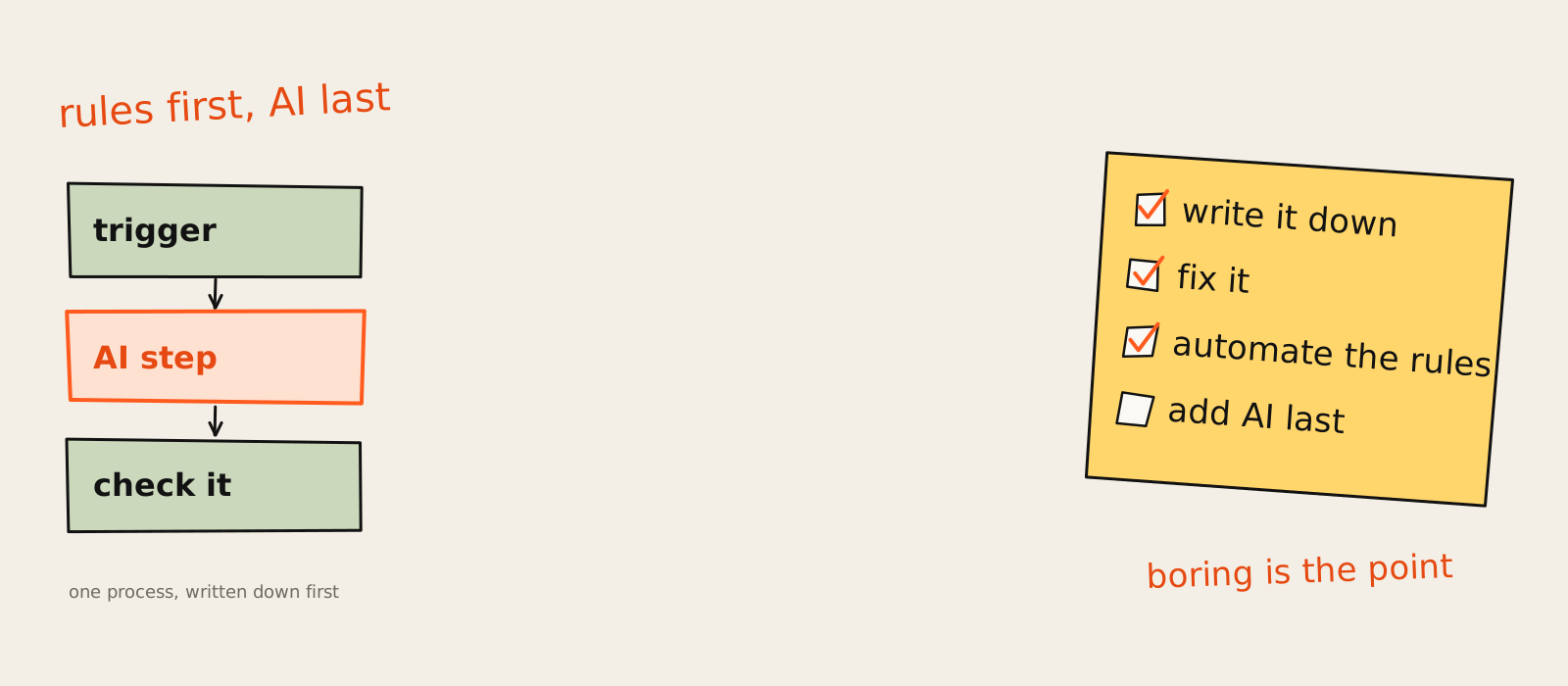
Start with one process, not a platform. Pick something that runs often, follows rules you can write down and has cheap mistakes. Write its steps out, automate them with plain rules first, add AI only at the step that needs judgment, then measure time saved and errors caught for a month before you touch the next one.
Pick the first process
Score every candidate on four questions. The one with the most yeses goes first:
- How often does it run? Daily or weekly beats quarterly. A process that runs four times a year can stay a checklist.
- Can you write the rules down? If the steps fit on one page and two people would follow them the same way, that's a yes.
- Is there volume? Forty items a run earns its keep faster than one.
- What does one mistake cost? A wrong Slack tag is cheap. A wrong refund, invoice or price in a live ad is not.
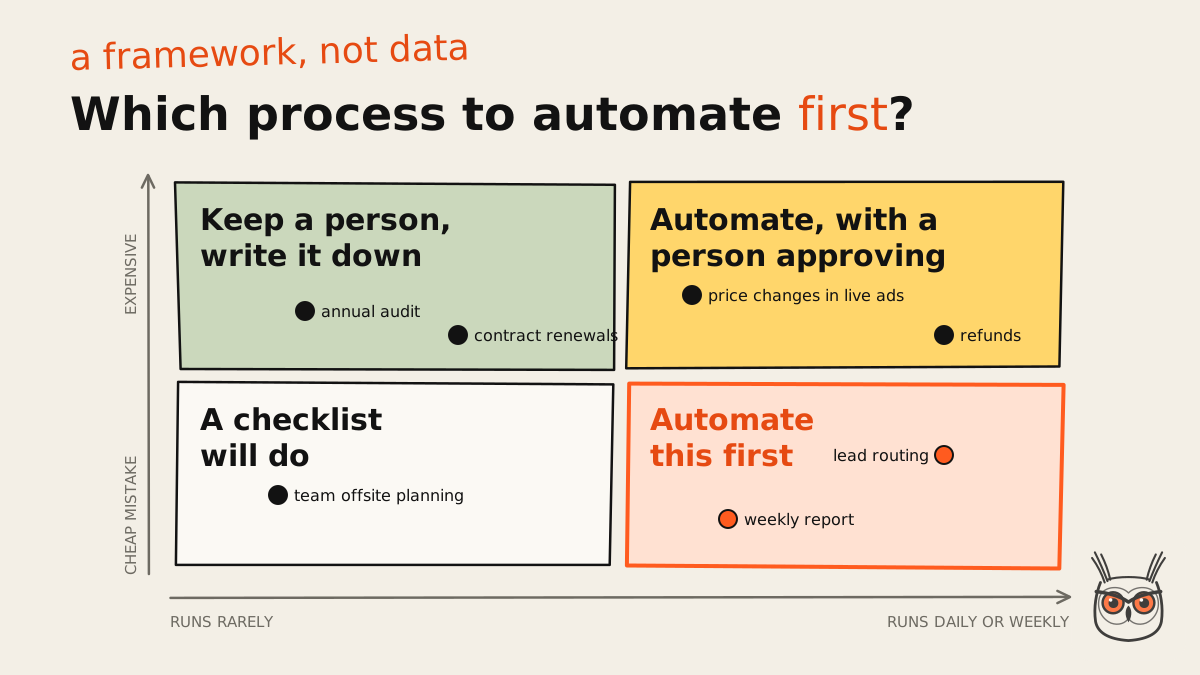
The last question does most of the sorting. High volume and cheap mistakes is where you start; high volume and expensive mistakes is where you automate with a person approving the risky step. Rare and expensive stays with a human and a good document. I use the same ranking for picking jobs for an agent in AI agents for business, because the logic doesn't change when the software gets smarter.
Map it, automate it, measure it
Map it
Write down every step, every system it touches and every exception you have seen. If you find three versions of the same spreadsheet, fix that first.
Fix it
Delete the steps that only exist because of an old tool or an old manager. Automating them just makes them faster.
Automate the rules
Triggers, routing, maths and validation go in plain logic. It is cheaper, quicker and gives the same answer twice.
Add AI where judgment lives
Only at the step that reads messy input, like an email, a PDF or a free-text answer. Wrap it in checks.
Measure for a month
Track time saved, errors caught and runs that failed. Then pick the next process, not before.
That order (map first, rules second, automation last) is the same one I followed for a much bigger build, an SEO content automation with a dozen steps. Same bones, more limbs. The process got bigger; the order didn't change.
Business process automation solutions: what to look for
Good business process automation solutions connect to the tools you already use, show you every run and every failure, let a person approve risky steps, and bill in a way you can predict. Pick by the process, not the demo: a tool built for workflows across five apps is often wrong for a process that lives inside your CRM.
- Connectors and an API: does it talk to your CRM, billing and support tools natively, or through a webhook you'll be babysitting?
- Error handling and alerts: what happens when a step fails at 2am? If the answer is "it writes to a log", ask who reads the log.
- Human approval steps: can a run pause for a sign-off before money or customers are involved?
- The billing unit: tasks, credits, executions or seats. The same process can cost very different amounts depending on what the tool counts.
- Ownership: can someone on your team change it without calling the person who built it?
- Exit: can you export the workflows, or do they live and die on the vendor's servers?
One rule of thumb I'd stand by, loosely: if the process lives entirely inside one platform (a CRM, a marketing tool), use that platform's own automation or a partner certified on it. If it spans several tools, a general workflow tool fits better. Platform partners tend to keep everything inside their platform, even when a cheaper cross-tool flow would do the job. For the marketing side of that choice, see marketing automation for small business.
For the actual shortlist, with prices checked and where each tool breaks, see business automation software worth paying for. This page sticks to the definition, which is a polite way of saying I've already ranked the tools elsewhere and I'm not doing it twice.
What AI changes in business process automation
AI lets business process automation handle inputs that rules can't: free-text emails, PDFs, images, call recordings. It adds a judgment step inside the process; you still need the process. The reliable pattern keeps rules around the AI: clean the input, let the model interpret it, validate what comes back, and send anything uncertain to a person.
What practitioners say is boringly consistent. n8n's production playbook, published on 2 April 2026, puts it in two sentences: "The fix isn't more AI. It's less of it." Reliable AI workflows wrap the model in deterministic steps. Rules clean the input, the model reads or writes, rules check and route the result.
The same playbook has the most practical idea I've seen for phasing AI in: route by confidence. High confidence runs on its own, medium gets flagged for review, low goes to a person. Start with the bar set high so humans see most items, then lower it as the model proves it's accurate. It's how you'd treat a new hire, minus the welcome hoodie.
I wrote the longer version, including how to score the AI step on its own, in AI for business automation: which processes to automate first.
If the term itself is the sticking point, the plain definition is in what AI automation is and how it works.
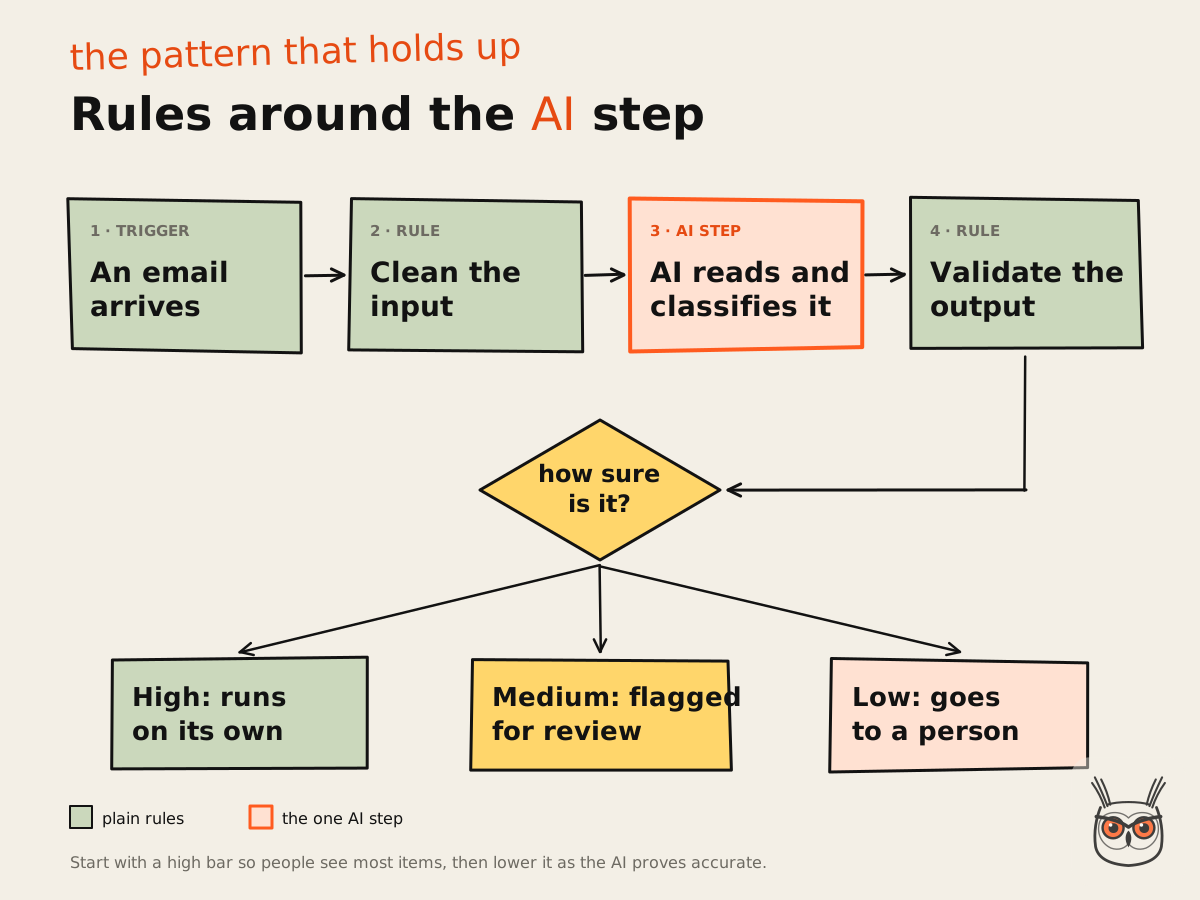
My ad workflow runs on the same idea. The AI writes copy; code checks every claim against facts it already worked out. And failures are sized to the damage: skip a bad product, send a bad ad to a person, and stop the whole run only when the feed, the ad network or the delivery count says something big broke.
Where people disagree: agent vendors pitch models that run whole processes end to end. The workflow camp (n8n, and more pointedly Gartner) says many of those use cases don't need an agent at all. I'm with the workflow camp, for now. Their arguments are sourced and dated; the "agents run everything" claim mostly lives in demos. n8n sells workflows, so it isn't a neutral referee, which is why my margin here is modest rather than smug.
The model makers point the same way. Anthropic's guide to building effective agents, updated on 9 October 2026, tells you to find the simplest solution that works, which is often no agent. Most first AI automations should be a workflow with one model call. Build an agent only when you can't know the number of steps in advance. When you do need one, here's how to build AI agents without the theatre.
What this means for SEO and AEO automation
The same split shows up in search work. In SEO and AEO automation, the judgment steps are reading a results page, sorting queries by intent and drafting. The rule steps are checking indexation, validating schema, checking links and raising an alert when a key page drops out. I'd automate the checks before the drafts: an alert that a money page fell out of the index is worth more than a hundred drafts. It's the order I work in on SEO and AEO projects as well.
When not to automate a process
Don't automate a process you can't describe, one that changes every month, one that runs a few times a year, or one where a single mistake is expensive and hard to spot. Fix or document the process first. Automate a broken process and you get the same mess, only faster, and now with a log that proves it happened.
The skeptic's case is older than the AI hype and still right. In October 2022, IBM listed the usual reasons automation projects fail, and number one was automating broken or poorly executed processes. The rest: not testing first, automating tasks instead of whole processes, not iterating, and not having the skills. IBM sells process mining, so it has a horse in this race. I've still never seen anyone prove the point wrong.
The AI version of the same mistake is fresher. In June 2025, Gartner forecast that over 40% of agentic AI projects will be cancelled by the end of 2027, over rising costs, unclear value or weak risk controls. It also noted that many use cases sold as agentic don't need an agentic implementation. A forecast, not a body count. I'd still take the hint.
New angle, and one I haven't seen the big guides make: IBM's 2022 advice (understand the process first) and n8n's 2026 advice (rules first, AI last) are the same rule at two levels. One is about the process, the other about the steps inside it. Both say: know exactly what should happen before you let software decide.
The steps change depending on who is in that day.
There are three versions of the spreadsheet and all of them are called FINAL.
The exceptions outnumber the normal cases.
Nobody can say what done looks like.
It runs twice a year and the only person who knows how is on holiday for one of them.
Any of those, and the right first tool is a document. Boring, I know. Boring is the point.
Challenges and risks of business process automation
The real risks of business process automation show up after launch: workflows that fail without telling anyone, nobody owning them, connected apps changing underneath you, plan limits, and AI steps that answer differently on different days. For a small team, maintenance is the cost nobody budgets for. Plan an owner, alerts and a monthly check from day one.
This is the part most guides skip, and it's the one I'd read twice. An automation is a small piece of software, and software needs an owner. Someone has to notice when it stops, update it when a tool changes its API, and decide whether the exception that keeps showing up has quietly become the rule.
- Silent failure: the scariest automation is the one that stops and tells nobody. Alert on zero runs, not only on errors.
- The builder leaves: if one person built it and nobody else can open it, you've automated the process and created a single point of failure in the same afternoon.
- Drift: apps rename fields, retire APIs and redesign screens. RPA bots feel this the most.
- Cost creep: usage-based billing grows with volume, which is good news right up until the invoice.
- Variable AI output: a model step can answer differently next Tuesday. Validate it in code, every time.
- Access: automations often run with more permissions than any single employee. Give them the least they need.
Loud failures get fixed by lunch. The quiet ones get found in the quarterly review.
The cost view, in one line: the build is the cheap part; the next two years of looking after it are the real price. If nobody on your team can own an automation, that's a reason to keep it simple, or to bring in someone who will. Boring is the point here too.
Back to that Monday morning
That sales ops lead with the forty-minute Monday didn't need a platform, a BPM method or an agent. They needed one workflow: form in, CRM updated, Slack summary out, and an alert if it ever ran empty. That's business process automation at its most useful, and most processes worth automating look a lot like it. Finding yours is the first job in any AI automation and agents project I take on.
If you want to see what else I work on, the growthvibes.ai homepage has the rest. Start with the boring one. It's always the boring one.
Frequently asked questions
What does BPA stand for?
BPA stands for business process automation: using software to run a repeatable business process from the trigger to the final record, with people stepping in only for exceptions and judgment calls.
You will also see it called business automation. It is the umbrella term; RPA, workflow automation and AI agents are ways to build it.
What is the difference between BPA and RPA?
BPA is the goal of running a whole process with software. RPA is one way to get there: software robots that copy a person's clicks in a user interface, mostly used when old systems have no API.
If your tools have APIs, a workflow tool is usually cheaper and less fragile than RPA, because nothing breaks when someone redesigns a screen.
What business processes can be automated?
Any process that runs often, follows rules you can write down and has mistakes you can catch cheaply. Lead routing, invoice matching, employee onboarding, ticket triage and weekly reporting are the usual first candidates.
Processes that change every month, run a few times a year or depend on who is in that day should be documented and fixed before anyone automates them.
What is an example of business process automation?
A demo request that gets enriched, scored, routed to the right sales rep and logged in the CRM within minutes, with nobody copying data by hand, is a classic example of business process automation.
A bigger one: my ad workflow writes and publishes about 200 ads a week, and only one of its six stages uses AI. The rest is plain rules and checks.
Is BPA the same as BPM?
No. BPM, business process management, is the discipline of designing, running and improving processes, with or without automation. BPA is the automation itself, and it is often built on top of a BPM effort.
Large, regulated companies tend to need both. A small team usually needs a written-down process and one good workflow, and can skip the methodology.
What is AI business process automation?
AI business process automation adds AI models to an automated process so it can handle messy inputs such as emails, documents and images. The reliable version keeps plain rules around the AI step and sends uncertain results to a person.
Start with a high confidence bar so people review most items, then lower it as the AI proves accurate on your own data.
