
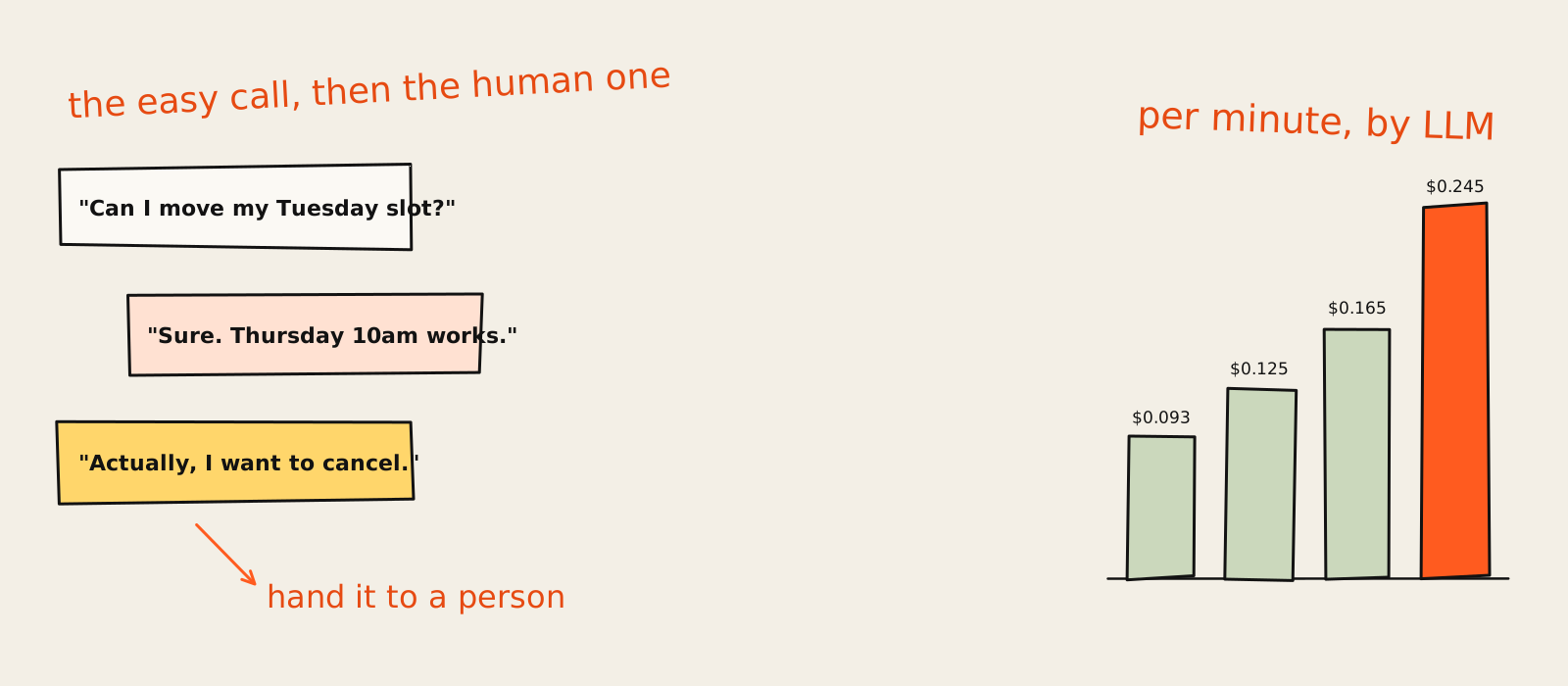
AI voice agents are good at the calls your team could answer half asleep: booking and moving appointments, qualifying an inbound lead, telling someone where their order is, chasing a payment, sending a caller to the right person. They are bad at angry customers, policy exceptions and anything with legal or medical weight. Start with one boring, high-volume call type, and build the human handoff before the agent says hello.
Picture a plumber at 7:40 on a Monday morning. He's under a sink in someone else's kitchen, his phone is buzzing in his back pocket, and the caller has a dead boiler and a list of other plumbers. That missed call is the whole business case for an AI voice agent, and it's also where most of the bad decisions start, because the jump from "answer the phone" to "replace the front desk" happens about one demo later.
Most of the pages ranking for this topic come from companies that sell voice platforms, which is like asking a car dealer which car you should buy. Shockingly, it's the one on his lot. I don't sell any of these platforms and there are no affiliate links here. What I do sell, here on growthvibes.ai, is AI automation and agents for marketing and growth teams, so I care a lot more about what happens after the call (the CRM, the follow-up, the handoff) than about which voice sounds most like a podcast host.
Below: what a voice agent is and how it works, what it handles well and badly, how to choose a platform, 11 platforms grouped by who they suit, what the bill really looks like per minute, build vs buy, a pilot plan with metrics, and the compliance basics. Prices come from each vendor's own page on 15 November 2026. They will change, probably before you finish reading.
What are AI voice agents?
An AI voice agent is software that answers or makes phone calls and holds a real conversation: it listens, works out what the caller wants, looks things up or takes an action (book, update, transfer), and talks back in a natural voice. Unlike a phone menu, the caller just says what they need, in their own words.
Under the hood it's the same idea as any other AI agent: a language model that can use tools, wrapped in a phone line. The phone part is what makes it hard. A chatbot can take three seconds to answer and nobody minds. On a call, one second of silence feels like the line dropped.
How an AI voice agent works (speech to text, LLM, text to speech)
Every turn of the conversation goes through four steps. The phone line (a SIP trunk or a provider like Twilio) carries the audio in. Speech to text turns it into words. The LLM decides what to say or which tool to call: check the calendar, look up the order, write to the CRM. Text to speech turns the reply into a voice, and the caller hears it.
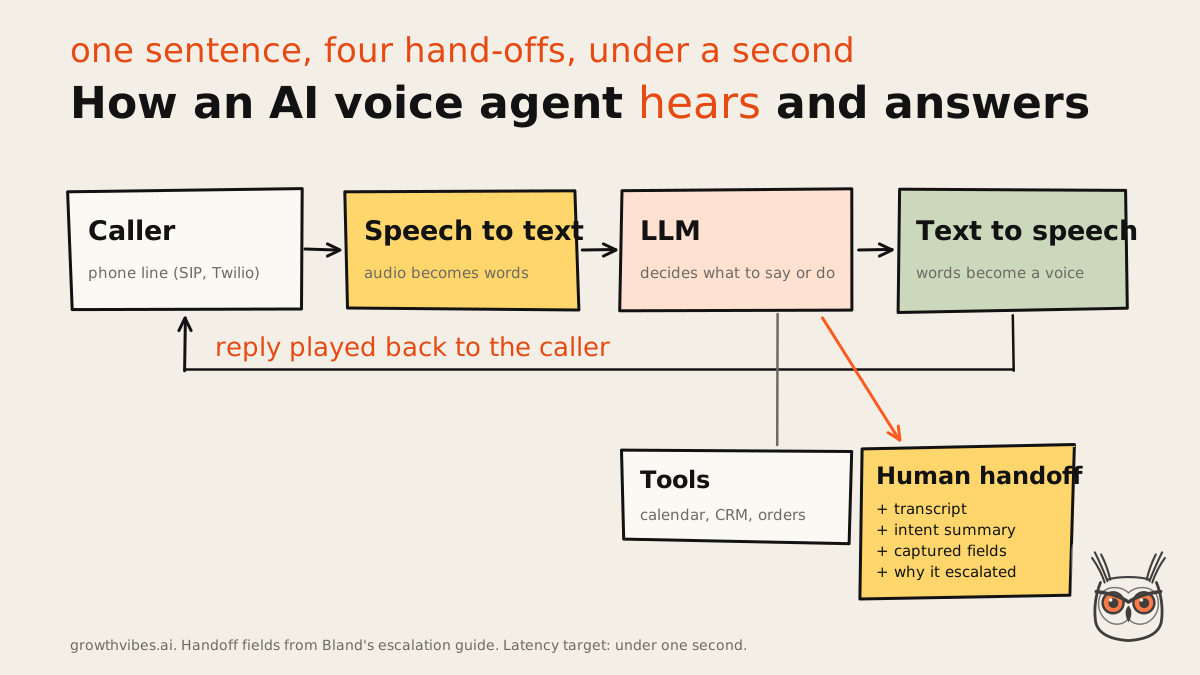
All four steps have to finish in about a second, which is why latency comes up on every vendor page. Anything over a second between the caller finishing a sentence and the agent answering starts to feel awkward, and the good platforms also handle barge-in, the caller talking over the agent mid-sentence, without losing the thread. Some newer setups skip the middle steps with speech-to-speech models, but the four-step pipeline is still what most platforms run, and what most of them bill you for, step by step.
AI voice agent vs IVR vs chatbot
People mix these up because all three "answer customers automatically". They are different machines.
| IVR (phone menu) | Chatbot | AI voice agent | |
|---|---|---|---|
| How the customer talks to it | Presses keys or says one word | Types | Talks normally |
| What it understands | Fixed options | Free text | Free speech, interruptions |
| What it can do | Route the call | Answer, link, sometimes act | Answer, act in your systems, transfer with context |
| Where it fails | Anything off the menu | Slow, typed back-and-forth | Latency, accents, noise, edge cases |
| Typical price | Monthly licence | Per conversation or seat | Per minute, per caller or per outcome |
If your phone menu has a "press 9 to hear these options again", you already know why voice agents exist. (Nobody in history has pressed 9 out of joy.)
What AI voice agents handle well
AI voice agents handle structured, repetitive calls well: booking and rescheduling, basic lead qualification, order and delivery status, payment reminders, after-hours answering and routing callers to the right team. These calls follow a script, need data you already have, and end with a clear result your systems can confirm.
The pattern behind every good use case is the same: high volume, a predictable script, and a result a system can check. "Thursday at 10 is booked" can be checked against the calendar. "The customer seemed happy with our refund policy" can't. If you run a business where the phone rings with the same five questions all day, that's the sweet spot. It's the same test I use for any AI automation and agents project: lots of the same thing, one decision per item, and a way to know it worked.
Appointment booking, lead qualification, order status, payment reminders, routing
- Appointment booking and rescheduling. The classic. The agent reads availability, offers two slots, books one and confirms. Clinics, salons, home services, demos. This is where most platforms put their demo for a reason.
- Lead qualification. An inbound caller asks about pricing, the agent asks three or four qualifying questions, then books a call or routes them to sales. Outbound works too, but that's where the rules get stricter (more on that in compliance).
- Order and delivery status. "Where is my order?" is a database lookup with a voice on top. Perfect for an agent, provided it can actually reach the order system.
- Payment reminders. Tightly scripted, the same wording every time, often regulated. Scripted flows like this are one of the few regulated jobs that automate well.
- After-hours answering and routing. Take the message, capture the details, send the urgent ones to whoever is on call, and stop paying an answering service to say "someone will call you back".
For lead calls specifically, the same thinking applies as with any AI sales agent: the qualification questions and the CRM write-back matter more than the voice. A beautiful voice that forgets to log the lead is a very expensive way to be polite.
A small agency I advised had a version of this. Their phones were fine on a Tuesday and chaos on a Monday, and the "chaos" was mostly the same three questions about opening hours, parking and whether they could move an appointment. Nobody needed a genius on the line. They needed something that never got bored of question number two.
What they handle badly, and when to keep a human
Voice agents handle emotional, exception-heavy and high-stakes calls badly: cancellations, complaints, fraud, anything legal, medical or financial, and any call where the answer depends on judgment rather than a rule. Keep a person on those, and never launch without a staffed live transfer behind the agent. (None of the top guides give this list.)
This is the part the vendor pages skim. They mention "seamless handoff" in one line and move on to the voice library. Here's the do-not-automate list, pieced together from the practitioner guides that actually cover failure, like MultiplierAI's escalation guide and Appther's write-up on why voice agents fail. One honest caveat: these are agencies and vendors too, and I couldn't find an independent study. The direction is consistent across them, so I'd treat it as a strong rule of thumb, not a law of physics.
Nobody is staffed to take a live transfer.
The call needs a policy judgment or an exception.
The caller is upset, cancelling or reporting fraud.
Legal, medical, financial or identity details are involved.
The caller asks for a person.
The agent has failed the same step twice.
The cancellation one deserves a sentence of its own. Retention calls mix urgency, emotion and money, and they are exactly where a company is most tempted to automate ("let the agent offer the discount!"). A voice agent arguing with someone who wants to leave is the fastest way to turn a churned customer into a one-star review.
The escalation triggers to build before launch
Write these into the agent from day one, not after the first bad call:
- Repeated failure. The agent fails the same step twice (can't find the booking, can't parse the address): transfer.
- Explicit request. The caller says "agent", "human" or "person" in any form: transfer, no "let me try to help you first" loop.
- Negative sentiment. Raised voice, swearing, "this is ridiculous": transfer.
- Loops. The agent asks the same question for the third time: transfer. Appther describes the classic failure as an agent that "keeps trying when it should have transferred the call three exchanges earlier", which is painfully accurate.
And one rule that sounds obvious until you see it broken: the agent must never tell a caller something happened unless the system confirmed it. If the CRM doesn't return a booking confirmation, the agent doesn't say "you're booked". A confident wrong "done" is worse than an honest "let me get someone".
What a warm handoff carries
A transfer where the caller has to repeat everything isn't a handoff, it's a second call. Bland's escalation guide lists four things the human should get: the full transcript, an intent summary, the data fields already captured, and why escalation fired. I'd add one more: the transfer should land with a person who has a screen open, not a queue.
Build the exit before the entrance: the human handoff goes live before the voice agent does.
That's the house rule for this article, and you'll hear it again. My position, held with medium confidence because the evidence is practitioner experience rather than research: start on one narrow, structured call type, with a staffed handoff, and keep the emotional and judgment-heavy calls human-first. The case against is real (tightly scripted regulated flows like payment reminders automate fine), but that's the exception that proves you need a script. It's the same split I see across AI agents for business in general: they earn their keep on repetitive work and lose it on judgment.
How to choose an AI voice agent platform
Choose an AI voice agent platform by testing six things on real calls: latency, voice quality under interruptions, integrations with your calendar and CRM, how clearly it prices the whole stack, compliance paperwork, and call logs you can actually review. Name your one call type first, then judge every platform against it.
Latency, voice quality, integrations, pricing transparency, compliance, observability
- Latency. Call it yourself, from a mobile, with background noise. Interrupt it. Change your mind halfway through a sentence. Demo latency and production latency at load are different numbers, so ask for the second one.
- Voice quality. Not "does it sound human" but "does it stay clear when I talk over it, and does it recover". A slightly robotic voice that never loses the thread beats a gorgeous one that panics.
- Integrations. Can it read your calendar, write to your CRM and transfer to your phone system without a custom project? If the answer is "via webhook", someone on your side is writing code.
- Pricing transparency. Can you price 1,000 minutes, all-in, from the public page? Several platforms below can't be priced at all without a sales call, which tells you who they're for.
- Compliance. If you touch health, payments or the EU, ask for the BAA, DPA and SOC 2 report before the demo, not after.
- Observability. Transcripts, recordings, a reason for every transfer, and a way to search failed calls. You'll improve the agent by reading bad calls, so make sure you can find them.
If you're comparing voice platforms against the rest of your stack, the same rules apply as with any business automation software: price it at the volume you'll have in six months, and check what you can export when you leave.
AI voice agent platforms compared
The best AI voice agent platform depends on who's building it: developers should start with Retell or Vapi, small businesses with Goodcall, teams that want flat per-minute billing with Bland, and large contact centers with PolyAI, Cognigy, Sierra or Replicant. Prices below were checked on vendor pages on 15 November 2026.
| Platform | Who it suits | Starting price (15 Nov 2026) | Pricing model | Verdict |
|---|---|---|---|---|
| Retell | Developers and product teams | $0.085/min + LLM | Per minute, itemised | Best first test |
| Vapi | Developers who want full control | $0.05/min + models at cost | Per minute, pass-through | Most flexible, most work |
| Bland | Teams that want one rate | $0.14/min, no platform fee | Flat per minute | Easiest bill to forecast |
| Goodcall | Small businesses | $79/month | Per unique caller | Best for one location |
| ElevenLabs | Voice-first brands, agencies | Credit-based plans | Credits | Best voices, pair it up |
| Voiceflow | Product and CX teams | Free trial, then usage | Usage, Business via sales | Best for designing flows |
| Synthflow | Mid-market, no-code | Annual contract via sales | Enterprise agreement | No longer self-serve |
| PolyAI | Enterprise contact centers | Not published | Per minute, via sales | Strong, heavy lift |
| Cognigy | Existing contact centers | Not published | Per conversation | If you already run NICE |
| Sierra | Consumer brands | Not published | Per outcome | Interesting pricing model |
| Replicant | High-volume support teams | Not published | Enterprise contract | Tier 1 call deflection |
Four of the eleven publish a number you can multiply. That isn't an accident: if you can't see the price, the price assumes a contact center.
The platforms worth trying
The platforms worth trying fall into three groups. Developer platforms (Retell, Vapi, Bland) give you the most control for the lowest per-minute price. No-code and small business tools (Goodcall, ElevenLabs, Voiceflow, Synthflow) trade control for speed. Enterprise platforms (PolyAI, Cognigy, Sierra, Replicant) bring compliance and services, with contracts to match.
They're ranked by how likely each one is to be the right first test for a small or mid-size team, which is who this article is for. If you run a 500-seat contact center, read the list from the bottom up. Every section has the same layout: a screenshot, the verdict, the breakdown, what users and skeptics say, and three numbers worth remembering.
1. Retell: best for a first voice agent you can price to the cent

Retell is where I'd send most small and mid-size teams for their first test. The pricing is itemised on a public page, setup is quick, and post-call analysis comes built in. It suits support and booking lines. It's less suited to teams who need someone to pick up the phone when it breaks.
- Best for: inbound support and booking lines where you want to see every cost line and every failed call.
- Pricing (15 Nov 2026): voice infrastructure $0.055, platform voice $0.015 and US telephony $0.015 a minute, so $0.085 before the LLM. Add $0.008 (GPT 5 mini) to $0.16 (GPT 5.5) for the model.
- Setup effort: low. Visual flow builder, knowledge base upload, phone number in the dashboard.
- Compliance: roundups list SOC 2, HIPAA and GDPR; ask for the paperwork for your own case.
- Where it breaks: complex flows still need real prompt tuning, and support comes up again and again in user reviews.
- Skip it if: nobody on your team will read call logs and tune prompts for the first month.
- What reviewers say: live fast, useful post-call data (sentiment, failed handoffs), natural interruption handling.
- The skeptic's take: Trustpilot reviewers complain about slow support, and when your phone line is down, a slow reply is a long wait.
- The cost view: the advertised $0.07 to $0.31 a minute leaves out telephony and add-ons, by Retell's own cost guide.
- What changed: as of 15 November 2026 the site banner says Retell has crossed $100M in revenue run rate. Somebody is buying.
My read of the pricing page: this is the one vendor in the list that does your cost math for you, and then (to be fair) its own guide admits the headline range skips a few lines. Even so, you can price 1,000 minutes from a public page in five minutes, which on this list is almost a personality trait.
The verdict: start here if you want a test running this week. Pick the cheapest model that passes your three nasty test calls, not the smartest one, because on Retell the LLM is the line that moves the bill most. The page itself takes a dig at "annual contracts before you write a single line of code", which is a fair hit at half the names further down.
2. Vapi: best for developers who want to pick every part of the stack

Vapi is a developer platform where you choose the speech-to-text, the model and the voice yourself, and Vapi charges a hosting fee on top with models at cost. It's the most flexible option here and the cheapest when tuned. You need engineers, and the bill has several moving parts.
- Best for: engineering teams building a custom voice product, or anyone who wants to swap providers without migrating.
- Pricing (15 Nov 2026): $0.05 a minute hosting, models passed through at cost; Vapi's own estimate for 1,000 minutes is $82 to $129 a month.
- Setup effort: a basic agent is quick; a production one needs error handling, retries and tests you write yourself.
- Compliance: HIPAA handling with a BAA is a $2,000 a month add-on, with a standard DPA.
- Where it breaks: the edges. Every provider you add is another invoice, another outage and another setting to get wrong.
- Skip it if: you don't have a developer who wants to own this.
- What reviewers say: total control, and swapping a voice or model is one config change.
- The skeptic's take: "everything else is on you" is a feature until it's 2am and a JSON parse error is dropping calls.
- The cost view: concurrency is extra. Four lines without a support package, then $10 a line a month, and the Pro package has a $999 a month minimum.
The home page leads with a quote from Ring about going from zero to production in two weeks with all its inbound volume on Vapi. Lovely. Ring also has engineers. Vapi is a kit, not a product, and that is exactly why developers like it.
The verdict: if you'd describe yourself as "a team that lives in code", Vapi gives you the best price and no lock-in at the model layer. If that sentence made you slightly nervous, start with Retell or get someone to build it with you. Wiring this kind of thing into a CRM and a follow-up sequence is the AI automation work I do, and the voice part is usually the easy half.
3. Bland: best for one flat per-minute rate and outbound volume

Bland runs its own speech and reasoning models and charges one rate per minute with the model included. That makes it the easiest bill on the list to forecast. It suits outbound campaigns and teams that hate itemised invoices. The builder takes a while to learn, and the free plan caps daily calls.
- Best for: outbound reminders and callbacks, and teams that want one number per minute.
- Pricing (15 Nov 2026): Start at $0.14 a minute with no platform fee; Build at $0.12 a minute plus $299 a month; Enterprise is custom.
- Setup effort: medium to high. Conversational Pathways does a lot, but it is a new way of thinking about flows.
- Compliance: BAA, SSO and data residency sit on Enterprise, with on-prem or VPC available.
- Where it breaks: caps. Start allows 10 concurrent calls and 100 calls a day; Build lifts that to 50 and 2,000.
- Skip it if: you want to pick your own LLM, or you need something live by Friday.
- What reviewers say: it holds the script on awkward callers, and the webhooks behave.
- The skeptic's take: the learning curve is real, and frequent product updates mean revisiting flows you thought were done.
- The cost view: transfers cost extra, $0.05 a minute on Start and $0.04 on Build, so a flow that hands off a lot costs more than the headline.
Here's a contradiction worth sitting with. Bland's pricing page says "no token charges, no model-provider pass-throughs, no surprise bills". Vapi's model is the exact opposite: pass everything through at cost and let you tune it down. Both are right, for different people. If you'll never touch the model settings, Bland's flat rate is easier to live with. If you will, Vapi or Retell end up cheaper per minute.
The verdict: pick Bland when predictability beats price, especially for outbound. Just check your daily volume against the plan caps before you plan a campaign around the free tier.
4. Goodcall: best for a small business that just needs the phone answered

Goodcall is the no-engineering option for a single business: connect your info, set the behaviour, and it answers your number, captures leads and books jobs. It charges per unique customer, not per minute. It's ideal for a plumber, a clinic or a salon. It isn't built for complex support.
- Best for: local businesses that miss calls while doing the actual work.
- Pricing (15 Nov 2026): Starter $79 a month for 100 unique customers, Growth $129 for 500, Scale $299 for 2,000, then 79¢, 26¢ and 15¢ per extra customer.
- Setup effort: low. You can start free with a demo agent and add a number when you're ready.
- Compliance: not on the public page; enterprise plans exist for call centers and custom CRM setups.
- Where it breaks: conversations with any subtlety. It's built for structured, repeatable calls and is honest about it.
- Skip it if: your calls need lookups in your own systems that aren't on its integration list.
- What reviewers say: live in minutes, and long calls don't cost extra because billing counts callers, not minutes.
- The skeptic's take: good at generic answers, weaker at sounding like a person, and the per-caller model gets harder to predict as volume grows.
- What changed: the live page no longer matches what roundups list. Lindy's guide still lists Scale at $249 for 500 customers; on 15 November 2026 the page shows $299 for 2,000.
"No per-minute charges. A bill you can predict." Read the small print under the plans and the headline holds up: a customer who calls four times about the same leak counts once. For a small business, per-caller pricing is the friendliest model on this list.
The verdict: this is the one I'd give the plumber from the intro. It won't run a contact center and doesn't pretend to. And note how the roundups and the live page disagree on price: always trust the vendor's page over somebody's list, including this one, a month from now.
5. ElevenLabs: best for voice quality when the voice is the brand
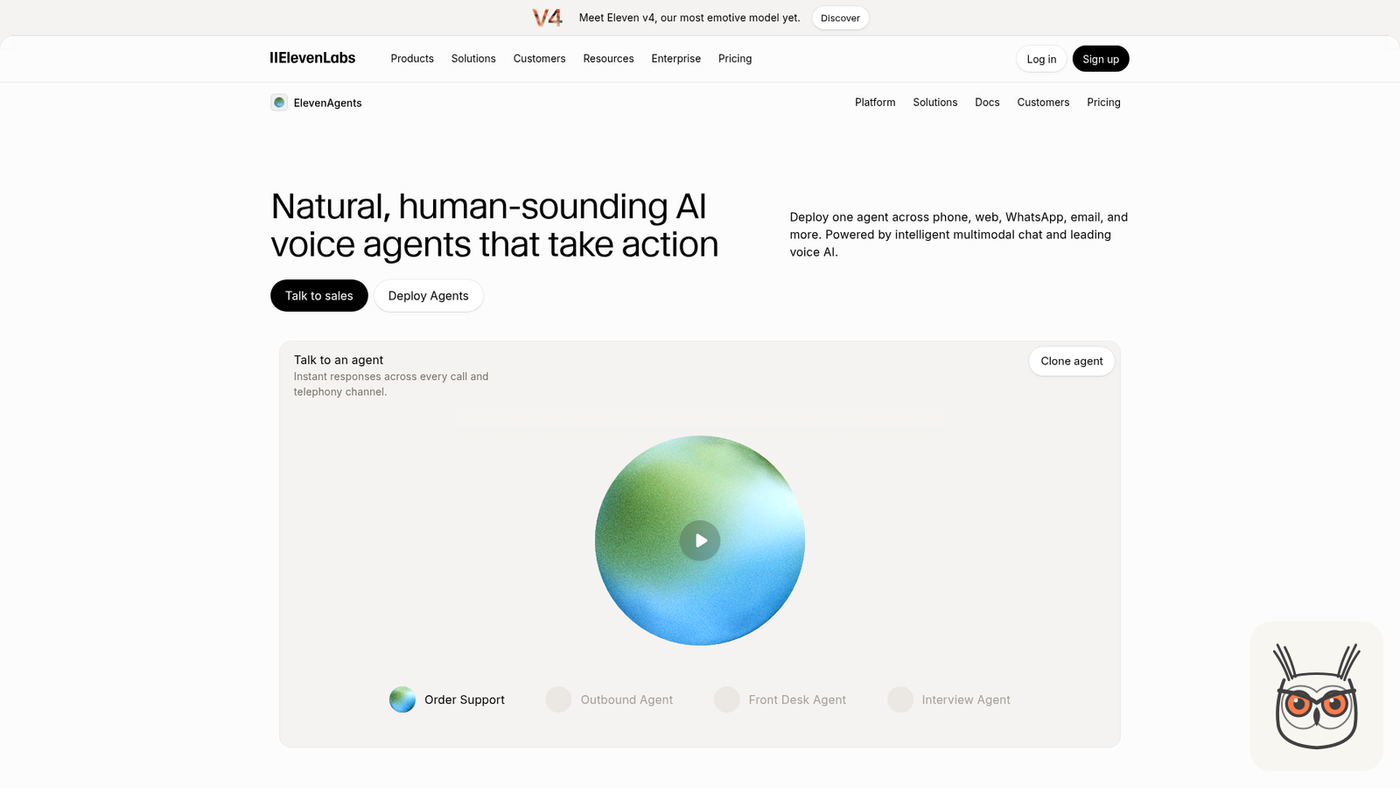
ElevenLabs makes the most natural voices you can buy, and its agents product puts them on the phone, the web, WhatsApp and email. Pick it when how you sound is the point. For heavy call routing and monitoring, plan to pair it with a telephony platform or a contact center tool.
- Best for: brands where voice is part of the product, and agencies building branded agents for clients.
- Pricing (15 Nov 2026): credit-based subscription plans; the agents page itself pushes you to "Talk to sales" for anything sizeable.
- Setup effort: medium. Building the agent is easy; getting telephony routing right is where the work is.
- Compliance: check per plan; roundups rate it lighter here than the contact center platforms.
- Where it breaks: operations. Monitoring and call routing are thinner than the voice.
- Skip it if: you need deep IVR replacement or complex transfers out of the box.
- What reviewers say: callers often can't tell it's an AI, and the accents and languages are wide.
- The skeptic's take: one roundup goes as far as saying you won't know it's failing until a user complains, and teams add third-party monitoring to compensate.
- The cost view: credits are hard to forecast at volume, so model a busy month before you commit.
- What changed: in November 2026 the site banner introduces Eleven v4, "our most emotive model yet".
The agents page makes it pretty clear that ElevenLabs is selling the voice first and the plumbing second, which is honest, because the voice is genuinely the thing. The best-sounding agent still needs somebody watching the calls.
The verdict: great if the voice is your differentiator (a consumer brand, an audio product, an agency with picky clients). For a booking line, it's more voice than you need, and you'll spend the savings on monitoring.
6. Voiceflow: best for teams that design conversations together

Voiceflow is a design and build workspace for chat and voice agents, where product, CX and engineering work on the same flows. It's model-agnostic and strong on collaboration. Phone delivery leans on external telephony, and big flows get hard to debug, so it suits teams with a conversation designer.
- Best for: product and CX teams building one agent for chat and voice, with reviews and versions.
- Pricing (15 Nov 2026): free trial with no card, usage-based billing, Business through sales.
- Setup effort: medium. The canvas is friendly; the thinking behind a good flow isn't.
- Compliance: Business and enterprise plans via sales; not itemised on the public page.
- Where it breaks: large flows. Small changes mean tracing several steps to make sure nothing downstream breaks.
- Skip it if: you're one person who just wants a phone answered.
- What reviewers say: explaining a flow to a non-technical stakeholder is easy because it's all on the screen.
- The skeptic's take: it made voice agents team-friendly, not faster, and you still need to think like a conversation designer.
- What changed: the home page now pitches building from the API, a CLI and MCP, or handing it to its own assistant, Atlas. The audience has shifted towards people who build with coding agents.
Voiceflow's headline is "AI agents, built like software", which made me smile, because the honest version for most teams is "built like a spreadsheet nobody wants to touch". The collaboration features are what stop that from happening.
The verdict: the best place to design the conversation, not the cheapest place to run the calls. Pick it when several people need to agree on what the agent says, and pair it with a telephony provider you trust.
7. Synthflow: best for mid-market teams that want no-code with a contract

Synthflow started life as a no-code builder for voice agents and has moved upmarket. Today it sells annual enterprise agreements with telephony, integrations and launch support scoped in. That suits mid-market teams that want help. Small teams looking for a cheap self-serve plan should look elsewhere now.
- Best for: mid-market and enterprise teams that want a no-code builder plus a vendor to launch it with.
- Pricing (15 Nov 2026): an annual enterprise agreement, scoped to call volume, phone system, integrations, security and launch support. No free plan, no trial, no per-minute rate.
- Setup effort: low on the builder side, plus a sales and scoping process before you start.
- Compliance: GDPR, SOC 2 and HIPAA support are listed on its security page.
- Where it breaks: off-script moments. Predictable calls run fine; "wait, can you repeat that?" can trip it into a canned reply.
- Skip it if: you want to try a voice agent this week for under $100.
- What users say: fast to build, and fine for bookings and FAQs.
- The skeptic's take: a Reddit review and others say it gets brittle when callers go off script.
- What changed: roundups still quote about $0.08 a minute pay-as-you-go. The vendor's own page now says annual contract only.
This is the clearest case of a list going stale. Several roundups still have Synthflow as the cheap no-code pick at about eight cents a minute. The pricing page now says the opposite in plain words, and I'd believe the company about its own prices.
The verdict: worth a look if you're mid-market, want no-code and are happy to sign an annual deal for the hand-holding. Everyone else, start with Retell or Goodcall and come back when you've outgrown them.
8. PolyAI: best for enterprise contact centers with complex calls

PolyAI builds voice agents for large contact centers in banking, healthcare, hospitality and retail, and handles messy calls (topic changes, accents) better than most. Expect weeks of implementation and a sales-led contract. New in November 2026: a self-serve API with free credit to try it.
- Best for: high-volume enterprise lines where callers wander off script and compliance is non-negotiable.
- Pricing (15 Nov 2026): per-minute pricing, scoped through sales; no public rates.
- Setup effort: high. Several weeks, cross-functional, with real CX resources on your side.
- Compliance: ISO 27001, SOC 2, PCI DSS, GDPR and HIPAA coverage listed.
- Where it breaks: speed and flexibility. It runs closer to a managed service than a tool you tinker with.
- Skip it if: you have fewer than a few thousand calls a month.
- What reviewers say: it keeps context when callers change topics or speak with heavy accents.
- The skeptic's take: months of implementation and a tight vendor relationship are the price of that quality.
- What changed: as of 15 November 2026 the site banner says the Dialog-RSN-1 API is live, with $100 in free credit for new accounts for a limited time. An enterprise vendor with a "try free" button is new.
The containment figure is PolyAI's own number, so read it the way you'd read any vendor's best result: as a ceiling, not a forecast. Still, the self-serve API is the interesting move here, because it lets a technical team poke at the model before a six-month procurement cycle.
The verdict: excellent if you're the kind of company that has a "head of contact center". Massive overkill for everyone else.
9. Cognigy: best for adding AI agents to a contact center you already run

Cognigy, now part of NICE, adds AI agents to an existing contact center rather than replacing it: voice, chat and messaging agents plus a copilot for human agents, plugged into the telephony you already own. Brilliant inside that world. Pointless if you're starting from a single phone number.
- Best for: large contact centers on Avaya, Genesys or NICE that want automation without ripping anything out.
- Pricing (15 Nov 2026): billed per conversation, with extra charges for Voice Gateway concurrent lines and Knowledge AI queries; contracts via sales.
- Setup effort: high. IT, operations and CX all need to be in the room.
- Compliance: enterprise-grade, scoped in the contract.
- Where it breaks: small teams. There's no fast, self-serve path.
- Skip it if: you don't already run a contact center platform.
- What reviewers say: the AI-to-human handover is the standout, with context passed through so the agent doesn't ask again.
- What changed: the November 2026 site leads with "next-gen NiCE Cognigy", the post-acquisition rebrand.
Cognigy's whole pitch is "don't rip and replace", and for a big contact center that's the right pitch. It's a contact center integration play wearing a voice agent's clothes, and I mean that as a compliment for the people it's built for.
The verdict: on the shortlist if NICE or Genesys already runs your phones. Off it otherwise.
10. Sierra: best for consumer brands that want to pay per outcome

Sierra builds customer service agents for big consumer brands, with one agent across voice, chat, SMS, WhatsApp, email and ChatGPT. The interesting part is the pricing: you pay for outcomes, not minutes. It's enterprise-only, sales-led and opaque on actual numbers.
- Best for: consumer brands where tone of voice matters on every call and volume is large.
- Pricing (15 Nov 2026): outcome-based pricing, charged on results rather than per minute or per conversation; no public rates.
- Setup effort: medium, with an Agent Studio for CX teams and engineering support when you need it.
- Compliance: enterprise contract; scoped with sales.
- Where it breaks: transparency. You can't evaluate cost before a sales process.
- Skip it if: you need a price before you need a meeting.
- The skeptic's take: one reviewer argues Sierra is selling premium brand-voice tooling slightly before most companies are ready for it, and that very high volumes are still unproven.
- The cost view: paying per outcome lines the vendor's incentive up with yours, provided you agree on what counts as an outcome.
I'm a fan of the pricing idea. It's the same thing I argue for with every agent: price the finished job, not the minute. The catch is in the contract, because "resolved" means one thing to you and possibly another to the invoice.
The verdict: worth a meeting if you're a large consumer brand. Not a test you can run on a Tuesday afternoon.
11. Replicant: best for deflecting tier 1 support calls at volume

Replicant sells enterprise AI agents built to resolve routine support calls on the first try, so live agents get the hard ones. It covers voice, chat and SMS, comes with hands-on implementation help and has no public pricing. It's a fit for support-heavy companies, not for small teams.
- Best for: large support teams drowning in tier 1 calls (password resets, order changes, account questions).
- Pricing (15 Nov 2026): enterprise contracts tailored to volume and integrations; no public pricing.
- Setup effort: medium to high, with the vendor doing much of the implementation.
- Compliance: enterprise controls, scoped in the contract.
- Where it breaks: anything below contact-center volume. The model only pays off with big call volumes.
- Skip it if: your phone rings a few hundred times a month.
- What reviewers say: the implementation support gets called out as a strength, which matters more than any feature on a big rollout.
The home page carries a whole shelf of analyst badges and review scores, which tells you the buyer: someone who has to justify the choice to a procurement team. Resolution first, not routing, is the right philosophy for a support line. It's just priced for a support line with hundreds of seats.
The verdict: a sensible shortlist pick for a big support operation, next to PolyAI. Not where a small team should spend its first month.
What AI voice agents really cost
AI voice agents cost roughly $0.09 to $0.25 a minute all-in on a developer platform like Retell, depending mostly on the language model, or a flat $0.14 a minute on Bland. Small business tools charge per caller from $79 a month, and enterprise platforms only quote through sales. Headline per-minute rates aren't comparable until you add every layer.
This is where the vendor lists go quiet, so here's the math nobody does. A voice agent bill has five layers: the platform fee, the speech-to-text, the LLM, the voice and the phone line. Some vendors bundle them, some itemise them, some pass them through at cost. Comparing "$0.05" with "$0.14" without knowing which is which is comparing a car's price with and without the engine.
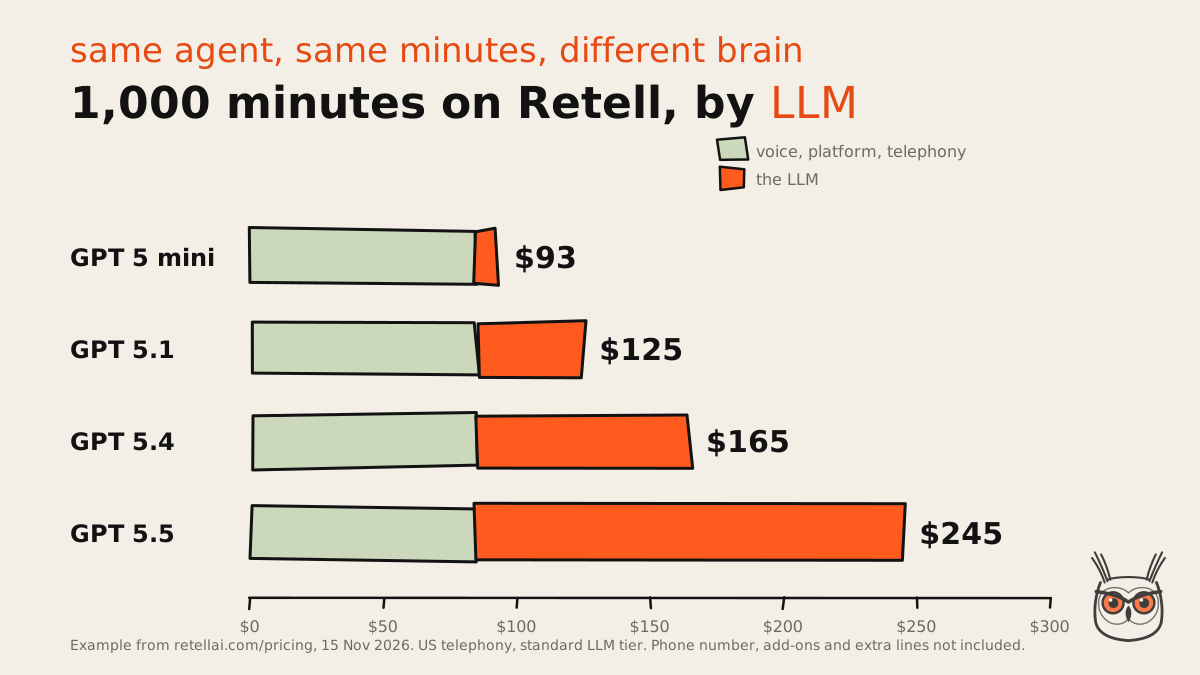
On Retell, the fixed part (voice infrastructure, platform voice, US telephony) is $0.085 a minute whatever you do. The model is what moves. Same agent, same minutes, and the bill nearly triples depending on which brain you pick. That's new information compared with every guide I found, which quote the cheapest line and stop there.
| Model on Retell | All-in per minute | Per 1,000 minutes |
|---|---|---|
| GPT 5 mini | $0.093 | $93 |
| GPT 5.1 | $0.125 | $125 |
| GPT 5.4 | $0.165 | $165 |
| GPT 5.5 | $0.245 | $245 |
Phone number, add-ons and extra concurrent lines are on top. Retell's own cost guide says as much about its advertised range.
A worked example: 2,000 calls of three minutes
Say a clinic takes 2,000 calls a month and each lasts three minutes. That's 6,000 minutes. This is an example, not a benchmark, at Retell's rates on 15 November 2026:
The same volume on Bland's Start plan would be $840 at $0.14 a minute, model included, before transfer minutes (and well past the 100 calls a day the free plan allows, so you'd be on Build at $0.12 plus $299). On Goodcall it depends on how many different people call, not how long they talk. And on Vapi, the vendor's own 1,000-minute estimate of $82 to $129 scales to about $492 to $774 for the same 6,000 minutes, before concurrency.
The cost view nobody puts on the pricing page
Per-minute price is the wrong number to optimise anyway. A cheap agent that transfers half its calls costs you the agent and the human. Measure cost per successful outcome: per booking made, per lead qualified, per order answered. A $0.25 minute that books the appointment beats a $0.09 minute that ends with "let me transfer you".
I've watched teams do the opposite with other tools: pick the cheapest plan, then spend twice the difference in staff time cleaning up after it. Cheap per minute, expensive per customer.
Build vs buy
Buy a platform for your first voice agent unless voice is your product. Building on raw speech, model and telephony APIs means owning latency, interruptions, retries and monitoring yourself. Developer platforms like Retell and Vapi are the middle path: you build the logic and the integrations, they run the real-time audio.
A good part of my week goes into building agents and automations, mostly in n8n and Claude Code, and the honest split is this: the voice is the part you rent, the workflow behind it is the part you own. The real-time audio problem (barge-in, turn-taking, sub-second replies) is hard, boring and already solved by people who do nothing else. What's specific to you is what happens with the call: which fields go to the CRM, which follow-up fires, who gets alerted.
- Buy a no-code tool (Goodcall) when you have one location, standard calls and no developer.
- Use a developer platform (Retell, Vapi, Bland) when you have a developer and need custom integrations or prices you can tune.
- Go enterprise (PolyAI, Cognigy, Sierra, Replicant) when you have contact-center volume, compliance teams and a procurement process.
- Build from scratch only when voice is the product you sell. Otherwise you're rebuilding Vapi, slower.
If you do go the developer route, the same principles apply as for any agent: start with the simplest design that works, and add autonomy only where the steps can't be known in advance. I wrote the long version in how to build AI agents, and a voice agent is that guide with a phone line and a stopwatch attached.
Using AI voice agents for marketing automation, AI agents and AEO
For marketing teams, an AI voice agent is the front door of a marketing automation system, not a system on its own. The value comes from what happens after the call: the lead lands in the CRM, the right nurture starts, sales gets a summary. And the answers it gives should come from the same content you structure for AEO.
This is the part of the topic I care about most, because it's the work I do. A voice agent that qualifies a lead and then lets it sit in a call log is a very polite dead end. Wire it into AI agents and marketing automation and the same call creates a contact, tags the intent, starts the right sequence and books the follow-up. Retell and Vapi are the sensible engines for that, because they expose webhooks and work with tools like n8n and Make. Goodcall covers the small-business version with its CRM and Google Sheets sync.
The second connection is less obvious. A voice agent's knowledge base is answer-first content: short, direct answers to the questions customers actually ask. That's exactly what you write for answer engines. If your FAQ, pricing and policy pages are already structured for SEO and AEO, your agent has a clean source to quote from, and you're not maintaining two versions of the truth. If they aren't, the agent will happily read out the confusing version on the phone.
So my pick for a marketing team: Retell or Vapi as the voice, n8n or your CRM's own automation as the engine, and your AEO-ready help content as the script. Three parts, each replaceable. That's AI automation built so you can still change it next year.
How to run a pilot
Run an AI voice agent pilot on one call type for two to four weeks, with a human handoff live from day one. Agree the success metrics before launch (containment, escalation rate, handling time, satisfaction and cost per successful outcome), listen to a sample of calls every week, and only then add the next call type.
Pick one call type
The highest-volume, most scripted call you get. Write down what "done" looks like for it in one sentence.
Write the test calls
Twenty realistic calls, including the nasty ones: interruptions, wrong details, someone who wants a human. This is your answer key.
Build the handoff first
Live transfer to a staffed person, with transcript, summary, captured fields and the reason for the transfer.
Run the test calls twice
Agents don't answer the same way every time. Fixing one failed call can break another, so rerun the whole set after every change.
Go live on a slice
After-hours only, or 20% of calls. Read the failed calls every week, not the dashboard averages.
Decide with numbers
Compare against the metrics you set in week zero, then expand, fix or stop.
Step four is the one teams skip. Agents are non-deterministic, so a fix that works on one call proves very little. A bigger set of test calls is the only way to know the agent got better, not just different. It's the same discipline I'd use for AI for business automation generally: the tests are the product.
The metrics that matter
| Metric | What it tells you | Watch out for |
|---|---|---|
| Containment rate | Share of calls finished without a human | High containment from refusing to transfer |
| Escalation rate | Share of calls sent to a person, and why | No reason logged per transfer |
| Average handling time | How long a call takes end to end | Short calls that end in hang-ups |
| Customer satisfaction | A quick post-call rating | Only happy callers answer |
| Cost per successful outcome | Total cost divided by bookings, leads or answers | Counting minutes instead of results |
Containment is the vanity metric of this world. An agent can hit 90% containment by never letting anyone leave. Pair it with escalation reasons and satisfaction, and judge the pilot on cost per successful outcome. If you're mapping which other processes deserve the same treatment, the business process automation guide has the wider version of this prioritisation.
Compliance and privacy basics
For AI voice agents, compliance comes down to four things: tell callers they may be recorded and talking to an AI where the law requires it, sign a BAA if you handle US health data, sign a DPA and keep data in the right region if you serve the EU, and follow outbound calling rules before any automated campaign.
- HIPAA (US health data). You need a Business Associate Agreement with the vendor. It isn't free: on 15 November 2026, Vapi lists HIPAA handling with a BAA as a $2,000 a month add-on, and Bland keeps its BAA on the Enterprise plan. Budget for it before the pilot, not after.
- GDPR (EU callers). Sign a Data Processing Agreement, check where recordings and transcripts are stored, and set retention periods. GDPR's basics apply to voice recordings like any other personal data.
- Call recording consent. Rules differ by country and by US state; some require every party on the call to consent. Say it at the start of the call. It costs you four seconds.
- Outbound calls. In the US, robocall rules (the TCPA) cover AI-generated voices, which the FCC confirmed in early 2024. Consent and opt-out handling come before the first campaign.
- SOC 2 and security reviews. Ask for the report. If a vendor can't share it under NDA, that's your answer.
None of the top guides put a price on compliance, and that's the useful bit: a $2,000 monthly add-on can cost more than the minutes of a small pilot. If your use case touches health data, include that line in the cost model from the start. And none of this is legal advice; your lawyer will enjoy this section much less than you did.
So, should the plumber get one?
Yes, for the 7:40 call. A voice agent that answers, takes the address, books the earliest slot and texts him the details is cheap, boring and exactly what AI is good at. The boiler owner gets a real answer instead of a voicemail, and the plumber finishes the sink in peace.
What he shouldn't hand over is the angry customer whose repair failed, or the one asking for a discount. Build the exit before the entrance, start with one call type, and judge it per booking, not per minute. If you want the call wired into the rest of your stack, that's the AI automation and agents work I do.
Frequently asked questions
What is an AI voice agent?
An AI voice agent is software that answers or makes phone calls and holds a natural conversation: it understands what the caller says, takes actions like booking or looking up an order, and replies in a human-sounding voice.
It works by chaining speech to text, a language model and text to speech in under a second per turn, connected to a phone line and to your systems.
How is a voice agent different from an IVR?
An IVR makes callers press keys or say one word to pick from a fixed menu. A voice agent lets them speak normally, understands free speech and interruptions, and can complete the task instead of just routing the call.
The trade-off is cost and risk: an IVR is predictable and cheap, a voice agent is flexible but needs testing, monitoring and a human fallback.
How much do AI voice agents cost?
On 15 November 2026, developer platforms cost roughly $0.09 to $0.25 a minute all-in (Retell, depending on the model), Bland charges a flat $0.14, Goodcall starts at $79 a month, and enterprise platforms quote through sales.
Compare cost per successful outcome, not per minute, and remember phone numbers, concurrency and compliance add-ons sit on top.
Can AI voice agents replace call center staff?
They can take a large share of routine calls (booking, status, reminders, routing), but they shouldn't handle emotional, exception-heavy or high-stakes calls. The realistic model is hybrid: the agent handles routine calls and hands the rest to people with full context.
Are AI voice agents HIPAA or GDPR compliant?
It depends on the vendor and the plan. For US health data you need a signed BAA, which some platforms sell as an add-on; for EU callers you need a DPA, data residency and retention settings.
Ask for the paperwork and the SOC 2 report before you start a pilot, not after.
How do I stop a voice agent from making things up?
Ground it in your own content, give it tools that return confirmed results, and forbid it from saying anything happened unless a system confirmed it. Then test it on a fixed set of realistic calls after every change.
Add escalation triggers (repeated failure, a request for a person, negative sentiment, loops) so it transfers instead of improvising.
