
Enterprise AI agents are software agents that big companies let loose on real work: answering support tickets, resetting passwords, matching invoices, screening candidates, pulling numbers for a report. What makes them "enterprise" is not a smarter model. It's the boring layer around the model: its own login, a short list of tools it may touch, a spending limit, a log and a person who signs off.
A few weeks ago the ops lead at a 60-person SaaS company sent me a slightly panicked message. Their CEO had come back from a conference with a lanyard, a tote bag and a new conviction that the company "needs an enterprise agent platform by Q1". The ops lead wanted to know two things. What do the big companies actually run? And does any of it apply to a team that still shares one Notion page for onboarding?
Good questions. The pages that rank for this topic answer them the way a car salesman answers "do I need the upgrade?". Most are written by the platforms themselves, so they lean heavily on the words autonomous, governed and scalable, and light on what anything costs or where it breaks.
So this is the independent version. What large teams deploy, how the platforms bill you (the meters are wildly different), why so many projects stall, and the part nobody else writes: which bits a SaaS team should copy, which to adapt and which to skip. I build AI agents and automations for marketing and growth teams here at growthvibes.ai, so I have opinions. Fair warning.
What are enterprise AI agents?
An enterprise AI agent is an AI model that takes actions inside a company's systems, not just answers questions. It reads data, decides the next step, calls a tool such as the CRM or ticketing system, and repeats until done. The enterprise part is the control around it: identity, permissions, spend limits and an audit trail.
If you want the general definition first, I wrote a plainer guide on what AI agents are and how to tell one from a script. The short version: an agent picks its own next step. A chatbot answers. A workflow follows the path you drew.
In big companies the agents are rarely glamorous. They sit inside software the company already pays for (Microsoft 365, Salesforce, ServiceNow, Google Workspace) and do one narrow job a few thousand times a day. Nobody at a bank is letting an agent "run finance". They let it match invoices to purchase orders and flag the ones that don't add up. That's the job. It is extremely unsexy, and it's where the money is.
Searches like ai agents for enterprise and enterprise agent mostly come from people trying to work out whether the thing in front of them is a real agent or a chatbot in a nicer jacket. Which brings us to the naming problem.
Enterprise AI agent vs chatbot vs copilot vs workflow automation
Four names, four very different amounts of freedom. What changed over the last few years is mostly the label on the box. Chatbots became "assistants", assistants became "copilots", and copilots became agents, sometimes without a single line of new code (marketing departments work fast when they want to). The useful test is mechanical: who picks the next step, and can it act without a sign-off?
| Type | Who picks the next step | Can it act on its own | Enterprise example |
|---|---|---|---|
| Chatbot | Nobody, it answers | No | FAQ bot on the help center |
| Copilot / enterprise AI assistant | The human | No, it suggests | Drafts an email reply you send |
| Workflow automation | The person who built it | Yes, on a fixed path | New invoice goes to finance, a model reads the PDF |
| AI agent | The model | Yes, within its permissions | Works a support ticket end to end, escalates when unsure |
The third row is where most of the real value sits, and it's also where a lot of "agents" turn out to live. A workflow with one model step is plain AI automation, and that's fine. Most jobs don't need the model to pick its own path, and the ones that do cost more to run and to watch.
You'll also see the phrase enterprise agentic AI (a term that has never once been said out loud at a dinner party). It means the same thing: agents with enterprise controls. If a vendor can't show you the controls, it's a chatbot with ambition.
How enterprise AI agents work
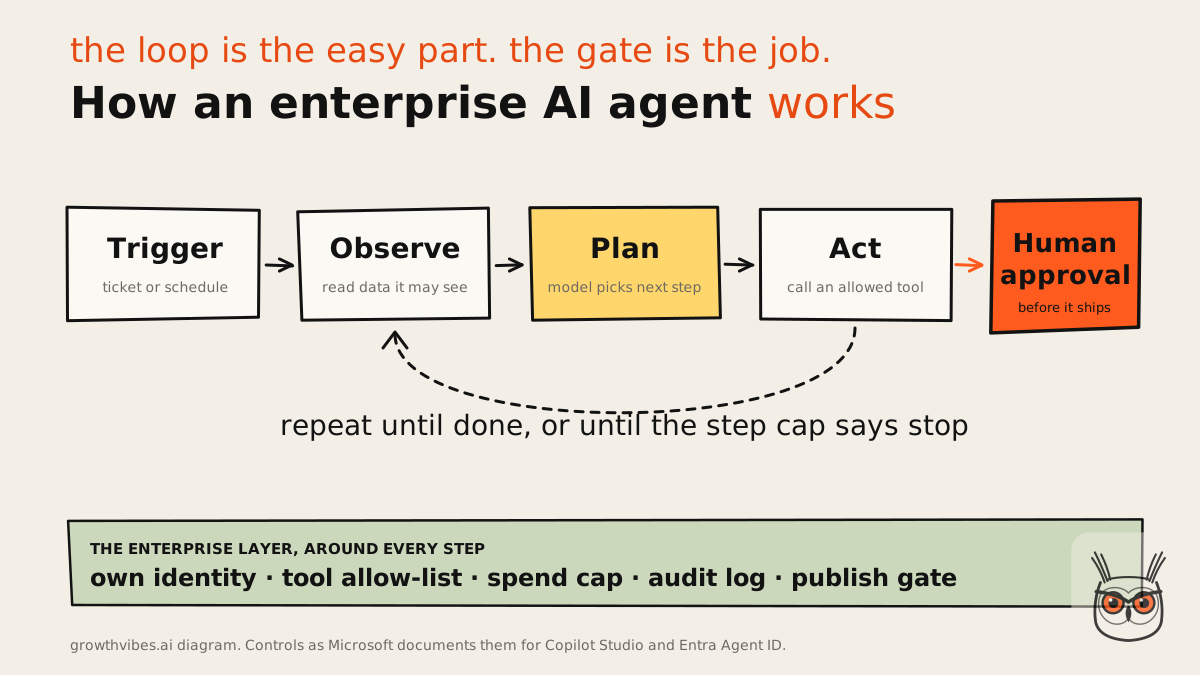
Enterprise AI agents run a loop. A trigger arrives, the agent reads the data it's allowed to see, the model plans the next step, and the agent calls one of its approved tools. It repeats until the job is done or a step cap stops it. Around every step sits an identity, a permission check and a log entry.
The loop: observe, plan, act
The loop itself is the easy part. Every framework and every platform does it. Observe means the agent pulls context: the ticket, the customer record, the last five emails. Plan means the model decides what to do next. Act means it calls a tool: update a field, send a message, open a refund.
Then it looks at the result and goes round again. This is also where agents get expensive, because each lap is another model call. Anthropic's guide to building agents (updated 9 October 2026) recommends stopping conditions such as a maximum number of iterations, and pausing for human feedback at checkpoints. I'd make the step cap the first setting you touch, not the last. It's the first line in every AI automation and agents build I scope. An agent with no cap is a credit card with a curious toddler attached.
What makes them enterprise: identity, permissions, audit logs
Here's the part the demos skip. A big company can't let an agent act through an employee's login, because then nobody can tell from the logs who did what. So the agent gets its own identity: one that separates its actions from human ones, gives it right-sized access and keeps it away from the most critical roles. In Entra Agent ID (docs updated 15 June 2026), every Copilot Studio agent gets one, and the person who built it is recorded as its sponsor.
I like that last detail a lot. Every agent has a named human who owns it. That one rule would fix half the "who set this up?" mysteries I've seen in small teams' Zapier accounts. Before any agent I build goes live, it gets its own account and an owner whose name is on it.
Enterprise AI agents examples: what large teams actually deploy
Large teams deploy agents where the work is high volume, rule-heavy and easy to check: customer service, IT help desks, finance back office, HR admin, data questions and sales follow-up. The pattern is not "most advanced use case first". It's "cheapest mistake first". The jobs where a wrong answer costs a re-do, not a lawsuit, go live first.
For ready-made agents sorted by job instead of company size, I wrote up the best AI agents by job to be done.
I find the function list everyone publishes slightly useless on its own, because "finance" covers both "categorise this receipt" and "approve this wire transfer". So here is the same list, sorted by what a wrong output costs. That's the order I'd hand work to an agent in, at any size.
| Function | What the agent does | If it gets it wrong | Sign-off |
|---|---|---|---|
| Data analysis | Answers questions from approved reports | A wrong number in a draft | Spot-check weekly |
| IT ops | Password resets, access requests, triage | A ticket goes to the wrong queue | None for resets, yes for access |
| HR | Answers policy questions, schedules interviews | An awkward email | Yes for anything sent to candidates |
| Customer service | Answers and routes tickets, drafts replies | An annoyed customer | Yes at first, then by confidence |
| Sales | Qualifies leads, books meetings, updates CRM | A burned lead | Yes for outbound |
| Finance | Matches invoices, flags anomalies | Money moves wrongly | Always, for payments |
Notice what's missing: anything where the agent decides strategy. Big companies use agents for the work between the decisions, the reading, sorting, matching and drafting that eats people's afternoons. The test I keep coming back to is simple: lots of items, and one question you need answered about each one. "Is this a refund request?" "Does this invoice match the PO?" "Is this lead in our ICP?" If you can phrase the job like that, an agent can probably do it.
Most of these are business process automation with a model added at the fuzzy step, not a robot running a department. The process was always there. The agent just reads the messy bit.
Sales is the loudest category right now, mostly because the vendors are loud. Salesforce sells Agentforce agents for qualification and follow-up, and a crowd of startups sell "AI SDRs" that promise outbound with nobody approving. I compared them in a separate piece on AI sales agents. Short version: the ones with a human approving outbound are the ones I'd trust with a brand I cared about.
Enterprise AI agent platforms compared
Enterprise AI agent platforms split by where your company already lives. Microsoft shops get Copilot Studio, Salesforce shops get Agentforce, Google Cloud shops get Gemini Enterprise, IBM shops get watsonx Orchestrate. Integration suites like Workato and UiPath sell by quote. Pick the platform your data already sits in, and compare them by what runs out first, not the headline price.
The cost view is where these platforms differ most, and it's the part vendor-written lists quietly skip. Every one of them bills on a different meter: credits, conversations, users or a quote from a sales rep. Prices below are from the vendors' own pages, checked on 16 November 2026.
| Platform | Lives in | How it bills (16 Nov 2026) | Fits | The tradeoff |
|---|---|---|---|---|
| Microsoft Copilot Studio | Microsoft 365, Azure | $200 per pack of 25,000 Copilot Credits a month, or pay-as-you-go | Companies on Microsoft 365 | Credits plus an Azure subscription: two bills to read |
| Salesforce Agentforce | Salesforce CRM | $500 per 100k Flex Credits, $2 per conversation, or $125 to $150 per user a month for employee use | Teams whose customers live in Salesforce | Great inside Salesforce, pointless outside it |
| Workato | Integration platform | Quote only; Standard includes 1 concurrency (10 Nov 2026) | IT-led integration across many apps | You talk to sales before you see a number |
| UiPath | RPA plus agents | Standard and Enterprise by quote; Basic plan marked as changing (10 Nov 2026) | Companies with legacy screens and no APIs | Heavy setup for a SaaS team |
| CrewAI | Open-source Python framework | Free framework; you pay for models and hosting | Teams with developers | You build the governance yourself |
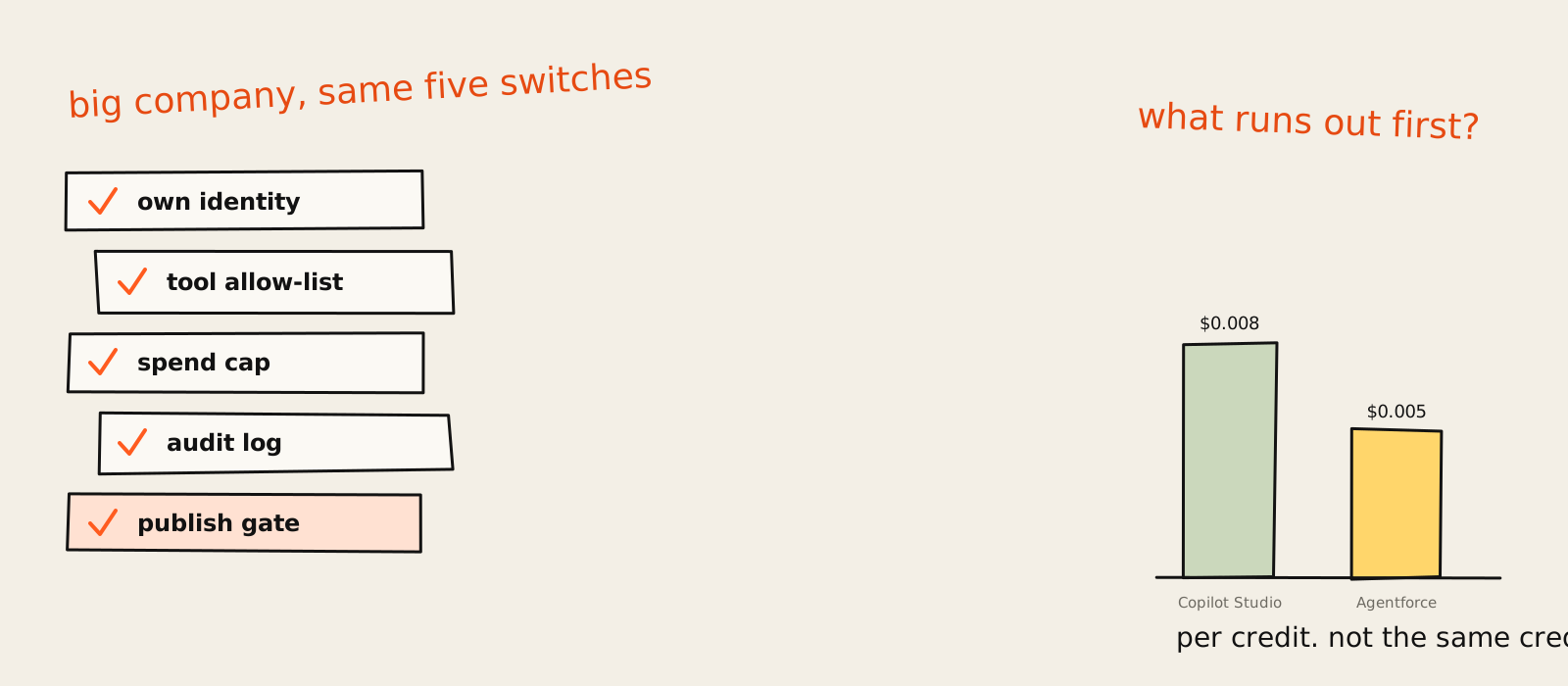
Here's the bit that trips people up. Divide the list prices and Copilot Studio works out at $0.008 per credit, Agentforce at $0.005. Agentforce looks cheaper. It isn't, necessarily, because a credit is not the same unit of work on the two platforms. Comparing them per credit is like comparing two gyms by the price per "session" when one session is a swim and the other is a marathon. The Copilot Studio page and the Agentforce pricing page each define their own unit, and neither converts into the other.
Google, IBM and Glean sell agent builders too (Gemini Enterprise, watsonx Orchestrate and Glean's agents), each built to sit inside its own stack. Same rule applies: they make most sense where your data already lives, and the meter is whatever their sales team writes into the contract.
If you're a SaaS team weighing these against simpler tools, my longer comparison of business automation software covers the Zapier, Make and n8n end of the market, where the prices are public and nobody makes you book a demo to learn them.
Benefits and ROI: what to expect and what to measure
The benefit of enterprise AI agents is hours back on repetitive work and faster answers for customers and staff. The catch is that the real cost is rarely the platform. It's the people who review, fix and maintain the agent. Measure cost per finished job and error rate, not credits used or messages sent.
Vendor pages love a big ROI number. Most of them are vendor arithmetic, measured by the vendor, on the vendor's best customer. Here's the maths that decides whether yours works.
Take an example (an example, not a benchmark). Say a support agent on Agentforce handles 500 conversations a month at $2 each. That's $1,000 a month. Now say someone spends 5 hours a week checking its answers at $50 an hour. That review time costs about $1,083 a month, more than the platform. On Copilot Studio, a single $200 credit pack is easily dwarfed by the same review hours.
For a pilot, the oversight costs more than the subscription. Put the review hours in the budget before you start (I put them in every AI agent project quote for exactly this reason), or the business case will look fantastic right up until someone asks who's been checking the agent's work.
What I'd measure, in order:
- Cost per finished job: platform cost plus review hours, divided by jobs done without a human redoing them.
- Error rate in a weekly sample: read 20 outputs every week. Boring. Essential.
- Override rate: how often a person changes what the agent did. When it drops and stays low, loosen the approval.
- Time to resolution: the customer-facing number, and the one your CEO will actually ask about.
If the cost per finished job doesn't beat a person doing it, you don't have an agent problem. You have a choice-of-job problem.
Governance, security and risk
Enterprise AI agent governance is a short list of controls you switch on before launch, not a framework. Microsoft documents them: an identity per agent, data policies on its tools, spend caps, audit logs and a way to block publishing. The risk is rarely the model going rogue. It's an agent with too much access and nobody reading its log.
Every governance page in this space says "principles". Fairness, transparency, accountability. Lovely words. Not one of them tells you which box to tick on a Tuesday. So I went to the documentation instead, where the actual switches are.
A governance checklist
The Copilot Studio security and governance docs (updated 5 November 2026) list data policies that cover knowledge sources, actions, connectors, HTTP requests, publishing and triggers. Admins can set pay-as-you-go credit caps, send audit logs to Purview and Sentinel, and turn off publishing of generative AI agents entirely. Add the agent identity from Entra and you get five switches. I'd bet the same five travel to any stack. Microsoft is just the one that writes them down this plainly.
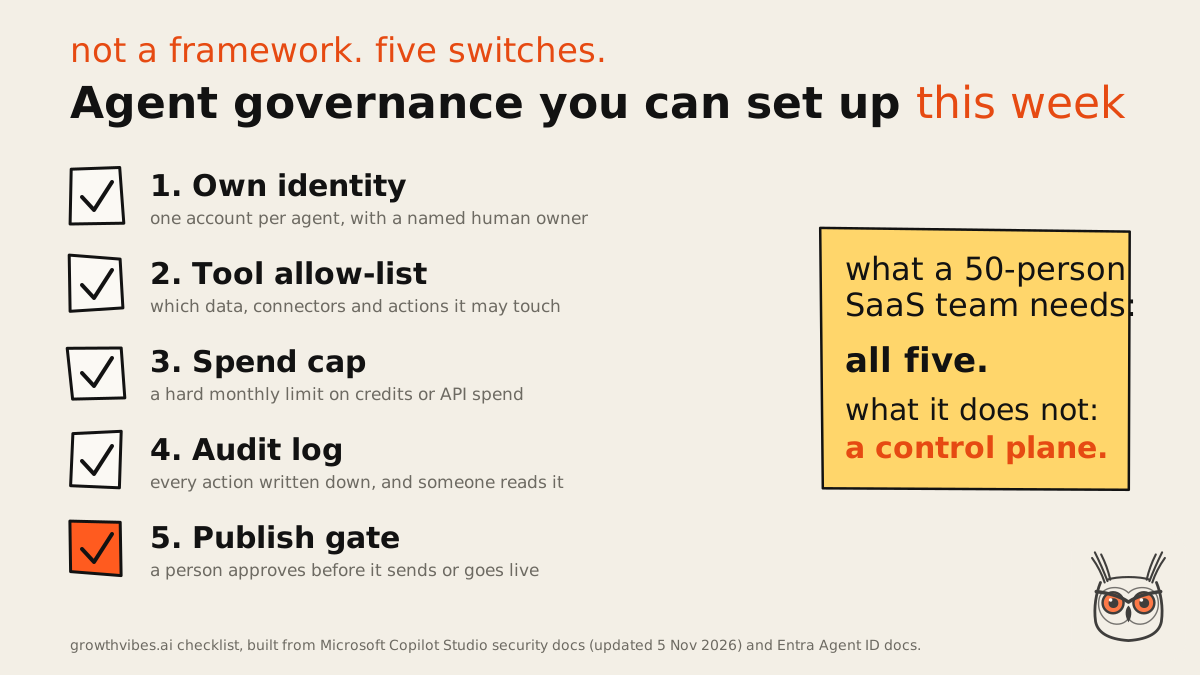
- Own identity. One account per agent, never a person's login, with a named human owner.
- Tool allow-list. Write down which data, connectors and actions it may touch. Everything else is off.
- Spend cap. A hard monthly limit on credits or API spend, set before the first run.
- Audit log. Every action written down in plain words, and a person who actually reads it.
- Publish gate. Nothing goes to a customer, a website or an ad network without a sign-off, at least at first.
None of these needs an enterprise platform. In an n8n ads agent I built for a client, the "audit log" is one readable line per outcome and a prompt version stamped on every ad, so "which prompt wrote this?" always has an answer. Small-team version, same switch.
Count the switches, not the agents. A company with three agents and all five switches is in better shape than one with thirty agents and a governance slide.
Why enterprise agent projects stall
Enterprise agent projects stall on cost, unclear value and weak risk controls, not on weak models. Gartner predicted in June 2025 that over 40% of agentic AI projects will be canceled by the end of 2027 for exactly those three reasons. The model is usually fine. The business case and the guardrails are what fall over.
The skeptic's take is worth hearing in full here. Only about 130 of the thousands of agentic AI vendors are real, by that same analyst count, and the rest is "agent washing": chatbots, RPA and assistants rebranded as agents. Meanwhile a poll of 3,412 webinar attendees in January 2025 found most companies dipping a toe rather than diving in.
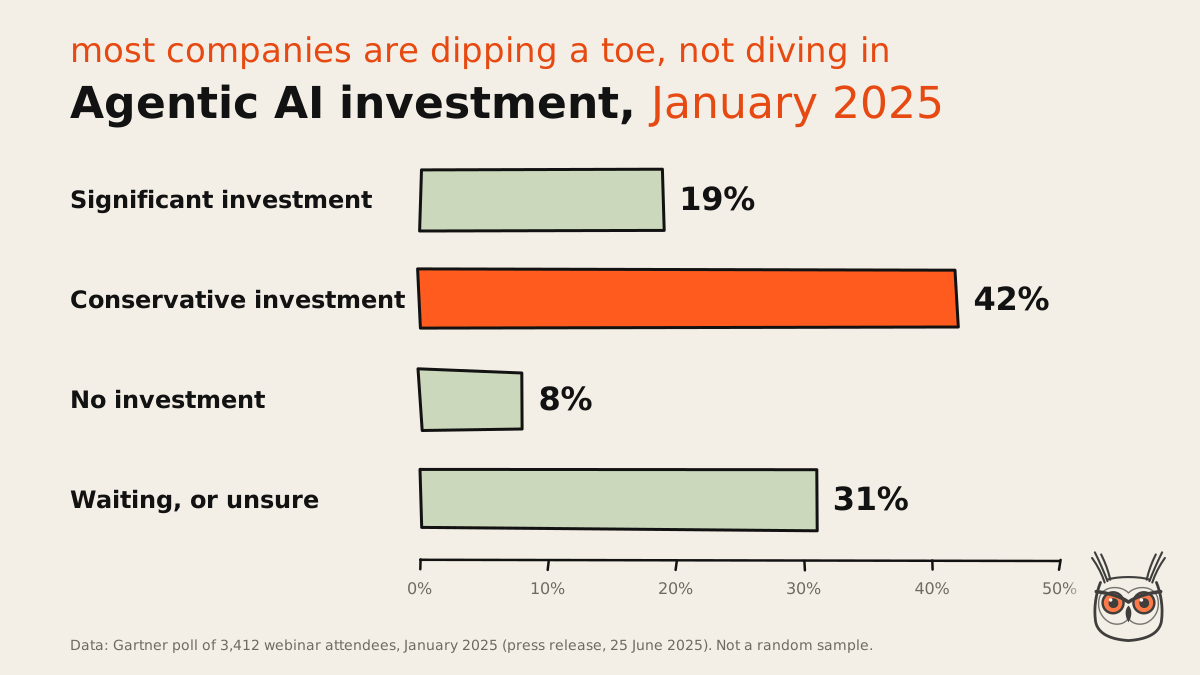
Two caveats, because I'd want them if I were you. It's a prediction, not a count of dead projects. And the poll is people who chose to attend a webinar about agents, which is not exactly a random sample of humanity. Still, the three reasons match what I see when an automation project dies, usually because nobody picked the right job first. That choice is the whole point of my guide to AI for business automation.
So here's the contradiction. Vendor pages promise autonomous agents that run whole processes. The analysts predict that a big chunk of those projects get canceled. I side with the analysts, and the reason is boring: autonomy is exactly what makes cost unpredictable and risk hard to control. The projects that survive tend to be the ones that gave the agent less freedom, not more.
The stall pattern I'd watch for, in the order it usually shows up:
- The pilot had no job. "Explore agents" is not a use case. Nobody can say if it worked.
- The bill surprised someone. No step cap, no spend cap, and a loop that ran all weekend.
- Security said no in month three. The agent used a person's login and nobody could audit it.
- The review work was invisible. Someone checked every output by hand, then went on holiday.
Every one of those is a switch that wasn't flipped on day one. Count the switches, not the agents.
What a SaaS team can copy from enterprise AI agents
A SaaS team should copy the controls from enterprise AI agents, not the platforms. Own identity per agent, a spend cap, a readable log and human approval at the start all work at 20 people. Central control planes, per-team environments and big platform contracts are for companies with hundreds of agents, and most SaaS teams will never be one.
Copy the switches. Skip the control plane. Most SaaS teams need one good agent, not an agent platform.
What builders say lines up with this more than the vendors would like. The simplest thing that works beats the clever thing, and complexity gets added only when the job proves it needs it, because every extra lap of an agent costs time and money. n8n's Production AI Playbook (updated 9 November 2026) is even blunter: the fix for unreliable AI workflows "isn't more AI. It's less of it."
And here is the second contradiction. Salesforce's own AI sales agent page recommends a trusted platform like Agentforce instead of do-it-yourself AI. Builders say start simple. For a SaaS team that doesn't already live in Salesforce, I'm with the builders. A workflow tool plus one well-fenced agent will teach you more in a month than a platform rollout teaches you in a quarter. If your customer data is all in Salesforce already, fine, Agentforce is the shortest path. Otherwise the CRM becomes the real price.
Copy / adapt / skip table
Here's how I'd sort the enterprise playbook for a team of 20 to 500 people. Argue with it if your situation is different; the "skip" column is the one people argue with most.
| Enterprise practice | Copy, adapt or skip | The SaaS version |
|---|---|---|
| Own identity per agent | Copy | A service account per agent, with an owner in your team wiki |
| Spend cap | Copy | A hard monthly limit in your model provider and automation tool |
| Audit log | Copy | One plain line per action in Slack or a sheet, read weekly |
| Human approval | Copy | On for everything customer-facing until the error log is boring |
| Data policies on connectors | Adapt | A short allow-list of tools the agent may call |
| Formal evaluation suites | Adapt | A weekly sample of 20 outputs, scored by a person |
| Central control plane | Skip | Not until you run dozens of agents |
| Per-team environments | Skip | One staging copy of the workflow is enough |
| Customer-managed encryption keys | Skip | Unless an enterprise customer demands it in a contract |
The "skip" column isn't me being lazy. It's the part of the enterprise stack built for a problem you don't have yet: hundreds of agents, built by dozens of teams, inspected by a security department. If you want the broader picture of where agents earn their keep in a smaller company, I covered it in AI agents for business.
SEO and AEO automation: a sensible first marketing agent
For a marketing team, one of the safest first jobs is in SEO and AEO. Drafting meta descriptions, finding internal link gaps, checking which pages lost clicks last week, or tracking whether your brand shows up in AI answers are all high volume and low stakes. Nothing goes live without a person, and a wrong draft costs a re-do. That's the "cheapest mistake first" rule applied to search.
It's also where I'd want the publish gate most firmly shut. SEO automation that writes straight to a live site without review is how you end up with 400 near-identical pages and a very quiet Search Console. An SEO agent that drafts and a person who publishes is the version I'd build first. SEO automation and AEO automation are also where a lot of my own builds started, mostly because the feedback loop is fast and the stakes are low.
A first agent for a SaaS team, in one week
Here's the week I'd plan, with all five switches on from day one. It's deliberately small. A first agent that does one job well is worth ten that do everything in a demo.
Monday: pick one job
High volume, low stakes, easy to check. Write it as one question per item, like "is this ticket a refund request?".
Tuesday: map the tools
List the data it reads and the actions it may take. That list is your allow-list. Everything else stays off.
Wednesday: build it as a workflow
One model call inside a fixed path. Add a step cap and a spend cap before the first test run.
Thursday: wire the log and the gate
One readable line per outcome, and a person approves anything customer-facing.
Friday: run it on real items
Read every output. Note what you would have done differently. That list is next week's prompt.
This is the same shape as the client ads build I mentioned earlier: about 200 ads a week, roughly 8 hours a week handed back to the team, and only 1 of its 6 stages calls a model. Everything that could cost money is checked in plain code. It is technically "an agent". It mostly behaves like a very disciplined spreadsheet, which is exactly why it runs every week without me watching it.
How to get started
Start with one job, the five governance switches and a workflow tool you already know. Run it with human approval on for a few weeks, measure cost per finished job and the error rate, then loosen the approval only when the log is boring. Buy an enterprise platform when you hit its problems, not before.
If you're in a large company already on Microsoft or Salesforce, the shortest route is the agent builder inside the platform you pay for. The governance controls are already there, so switch them on before anyone builds anything clever.
If you're a SaaS team, start smaller. My step-by-step guide on how to build AI agents walks through tool design, step caps and when a workflow beats an agent. Do that before you sit through a single platform demo.
And if you're still deciding which processes deserve automation at all, the earlier question is which jobs to hand over at all. Most teams find two or three jobs where a plain workflow does the trick and one where an agent actually pays for itself.
Then, once the first agent has run for a month with a boring log, you'll know more about enterprise AI agents than most of the slides at the conference your CEO went to.
What I told the ops lead
So, the ops lead and the CEO's tote bag. I told them to put the platform shopping on hold and spend Q1 on one agent with five switches: its own login, an allow-list, a spend cap, a log someone reads and a sign-off before anything reaches a customer. If that agent pays for its reviewer, they've earned the right to think about platforms. If it doesn't, they've saved a contract. That's the work I do in AI automation and agents, and it's less exciting than the keynote. The tote bag can stay.
Frequently asked questions
What are enterprise AI agents?
Enterprise AI agents are AI models that take actions inside a company's systems, such as updating a ticket or matching an invoice, with enterprise controls around them: their own identity, limited permissions, spend caps, audit logs and human approval.
The model is the same kind you'd use anywhere. The controls are what make it safe enough for a large company to let it act.
Does enterprise use AI agents?
Yes, mostly for narrow, high-volume jobs: support tickets, IT help desk requests, invoice matching, HR questions and sales follow-up. Many companies are still cautious, and Gartner's January 2025 poll found 42% making conservative investments.
Gartner also predicts over 40% of agentic AI projects will be canceled by the end of 2027, mostly over cost, unclear value and risk controls.
Who are the big 4 AI agents?
There is no official big 4. People usually mean the agent platforms from the four big enterprise vendors: Microsoft Copilot Studio, Salesforce Agentforce, Google Gemini Enterprise and IBM watsonx Orchestrate. Each fits best where your data already lives.
The "top 3" lists you'll find are usually the same names minus one, ranked by whoever wrote the list.
Can a small SaaS team use enterprise AI agents?
Yes, but it should copy the controls rather than buy the platform. An own identity per agent, a spend cap, a readable log and human approval work at 20 people. A central control plane does not.
Start with one job and a workflow tool you already use, then decide on a platform once you hit problems only a platform solves.
What is the difference between an enterprise AI agent and a chatbot?
A chatbot answers questions. An enterprise AI agent takes actions, like updating records or sending messages, and decides its own next step within the permissions it was given. The agent also needs an identity, limits and a log.
How are enterprise AI agents governed?
With a short list of switches set before launch: a separate identity per agent, data policies on its tools, a spend cap, an audit log and a gate before anything is published. Microsoft documents all five for Copilot Studio.
